

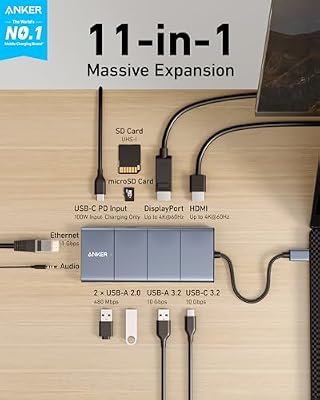
The Anker 11-in-1 USB-C Docking Station is a dual-display desktop dock built for the workstation use case — one HDMI and one DisplayPort each at 4K@60Hz, 100W PD to the host, 10Gbps USB-C data, gigabit Ethernet, SD and microSD, USB-A peripherals and 3.5mm audio. Unlike the triple-display 13-in-1, the 11-in-1 runs the dual displays through DisplayPort alt-mode rather than DisplayLink, which makes it a true native dual-display dock for any host that supports two displays. At around $200 it is one of the better-value full-feature docks; this Anker 11-in-1 review covers the spec table and the verdict.
- Anker 11-in-1 USB-C Docking Station at a Glance
- Performance and Data Speeds
- Power Delivery and Charging
- Display Output and Multi-Monitor
- Build and Connector Quality
- Compatibility — Mac, PC and Steam Deck
- Verdict
- Frequently Asked Questions
- More Thunderbolt 4 Reviews
- Related Articles
- Related Articles
- Related Guides

Anker USB-C Hub, 11-in-1 Docking Station Dual Monitor with 4K HDMI and DP | 1 USB-C and 1 USB-A 10Gbps Data Ports, 2 USB 2.0 Data Ports, 4K HDMI and DisplayPort, 85W Max PD, Ethernet, for XPS and More


As an Amazon Associate we earn from qualifying purchases. Product prices and availability are accurate as of the date/time indicated.
🛒 Best Price Today on Amazon
Prime members get fast, free shipping on everything above, plus member-only deals. New members get a 30-day free trial — cancel anytime.
As an Amazon Associate we earn from qualifying purchases.





Anker 11-in-1 USB-C Docking Station at a Glance
| Component | Specification |
|---|---|
| Type | USB-C docking station (native dual-display, not full TB4) |
| Data speed | 10 Gbps (USB 3.2 Gen 2 on data ports) |
| Cable length | USB-C host cable around 1 m |
| Power Delivery | Up to 100W PD to the host laptop |
| Display output | Dual 4K@60Hz (HDMI + DisplayPort) |
| Compatibility | USB-C laptops, Thunderbolt 4 / 3, USB4 |
| Port count | 11 (HDMI, DP, 4 USB-A, 2 USB-C data, Ethernet, SD, microSD, audio, PD) |
| Certification | Anker-branded, USB-IF marketed, not Intel TB4 certified |
| Approx price | Around $200 |
Performance and Data Speeds
The 11-in-1 is a USB-C dock, not a TB4 dock — its data ports run at 10Gbps over USB 3.2 Gen 2 rather than the 40Gbps of true TB4. For everyday desk work that is the right speed: a 10Gbps external SSD runs at full speed, USB-A peripherals (mouse, keyboard, headset, webcam) draw negligible bandwidth, gigabit Ethernet uses a small slice, and an SD card transfer completes well before the bandwidth becomes a limit. What you give up against a TB4 dock is the headroom for an eGPU (no PCIe tunneling) and the ability to run two displays plus a sustained 30Gbps+ data load through the same cable. For most workstation users those are not real constraints — for buyers who need them, a TB4 dock is the right choice. Compare with hosts in our best RTX 5070 gaming laptops roundup.
Power Delivery and Charging
The 100W PD rating covers the vast majority of USB-C-charged laptops at full speed — every M-series MacBook, every 14-inch and 13-inch ultrabook, every PC ultrabook in the typical 65W to 90W envelope. A 16-inch MacBook Pro accepts the 100W and charges happily, with the 140W full-speed charging only invisible under sustained heavy load. The single-cable model is the same as the 13-in-1: plug a 100W USB-C PSU into the dock, and one USB-C cable from the dock to the laptop carries both the data and the charge. For desk-bound users, this is the right setup.
Display Output and Multi-Monitor
The dual-display setup is native, which is a meaningful difference from the 13-in-1. The HDMI port runs at 4K@60Hz and the DisplayPort port runs at 4K@60Hz, both through the host’s DisplayPort alt-mode — there is no DisplayLink overhead, no host CPU load and no driver to install. For a TB4 PC laptop or a multi-display M-series MacBook Pro, the dock simply presents two native displays to the host. Where the 13-in-1 unlocks triple-display through DisplayLink, the 11-in-1 sticks to native dual — which is the right call for buyers who want minimum latency, full refresh-rate support and zero driver complications. For the buyer who wants four monitors, the 13-in-1 wins; for dual-display done right, the 11-in-1 wins. See our best 240Hz gaming laptops guide for monitor pairings.
Build and Connector Quality
The 11-in-1 carries the same Anker desktop dock build language as the 13-in-1 — anodised aluminium, heavy enough base to stay put under cable load, clear front-back port layout. The host cable is about 1m, the right length for a desk-side run with the dock at the back. The 100W PSU is a separate brick. The chassis is fractionally smaller than the 13-in-1 because there is no DisplayLink adapter inside, which is a minor practical win for desk space. For desk-build context, see the best gaming desks roundup.
Compatibility — Mac, PC and Steam Deck
The 11-in-1 works on any USB-C host that supports DisplayPort alt-mode with multi-stream transport (MST) — every TB4 and USB4 host (where MST is required), every current PC ultrabook, and M-series MacBooks that natively support multiple external displays (every M1 Pro / Max, every M2 / M3 / M4 Pro / Max). M-series MacBook Air (M1, M2, M3) supports only one external display and will mirror across both of the dock’s outputs — for triple-display on a MacBook Air, the 13-in-1 with its DisplayLink adapter is the right pick. PC laptops with TB4 or USB4 run the dock without issue. The Steam Deck supports the dock’s USB-C at 10Gbps and a single display through HDMI. For Steam Deck context, see our Intel Core Ultra laptop guide guide.
Verdict
At around $200 the Anker 11-in-1 USB-C Docking Station is one of the best-value full-feature desktop docks for native dual-display use. The 4K@60Hz HDMI + 4K@60Hz DisplayPort output is the right answer for buyers who want two real displays without DisplayLink overhead, the 100W PD covers most laptops, and the 11-port spread covers every realistic peripheral. The 10Gbps data is the right speed for everyday work, and the lack of TB4 certification keeps the price below true TB4 docks while delivering most of what TB4 buyers actually use. For users who need TB4-specific features (eGPU, 40Gbps SSD) a TB4 dock is needed; for everyday dual-display desk use, the 11-in-1 is well judged. See our best USB hubs roundup for compact alternatives.
Where the 11-in-1 lands particularly well is on the TB4 PC ultrabook desk: the host laptop has TB4, but the buyer does not need TB4-only features like eGPU and instead wants a dependable dual-display, gigabit-Ethernet, 10Gbps-SSD-capable dock. A true TB4-certified dock for that desk runs $300 and up, and the buyer gets no measurable advantage in everyday use over the 11-in-1 at $200. The same equation holds on a multi-display M1 Pro / M2 Pro / M3 Pro / M4 Pro MacBook Pro: the host supports native dual-display through USB-C, the 11-in-1 delivers it, and the $100 saved over a TB4 dock buys the user a better external SSD or a better USB-C cable to pair with the setup. For most desk-bound dual-display buyers, the 11-in-1 is the smart-money pick.
Frequently Asked Questions
Is the Anker 11-in-1 Docking Station native dual-display or DisplayLink?
Native. The HDMI and DisplayPort outputs run through the host’s DisplayPort alt-mode rather than through DisplayLink, which means no driver installation, no host CPU overhead and full refresh-rate support.
Can the Anker 11-in-1 run dual 4K monitors at 60Hz?
Yes. Both the HDMI and the DisplayPort outputs support 4K@60Hz natively, on any host that supports DisplayPort alt-mode with multi-stream transport — every TB4 and USB4 host, plus M-series MacBook Pro models.
Does the Anker 11-in-1 work with a MacBook Air?
It connects, but the MacBook Air’s native one-external-display limit means both of the dock’s display outputs will mirror the same content. For triple-display on a MacBook Air via DisplayLink, the 13-in-1 is the right pick.
Will the Anker 11-in-1 charge a 16-inch MacBook Pro at full speed?
Yes for normal use, and almost-full speed for sustained heavy load. The 100W PD covers the 16-inch’s charging needs in everyday use; only sustained 140W workloads are slightly slower to top up.
More Thunderbolt 4 Reviews
- MOKiN USB-C Hub 10Gbps 4K@60Hz 100W PD Review
- UGREEN Revodok Pro USB-C Hub 6-in-1 10Gbps 4K Review
- Anker 8-in-1 USB-C Dock Dual Monitor 2 HDMI 4K Review
- Maxonar 2-Pack Thunderbolt 4 Cable 40Gbps 240W 8K Review
- Cable Matters Intel-Certified TB4 Cable 3.3ft 40Gbps Review
- Cable Matters Intel-Certified TB4 Cable 1ft 40Gbps Review
- Silkland USB-C to USB-C 240W 40Gbps USB4 Cable Review
- Silkland USB 4 Cable 16.5ft / 5m 20Gbps Long Cable Review
Affiliate Disclosure: As an Amazon Associate, we earn from qualifying purchases. If you click a link and make a purchase, we may earn a small commission at no extra cost to you. Prices and availability are accurate as of publication and may change.
Related Articles
Looking for more on this topic? Browse the hand-picked guides below — each one applies the same scoring rubric used in this review.










