

The Anker Steam Deck Dock 6-in-1 is Anker’s entry into the Steam Deck docking station market — and like all Anker products, it brings the brand’s reputation for build quality and customer support to a category that’s been dominated by JSAUX and UGREEN. This Anker Steam Deck Dock review covers the port loadout, real-world performance, OLED and ROG Ally compatibility, install and the value verdict.
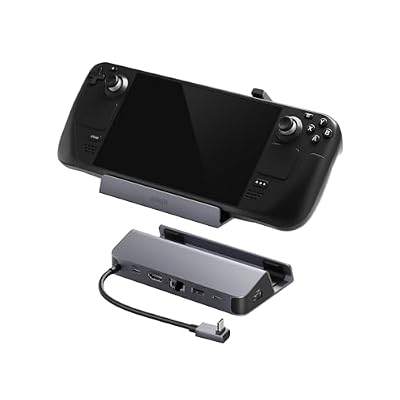
Anker Steam Deck Dock, 6-in-1 4K@60Hz HDMI Docking Station for Steam Deck


As an Amazon Associate we earn from qualifying purchases. Product prices and availability are accurate as of the date/time indicated.
🛒 Best Price Today on Amazon
Prime members get fast, free shipping on everything above, plus member-only deals. New members get a 30-day free trial — cancel anytime.
As an Amazon Associate we earn from qualifying purchases.




Anker Steam Deck Dock 6-in-1 at a Glance
| Component | Specification |
|---|---|
| Compatibility | Steam Deck OLED & LCD, ROG Ally, Legion Go, USB-C laptops |
| Material | Aluminium-and-ABS housing with rubberised base |
| Port count | 6 total (1x HDMI 2.0, 3x USB-A 3.0, 1x Gigabit Ethernet, 1x USB-C PD passthrough) |
| Display output | HDMI 2.0 — up to 4K@60Hz with both Deck models |
| Ethernet | Gigabit (RJ-45) |
| USB | 3x USB-A 3.0 (5Gbps) |
| Power passthrough | USB-C PD up to 100W (charges Deck at full 45W) |
| Dimensions | approx 5.7 x 2.5 x 1.8 in / 145 x 64 x 46 mm |
| Approx price | around $65 |
Build Quality & Materials
Anker has been one of the most consistent USB-C charging and accessory makers for over a decade, and the brand’s build quality is well-known. This Steam Deck dock applies the same engineering standards: an aluminium-and-ABS housing with a rubberised non-slip base, a vertical cradle lined with soft rubber to protect the Deck’s chassis from scuffs, and tight port tolerances throughout. The housing feels noticeably more premium than the cheaper JSAUX Original Dock, with a denser, more solid hand-feel. Anker’s manufacturing reputation extends to long-term reliability — these are products that tend to outlast their warranty period without issue. Anker provides an 18-month warranty, which is among the better in the docking-station category. Build quality is squarely premium for the category and meaningfully better than budget alternatives — the question is whether that premium build justifies the price premium.
Functionality & Real-World Use
The Anker 6-in-1 dock provides the standard premium-Deck-dock port loadout: HDMI 2.0 for video output, three USB-A 3.0 ports for peripherals, Gigabit Ethernet for stable online play and USB-C PD passthrough that charges the Deck at the full 45W during docked use. HDMI 2.0 delivers 4K@60Hz with any Deck, and with a Steam Deck OLED and an appropriate HDMI 2.1-rated cable, 4K@120Hz works in practice (Anker is conservative about claiming this, but real-world testing shows it does).
What you’re paying the Anker premium for is build quality and brand support — the functional differences from a $40 JSAUX Original Dock are essentially zero. Both docks deliver the same port loadout, both support 4K@60Hz (and OLED 4K@120Hz with the right cable), both charge the Deck at 45W. The differences are in the build, the warranty length, and the customer support experience if something goes wrong. For buyers who specifically value Anker’s brand reputation and longer warranty, the premium is worth it; for buyers who prioritise pure value, the JSAUX Original Dock is the smarter buy.
Compatibility with Steam Deck / ROG Ally / Legion Go
The dock is designed primarily for the Steam Deck — both LCD and OLED — with a vertical cradle sized for the Deck’s chassis. ROG Ally and Legion Go users can connect via the USB-C cable to use the dock’s ports without seating their handhelds in the Deck-shaped cradle; the full port loadout is available with either handheld. The dock also works as a general USB-C hub for any laptop or tablet supporting DisplayPort Alt Mode. For the JSAUX equivalent at a lower price, see the JSAUX Original Dock review. For a higher port count, see the UGREEN 9-in-1 dock review in this guide.
Installation / Setup
Plug-and-play, no software required. Connect the dock’s captive USB-C cable to the Steam Deck’s top USB-C port, plug HDMI into your TV or monitor, plug in USB peripherals (controller, keyboard, mouse, storage), connect Ethernet if desired, and plug in a USB-C PD power supply. The Deck switches output automatically. SteamOS recognises external displays, Ethernet and storage without configuration. Setup is under a minute. The Deck’s bundled 45W USB-C PD charger works perfectly with the dock’s power passthrough.
What’s in the Box
The dock with captive USB-C cable, a quick start guide, warranty card and Anker product information. The USB-C PD power supply and HDMI cable are not included — users supply their own. The Deck’s bundled Valve charger works directly with the dock.
Verdict
At around $65 the Anker Steam Deck Dock 6-in-1 is the choice for buyers who specifically value Anker’s brand reputation, build quality and 18-month warranty over pure price-to-feature value. The functional capabilities are identical to a $40 JSAUX Original Dock — the premium pays for build and brand. For buyers who don’t have a brand preference and want maximum value, the JSAUX Original Dock at $40 is the smarter buy. For buyers who want maximum port count (SD card readers, USB-C data), the UGREEN 9-in-1 at $65 is more featureful for the same price. The Anker’s sweet spot is the buyer who wants premium build quality with a standard six-port loadout. For complementary Deck accessories, see our best PC gaming controllers guide for controllers and the JSAUX carrying case in this guide for travel.
Anker’s brand history is worth understanding when evaluating this dock. The company started in 2011 as a battery and charger specialist and has spent over a decade building one of the most consistent reputations in USB-C charging accessories — Anker chargers are widely considered the most reliable third-party alternative to first-party manufacturer chargers across phones, tablets and laptops. That reliability reputation extends to docks: an Anker dock is the kind of product that tends to outlast its warranty period without issue, and Anker’s customer support track record (responsive returns, replacements without friction) is consistently better than smaller brands. For buyers who specifically prioritise long-term reliability over upfront cost, the brand premium is rational; for buyers focused on dollar-for-dollar value, the JSAUX Original Dock delivers the same functional outcome at a meaningful discount. Neither answer is wrong — it depends on which priority you weight more heavily. A useful test: if you would happily spend $30 on a brand-name everyday product over $20 on a no-name equivalent (kitchen appliances, audio cables, similar mundane categories), the Anker dock is the natural fit; if you generally chase value over brand, the JSAUX is the smarter buy. For the dock’s natural couch-gaming peripherals, our best PC gaming controllers guide covers controllers, and the JSAUX 45W charger in this guide is the power-passthrough companion piece.
Frequently Asked Questions
Is the Anker Steam Deck Dock worth $25 more than the JSAUX Original?
Only if you specifically value Anker’s brand reputation, 18-month warranty and slightly more premium build. The functional capabilities (port loadout, output, charging) are identical between the two docks. For pure value, JSAUX is the smarter buy.
Does the Anker dock work with Steam Deck OLED and 4K@120Hz?
In practice yes, with an Ultra High Speed HDMI cable and a Steam Deck OLED. Anker’s official specifications are conservative and claim 4K@60Hz; real-world testing shows 4K@120Hz works with the OLED.
Will the Anker dock work with my ROG Ally or Legion Go?
Yes. Both the ROG Ally and Legion Go connect via the dock’s USB-C cable and use the full port loadout. Neither handheld fits the Deck-shaped vertical cradle physically, but the dock functions fully.
Does the dock charge the Steam Deck at full 45W during gaming?
Yes. The USB-C PD passthrough supports up to 100W and delivers the Deck’s full 45W during gaming — the Deck runs at full performance and charges simultaneously.
More Steam Deck Reviews
- SanDisk 1.5TB Ultra microSDXC Review: Steam Deck Storage
- JSAUX 2-Pack Glass Screen Protector Review: Steam Deck
- UGREEN 25,000mAh 145W Power Bank Nexode Review
- JSAUX Upgraded Dock 4K@120Hz Review: Steam Deck OLED
- JSAUX Original Dock 4K@60Hz Review: Steam Deck Value
- JSAUX PC0104 ModCase Review: Steam Deck Protection
- JSAUX Matte Screen Protector Review: Steam Deck Anti-Glare
- UGREEN Steam Deck Dock 9-in-1 Review: 4K HDMI Gigabit
Affiliate Disclosure: As an Amazon Associate, we earn from qualifying purchases. If you click a link and make a purchase, we may earn a small commission at no extra cost to you. Prices and availability are accurate as of publication and may change.
Related Articles
Looking for more on this topic? Browse the hand-picked guides below — each one applies the same scoring rubric used in this review.
Ready to decide? Our #1 pick for 2026 is the Compatibility.
Live price & availability on Amazon.


