

The JSAUX 2-Pack 9H Tempered Glass Screen Protector for Steam Deck is among the most popular screen protectors for Valve’s handheld, and for good reason — it is a recognisable accessory brand, the package includes two protectors per pack, and tempered glass remains the gold standard for handheld screen protection. This JSAUX Steam Deck screen protector review covers the build, install, real-world feel, and how it compares with PET film alternatives.

JSAUX 2-Pack Ultra HD Screen Protector for Steam Deck OLED/LCD | with Guide Frame, Easy to Install, 99.99% Clarity, Full-Screen Coverage, 9H Glass, Anti-Fingerprint, Scratch Resistant



As an Amazon Associate we earn from qualifying purchases. Product prices and availability are accurate as of the date/time indicated.
🛒 Best Price Today on Amazon
Prime members get fast, free shipping on everything above, plus member-only deals. New members get a 30-day free trial — cancel anytime.
As an Amazon Associate we earn from qualifying purchases.





![JSAUX AR Screen Protector for Google Pixel 10a [2 Pack] Tempered Glass](https://m.media-amazon.com/images/I/51aeLGDL-mL._SL160_.jpg)
JSAUX 9H Glass Screen Protector at a Glance
| Component | Specification |
|---|---|
| Compatibility | Steam Deck LCD (2022); check fit for OLED, see compatibility section |
| Material | Tempered glass, 0.3mm thickness |
| Hardness | 9H surface hardness |
| Quantity | 2 protectors per pack |
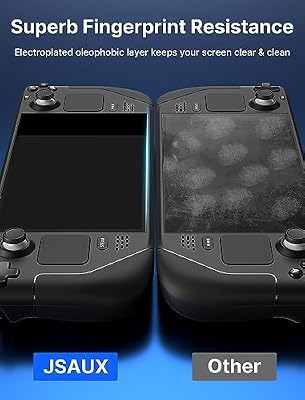
| Coating | Oleophobic (fingerprint resistant), hydrophobic |
| Edge | Rounded 2.5D edges |
| Touch sensitivity | Full multi-touch passthrough, designed for fast input |
| Bundled accessories | Cleaning cloth, dust removal stickers, wet/dry wipes, install guide |
| Approx price | around $13 |
Build Quality & Materials
JSAUX builds this protector from 0.3mm tempered glass with a rated 9H surface hardness — that is the same hardness rating used by most reputable phone-screen-protector makers, and it means everyday metal items like keys and coins will not scratch the glass. The edges are rounded 2.5D, which means they curve down slightly at the perimeter so the protector does not feel sharp under the thumb during long gaming sessions. The oleophobic coating reduces fingerprint smudging — a meaningful real-world benefit on a handheld, where fingers spend hours on the bezel area near the screen — and the hydrophobic finish makes the surface easier to wipe clean. Two protectors per pack is a genuine value addition: you can keep a spare for when the first inevitably picks up a hairline scratch or chips at a corner. The build is appropriate for a $13-class accessory: it is not premium glass, but it is the right glass for the price.
Functionality & Real-World Use
Once installed, a tempered glass protector on the Steam Deck is, ideally, almost invisible — and JSAUX achieves that here. Touch response feels native, with no lag or dead zones; multi-touch gestures work normally; and the screen brightness penalty is minimal. The oleophobic coating is the most appreciable everyday benefit: fingers slide more smoothly across the glass than across the bare Deck screen, and smudges wipe away easily. Over months of use you will notice the protector picking up the occasional micro-scratch that would otherwise have gone into the Deck’s actual screen — exactly the job it is here to do. A point of honest disclosure: glass protectors do add a very slight extra layer of thickness which, on the Steam Deck specifically, sits within the bezel cutout. Some buyers report a tiny gap between the glass and the very edge of the touchscreen layer; this is a design constraint of the Deck’s bezel, not a JSAUX defect, and it is invisible in normal use.
Compatibility with Steam Deck / ROG Ally / Legion Go
This protector is specifically cut and curved for the Steam Deck LCD (the 2022 model). Important note for OLED owners: the Steam Deck OLED has slightly different bezel and touchscreen dimensions to the LCD, and Valve also added an etched anti-glare layer to the OLED’s premium variant — protectors cut for the LCD may not align perfectly on the OLED, and an OLED-specific JSAUX variant exists. Always check the listing for OLED compatibility before buying. ROG Ally and Legion Go use different screen sizes (7-inch and 8.8-inch respectively) and need their own dedicated protectors. For more on Steam Deck-class portable gaming, see our best gaming laptops under $1,200 guide for adjacent portable PC options.
Installation / Setup
JSAUX’s install kit is thoughtful: each pack ships with a microfibre cleaning cloth, wet and dry wipes, two dust-removal stickers and a clear pictorial install guide. The process: clean the screen thoroughly with the wet wipe first, dry with the cloth, and remove residual dust with the sticky-tag dust removers. Peel the backing from the protector, align with the screen (the corners are the most useful alignment landmarks), and lay the glass down from one edge to the other to avoid air bubbles. Any minor bubbles can be pushed to the edge with a credit card or the included card. With two protectors in the pack, even a failed first install is no real loss. Allow about 24 hours after install for any remaining air micro-bubbles under the protector to fully self-discharge.
What’s in the Box
The pack contains two tempered glass protectors, two alcohol wet wipes, two dry cleaning cloths, two dust-removal stickers, an install guide and JSAUX product information. The included accessories are sufficient to install both protectors cleanly without any additional materials.
Verdict
At around $13 for two protectors, the JSAUX 9H Tempered Glass pack is excellent value for Steam Deck owners. The build is solid for the price, install is straightforward thanks to the included kit, and the having-a-spare benefit is genuine. There are slightly more premium options (notably DBrand’s Deck protectors), but for the money, JSAUX’s pack is the sensible default for an LCD Steam Deck. OLED owners should buy the OLED-specific variant rather than this LCD pack. For other Deck accessories, see our best PC gaming controllers guide for controller alternatives when docking.
A useful comparison frame: the Steam Deck’s bare touchscreen is genuinely scratch-prone, particularly along the right thumb resting position where the trackpad sits adjacent to the screen — many uncased Decks develop a faint scratch line there within a few months of regular use. Adding a glass protector eliminates this risk entirely. The cost is roughly 0.3mm of added thickness in the bezel cutout, which most owners do not notice. Over a typical Deck ownership of three years or more, the protector pays for itself the first time it absorbs a scratch that would otherwise have gone into the actual screen — and over that same ownership period, you may use both protectors in the pack, since a heavily-used Deck protector will eventually accumulate enough micro-scratches to warrant replacement. For buyers also planning to use a chassis case like the JSAUX PC0104 ModCase or Spigen Rugged Armor, the glass protector is fully compatible — neither case obstructs the screen area, and the protector sits flush inside the case’s screen cutout. For broader Deck protection during travel, the JSAUX carrying case (covered in this guide) is the natural companion piece to keep both screen and chassis safe in a backpack or overhead bin.
Frequently Asked Questions
Does this protector work with the Steam Deck OLED?
This LCD-specific pack does not align perfectly with the Steam Deck OLED, whose screen dimensions and bezel differ slightly. JSAUX sells an OLED-specific variant — buy that instead for OLED. The OLED Limited Edition’s anti-glare screen also benefits from a dedicated OLED protector.
Does the glass protector affect touch sensitivity on Steam Deck?
No, not in normal use. At 0.3mm thick with full multi-touch passthrough, touch input feels native — there is no perceivable lag, dead zones or reduced multi-touch behaviour.
Is tempered glass better than PET film for Steam Deck?
Glass offers better scratch resistance (9H hardness, key-and-coin proof) and a smoother finger feel. PET film is thinner, cheaper and absorbs minor shocks slightly better but scratches more easily. Glass is the consensus choice for handhelds.
How do I remove the JSAUX glass protector if I need to?
Lift one corner gently with a fingernail or a credit card and peel upward steadily. The adhesive is reusable in the short term but tends to pick up dust on reapplication, so plan to use a fresh protector — which is why JSAUX includes two in the pack.
More Steam Deck Reviews
- UGREEN 25,000mAh 145W Power Bank Nexode Review
- JSAUX Upgraded Dock 4K@120Hz Review: Steam Deck OLED
- JSAUX Original Dock 4K@60Hz Review: Steam Deck Value
- JSAUX PC0104 ModCase Review: Steam Deck Protection
- JSAUX Matte Screen Protector Review: Steam Deck Anti-Glare
- UGREEN Steam Deck Dock 9-in-1 Review: 4K HDMI Gigabit
- Spigen Rugged Armor Review: Steam Deck Case LCD/OLED
- JSAUX Carrying Case Review: Steam Deck / ROG Ally Travel
Affiliate Disclosure: As an Amazon Associate, we earn from qualifying purchases. If you click a link and make a purchase, we may earn a small commission at no extra cost to you. Prices and availability are accurate as of publication and may change.
Related Articles
Looking for more on this topic? Browse the hand-picked guides below — each one applies the same scoring rubric used in this review.










