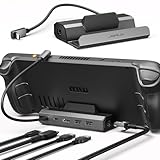
- Top Pick: JSAUX 6-in-1 Docking Station for Steam Deck/ROG Ally X/Legion Go S-HB0603 | 4K@120Hz HDMI, Gigabit Ethernet, 100W PD Fast Charging, 3 USB 3.0 Ports, Widely Compatible with SteamOS & Windows Handhelds
- Best Value: Anker Steam Deck Dock, 6-in-1 4K@60Hz HDMI Docking Station for Steam Deck | USB-C & 2 USB-A Data Ports, 1 Gbps Ethernet, Fast Charging, for Steam Deck (OLED)/ROG Ally/Legion Go (Not for Rog Ally X)
- Premium Choice: JSAUX 5-in-1 Docking Station for Steam Deck/ROG Ally X/Legion Go S-HB0602 | 4K@120Hz HDMI, 100Mbps Ethernet, 100W PD Fast Charging, 2 USB 2.0 Ports, Widely Compatible with SteamOS & Windows Handhelds
The moment a Steam Deck leaves your hands and meets a TV, it needs one cable to do four jobs: carry video, deliver power, add a wired network link, and expose a couple of USB ports for a controller or keyboard. Valve’s own dock does this, but a crowd of third-party docks now offer similar ports in smaller bodies, and the specs on the box vary far more than the price suggests. Video standard, charging wattage, and Ethernet speed are where the real differences sit.
This guide is for owners who want a living-room or desk setup without constantly replugging cables. Most docks below also advertise support for the ROG Ally, Legion Go, and similar handhelds, which gives them a second life if you ever change devices. Read the port line carefully: a dock that lists USB 2.0 ports or 100Mbps Ethernet is a different product from one that lists 10Gbps USB and Gigabit.
Quick Picks
As an Amazon Associate we earn from qualifying purchases at no extra cost to you.




| Product | Best for | Key spec from the title |
|---|---|---|
| JSAUX 6-in-1 HB0603 | High refresh TV output | 4K@120Hz HDMI, Gigabit Ethernet, 100W PD |
| Anker 6-in-1 | Name-brand simplicity | 4K@60Hz HDMI, 1 Gbps Ethernet |
| JSAUX 5-in-1 HB0602 | Light wired needs | 4K@120Hz HDMI, 100Mbps Ethernet, 2 USB 2.0 |
| WAVLINK Gaming Dock | Most capable ports | HDMI 2.1, 4K@144Hz, 10Gb USB |
| UGREEN 6-in-1 | HDMI 2.1 and Gigabit | 4K@120Hz HDMI 2.1, 100W PD |
| UGREEN 9-in-1 Foldable | Stand plus card slots | Foldable stand, 10Gbps USB, TF/SD |
| Unbranded 6-in-1 HDMI 2.0 | Wide device support | 4K@60Hz, 3 USB-A 3.0, Gigabit |
| YCBUENO 12-in-1 | Cooling and port count | Dual 5cm RGB fans, 6 USB ports |
| BENFEI 6-in-1 | Compact everyday dock | 4K@60Hz HDMI, 1Gbps Ethernet |
| Unbranded 6-in-1 4K UHD | Lowest-spec network | HDMI 4K UHD, 100Mbps RJ45 |
How to Choose
Video standard and the 4K claim
HDMI 2.0 handles 4K at 60Hz, while HDMI 2.1 is what lists higher refresh rates such as 4K@120Hz and 4K@144Hz. Those numbers describe the dock, not your whole chain. The handheld, the cable, and the TV must also support the mode. If your TV tops out at 60Hz, paying for a higher figure buys nothing. For the Steam Deck itself, treat 4K@60Hz as a safe expectation and anything higher as a bonus worth verifying.
Power delivery and charging
Most docks list 100W PD, which describes the pass-through limit rather than what the handheld will draw. The practical rule is simple: bring a charger that matches or exceeds what your handheld needs and plug it into the dock’s PD input. A dock with no clear PD figure is a risk, since a weak pass-through can leave the device charging slowly under load.
Ethernet and USB speed
Wired internet is a major reason to dock at all. Gigabit Ethernet suits downloads and online play. A 100Mbps port, listed on two models here, is slower than many home plans and will slow big game installs. For USB, USB 3.0 ports handle controllers and external drives, USB 2.0 is fine for a keyboard dongle, and a 10Gbps port matters if you plan to run an external SSD.
Cooling, stand, and extras
Some docks add cooling fans, a foldable stand, or card readers. These extras help a specific use case but add bulk and, in the fan models, noise. Budget docks usually cut corners with unnamed chipsets and thinner cables. Ignore a long port count unless you will actually fill the ports, and look at brand support before choosing an unbranded unit.
Cable choice deserves a final word. A dock can only output what the HDMI cable carries, so pair a high refresh dock with a cable rated for the same mode. Also keep the power adapter’s wattage in view: a handheld that draws heavily during play may only maintain its battery, rather than charge, on a weaker brick. Placement counts too, since a dock that sits behind a TV cabinet door can run warm without airflow.
The 10 Best Options
JSAUX 6-in-1 HB0603
JSAUX lists 4K@120Hz HDMI, Gigabit Ethernet, 100W PD fast charging, and 3 USB 3.0 ports for Steam Deck, ROG Ally X, and Legion Go S. It reads as the all-rounder of the JSAUX pair, with the networking and USB speed that the smaller sibling gives up.
- Strength: Gigabit Ethernet with high refresh HDMI.
- Strength: three USB 3.0 ports cover a controller and a drive.
- Trade-off: the 120Hz claim depends on your handheld and TV.
Skip it if you will only ever use 4K@60Hz.
Anker 6-in-1
Anker offers 4K@60Hz HDMI, a USB-C port, 2 USB-A data ports, 1 Gbps Ethernet, and fast charging, made for the Steam Deck. For buyers who care about brand backing as much as ports, the Deck-specific naming is the main draw, and the port mix covers a controller dongle plus a wired link.
- Strength: established brand with a clear Steam Deck focus.
- Strength: Gigabit Ethernet and a USB-C port.
- Trade-off: capped at 4K@60Hz.
Skip it if you want higher refresh output on a fast TV.
JSAUX 5-in-1 HB0602
The smaller JSAUX keeps 4K@120Hz HDMI and 100W PD but cuts Ethernet to 100Mbps and uses 2 USB 2.0 ports. That trade makes sense for a bedroom setup where Wi-Fi does the networking and the only USB devices are a keyboard receiver and a charger.
- Strength: high refresh HDMI in a lighter package.
- Strength: 100W PD included.
- Trade-off: 100Mbps Ethernet and USB 2.0 are slow.
Skip it if you download large games over a wired link.
WAVLINK Gaming Dock
WAVLINK lists HDMI 2.1, a single 4K@144Hz output, 100W PD in, 2 USB-A 10Gb ports, 1 USB-C 10Gb port, and Gigabit Ethernet. It is the most gaming-flavored name on the list, aimed at buyers who want headroom rather than the cheapest dock.
- Strength: the fastest USB ports in the list.
- Strength: HDMI 2.1 and a stated 4K@144Hz output.
- Trade-off: the visible title does not show every compatible device.
Skip it if you only need a basic charging and HDMI dock.
UGREEN 6-in-1
UGREEN states 4K@120Hz HDMI 2.1, 100W PD, USB-A and USB-C 3.0 ports, and Gigabit Ethernet, with a device list that spans several handhelds. The pairing of HDMI 2.1 and Gigabit Ethernet makes it a balanced pick for a living-room TV.
- Strength: HDMI 2.1 and Gigabit Ethernet.
- Strength: broad handheld compatibility.
- Trade-off: only USB 3.0 speed, not 10Gbps.
Skip it if you need fast external drive transfers.
UGREEN 9-in-1 Foldable
This UGREEN dock folds into a stand and adds TF and SD slots, 4K@60Hz HDMI, Gigabit Ethernet, 100W PD, and 10Gbps USB A and C 3.2 ports. The foldable stand idea suits a desk where the handheld sits upright beside a monitor, with a card slot handy for moving files.
- Strength: stand plus card readers for a compact desk.
- Strength: 10Gbps USB ports.
- Trade-off: HDMI is limited to 4K@60Hz.
Skip it if high refresh TV output is your priority.
Unbranded 6-in-1 HDMI 2.0
Aimed at Steam Deck OLED, ROG Ally, Legion Go, and MSI Claw, this dock has 4K@60Hz HDMI 2.0, 1000Mbps Ethernet, and 3 USB-A 3.0 ports. The long device list is useful for households that own more than one handheld and want a single spare dock.
- Strength: wide device list.
- Strength: Gigabit Ethernet and three USB-A ports.
- Trade-off: unbranded, so support details are unclear.
Skip it if you want a recognized brand, a clear warranty path, or published support contacts for when something misbehaves.
YCBUENO 12-in-1
YCBUENO packs dual 5cm RGB cooling fans, 6 USB ports, 4K60Hz HDMI, and 1000Mbps Ethernet, for ROG Ally X, Legion Go, and Switch. The mention of Switch widens its appeal for a shared family setup, though the fan hardware is the main reason to pick it.
- Strength: the highest port count here.
- Strength: built-in fans aimed at heat management.
- Trade-off: fans add noise and bulk.
Skip it if you want a quiet, simple dock, or if the dock will sit in a cabinet where RGB lighting serves no purpose.
BENFEI 6-in-1
BENFEI offers a compact 6-in-1 hub with HDMI 4K@60Hz, 1Gbps Ethernet, one USB-C, and two USB 3.0 ports for Steam Deck OLED and ROG Ally. It is the plain-vanilla option: enough ports for a controller and a drive, and Gigabit Ethernet for downloads.
- Strength: compact, with Gigabit Ethernet.
- Strength: a USB-C port for accessories.
- Trade-off: only two USB 3.0 ports.
Skip it if you need more than a couple of USB devices.
Unbranded 6-in-1 4K UHD
This unbranded dock covers Steam Deck, ROG Ally, Legion Go, MSI Claw, and Nitro Deck, with HDMI 4K UHD and a 100Mbps RJ45 port. It fits buyers who mostly use the dock for video and charging and treat the wired port as an occasional extra.
- Strength: broad device support.
- Strength: 6-in-1 layout with HDMI 4K.
- Trade-off: 100Mbps Ethernet is the slowest wired speed listed.
Skip it if you game online over a wired network, or if you move large game files between machines on your home network.
Which One Fits Your Situation
You game on a 120Hz TV
The JSAUX HB0603 and the UGREEN 6-in-1 both list 4K@120Hz plus Gigabit Ethernet. For maximum headroom, the WAVLINK states HDMI 2.1 at 4K@144Hz.
You want a trusted brand
The Anker 6-in-1 is the clearest Steam Deck-focused name, and the BENFEI is another compact option. Both state Gigabit-class Ethernet and 4K@60Hz, which is the realistic ceiling for many handheld and TV pairings.
You attach external storage
The UGREEN 9-in-1 and WAVLINK both state 10Gbps USB ports, making them the better fit for an external SSD. Moving a game library to a fast external drive is where the extra port speed pays off.
You switch between handhelds
The YCBUENO and the unbranded 6-in-1 docks list multiple handhelds, including ROG Ally X, Legion Go, and MSI Claw, so a future handheld upgrade will not mean buying a new dock in 2026.
Common Mistakes
- Paying for a 120Hz dock and using a 60Hz TV.
- Skipping the charger and expecting the dock to power the handheld alone.
- Choosing a 100Mbps Ethernet model for large downloads.
- Using a cheap HDMI cable that cannot carry the stated mode.
- Forgetting that thick cases can block the USB-C connector from seating.
Related guides
- Aio Liquid Coolers For High Performance Gaming
- Wireless Gaming Headsets Under 100 For Pc
- Ssds For Large Video And Raw Photo Files
Frequently Asked Questions
Do third-party docks work like the official dock?
Core functions are similar: video, power, network, and USB. The main differences are build quality, supported video modes, and warranty handling, so read the port list and the compatibility line rather than assuming every dock behaves the same.
Do I need a power adapter for the dock?
Yes. Most listings advertise 100W PD pass-through, which means you supply the charger and the dock passes it along to the handheld.
Is a dock with fans worth it?
Only if you value the extra airflow. The fan model adds noise, and no listing states a measured temperature result.
Will the dock work with a case on?
Possibly not. Thick or bulky cases can stop the connector from seating, so remove the case before docking if you notice a loose fit.