

The Nintendo Switch 2 has landed, and it is flying off shelves faster than retailers can restock it. But snagging the console is only half the battle: to get the most out of Nintendo’s beefier hybrid, you need the right gear. From lightning-fast microSD Express cards to rugged travel cases and a Pro Controller that finally feels next-gen, this guide ranks the best Nintendo Switch 2 accessories in 2026 across every budget.
As an Amazon Associate we earn from qualifying purchases. Prices and availability are accurate as of the date/time indicated and are subject to change.
As an Amazon Associate we earn from qualifying purchases at no extra cost to you.





![SUPCASE Unicorn Beetle Pro Case for Nintendo Switch 2 2025, [Military-Grade Protection] [Joy Con Remove Friendly] Dockable Integrated Cover Accessories Compatible with Switch 2, Black](https://m.media-amazon.com/images/I/71G5N6BURYL._SL400_.jpg)
![SUPCASE Pro Edition Carrying Case for Nintendo Switch 2 2025, [12 Game Card Storage] [Military-Grade Protection] Spacious Portable Hard Shell Travel Bag for Switch 2 Console & Accessories, Black](https://m.media-amazon.com/images/I/81A2iSLxOrL._AC_SL400_.jpg)

![amFilm Auto-Alignment OneTouch for Nintendo Switch 2 Screen Protector [7.9''] 2025 Tempered Glass, Accessories, 30 seconds Installation, Bubble Free, Scratch Resistant, Touch Sensitive, Transparent [2 Pack]](https://m.media-amazon.com/images/I/61eLt9bO17L._AC_SL400_.jpg)

Quick answer: Our top pick in 2026 is the 256GB microSD Express Card — see the full ranked comparison, alternatives and buying advice below.
🛒 Best Price Today on Amazon
Prime members get fast, free shipping on everything above, plus member-only deals. New members get a 30-day free trial — cancel anytime.
How We Ranked the Best Nintendo Switch 2 Accessories
We prioritized accessories that solve a real problem the Switch 2 creates. The console’s faster storage standard, brighter 1080p screen, magnetic Joy-Con 2 controllers, and higher-wattage dock all change what “must-have” means compared to the original Switch. We weighed real-world durability, value for money, compatibility with Switch 2’s new hardware, and how quickly each product tends to sell out. Below you’ll find our top picks, a quick comparison table, and a full FAQ to help you buy smart on your first try.
Why Switch 2 Accessories Are Different This Generation
Here’s the big one: the Switch 2 uses microSD Express, not the standard UHS-I microSD cards you may already own. Your old cards physically fit, but they are far too slow to store Switch 2 games and will simply be rejected for game storage. That single change makes storage the number-one accessory to buy on day one. Beyond that, the larger 7.9-inch screen demands a properly sized screen protector, and the redesigned Joy-Con 2 grips and dock accessories are not cross-compatible with Gen 1 hardware. Buy accessories built specifically for Switch 2, and check the packaging carefully. For more on the console itself, see our full Nintendo Switch 2 review.
Best Nintendo Switch 2 Accessories: Comparison Table
| Accessory | What it does | Best for | Price range | Rating |
|---|---|---|---|---|
| 256GB microSD Express Card | Adds fast, official-spec game storage the Switch 2 actually accepts | Every single Switch 2 owner | $50–$70 | 4.9 / 5 |
| Hardshell Carrying Case | Protects the console, screen, and games during travel | Commuters and travelers | $20–$35 | 4.8 / 5 |
| Tempered Glass Screen Protector (2-Pack) | Shields the 7.9″ display from scratches and cracks | Handheld-first players | $8–$15 | 4.7 / 5 |
| Switch 2 Pro Controller | Comfier grip, longer battery, and precise sticks for docked play | TV and competitive gamers | $70–$85 | 4.8 / 5 |
| Multi-Port Charging Dock / USB-C Charger | Fast-charges the console and powers accessories on the go | Budget-minded and multi-device owners | $18–$40 | 4.6 / 5 |
The Must-Have Nintendo Switch 2 Accessories, Ranked
1. microSD Express Card — The One You Can’t Skip
If you buy only one accessory, make it a microSD Express card. Switch 2 games are larger, and the internal storage fills up fast once you install a few AAA titles plus updates. A 256GB card is the sweet spot for most players, giving you room for a dozen-plus big games without breaking the bank, while 512GB and 1TB options exist for hardcore collectors who go all-digital. Look for cards clearly labeled “microSD Express” with the EX logo; a standard high-endurance card, no matter how fast it sounds, will not work for Switch 2 game storage. This is the upgrade that makes every other part of the console better, since you’ll never have to delete a game to make room for a new one. Pair it wisely by checking our guide on how much Switch 2 storage you really need.
2. Hardshell Carrying Case — Protection That Travels
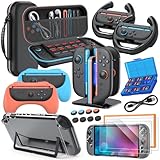
The Switch 2 is a portable machine, and a good hardshell case is cheap insurance against a cracked screen or scuffed Joy-Con 2. The best cases feature a rigid EVA exterior, a soft microfiber interior, elastic straps to lock the console in place, and slots for at least eight to ten game cartridges. Some premium versions add a separate compartment for your charger and spare card. For daily commuters and anyone tossing the console into a backpack, this is a genuine must-have rather than a nice-to-have. If you travel with more than just the console, our Switch 2 travel setup guide covers cables, power banks, and organizers too.
3. Tempered Glass Screen Protector — Cheap, Essential Insurance
That gorgeous 7.9-inch display is bigger than ever, which means there’s more surface area to scratch. A 9H tempered glass protector applies in minutes, resists scratches from cartridges and keys, and preserves the screen’s clarity and touch response. Buy a two-pack so you have a spare for the inevitable botched first application, and always clean the screen and use the included dust stickers before you lay the glass down. At under fifteen bucks, it’s the highest-value protection you can add on day one.
4. Switch 2 Pro Controller — Best for the Big Screen
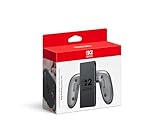
When you dock the Switch 2 and play on your TV, the redesigned Pro Controller transforms the experience. Expect a more ergonomic grip, longer battery life, responsive sticks with improved anti-drift performance, and mappable back buttons on many models. It’s the go-to choice for platformers, shooters, and fighting games where precision matters. Third-party controllers can save you money, but confirm Switch 2 compatibility and features like HD rumble and NFC before you buy. Serious players should read our best Switch 2 controllers roundup for budget alternatives.
5. Charging Dock and USB-C Chargers — Power Where You Need It
Rounding out the essentials is smart charging. A compact USB-C fast charger keeps your console topped up on trips, while a multi-port charging dock or stand lets you power the console, a Pro Controller, and a phone at once. Look for chargers that deliver enough wattage to support the Switch 2’s higher power draw in TV mode, and prioritize brands with over-voltage protection. This is the most budget-friendly category on the list, yet it prevents the dead-battery frustration that ends game nights early.
Buying the Best Nintendo Switch 2 Accessories on a Budget
You don’t need to spend a fortune to gear up. If money is tight, prioritize in this order: a microSD Express card first, then a screen protector, then a case. Those three cover storage, protection, and portability for well under a hundred dollars combined. Controllers and premium docks can wait until payday, and third-party options often deliver ninety percent of the experience at half the price. Watch for retailer bundles that pair the console with a case and card, since these frequently undercut buying each piece separately, especially during sales events.
Frequently Asked Questions
Does the Nintendo Switch 2 need a microSD Express card?
Yes, if you want to expand storage. The Switch 2 only accepts microSD Express cards for game storage; older standard UHS-I microSD cards are too slow and will be rejected. Since Switch 2 games are large and internal storage fills quickly, a microSD Express card is the single most important accessory to buy, and a 256GB model is the best value for most players.
What is the best carrying case for the Switch 2?
The best case is a hardshell EVA design with a soft interior lining, secure elastic straps, and slots for at least eight to ten game cartridges. Look for a model that specifically fits the larger Switch 2 dimensions, since original Switch cases are too small. A version with a dedicated pocket for your charger and spare cards is ideal for frequent travelers.
What is the best Pro Controller for the Switch 2?
Nintendo’s official Switch 2 Pro Controller is the safest pick, offering an ergonomic grip, long battery life, low-drift sticks, and full feature support like HD rumble and NFC. If you’re on a budget, several reputable third-party controllers add extras like back buttons at a lower price, just confirm they list Switch 2 compatibility before buying.
Do I really need a screen protector for the Switch 2?
Absolutely. The Switch 2’s larger 7.9-inch screen is a magnet for scratches from cartridges, keys, and everyday handling. A 9H tempered glass protector costs only a few dollars, installs in minutes, and preserves both clarity and touch sensitivity. Buying a two-pack gives you a spare in case your first application traps dust or misaligns.
Ready to decide? Our #1 pick for 2026 is the 256GB microSD Express Card.
Live price & availability on Amazon.


