Steam Deck OLED 1TB Review 2026: Is the 1TB Model Worth the Extra Money?
The Steam Deck OLED 1TB is the top storage configuration of Valve’s handheld, and it raises a simple question: does the extra storage justify the higher price over the smaller model? This review looks at the OLED display, the handheld’s day-to-day behaviour, how storage affects a real library, and who should buy the larger version. It also covers the buying traps, such as accessories and storage upgrades, that change the real cost.
The answer depends on how you play. If you keep a large library installed, play several big titles at once, or dislike managing deletions, the 1TB model removes friction. If you play mostly smaller games, stream most of your content, or are happy to swap games in and out, the smaller model may be the more sensible purchase. Read the rest of this review with that choice in mind.
The Steam Deck OLED Platform in 2026
The Steam Deck OLED is a handheld PC that runs SteamOS, Valve’s Linux-based operating system, and plays a large part of the Steam library directly on the device. It uses an OLED display, a change from the LCD of the original model, and it keeps the same general layout of controls. For most users, the platform’s biggest strength is compatibility with the existing Steam library and the ability to play docked on a TV or monitor. Its biggest limitation is that not every game is verified for the handheld, so check compatibility status before buying a title you care about.
The OLED display
The OLED panel is the main hardware difference from the original model. It offers deeper blacks and higher contrast, which matters in dark games, and it is generally more vivid than the earlier LCD. The screen is a small 7.4-inch panel, so the experience depends on your viewing distance and how much you value colour and contrast. OLED screens can show burn-in in static content over long periods, so avoid leaving a static interface on screen for hours at a time.
Ergonomics and day-to-day use
The handheld is comfortable for long sessions for most players, though hand size and grip preference matter. The layout is familiar to people who have used a controller on a console, and the trackpads add precision for certain games and desktop tasks. Battery life depends heavily on the game, the frame-rate cap and the screen brightness, so use the built-in performance settings to tune the balance between battery and performance for each title.
Why Storage Is the Real Question
Storage is the only real hardware difference between the 1TB model and the smaller configuration, so the question is whether you need the space. Modern games can be very large, and some titles take up tens of gigabytes on their own. A 1TB model holds a significantly bigger library before you need to delete anything, which is the main reason to pay the premium.
There is a second consideration. The Steam Deck supports expandable storage through microSD cards and external drives for games, but performance and compatibility vary. Some players use a fast card for lighter titles and keep the most demanding games on the internal drive. Before relying on expansion, check that the card or drive is fast enough for the games you play, and check Valve’s guidance on which storage options are supported.
What a 1TB library looks like
A practical 1TB library might include a large open-world title, a few medium-sized action games, several indie games and a set of smaller titles you return to often. You would still need to manage space if you install every big release, but the frequency of deletions drops. Players who install a game, finish it and remove it will feel less pressure with 1TB than players who keep a dozen large titles on the device at once.
Comparison Table: Storage and Buying Factors
The table below compares the factors that matter most in this decision. Price tiers are relative, and live prices and ratings are shown in the product cards below.
| Factor | 1TB OLED model | Smaller OLED model | Practical takeaway |
|---|---|---|---|
| Price tier | Premium | Mid to premium | The 1TB costs more; compare the difference to your need |
| Internal storage | Largest library before deletions | Smaller library before deletions | Storage is the main hardware difference |
| Display | 7.4-inch OLED | 7.4-inch OLED | Same screen type, so storage is the deciding factor |
| Expansion | microSD and external options | microSD and external options | Expansion reduces the gap but varies by card speed |
| Best for | Large libraries, few deletions | Smaller libraries, cloud or streaming users | Match the model to how you manage installs |

Valve Steam Deck OLED 1TB Handheld Gaming Console


As an Amazon Associate we earn from qualifying purchases. Product prices and availability are accurate as of the date/time indicated.
Performance, Settings and Playability
This review does not publish frame-rate charts. Handheld performance depends on the game, the power profile, the frame-rate cap and any updates Valve or the game developer has released. The most useful approach is to test the games you play, use the built-in performance overlay, and adjust settings per game. Many players find that a modest frame-rate cap improves battery life and temperatures without a noticeable loss in smoothness.
Compatibility is the other key factor. Valve’s verification system tells you whether a game is designed for the Deck. Verified titles generally run well, while unverified titles may need manual tuning or may not run at all. Check the status before buying a game you are not sure about, and read recent player reports, because compatibility can change with updates.
Docking, Accessories and Hidden Costs
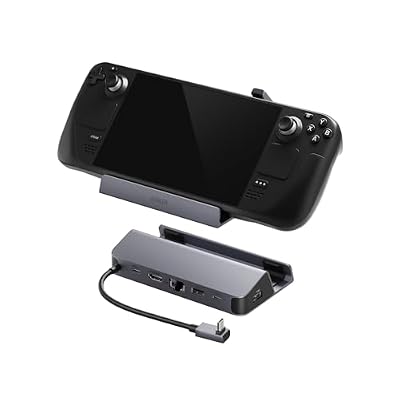
The Deck can be docked to a TV or monitor, which turns it into a small desktop-style console. A dock, a USB-C hub and an external controller are common additions. Factor these into the total cost, because a dock is not always included and some accessories are needed for specific uses. A protective case is also worth considering, especially if you carry the device daily. Our guide to the best gaming handhelds compares the Deck with other handheld options if you are still deciding on the platform.
For storage, consider an external SSD if you want to move games between devices or keep a large library off the internal drive. Our list of portable SSDs for gaming covers the options with the speeds you need for game loading.
Who Should Buy the 1TB Steam Deck OLED
Buy the 1TB model if you want a large library without constant management, if you play many large titles, or if you prefer to keep games installed rather than re-download them. It is the more comfortable choice for players who value convenience over the lower upfront price.
Choose the smaller model if you mostly play smaller games, if you are happy to swap titles on and off the device, or if you already own a fast external storage solution that you plan to use. Also consider the cost of accessories, because a case, a dock and a good SD card can narrow the gap between the two models.
Related Guides
More reading that pairs with this topic:
- best gaming handhelds 2025
- best handheld gaming pc
- best handheld gaming system
- best handheld gaming device
- best retro gaming handheld
- best ssd for gaming pc
- best external ssd for gaming
- best gaming ssds
Frequently Asked Questions
Is the Steam Deck OLED 1TB worth the extra money?
It is worth it if you need the storage, especially for a large library with big titles. If you play smaller games or are comfortable managing installs, the smaller model is often the better value.
Can I use a microSD card instead of buying the 1TB model?
Yes, but performance and compatibility vary by card. Use a fast card, check Valve’s guidance, and keep the most demanding games on the internal drive if you notice loading or stutter issues.
Does the OLED screen change how the Deck plays games?
The screen improves contrast and colour, which helps in dark and vivid games. Frame rate and playability depend mainly on the game and the power settings, not the screen type.
Can I play Steam Deck games on a TV?
Yes, with a compatible dock or USB-C adapter that supports video output. Check the dock’s specifications and your TV’s input support before buying.
Is the Steam Deck good for battery-powered play?
Battery life varies widely by game and settings. Lower the frame-rate cap and screen brightness for longer sessions, and use the built-in performance tools to tune each game.