ASUS ROG Ally X 2026 Review Performance: Battery, Settings and Real Limits
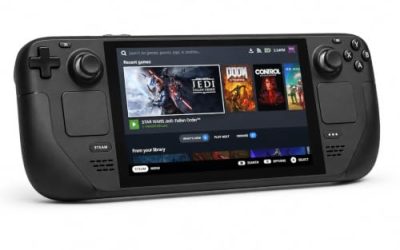
The ASUS ROG Ally X is a Windows handheld built for playing PC games away from a desk. Its performance is strong for a handheld, but the experience depends heavily on power mode, game choice and how much you accept lowering settings to protect battery life. This performance-focused guide explains what the Ally X does well, where it runs out of headroom, and how to tune it so the results match what you expect.
The hero listing and alternatives came from the query “ASUS ROG Ally X 24GB”. Retail listings for handhelds vary by storage size, memory configuration and bundled accessories, and some sellers list older or refurbished units alongside new ones. Confirm the memory, storage and warranty on the live page. This article describes performance in general terms and does not claim benchmark numbers, because results change with game, driver and power setting.

Performance Profile: What the Ally X Handles Well
The Ally X is strongest with games that are optimized for handheld play or that run at modest resolutions. Indie titles, older AAA games and many popular multiplayer games run comfortably at reduced settings. The screen is a 1080p panel with a high refresh rate, which makes fast-paced games look smooth when the frame rate holds. On a handheld, smooth frame pacing often feels better than a higher peak frame rate that drops in bursts.
The 24GB memory configuration helps with multitasking and with games that cache large amounts of data. Storage is the other key factor. Modern games are large, so storage capacity and a quick way to add a microSD card matter if you plan to keep a library installed. Check whether the listing includes the storage size you want, because you may need to add more later.
Where the Ally X Runs Out of Headroom
Demanding AAA titles at high settings are where the Ally X struggles. You will need to drop resolution, enable upscaling where supported, or lower shadows and post-processing effects. Frame rates in heavy open-world games will vary as you move through the map. This is normal for a handheld, but it means you should not expect the same experience as a desktop at the same settings.
Battery Life Trade-Offs
Battery life is the main limit on a handheld, and it changes sharply with the power mode. Higher performance modes deliver better frame rates and drain the battery faster. Quieter modes extend play time at the cost of frame rate. Set a power profile for each game rather than leaving one mode on all day. Lighter games can run in a lower mode without a noticeable difference, which saves battery.
Tuning for the Best Experience
Start with the default power mode and adjust from there. Lower the in-game resolution or enable upscaling first, because those changes give the largest frame rate gain for the least visual cost. Next, drop shadows and volumetric effects. Turn off motion blur and heavy post-processing if the game offers it. Finally, cap the frame rate to a level the handheld can hold consistently. A steady 40 or 60 frames per second often feels better than a fluctuating 70.
Keep the driver and BIOS software updated through the official tools. Close background apps before a session, and check that the device is not throttling from heat. A handheld in a closed bag or on a warm surface will lower its clock speeds to protect itself. Use the device on a hard surface with vents clear.
Comparing the Ally X Against Other Options
The table below lists the five ASINs returned for the query. Some listings may be different models or variants, so confirm the product before buying. Prices and ratings change often and are left for the live page.
| Option | ASIN | What to verify | Price | Rating |
|---|---|---|---|---|
| Hero listing | B0D7QNNHQ4 | Memory configuration and storage size | Check live listing | Check live listing |
| Alternative 1 | B0GRG2WP5Z | Confirm it is the Ally X model, not a different handheld | Check live listing | Check live listing |
| Alternative 2 | B0D7QND8GP | Storage size and included accessories | Check live listing | Check live listing |
| Alternative 3 | B0CQ3L4726 | Compare with a Steam Deck class handheld on the same use | Check live listing | Check live listing |
| Alternative 4 | B0G5VHZ1TC | Compare with a Windows handheld in a higher price band | Check live listing | Check live listing |
For a wider view of the market, the best handheld gaming PC guide and the handheld gaming picks show how Windows handhelds compare with other designs. The main alternative to consider is a console-style handheld with a different operating system. Those devices usually have longer battery life and simpler software, but less freedom to install launchers and storefronts. Compare the trade-off against your game library before you buy.
Who the Ally X Suits, and Who Should Pass
The Ally X suits players who want to run their existing PC library on the go, enjoy tuning settings, and accept that heavy games will need compromises. It is a good match for people who already use Steam and other PC launchers and want to play them in bed or on a couch.
It is a poor match if you want the best battery life, if you mainly play demanding AAA titles at high settings, or if you want a plug-and-play console experience. A budget handheld or an older console may fit better in those cases. Our guide to the budget handheld gaming device covers the cheaper end of the market, and our gaming handhelds roundup compares the wider field.
Buying Tips
Check the return window and the warranty, and buy from a seller you trust. Confirm whether the listing is new or used, and whether it includes a case or charger. If storage is important, budget for a microSD card from the start. Read reviews that test sustained play, not only short benchmark runs, because a handheld that holds frame rate for 10 minutes can drop sharply after an hour when heat builds up.
If you are deciding whether to buy the Ally X or a different handheld, our best gaming handheld page lays out the main choices, and our Android gaming handheld guide covers the other operating system path. For a cheaper pick, see our retro gaming handheld guide if your library is mainly older titles. Our temperature checking guide shows how to confirm whether the handheld is throttling.
Frequently Asked Questions
Is the ROG Ally X good for AAA games?
It can run many AAA titles, but usually at reduced settings or with upscaling enabled. Expect to adjust resolution and effects to keep frame rates steady, especially in open-world games.
How long does the battery last?
Battery life depends heavily on the game and power mode. Light games in a quieter mode last much longer than demanding games at high performance. Test your own games and set a profile for each one rather than relying on a single number.
Should I buy the 24GB model?
The 24GB configuration gives more memory headroom for multitasking and large games. Confirm the memory and storage on the listing, because configurations differ, and remember that storage can be expanded with a microSD card.
Is it better than a Steam Deck?
It depends on what you value. The Ally X runs Windows, which gives access to more launchers and PC software, while the Steam Deck has a simpler system and different battery trade-offs. Choose based on your library and how you want the device to work.
Final Verdict: ASUS ROG Ally X Review
The ASUS ROG Ally X is a capable Windows handheld that runs a wide range of PC games with the right settings. Its strengths are the screen, the memory headroom and access to your existing library. Its limits are battery life under load and the difficulty of running demanding AAA titles at high settings. Buy it if you want a PC in your hands and will tune your games. Check the live listing for memory, storage and warranty before ordering.