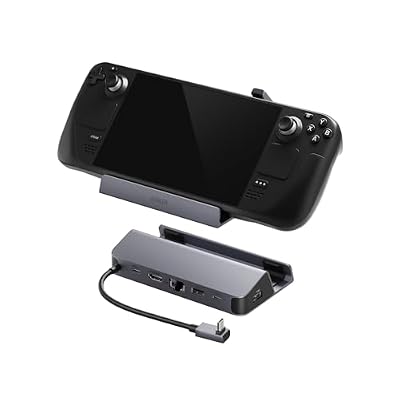
- Top Pick: Syntech Protective Silicone Case for Steam Deck OLED & LCD – Gray | Upgraded Zero-Gap Fit Fixes Edge Sagging, All-Round Shock Absorption, Non-Slip Grips & Complimentary Thumb Caps Included
- Best Value: UYIYE Case for Steam Deck OLED & LCD with Kickstand – Blue Purple Gradient | Soft Leather Grips Steam Deck Protective Case, 1:1 Precise Fit 7.4‘’Display, Drop Protection, Built-in Stand & Heat Vent
- Premium Choice: JSAUX ModCase for Steam Deck/Steam Deck OLED, PC0104 Modular Valve Steam Deck Case Include Protective Case, Face Cover, Cooling Fan, Metal Bracket and Strap – Cooler Set
The best Steam Deck protective case for most owners is the JSAUX ModCase for a shell you leave on the device, the tomtoc Steam Deck Armor Slim case for a hard carry case, and the Spigen Rugged Armor as the budget-friendly shell. The first decision is the type: a snap-on shell protects against scratches and bumps while you play, while a carry case protects against crushing and drops in a bag. Many players need both.
As an Amazon Associate we earn from qualifying purchases at no extra cost to you.



Shell, grip or carry case: pick the type first
Steam Deck cases fall into three groups, and they solve different problems.
- Snap-on shells and grips sit on the back and sides of the Deck. They add scratch protection and often a grip, kickstand or storage for extra items. They must leave the vents, speakers, buttons and ports open, and they must clear the dock connector if you use a dock.
- Hard carry cases are zippered EVA shells that hold the Deck, a charger and a few accessories. They protect against pressure and impacts in a bag. They do not help while you play.
- Soft sleeves and pouches add minimal protection and weight. They suit short trips where the Deck lives in a bag with a laptop.
The device itself is large for a handheld. Both the LCD and OLED models measure roughly 298 mm by 117 mm by 49 mm, the LCD weighs about 669 g and the OLED about 640 g. Both models share the same overall footprint, but there are small differences in vent and button positions, which is why fit matters.
How we chose
This is a research-based comparison drawn from manufacturer specification pages and product listings. We compared fit for the LCD and OLED models, type (shell, grip or carry case), material, vent and port clearance, dock compatibility, accessory storage, and added weight and bulk. Every product named is a real product made for the Steam Deck. Where a maker does not publish a figure such as drop height or exact weight, we describe the class instead of inventing a number. Always confirm model compatibility on the listing before buying, because a few cases fit only the LCD model.
Buyer criteria with thresholds
Fit: LCD, OLED, or both
Choose a case that lists your exact model. Some cases fit both versions, but others are LCD only. A case designed for the wrong model can block a vent or a port. If you own an OLED Deck, buy a case that says so explicitly.
Airflow and port clearance
The Deck exhausts heat from top vents and draws in air from the back. A shell must leave those vents unobstructed. Poor clearance raises fan noise and temperature in demanding games, which matters if you stream with a nearby microphone. Check that the USB-C charging port is reachable with the case on, and that any cutouts suit thick cables.
Dock and accessory compatibility
If you use the official Steam Deck Dock or a third-party dock, check that the shell can stay on while docked. Many shells with a flush design allow it, while thick grips can prevent the Deck from seating.
Added weight and bulk
The Deck is already heavy. A grip can improve comfort during long sessions, but extra weight and bulk can tire the hands. Slim shells add the least. For a bag, a case with a rigid frame adds protection but also adds volume.
Carry-case capacity
If you carry the charger, a dock, a mouse and extra cables, look for a case with mesh pockets and room for a power adapter around 45 W to 65 W. Measure your accessories before buying.
Comparison table
| Product | Type | LCD and OLED fit | Standout trait |
|---|---|---|---|
| JSAUX ModCase | Modular snap-on shell | Both, per maker listing | Detachable front cover, accessory ecosystem |
| Spigen Rugged Armor | Flexible protective shell | Check model listing | Impact-oriented flexible material, low cost |
| Skull & Co. GripCase | Ergonomic grip case | Both, per maker listing | Added grip for comfort |
| dbrand Project Killswitch | Slim shell with kickstand | Check model listing | Built-in stand, premium finish |
| tomtoc Armor Slim case | Hard carry case | Both, per maker listing | Slim rigid protection |
| tomtoc G05 carry case | Larger carry case | Check model listing | Room for dock and cables |
| JSAUX Carrying Case | Hard carry case | Check model listing | Organized storage |
| Valve official carrying case | Soft-shell carry case | Designed for the Deck | Matches the device, comes with some bundles |
The eight cases, in detail
1. JSAUX ModCase: best shell to leave on
Spec line: Snap-on modular shell · fits LCD and OLED per maker listing · detachable front cover · 360-degree protection when assembled.
Best for: Players who want a shell that stays on during play and who like adding modules such as grips or a stand.
Skip if: You want the lightest possible setup. The full assembled case adds bulk and may not dock without removing parts.
- Pros: Wide protection, modular, works across both Deck versions.
- Cons: Adds bulk, some parts must come off for certain docks.
2. tomtoc Armor Slim case: best slim hard carry case
Spec line: Rigid EVA hard case · zippered · fits LCD and OLED per maker listing · slim profile.
Best for: Commuters who carry the Deck in a backpack alongside a laptop.
Skip if: You also carry a dock or a large charger. The slim body offers limited accessory room.
- Pros: Strong crush protection, slim, easy to carry.
- Cons: Limited storage, you cannot use the Deck inside it.
3. Spigen Rugged Armor: best budget shell
Spec line: Flexible protective shell · textured finish · keeps vents, ports and buttons accessible.
Best for: Buyers who want a low-cost, simple protection layer from a known brand.
Skip if: You want a built-in stand or a thick ergonomic grip.
- Pros: Affordable, simple fit, protects rear and sides against scuffs and light impacts.
- Cons: Fewer features, check the version for your exact Deck model.
4. Skull & Co. GripCase: best comfort grip
Spec line: Ergonomic grip case · fits LCD and OLED per maker listing · added hand contour.
Best for: Players who play at home for long sessions and want better hand comfort.
Skip if: You want maximum drop protection or a slim profile for a bag.
- Pros: Improves grip, lowers hand fatigue, budget friendly.
- Cons: Adds thickness, may not allow docking in some versions.
5. dbrand Project Killswitch: best premium slim shell with stand
Spec line: Slim protective shell · built-in kickstand · premium finish.
Best for: Desk players who want a stand and a clean look.
Skip if: You are on a tight budget or want a carry case for a bag.
- Pros: Integrated stand, slim design, strong brand finish.
- Cons: Higher cost, check model fit and availability before buying.
6. tomtoc G05 carry case: best for accessories
Spec line: Hard carry case · internal organization for dock, charger and cables · zippered.
Best for: Travelers who bring the dock, a charger and a controller or mouse.
Skip if: You only carry the Deck. The size is bulkier than slim cases.
- Pros: Room for accessories, solid protection, widely recommended carry case.
- Cons: Bulky, more than you need for a bare Deck.
7. JSAUX Carrying Case: best organized carry case
Spec line: Hard carry case · compartments for charger and cables · zippered.
Best for: Owners who want organized storage and a sturdy shell.
Skip if: You want a very slim bag companion.
- Pros: Organized layout, rigid protection.
- Cons: Larger than slim cases, check the listing for your Deck version.
8. Valve official carrying case: simplest matched option
Spec line: Soft-shell carry case designed for the Steam Deck · ships with some Deck bundles.
Best for: Owners who got one with their Deck and want a matched, simple carry option.
Skip if: You want hard crush protection or lots of accessory room.
- Pros: Designed for the Deck, simple, no fit risk.
- Cons: Less rigid than hard cases, limited organization.
Worked example: choose a case for your setup
Use a simple scoring method. Give each need a weight from one to three, then score each case type from zero to three on how well it serves that need, and multiply.
Say your needs are: scratch protection while playing (weight 3), protection in a bag (weight 3), hand comfort (weight 2), and docking while the case is on (weight 1). A snap-on shell scores 3, 1, 1, 2 on those. That yields 9, 3, 2 and 2, for a total of 16. A hard carry case scores 0, 3, 0, 0, which gives 0, 9, 0 and 0, for a total of 9. A grip case scores 3, 1, 3, 1, giving 9, 3, 6 and 1, for a total of 19.
The grip case wins on pure score. But the shell and carry case together cover both the bag and the play need, so a combined plan of a slim shell plus a hard carry case beats either alone. In this example the best purchase is a shell and a carry case, spending about as much on the pair as a single premium case.
Decision matrix
| Your situation | Pick | Why |
|---|---|---|
| Home play, comfort first | Skull & Co. GripCase | Ergonomic grip |
| Everyday shell, modular | JSAUX ModCase | Detachable front, add-ons |
| Lowest cost shell | Spigen Rugged Armor | Simple, low cost |
| Desk stand and style | dbrand Project Killswitch | Integrated kickstand |
| Backpack commuter | tomtoc Armor Slim case | Slim rigid case |
| Travel with dock and charger | tomtoc G05 or JSAUX Carrying Case | Accessory room |
| Own a Deck bundle with a case | Valve official carrying case | No extra purchase |
Care and fit checks before you buy
- Confirm your model: LCD or OLED. The listing should name the exact version.
- Check the vent map. Make sure the top and rear intake areas are open.
- Check the charging port clearance if you use a thick or right-angle cable.
- Check dock compatibility if you use a dock with the case on.
- Plan for both play and travel. Many owners use a slim shell at home and a hard case in a bag.
- Clean the Deck before fitting a shell. Dust trapped under a shell can scratch the finish.
- Check thumbstick and trackpad clearance. A case that touches the sticks causes drift-like input.
Gaming-specific points: heat, noise and latency
A case does not change input latency, but it can affect heat and noise. The Deck’s fan runs harder in demanding games, and a shell that blocks airflow raises fan noise, which a nearby microphone will hear. If you stream or voice chat from the Deck, test the airflow with the case on in a quiet room by comparing fan sound against a bare Deck, and remove the shell for long, demanding sessions if the fan is noticeably louder. For a desk setup, a kickstand shell or a separate stand helps keep the Deck at a comfortable angle and leaves the vents open.
Mistakes to avoid
- Buying by looks alone. A stylish shell that blocks a vent costs you fan noise and heat, which is the opposite of protection for a device that runs hot under load.
- Ignoring the cable. A shell with narrow charging cutouts may refuse a thick braided or right-angle cable. Check the opening width against the plug you use at your desk.
- Skipping a carry case when you travel. A grip shell does not stop a bag strap or a stack of books from pressing on the screen. A rigid case does.
- Leaving the shell on in hot rooms. In a warm gaming room, an enclosed shell holds heat. If the room is warm, take the shell off during long sessions.
- Forgetting the microSD card. Make sure the card slot stays reachable, or you will remove the case every time you swap storage.
- Mixing accessories. Stands, dock clips and third-party mounts may need a bare Deck or a specific shell. Read the accessory notes before stacking products.
Frequently asked questions
What is the best Steam Deck protective case?
The JSAUX ModCase is a strong all-round shell, and the tomtoc Armor Slim case is a strong carry case.
The right answer depends on whether you need protection while playing or in a bag, and many owners use one of each.
Do Steam Deck cases fit both LCD and OLED models?
Some do, but not all. Check the listing for your exact model before buying.
The two models share a similar footprint but differ in small details, and a mismatched case may block a vent or a port.
Can I use a case while the Steam Deck is docked?
Some slim shells allow docking, while thicker grips often prevent the Deck from seating properly.
Check the maker’s notes on dock compatibility, and be ready to remove a thick case before docking.
Does a case make the Steam Deck run hotter?
It can if it blocks vents. A well-designed shell leaves the top vents and rear intake open.
If the fan is noticeably louder or the device is hotter with the case on, remove it or choose a shell with more open airflow.
Is a hard carry case better than a shell?
They do different jobs. A hard case protects in a bag, while a shell protects during play.
If you travel with the Deck, a hard case is more important. For home use, a grip or shell is more useful.
Do I need a screen protector as well as a case?
A case does not protect the screen face. A screen protector helps against scratches and fingerprints.
Screen finish and size differ between the LCD and OLED models, so choose a protector made for your exact version.
Will a grip case reduce hand fatigue?
It can. A grip case improves hand contour, which helps in long sessions, but it adds thickness and weight.
Try one if you often play more than an hour at a time. If you play briefly, a slim shell is enough.
Can I fit a charger and dock in a carry case?
Larger carry cases such as the tomtoc G05 have room for a dock and charger. Slim cases usually do not.
Measure your charger and dock before buying, and leave a little room for cable bend.