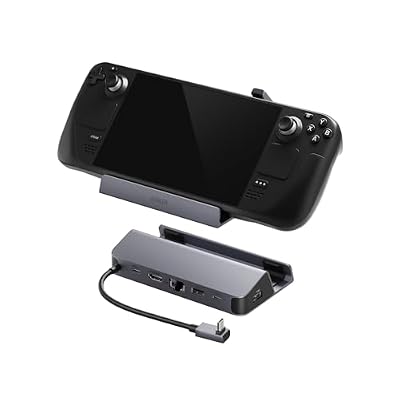
Steam Deck OLED vs ROG Ally X Comparison: Which Handheld Fits Your Games
The Steam Deck OLED and the ASUS ROG Ally X are the two handhelds most players compare when they want PC games on the go. Both run full PC titles, both have strong community support, and both can be tuned for battery life or performance. They are not the same device, though. The Steam Deck runs SteamOS and focuses on a streamlined library experience. The ROG Ally X runs Windows and gives you the full desktop, along with any launcher you choose. This comparison explains the differences that matter for daily play, so you can pick the one that matches how you use a handheld.
Specifications below are the widely published launch figures for each device. Retail configurations and firmware updates can change these values, so check the current manufacturer page before buying. The hero listing for this article matches the query “Steam Deck OLED ROG Ally X”, and the alternatives are other handheld listings included for comparison.

Display and Build: The Steam Deck OLED Advantage
The Steam Deck OLED uses a 7.4-inch OLED panel at 1280 by 800 resolution with a 90Hz refresh rate. OLED panels show deep blacks and strong contrast, and the display is one of the device’s standout features for games with dark scenes. The resolution is modest by modern standards, but at handheld screen sizes it looks sharp, and the lower pixel count helps the device hit higher frame rates. The ROG Ally X uses a 7-inch 1920 by 1080 LCD panel with a 120Hz refresh rate. Its pixel density is higher, and its refresh rate is faster, which helps in games that can sustain high frame rates.
Build and ergonomics are a matter of taste. The Steam Deck has a wide, rounded body that many players find comfortable for long sessions. The ROG Ally X is a little heavier and has a more angular shape with a more pronounced grip. Both devices benefit from carrying cases and a screen protector. If you play for hours in one position, try both at a store or with a friend’s device before you decide.
Performance, Battery and Software
The ROG Ally X uses an AMD processor with a built-in GPU, and it offers adjustable power limits through its software. That flexibility lets you choose between quieter play and higher performance. The Steam Deck uses an AMD processor too, but it runs SteamOS with a fixed set of performance profiles in the system menu. In practice, the ROG Ally X can deliver higher peak performance in demanding titles, while the Steam Deck tends to be more efficient and quieter for the same frame rate target. Battery life depends on the game, the brightness and the power profile, so treat any single number with care.
Software is the bigger difference. SteamOS is simple and familiar if you already use Steam. It also handles Steam library games with less setup. Windows on the ROG Ally X gives you access to any PC store, any launcher and any utility, but it also brings Windows updates, background tasks and the need for more manual tuning. If you want a device that works like a console, the Steam Deck is the better fit. If you want a handheld that also works like a small Windows PC, the ROG Ally X is the stronger choice.
Valve Steam Deck OLED 1TB Handheld Gaming Console


As an Amazon Associate we earn from qualifying purchases. Product prices and availability are accurate as of the date/time indicated.
Battery and heat in practice
Handhelds run hot when pushed, and heat affects both comfort and performance. The Steam Deck’s efficiency tends to keep it cooler at moderate settings. The ROG Ally X can run hotter at its highest power profile, which is why many owners use a balanced profile for long sessions. In both cases, a 30-minute test in your own games tells you more than any spec table. Use the built-in frame rate and power overlays to monitor the device during play.
Comparison Table: Hero Pick and Alternatives
The table below lists the hero listing and four alternative handheld listings. Use it to compare the things that vary most between models and configurations, then verify the values on each live page.
| Role | ASIN | Best for | Price | Rating | Verify before buying |
|---|---|---|---|---|---|
| Hero pick | B0CQ3L4726 | Steam Deck OLED for Steam library play | See live listing | See live listing | Storage size, OLED model, included accessories |
| Alternative 1 | B0D7QNNHQ4 | Buyers comparing a Windows handheld | See live listing | See live listing | Processor model, memory, storage |
| Alternative 2 | B0D7QND8GP | Buyers who want a different storage tier | See live listing | See live listing | Storage and warranty terms |
| Alternative 3 | B0GRG2WP5Z | Buyers who want a newer handheld | See live listing | See live listing | Firmware and software support |
| Alternative 4 | B0G5VHZ1TC | Buyers who want a premium handheld | See live listing | See live listing | Battery capacity and display specs |
Which One Should You Buy?
Choose the Steam Deck OLED if your library is mostly Steam, you value a simple and quiet device, and the OLED screen matters to you. It is also a strong choice for players who want to sit back and play without managing settings. Choose the ROG Ally X if you want the highest peak performance, the flexibility of Windows, or access to games from several stores. It suits players who enjoy tuning their device and who want a handheld that doubles as a small PC.
If you are unsure, consider the games you play most. Lighter indie and retro titles run well on both. Demanding AAA games at high settings will push the ROG Ally X further, but they will also drain the battery faster. For a wider view of the category, our best gaming handheld guide and the best gaming handhelds roundup place both devices in the broader market.
Common mistakes when choosing
Do not choose on the processor name alone. The display, battery and software matter just as much for daily use. Do not buy the smallest storage tier if you plan to install many large games, since an SD card or external drive adds cost and may be slower. Check the return policy, and confirm whether the device includes a case, charger and warranty in your region.
Frequently Asked Questions
Is the Steam Deck OLED better than the ROG Ally X?
It depends on your priorities. The Steam Deck OLED is simpler and has the OLED screen. The ROG Ally X has a faster display and more performance flexibility, with Windows software.
Can both handhelds play Steam games?
Yes. Both support Steam library titles. The Steam Deck runs them through SteamOS, and the ROG Ally X runs them through the Windows Steam client.
Which handheld has better battery life?
Battery life varies by game and settings. The Steam Deck tends to be more efficient at moderate settings. The ROG Ally X can drain faster at high power profiles.
Do I need Windows to play PC games on a handheld?
No. SteamOS handles most Steam games well. Windows is useful if you want non-Steam stores, launchers or utilities.
Related reading for handheld buyers: best handheld gaming device, best handheld gaming system, best retro gaming handheld, best Android gaming handheld and gaming PC vs console in 2026.
Final Verdict
The Steam Deck OLED is the better fit for Steam-first players who want simplicity and a strong OLED screen. The ROG Ally X is the better fit for players who want Windows flexibility and higher peak performance. Verify the storage, the price and the warranty on the live listing before you decide. For more handheld options, read our best handheld gaming PC guide and the best handheld gaming buys.