Steam Deck OLED 512GB vs 1TB Comparison: Is the Extra Storage Worth the Price?
The Steam Deck OLED comes in two storage tiers, 512GB and 1TB, and the choice between them is the main buying decision most people face. The question is simple, but the answer depends on how you use the handheld. Valve’s published specifications put the two models on the same core hardware, with the same OLED display, processor, and memory. The difference that matters at checkout is how much you can install before you need to delete games or buy a microSD card.
This comparison focuses on what the storage difference changes in practice: how many games fit, how quickly you fill the drive, what the microSD slot can do for you later, and when the 512GB model is the smarter buy. The hero listing is shown first, followed by four alternative listings. Check the live card for the exact model, bundle contents, and price, since those change often.

What the Two Steam Deck OLED Models Share
Before comparing storage, it helps to know what is the same. Both models use the OLED handheld design, the same 7.4-inch display, the same processor and graphics, and the same memory configuration according to Valve’s published specs. Battery size is also listed as the same across the two storage tiers. That means the 1TB model does not give you a faster handheld. It gives you more room to keep games installed.
This matters because some buyers assume the larger model performs better. It does not. If you only play a few games at a time, the 512GB model delivers the same experience for less money.
Steam Deck OLED 512GB vs 1TB: Storage Differences in Real Use
Storage on a handheld fills faster than people expect. Modern titles often take tens of gigabytes each, and some large games exceed 100GB once you include updates and optional content. A 512GB drive usually holds a rotating library of ten to twenty mid-sized games, depending on the titles, and you lose some space to the operating system and system files. The 1TB model roughly doubles that room, which is useful if you keep a broad library installed.
When 512GB Is Enough
The 512GB model suits a player who installs games on demand, keeps a small rotating set, and is happy to uninstall a title when they finish it. It also suits buyers who use cloud saves and reinstall games regularly. If you play mostly indie titles or older games, you may never fill the drive. For a handheld PC instead of a Steam Deck, see our handheld gaming PC guide.
When 1TB Makes Sense
The 1TB model is the better choice for players who keep several large AAA games installed at once, switch between titles often, or dislike waiting for downloads after deleting something. It is also useful if you play games that receive large patches. Each reinstall costs time, and a bigger drive reduces how often you face that cost. For a Best Buy shopper comparing handhelds, our handheld gaming guide is a starting point.
The microSD Option
The Steam Deck OLED has a microSD slot, which lets you add storage later. This changes the math. A 512GB model plus a good microSD card can be a cheaper route to a bigger library than buying the 1TB model outright. Check the microSD card’s speed rating before you buy. Slower cards can make load times longer, and some games feel the difference more than others. Our guide to portable SSDs for gaming covers the speed trade-offs in a similar way for external storage.
Comparison Table: Steam Deck OLED Hero and Alternatives
The table lists what to verify for each slot in this comparison. It deliberately avoids invented load-time or frame-rate figures, since those depend on the game and the driver version.
| Listing | Storage tier | Verify on the card | Why it matters | Price |
|---|---|---|---|---|
| Hero (B0CQ3L4726) | Confirm on card | Storage capacity, bundle contents | Storage is the main difference between tiers | See live card |
| Alternative slot 1 (B0CP47RBX3) | Confirm on card | Storage capacity, included accessories | Bundles can change the real value | See live card |
| Alternative slot 2 (B0DRD2PY6C) | Confirm on card | Model and region | Wrong region or model can limit warranty support | See live card |
| Alternative slot 3 (B0DPVL6ZS1) | Confirm on card | Case or carrying bag included | Protection matters for a handheld you carry | See live card |
| Alternative slot 4 (B0D7QNNHQ4) | Confirm on card | Seller and return policy | Returns are easier with a clear policy | See live card |
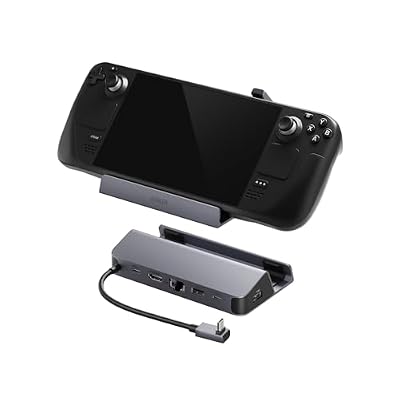
Valve Steam Deck OLED 1TB Handheld Gaming Console


As an Amazon Associate we earn from qualifying purchases. Product prices and availability are accurate as of the date/time indicated.
How to Decide Between 512GB and 1TB
Start with your current library. List the games you have installed and the games you plan to play in the next six months. Estimate the total size using the store page for each title. If the total fits within about 350GB after system overhead, the 512GB model gives you room. If you expect to keep more than that installed at once, the 1TB model or a microSD card is the better path.
Next, consider your habits. If you travel with the handheld and do not have reliable internet, pre-install the games you want on the road, which argues for more storage. If you play at home on Wi-Fi and reinstall without much trouble, the smaller model is the lower-risk buy. Finally, compare the price difference against the cost of a microSD card with the speed you need. Sometimes the cheaper route is the one that gives you the most flexibility. For external drives beyond the handheld, see our external SSD guide.
Who Should Buy Each Model
The 512GB model is the right buy for most players who play a rotating set of games and do not mind managing installs. It is also the better choice if you plan to add a microSD card later and want to keep the upfront cost down. The 1TB model is the right buy for players who keep a large library installed, play several big titles, or want to avoid managing storage at all.
Neither model is a clear upgrade in performance. If you are deciding whether a handheld is worth buying at all, compare it with other options in our gaming handheld roundup and the handheld gaming PC guide. For a broader view of the portable category, read the best gaming handheld. If you plan to use a controller, see our gaming controller guide.
Frequently Asked Questions About Steam Deck OLED Storage
Does the 1TB Steam Deck OLED run games faster than the 512GB?
Valve’s published specs list the same core hardware across both storage tiers, so the extra space does not add performance. The benefit is room to keep more games installed.
Can I add storage to the 512GB model?
Yes, through the microSD slot. Choose a card with a speed rating that suits your games, and remember that load times can differ between cards.
How much space does the operating system use?
Some of the drive is reserved for the operating system and system files, so the usable space is always less than the printed capacity. Check the exact free space on your unit after setup.
Should I wait for a newer model?
Handheld hardware changes on a multi-year cycle. If you need a handheld now, buy the storage tier that fits your library. If you can wait, compare any new model’s specs and price against the current OLED.
Final Verdict: Steam Deck OLED 512GB or 1TB?
The Steam Deck OLED 512GB is the better value for most buyers, especially if you plan to use a microSD card for extra space later. The 1TB model is worth the premium if you keep a large library installed and dislike managing downloads. Choose by how many games you want on the device at once, not by the assumption that the bigger model plays better. Confirm the live price, bundle contents, and seller policy before you buy.