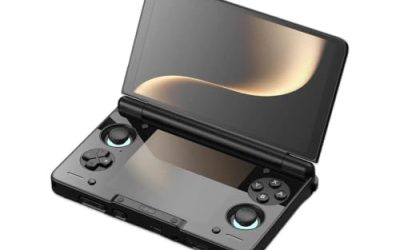
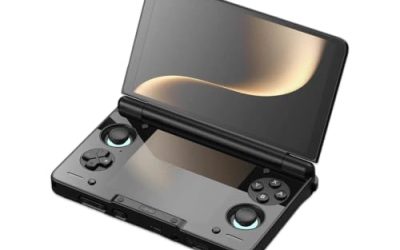
Emulation separates a true handheld PC from a cheap retro console. A handheld gaming PC runs a full desktop operating system, so it runs the same emulators as a laptop: RetroArch for cartridge-era systems, Dolphin and PCSX2 for the 128-bit generation, and RPCS3 for PlayStation 3. The best handheld gaming PC for emulation is the one whose processor, power limits, screen and storage match the console generations you want to revisit.
This guide compares five handheld PCs currently sold on Amazon US: the Valve Steam Deck OLED, the ASUS ROG Ally X, the Lenovo Legion Go, the ASUS ROG Ally and the MSI Claw 7 AI+. Every pick is a genuine PC handheld running SteamOS or Windows, not a closed retro console with preloaded games. Our guide to the best handheld gaming PC models covers the wider field.
As an Amazon Associate we earn from qualifying purchases
What to check before buying a handheld PC for emulation
APU strength and TDP decide your ceiling
Emulation is mostly a CPU task: the emulator translates the original console’s processor instructions in real time, so single-core speed and sustained power limits matter more than raw graphics specifications. Each handheld below exposes several power modes: a low silent mode stretches battery life for 8-bit and 16-bit systems, while a turbo mode in the 25 to 30 watt range gives heavier emulators their headroom. Treat the published TDP figures as the practical ceiling for PlayStation 2 and GameCube emulation, and as the deciding factor for PlayStation 3 attempts.
Match the machine to an emulation tier
Emulator projects publish their own hardware guidance and compatibility databases, and those sources draw a consistent map. Cartridge systems through the original PlayStation, plus the Dreamcast and PSP, run well on every device here. The PlayStation 2 and GameCube generation is the sweet spot: PCSX2 and Dolphin are mature projects whose recommended hardware sits below the specifications of the Z1 Extreme and Core Ultra 7 machines listed here. PlayStation 3 emulation through RPCS3 is the demanding tier; its compatibility database rates a large part of the library as playable, but results vary title by title. Xbox 360 emulation through Xenia remains experimental, so treat that generation as a bonus. Switch emulation is the heaviest tier of all.
Storage, upgrades and the operating system
Game libraries grow quickly, so storage flexibility matters. Every pick below accepts a microSD card, the simplest way to carry a large retro library, and most also use a replaceable internal SSD in a standard M.2 format. RAM cannot be upgraded on any of these machines, so choose the capacity you need at purchase. The operating system shapes daily use: SteamOS offers a console-style interface with tools such as EmuDeck built around it, while the Windows handhelds run front ends such as RetroBat and LaunchBox and accept every Windows emulator build directly.
One legal note: emulators are legal software, but the games and firmware files they need should come from your own collection and hardware.
The five picks compared
Valve Steam Deck OLED (512GB)

The Steam Deck OLED is the easiest recommendation for emulation-first buyers because the software ecosystem is built for it. EmuDeck, the best-known emulation setup tool, was written for SteamOS and configures RetroArch, Dolphin, PCSX2, PPSSPP and RPCS3 in one pass. Valve’s custom AMD APU pairs a four-core Zen 2 CPU with RDNA 2 graphics inside a 4 to 15 watt power envelope published by Valve, enough for the PlayStation 2 and GameCube tier at the screen’s native 1280 by 800 resolution, while sipping power on older systems.
The 7.4-inch HDR OLED display suits retro games well, with deep black levels and a 90Hz refresh rate that supports the 60Hz timing most classic systems use. The 512GB NVMe SSD sits in an M.2 2230 slot that Valve documents as replaceable, and the UHS-I microSD slot is the usual home for a ROM library. One USB-C port supports DisplayPort output for docked play, and Valve provides a one-year limited warranty.
Specs
- APU: AMD Zen 2, 4 cores / 8 threads, 2.4–3.5 GHz, RDNA 2 graphics with 8 compute units
- Power envelope: 4–15 W APU TDP (Valve specification)
- Display: 7.4-inch HDR OLED, 1280 x 800, up to 90Hz, up to 1,000 nits peak (HDR)
- Memory: 16GB LPDDR5 on board
- Storage: 512GB NVMe SSD (M.2 2230, replaceable), microSD UHS-I slot
- Ports: 1x USB-C with DisplayPort alt mode, 3.5mm audio jack
- Battery: 50Wh
- Operating system: SteamOS 3
- Warranty: 1-year limited warranty (Valve)
ASUS ROG Ally X

The ROG Ally X is the strongest Windows option here for buyers whose library reaches into the PlayStation 3 tier. Its Ryzen Z1 Extreme combines eight Zen 4 cores with RDNA 3 graphics, and ASUS publishes three operating modes, Silent at 13 watts, Performance at 17 watts and Turbo at 25 watts, rising to 30 watts on mains power. That top mode is what RPCS3 responds to, and the 24GB of LPDDR5X memory gives texture packs and shader caches more room than the 16GB fitted to most rivals.
ASUS also fixed the first Ally’s weaknesses. The 1TB SSD now uses the full-length M.2 2280 format, so replacement drives are common and simple to fit, and the microSD slot reads UHS-II cards. The 7-inch 1080p screen runs at 120Hz with FreeSync Premium, helping emulators match odd original frame rates. An 80Wh battery, the largest in this guide, offsets the higher power modes, and ASUS supplies a one-year limited warranty in the US.
Specs
- APU: AMD Ryzen Z1 Extreme, 8 cores / 16 threads, up to 5.1 GHz, RDNA 3 graphics with 12 compute units
- Power modes: 13 W Silent, 17 W Performance, 25 W Turbo, 30 W Turbo on mains power (ASUS specification)
- Display: 7-inch IPS touchscreen, 1920 x 1080, 120Hz, 500 nits, FreeSync Premium
- Memory: 24GB LPDDR5X on board
- Storage: 1TB NVMe SSD (M.2 2280, replaceable), microSD UHS-II slot
- Ports: 1x USB4 Type-C, 1x USB 3.2 Gen 2 Type-C, 3.5mm audio jack
- Battery: 80Wh
- Operating system: Windows 11 Home
- Warranty: 1-year limited warranty (ASUS US)
Lenovo Legion Go

The Legion Go takes the same Ryzen Z1 Extreme silicon as the Ally line and builds a bigger machine around it. Lenovo rates the chip for up to 30 watts of TDP, and the 8.8-inch WQXGA display is the standout feature for emulation: 2560 by 1600 resolution gives integer-scaling headroom for almost every classic system, the 144Hz refresh rate covers unusual source timings, and the panel carries 97 percent DCI-P3 coverage per Lenovo’s datasheet.
The detachable TrueStrike controllers unclip for tabletop play, and the right controller drops into an included base for an FPS mode that suits mouse-driven front ends. Storage starts at 512GB on a swappable M.2 2242 SSD, and the microSD reader accepts cards up to 2TB. Two USB4 Type-C ports support DisplayPort 1.4 output and Power Delivery 3.0 charging, making docked television play straightforward. The 16GB of LPDDR5X memory is soldered, and Lenovo covers the machine with its Legion Ultimate Support warranty service in the US.
Specs
- APU: AMD Ryzen Z1 Extreme, 8 cores / 16 threads, up to 5.1 GHz, RDNA 3 graphics
- Power: thermal modes up to 30 W TDP (Lenovo specification)
- Display: 8.8-inch IPS touchscreen, 2560 x 1600, 144Hz, 500 nits, 97% DCI-P3
- Memory: 16GB LPDDR5X-7500 on board
- Storage: 512GB NVMe SSD (M.2 2242 PCIe 4.0, replaceable), microSD slot (up to 2TB)
- Ports: 2x USB4 Type-C (DisplayPort 1.4, Power Delivery 3.0), 3.5mm audio combo jack
- Battery: 49.2Wh
- Operating system: Windows 11 Home
ASUS ROG Ally

The original ROG Ally remains a rational emulation buy because the silicon that matters is identical to the Ally X: the Ryzen Z1 Extreme with eight Zen 4 cores and RDNA 3 graphics. ASUS publishes Silent, Performance and Turbo modes of 9, 15 and 25 watts, with Turbo rising to 30 watts on mains power, so the PlayStation 2 and GameCube tier runs at full speed and lighter RPCS3 titles are within reach.
The compromises are in capacity rather than capability. Memory is 16GB of LPDDR5, the 512GB SSD uses the shorter M.2 2230 format, and the 40Wh battery is half the size of the one in the Ally X, so higher power modes are best used near a socket. The UHS-II microSD slot partly offsets the smaller SSD, and the 7-inch 1080p 120Hz display with FreeSync Premium matches the newer model.
Specs
- APU: AMD Ryzen Z1 Extreme, 8 cores / 16 threads, up to 5.1 GHz, RDNA 3 graphics with 12 compute units
- Power modes: 9 W Silent, 15 W Performance, 25 W Turbo, 30 W Turbo on mains power (ASUS specification)
- Display: 7-inch IPS touchscreen, 1920 x 1080, 120Hz, 500 nits, FreeSync Premium
- Memory: 16GB LPDDR5 on board
- Storage: 512GB NVMe SSD (M.2 2230, replaceable), microSD UHS-II slot
- Ports: 1x USB-C combined with ROG XG Mobile connector, 3.5mm audio jack
- Battery: 40Wh
- Operating system: Windows 11 Home
- Warranty: 1-year limited warranty (ASUS US)
MSI Claw 7 AI+

The Claw 7 AI+ is the Intel alternative, built on the Core Ultra 7 258V. Its eight CPU cores and Arc 140V graphics, with eight Xe2 cores, take a different route to the same tiers: Intel’s published figures put the chip’s default power at 17 watts with higher short turbo limits, and MSI’s Center M software exposes the power controls. The mature PlayStation 2 and GameCube projects run on this hardware, though buyers focused on RPCS3 should check that project’s current guidance, which has historically favoured AMD and NVIDIA graphics paths.
Where the Claw counters is memory and connectivity. It carries 32GB of LPDDR5X memory, the most in this guide, integrated into the processor package. The 512GB SSD is a replaceable M.2 2230 drive, a microSD reader handles expansion, and two Thunderbolt 4 ports allow charging, a dock and fast external storage at once. The 7-inch 1080p screen runs at 120Hz with variable refresh rate support, and MSI fits Hall effect sticks and triggers. MSI’s specification sheet lists a one-year limited warranty including one year of global cover.
Specs
- APU: Intel Core Ultra 7 258V, 8 cores, up to 4.8 GHz, Intel Arc 140V graphics with 8 Xe2 cores
- Power: 17 W default TDP (Intel specification), adjustable in MSI Center M
- Display: 7-inch IPS touchscreen, 1920 x 1080, 120Hz, 500 nits, variable refresh rate
- Memory: 32GB LPDDR5X-8533 in processor package (not upgradeable)
- Storage: 512GB NVMe SSD (M.2 2230 PCIe Gen 4, replaceable), microSD card reader
- Ports: 2x Thunderbolt 4 Type-C, 3.5mm audio combo jack
- Battery: 53Wh
- Operating system: Windows 11 Home
- Warranty: 1-year limited warranty including 1-year global cover (MSI specification)
How to choose between them
Decide by the highest console generation you plan to play. For libraries ending at PlayStation 2, GameCube and Wii, the Steam Deck OLED offers the smoothest setup path and the best screen for retro material, while the original ROG Ally covers the same tier on Windows. For PlayStation 3 titles the RPCS3 database rates as playable, the ROG Ally X and Legion Go are the safer hardware thanks to their 30-watt power modes; the Legion Go adds the big screen, the Ally X adds memory and battery capacity. The Claw 7 AI+ suits buyers who value memory headroom and Thunderbolt docking.
FAQ
Which handheld gaming PC is best for PlayStation 2 and GameCube emulation?
All five machines exceed the recommended hardware for PCSX2 and Dolphin. The Steam Deck OLED is the simplest route because EmuDeck configures both emulators automatically, while the ROG Ally X and Legion Go add headroom for higher rendering resolutions.
Can a handheld gaming PC emulate PlayStation 3 and Xbox 360 games?
PlayStation 3 emulation through RPCS3 works for titles the project rates as playable, and the Z1 Extreme machines with 30-watt modes give the best results here, though performance varies by game. Xbox 360 emulation through Xenia is still experimental.
Steam Deck or a Windows handheld: which is better for emulation?
SteamOS offers the more polished experience, with EmuDeck, per-game profiles and quick suspend built around the Deck. Windows handhelds run every emulator build and front end without workarounds, including systems whose emulators are Windows-first. The choice is about software preference.
How much storage does an emulation library need?
Cartridge-era libraries are small, but disc-based systems change the maths: PlayStation 2, GameCube and PlayStation 3 games occupy gigabytes each. A 512GB SSD plus a large microSD card is the practical minimum here.
Conclusion
The best handheld gaming PC for emulation depends on where your library stops. The Steam Deck OLED is the most complete package for the classic generations, the ROG Ally X is the strongest Windows pick, the Legion Go wins on screen size and flexibility, the original ROG Ally delivers the same core silicon for the mainstream tiers, and the MSI Claw 7 AI+ brings Intel hardware, generous memory and Thunderbolt docking. Match the machine to your highest target generation.