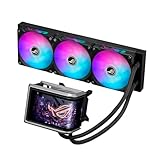
- Top Pick: ASUS ROG Ryuo IV ARGB 360mm AMD/Intel Gaming Liquid CPU Cooler | 360mm AIO, curved 6.67" AMOLED display, Asetek Gen8 V2 pump, daisy-chained ARGB fans, Intel LGA1851/1700 & AMD AM5/AM4
- Best Value: Noctua NL-LC1-36, High-Performance 360mm AIO CPU Cooler | Industry-Leading Quiet Cooling, 30mm Slim Radiator, Pump Noise Absorber, for Intel & AMD, 3x 120mm Fans, Rich Accessory Kit
- Premium Choice: Antec Ultra 360 ARGB Liquid CPU Cooler, 3x120mm PWM Fans, High-Performance Pump, Intel LGA 1200/1851/20XX & AMD AM4/AM5
A flagship processor and a hot graphics card share one small case, and the CPU cooler is the part that decides whether the processor holds its boost clocks or backs off after twenty minutes of play. That is the real question behind the search for the best AIO liquid cooler for high performance gaming: not which cooler looks best, but which radiator, pump and fan combination keeps a power-hungry chip stable without turning the room into a wind tunnel. Radiator length, thickness, socket support and noise all pull in different directions, and no single cooler wins every category.
This 2026 guide is for builders with a modern Intel or AMD processor, a roomy mid-tower and a budget that allows more than a basic air cooler. We compare eight AIOs by what their titles actually say: radiator size, pump generation, fan count, socket compatibility, display options and noise claims. Two of the picks are premium display coolers from ASUS, three are quiet-focused Noctua designs in different sizes, and the rest cover value-minded choices from ARCTIC, Antec and Cooler Master.
Quick Picks
As an Amazon Associate we earn from qualifying purchases at no extra cost to you.



| Product | Best for | Key spec from the title |
|---|---|---|
| ASUS ROG Ryuo IV ARGB 360mm | Showpiece builds with live stats | 360mm, curved 6.67-inch AMOLED display, Asetek Gen8 V2 pump |
| Noctua NL-LC1-36 360mm | Quiet high-end cooling | 360mm, 30mm slim radiator, pump noise absorber |
| Antec Ultra 360 ARGB | Value 360mm cooling | 3x120mm PWM fans, LGA 1200/1851/20XX and AM4/AM5 |
| ASUS ROG Ryujin III ARGB Extreme 360mm | Premium display and magnetic fans | 360mm, 3.5-inch 640×480 LCD, magnetic ARGB fans |
| ARCTIC Liquid Freezer III Pro 360 | Mainstream 360mm for new sockets | 3x120mm, LGA1851, LGA1700, AM4, AM5 |
| Noctua NL-LC1-24 240mm | Compact quiet builds | 240mm, 30mm slim radiator, pump noise absorber |
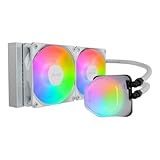
| Cooler Master Elite Liquid 240 | Budget white builds | 240mm, dual-chamber pump, ARGB, AM5/AM4 and LGA1851/1700 |
| Noctua NL-LC1-42 420mm | Maximum radiator area | 420mm, 30mm slim radiator, pump noise absorber |
The 8 Best Options
ASUS ROG Ryuo IV ARGB 360mm
The Ryuo IV is the pick for a builder who wants the cooler to be the centerpiece of the case. The title lists a 360mm AMD and Intel liquid CPU cooler with a curved 6.67-inch AMOLED display on the pump head, an Asetek Gen8 V2 pump and daisy-chained ARGB fans. The big screen turns the cooler into a status panel, while the 360mm radiator gives it a serious thermal footprint for current high-end processors.
Strengths
- A 360mm radiator suits demanding Core i7, i9 and Ryzen 9 class processors.
- The curved AMOLED display can show system information or custom images on the pump head.
- Daisy-chained ARGB fans reduce cable clutter inside the case.
Trade-offs
- The display and lighting add cost without improving cooling by themselves.
- The visible title text is cut off, so confirm socket support and fan details on the full listing.
In a glass-panel case with a high-end graphics card below it, this cooler doubles as a dashboard: it can sit at the top of the build and show temperatures or a custom image. Buyers who like to adjust lighting and display themes in software will get the most out of it, while those who only want low temperatures will be paying for features they never open.
Skip it if you want a plain, quiet cooler without software features. Compared with the Noctua NL-LC1-36 next, the Ryuo IV puts money into the display and lighting, while the Noctua puts it into noise control.
Noctua NL-LC1-36 360mm
The NL-LC1-36 is for the builder who wants strong cooling without hearing it. The title calls it a high-performance 360mm AIO CPU cooler with industry-leading quiet cooling, a 30mm slim radiator, a pump noise absorber, support for Intel and AMD, and three fans. The slim radiator and noise absorber point toward a design that prioritizes low noise and case compatibility over flashy extras.
Strengths
- A pump noise absorber targets one of the most common AIO complaints: pump hum.
- The 30mm slim radiator is easier to fit in cases with limited clearance.
- Support for both Intel and AMD sockets makes it a flexible long-term cooler.
Trade-offs
- The title does not mention RGB or a display, so the look is understated.
- A slim radiator offers less coolant volume than thicker designs, which matters for the hottest chips.
This is the cooler for a long-session player, a streamer with a microphone on the desk or anyone who works in the same room as the PC. The design philosophy in the title is to remove the sounds people notice first, the pump and the fans, rather than to add features that show up on a spec sheet.
Skip it if you want lighting and an information screen. Next to the Antec Ultra 360, the Noctua trades color and flash for the stronger noise claim, which suits a desk-side tower better than an open show case.
Antec Ultra 360 ARGB
The Antec Ultra 360 is a straightforward value pick for a 360mm radiator. The title lists a liquid CPU cooler with three 120mm PWM fans, a high-performance pump, support for Intel LGA 1200, 1851 and 20XX sockets, and AMD AM4 and AM5. The wide socket list is the headline: it covers older and newer platforms, which makes it a good choice for a builder upgrading across generations.
Strengths
- A 360mm radiator with three 120mm PWM fans gives strong cooling capacity.
- Wide socket support includes LGA 1200, 1851, 20XX, AM4 and AM5.
- ARGB lighting is included for builders who want color.
Trade-offs
- The title makes no specific noise claim, so fan sound is unverified from the listing.
- LGA 1700 is not named in the visible text, so confirm compatibility if you use a 12th, 13th or 14th Gen Intel chip.
It is a good fit for a builder who wants a 360mm radiator and ARGB lighting without paying for a premium display tier. The three 120mm PWM fans keep the airflow adjustable, and the wide socket list helps if you plan to move the cooler to a new platform in a few years.
Skip it if you own an LGA 1700 processor and cannot verify the bracket. Compared with the ARCTIC Liquid Freezer III Pro 360 that follows, the Antec covers more older sockets, while the ARCTIC names LGA1700 directly.
ASUS ROG Ryujin III ARGB Extreme 360mm
The Ryujin III Extreme is the premium sibling of the Ryuo IV, aimed at builders who want a display, magnetic fans and strong brand integration. The title lists a 360mm AMD and Intel liquid CPU cooler with an Asetek Gen8 V2 pump, magnetic ARGB fans, a 3.5-inch 640×480 LCD and a reference to VRM cooling. The magnetic fans are meant to snap onto the radiator quickly, which simplifies installation and tidies the look.
Strengths
- Magnetic ARGB fans make assembly cleaner.
- The 3.5-inch LCD gives a dedicated status and image display.
- A 360mm radiator with an Asetek Gen8 V2 pump is a capable thermal foundation.
Trade-offs
- It is the most feature-packed and likely the most expensive tier of the eight.
- The VRM reference is cut off in the title, so verify what it covers.
Think of it as the all-out enthusiast option: a builder who already owns a flagship processor and graphics card, wants a cooler that looks as premium as the rest of the build, and does not mind learning a software suite to manage the screen and lighting. The quick-attach magnetic fans are a practical bonus when you swap fans or move the radiator.
Skip it if you only care about cooling per dollar. Compared with the ARCTIC next, the Ryujin III pays for a screen and a premium finish, while the ARCTIC focuses on core cooling.
ARCTIC Liquid Freezer III Pro 360
The Liquid Freezer III Pro 360 is a mainstream 360mm option for current sockets. The title lists an AIO CPU cooler with three 120mm fans and compatibility with LGA1851, LGA1700, AM4 and AM5. That list covers the main Intel and AMD sockets in current use, which makes it a safe pick for most gaming builds without extra mounting parts.
Strengths
- Names LGA1851, LGA1700, AM4 and AM5, which covers the mainstream sockets.
- Three 120mm fans fit a 360mm radiator for strong cooling capacity.
- The title is simple and direct, with no display or lighting premium baked in.
Trade-offs
- The title does not list lighting or a display, so the look is plain.
- It does not mention LGA 1200, so older Intel platforms need verification.
This is the kind of cooler that suits a builder who researches compatibility carefully and prefers to spend on cooling hardware rather than decoration. Because it names the socket list clearly, it is easy to confirm that it will mount on a current Intel or AMD board without hunting for extra brackets.
Skip it if you want RGB features or a status screen. Next to the Noctua NL-LC1-24, the ARCTIC offers a larger radiator but needs a case with room for a 360mm mount.
Noctua NL-LC1-24 240mm
This is the compact quiet option. The title lists a high-performance 240mm AIO CPU cooler with industry-leading quiet cooling, a 30mm slim radiator, a pump noise absorber, support for Intel and AMD, and two fans. It fits cases that cannot take a 360mm radiator, which is common in smaller towers and some airflow-focused designs.
Strengths
- A 240mm radiator fits more cases than a 360mm design.
- The slim 30mm radiator helps with clearance around memory and the case roof.
- A pump noise absorber continues the quiet-focused design.
Trade-offs
- A 240mm radiator has less surface area than 360mm models, which limits headroom on the hottest chips.
- The title lists no RGB lighting.
It makes sense in a compact mid-tower, a case with a front-mounted 240mm radiator or a build around a mid-range processor where silence matters more than the last few degrees. The same quiet-first design as the larger Noctua models carries over, just in a size that fits more cases.
Skip it if your processor is among the hottest flagship models and your case supports a 360mm radiator. Compared with the Cooler Master Elite Liquid 240, the Noctua is the quiet-first option while the Cooler Master is the budget and color choice.
Cooler Master Elite Liquid 240 ARGB White
The Elite Liquid 240 is the budget-friendly white build option. The title lists a 240mm AIO liquid CPU cooler in white with ARGB lighting, AM5 and AM4 plus Intel LGA1851 and LGA1700 support, a dual-chamber pump and two low-noise fans. White hardware is rarer than black, so this stands out for color-matched builds.
Strengths
- White ARGB styling suits light-themed builds.
- A dual-chamber pump design is a distinguishing feature.
- Names AM5, AM4, LGA1851 and LGA1700, covering the mainstream sockets.
Trade-offs
- A 240mm radiator limits cooling headroom for the hottest processors.
- It lacks the display or premium features of the ROG models.
This model suits a first custom build where the goal is a clean white look without chasing the highest possible cooling capacity. The simple two-fan layout is easy to install, and the named socket list helps a buyer avoid the common mistake of ordering a cooler that lacks the right bracket.
Skip it if you run a high-power flagship processor in a hot case. Compared with the Noctua NL-LC1-42 that closes the list, it sits at the opposite end of the radiator size range.
Noctua NL-LC1-42 420mm
The 420mm is the largest cooler here, for builders who want maximum radiator area. The title lists a high-performance 420mm AIO CPU cooler with industry-leading quiet cooling, a 30mm slim radiator, a pump noise absorber, Intel and AMD support, and three fans. Radiator length raises cooling capacity, though it also demands a case with room for a 420mm mount.
Strengths
- The largest radiator on the list for maximum cooling capacity.
- Pump noise absorber and quiet-focused design.
- Intel and AMD support.
Trade-offs
- Few cases can mount a 420mm radiator, so compatibility is the main hurdle.
- No lighting or display is listed.
It is the specialist pick for a full-tower case with a front or top 420mm mount, where a builder wants the most surface area and the lowest fan speeds the radiator can allow. Measure the mount, the memory height and the tube reach before ordering, since this is the cooler most likely to meet a clearance problem.
Skip it if your case tops out at 360mm. It stands as the maximum-area counterpart to the compact Noctua 240mm.
Why Buy an AIO for High-Performance Gaming
An all-in-one liquid cooler makes sense when heat, noise or space is working against an air cooler. The decision is less about fashion and more about solving a specific problem in the build, and the three situations below cover most buyers who end up shopping for one of these eight coolers.
Hot flagship processors
High-end Intel and AMD chips can generate substantial heat under sustained load, especially when a game, a stream and a capture program run together. A 360mm or 420mm radiator spreads that heat across a larger surface and allows the fans to spin slower for the same temperature, which usually means a quieter PC at the same performance level.
Cases with limited CPU clearance
A tall air cooler can collide with tall memory modules or a glass side panel. An AIO moves the bulk of the cooler to the radiator, leaving only a compact pump head on the processor. That also improves airflow around the memory and the voltage regulator area of the board, which helps in a crowded build.
Quiet or showcase builds
Some AIOs focus on silence with noise absorbers and slim radiators, while others add displays and ARGB lighting. Decide early whether you are building a quiet tower for a desk or a visual centerpiece for a glass case, because the two goals point toward different products on this list.
How to Choose an AIO Liquid Cooler
Radiator size and thickness
A 240mm radiator suits mainstream processors in smaller cases. A 360mm radiator is the usual target for high-performance gaming builds with a flagship chip, and a 420mm radiator offers the most area but needs a large case with the right mounting points. Thickness matters too: a 30mm slim radiator, as on the Noctua models, fits tighter spaces, while thicker radiators hold more coolant. Always check the maximum radiator size in your case manual before ordering. Also note where the radiator will sit: a top mount can interfere with tall memory, while a front mount can reduce airflow to the graphics card if the fans fight each other.
Socket compatibility
Confirm that the cooler lists your exact socket: LGA 1700, LGA 1851 or LGA 1200 for Intel, and AM4 or AM5 for AMD. Visible titles can omit sockets, so verify with the manufacturer page. The Antec names LGA 1200, 1851 and 20XX, the ARCTIC and Cooler Master name LGA1851 and LGA1700, and the ROG and Noctua listings mention Intel and AMD in general terms. Mounting hardware is a common source of surprises with new platforms.
Fans, static pressure and noise
Look for PWM fans, which adjust speed with temperature and keep the PC quiet at idle. Fan count should match the radiator: two 120mm fans for a 240mm model, and three for a 360mm. Noctua titles emphasize noise reduction, while the Cooler Master mentions low-noise fans. Slow, large fans are usually quieter at the same airflow than small fast ones. A practical test is to set a fan curve that holds the fans near minimum speed until the processor passes a sensible temperature, then ramps gradually instead of jumping.
Pump design and tubing
The Asetek Gen8 V2 pump on the ROG coolers is a named design, and a pump noise absorber, as on the Noctua models, targets the hum some pumps make. Check tube length so the radiator can reach its mounting point, especially in a large case where the top and front mounts sit far from the processor.
Display, lighting and software
Displays and ARGB lighting add visual appeal but do not improve cooling. If you want them, check which software controls them and whether it fits your motherboard setup. Cables and controllers add complexity, so skip them if you prefer a simple build. Ignore marketing language that does not map to a measurable spec, and remember that a screen on the pump head is a fixed cost: if the display fails, the cooler still has to do its job, so look for clear warranty coverage on premium models.
Where budget models cut corners
Budget coolers typically trim fan quality, pump noise control, mounting hardware and warranty length. They may also include only a small number of mounting brackets or none for older sockets. Read the support terms and the length of the warranty, since a leaking or failed pump is a rare but serious risk for the rest of the PC.
240mm vs 360mm vs 420mm: Which Radiator Size
Radiator size is the biggest difference between the eight coolers, and it is the choice most buyers of this keyword face first. A larger radiator carries more heat away at lower fan speeds, but it demands a larger case and more careful mounting. The table groups the eight coolers by size so you can see where each one sits.
| Size | Models here | Best for |
|---|---|---|
| 240mm | Noctua NL-LC1-24, Cooler Master Elite Liquid 240 | Smaller cases and mainstream processors |
| 360mm | ROG Ryuo IV, ROG Ryujin III, Noctua NL-LC1-36, Antec Ultra 360, ARCTIC Liquid Freezer III Pro 360 | Most high-performance gaming builds |
| 420mm | Noctua NL-LC1-42 | Maximum cooling capacity in large cases |
When 360mm is the right call
For a flagship processor, 360mm is the usual starting point, and five of the eight picks here sit in that size. It balances cooling capacity with case compatibility, because most mid-tower and full-tower cases can take a 360mm radiator on the front or top. Choose it when you want headroom for future processors as well. Within the 360mm group, the choice then becomes quiet design (Noctua), value and socket coverage (ARCTIC and Antec) or display features (the two ROG models).
When 240mm or 420mm makes sense
Choose 240mm if your case is small or if your processor is a mid-range model that does not need extra capacity. Choose 420mm only if your case supports it and you want the maximum radiator area for a very hot processor. In both cases, check clearance for memory, the top of the case and any fans already installed.
Setup, Compatibility and Upgrade Tips
What to check before buying
Measure the radiator mounting space in your case, confirm socket support in the listing and check memory clearance around the pump head. Confirm that the fans fit the radiator and that the cooler includes the mounting bracket for your processor. For the ASUS displays, check which software and cables are needed to run them. Make sure the case has a free header for the pump and enough fan headers or a hub for the radiator fans.
What to upgrade first
Set fan and pump curves in the BIOS or software so the cooler stays quiet at idle and ramps up under load. Apply thermal paste carefully, in a small amount at the center, if the cooler does not come with it pre-applied. Check that the radiator is mounted so air flows in a consistent direction through the case. After the first few weeks, open the case and confirm the tubes have not shifted and the fans are still secure, since vibration can loosen small parts. Keep dust filters clean so the radiator fins do not clog.
Common compatibility traps
The most frequent trap is a radiator that does not fit the case, especially at 420mm. Another is a pump head that blocks memory slots, or tubes that are too short for the chosen mounting point. Finally, avoid mounting the radiator so that the pump sits at the highest point of the loop, since trapped air can make the pump louder. Also remove any protective film from the cold plate before mounting, and tighten the bracket screws evenly in a cross pattern so the plate sits flat on the processor.
Which One Fits Your Situation
You want a quiet gaming PC on a desk
The Noctua NL-LC1-36 pairs a 360mm radiator with a pump noise absorber, which suits a desk-side tower where sound matters. Pair it with a case that has good front airflow to get the most from the slim radiator.
You want the cooler to be the showpiece
The ASUS ROG Ryuo IV with its AMOLED display, or the ROG Ryujin III Extreme with its LCD and magnetic fans, fits a glass-panel case. Choose the Ryuo IV for the larger curved screen and the Ryujin III for the LCD and the magnetic fan design.
You want strong cooling for less
The ARCTIC Liquid Freezer III Pro 360 or the Antec Ultra 360 ARGB give you a 360mm radiator with three 120mm fans without display extras.
You have a small case or a white build
The Noctua NL-LC1-24 suits a quiet compact build, and the Cooler Master Elite Liquid 240 ARGB White suits a color-matched build. If your case can take a 420mm radiator, the Noctua NL-LC1-42 is the maximum-area option.
Common Mistakes
- Buying a 360mm or 420mm cooler without checking the case’s radiator support.
- Assuming every cooler fits every socket and skipping the compatibility list.
- Paying for a display or lighting when cooling capacity is the real goal.
- Leaving fan and pump curves at default settings and living with extra noise.
- Ignoring memory clearance around the pump head and tubes.
- Mounting the radiator so the pump sits at the top of the loop.
Related guides
- Wireless Gaming Headsets Under 100 For Pc
- Graphics Card For Esports 1080P 240Hz
- Oled Gaming Monitors For Dark Rooms
Frequently Asked Questions
Is a 360mm radiator better than a 240mm one?
A 360mm radiator has more surface area, so it can handle higher heat loads at lower fan speeds. A 240mm unit is still fine for mainstream processors in smaller cases.
Do I need a display on my AIO?
No, a display is a visual extra and does not improve cooling. The ROG models include one, while the ARCTIC, Antec and Noctua listings focus on cooling and noise.
Are Noctua AIOs quiet?
The titles describe quiet cooling and mention a pump noise absorber. Real-world sound still depends on your fan curves, case and processor load.
Will these coolers fit LGA 1700 processors?
The ARCTIC and Cooler Master titles name LGA1700 directly. For the others, check the manufacturer compatibility list before buying.
How much radiator clearance does my case need?
Check the case manual for the maximum radiator size at the front and top mounts, and allow for the radiator thickness plus the fans. A 30mm slim radiator needs less depth than thicker designs.
Can I reuse the cooler on a new platform?
Often yes, if the manufacturer supplies a bracket for the new socket. Confirm this before you plan to move the cooler to a different processor.
Final Words
The right AIO for high-performance gaming depends on your case, your processor and your tolerance for noise. A 360mm cooler is the safe default, with the Noctua NL-LC1-36 for quiet and the ARCTIC for value. The ROG models add displays for showpiece builds, and the 240mm and 420mm options handle the edges of case size. Verify socket support and radiator clearance first, set sensible fan curves, and let the radiator area, not the lighting, drive your choice. A cooler that fits the case and stays quiet at your usual load will serve a gaming PC better than any single standout feature on a spec sheet.