

- Top Pick: Asus ROG Strix B550-F Gaming WiFi II AMD AM4 (3rd Gen Ryzen) ATX DDR4 Gaming Motherboard (PCIe 4.0,WiFi 6E, 2.5Gb LAN, BIOS Flashback, HDMI 2.1, Addressable Gen 2 RGB Header and Aura Sync)
- Best Value: ASUS ROG Strix B850-F Gaming WiFi AMD AM5 B850-F ATX Motherboard 16+2+2 Power Stages, AI PC, DDR5 AEMP, WiFi 7, 4X M.2, PCIe® 5.0, Total Support of 19 USB, 20Gbps Type-C®, AI Networking II, Aura Sync
- Premium Choice: GIGABYTE B550 Eagle WIFI6 AMD AM4 ATX Motherboard, Supports Ryzen 5000/4000/3000 Processors, DDR4, 10+3 Power Phase, 2X M.2, PCIe 4.0, USB-C, WIFI6, GbE LAN, PCIe EZ-Latch, EZ-Latch, RGB Fusion
Affiliate disclosure: As an Amazon Associate we earn from qualifying purchases. This post contains affiliate links — if you buy through them we may earn a small commission at no extra cost to you. This never affects our recommendations.
- Quick Comparison Table
- How to Choose the Best Gaming Motherboard: Platform & Chipset Matters
- Best AM5 Motherboards for Gaming 2026
- Best Intel LGA1851 Motherboards for Gaming 2026
- Advanced Buying Guide: Features That Matter for Gaming
- Frequently Asked Questions About Gaming Motherboards
- Best Motherboards for Gaming 2026 — Final Roundup
- References and Further Reading
- Related Articles
- Related Articles
Choosing the right motherboard is one of the most critical decisions in building a gaming PC—yet it’s often overlooked by newcomers focused on flashy GPUs and processors. Your motherboard determines everything from power delivery to your CPU and GPU, the number of M.2 storage expansion slots, PCIe lane allocation, and future upgrade potential. In 2026, two dominant platforms dominate gaming: AMD’s AM5 socket with Ryzen 9000 series processors and Intel’s LGA1851 socket for Core Ultra 200 series. This comprehensive guide walks you through 8 of the best gaming motherboards across both platforms, helping you make an informed choice for your next build.
In a hurry? See the top-rated Motherboards for Gaming deals available right now:
🛒 Check Motherboards For Gaming Prices on Amazon →🛒 Best Price Today on Amazon
Prime members get fast, free shipping on everything above, plus member-only deals. New members get a 30-day free trial — cancel anytime.
Start 30-Day Prime Free Trial →See Today’s Amazon DealsQuick Comparison Table
| Motherboard | Chipset | Socket | Form Factor | RAM Speed (Max) | M.2 Slots | USB4/TB4 | Wi-Fi | Est. Price |
|---|---|---|---|---|---|---|---|---|
| ASRock B650M PG Lightning | B650 | AM5 | mATX | 7200+ MHz | 2 | No | Wi-Fi 6E | $130 |
| MSI MAG B650 Tomahawk Wi-Fi | B650 | AM5 | ATX | 7200+ MHz | 3 | No | Wi-Fi 6E | $200 |
| ASUS ROG Strix X870-E | X870-E | AM5 | ATX | 8000+ MHz | 5 | Yes | Wi-Fi 7 | $430 |
| Gigabyte X870E Aorus Master | X870E | AM5 | ATX | 8200+ MHz | 4 | Yes | Wi-Fi 7 | $500 |
| MSI PRO Z890-A Wi-Fi | Z890 | LGA1851 | ATX | 8600+ MHz | 3 | Yes (TB4) | Wi-Fi 7 | $280 |
| Gigabyte Z890 Aorus Elite Wi-Fi 7 | Z890 | LGA1851 | ATX | 8800+ MHz | 4 | Yes (TB4) | Wi-Fi 7 | $330 |
| ASUS ROG Strix Z890-F Gaming Wi-Fi | Z890 | LGA1851 | ATX | 9000+ MHz | 5 | Yes (TB4) | Wi-Fi 7 | $420 |
| ASRock Z890 Taichi | Z890 | LGA1851 | ATX | 9600+ MHz | 4 | Yes (TB4) | Wi-Fi 7 | $550 |
How to Choose the Best Gaming Motherboard: Platform & Chipset Matters
Selecting a motherboard involves three critical decisions: platform choice, chipset tier, and form factor. Your motherboard choice essentially locks you into a 5-7 year platform commitment, so understanding these categories is essential before spending money.
Platform: AM5 vs. LGA1851
AM5 (AMD Ryzen 9000 Series) offers excellent value and proven performance. The ecosystem is mature, with extensive motherboard options from budget to enthusiast-tier. AM5 supports backward compatibility with Ryzen 5000 and 7000 series CPUs, giving you upgrade flexibility within the same socket. Visit our dedicated AM5 motherboards guide for deep dives into specific models.
LGA1851 (Intel Core Ultra 200 Series) is Intel’s cutting-edge platform featuring their latest architectural improvements and integrated efficiency cores. LGA1851 boards support PCIe 5.0 natively and feature robust power delivery for Intel’s higher TDP processors. Learn more about platform differences in our AM5 vs. LGA1851 comparison.
Chipset Tiers
AMD Chipsets: B650 boards are for mainstream gaming, offering solid VRM and PCIe 4.0 for M.2 drives. X870 and X870-E boards are for enthusiasts, with superior power delivery, more M.2 slots, USB4 support, and higher overclocking headroom.
Intel Chipsets: B890 boards (if available) target value gamers, while Z890 boards serve mainstream to high-end users with PCIe 5.0, Thunderbolt 4, and superior VRM compared to earlier Z-series generations. Most 2026 gaming builds favor Z890 for its feature set.
Form Factor: ATX, Micro-ATX, and Mini-ITX
ATX (305mm × 244mm): Standard full-size boards with the most slots and I/O. Ideal for spacious cases and enthusiasts planning extensive upgrades. Most high-end gaming motherboards use ATX.
Micro-ATX (244mm × 244mm): Smaller board fitting mid-tower cases while still offering good expansion. Perfect for balanced gaming builds where size matters but not flexibility.
Mini-ITX (170mm × 170mm): Compact boards for small-form-factor builds. Limited expansion but increasingly popular for portable gaming PCs. Check our gaming cases guide to ensure compatibility.
Best AM5 Motherboards for Gaming 2026
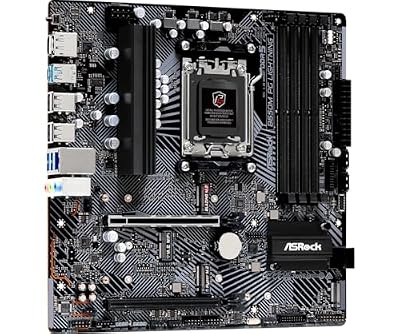
The ASRock B650M PG Lightning represents exceptional value for budget-conscious gamers. Despite its $130 price tag, this Micro-ATX motherboard delivers solid performance with a 6+2+1 phase power delivery system, Wi-Fi 6E connectivity, and support for DDR5 memory up to 7200+ MHz (OC). The board includes two M.2 slots—one PCIe 5.0 and one PCIe 4.0—providing ample storage expansion without premium pricing.
Best for: Budget builders, micro-ATX case enthusiasts, entry-level Ryzen 9000 gaming builds. The compact form factor makes it ideal for mid-tower gaming cases while the B650 chipset handles any non-overclocking gaming workload. BIOS flashback support ensures easy BIOS updates without a compatible CPU.

ASRock B650M PG Lightning AMD Socket AM5 Ryzen9000/8000/7000 Series Processors DDR5 7200+ MHz (OC) HDMI DisplayPort B650 Micro ATX Motherboard BIOS Flashback SATA3 6.0 Gb/s M.2 Key-E for WiFi




As an Amazon Associate we earn from qualifying purchases. Product prices and availability are accurate as of the date/time indicated.
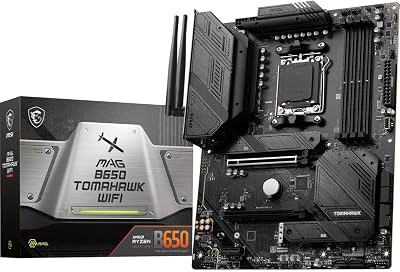
The MSI MAG B650 Tomahawk Wi-Fi is the sweet spot for mainstream AM5 gaming builds. At $200, you get a full-size ATX board with excellent power delivery (14+2+1 phases), three M.2 slots, and comprehensive I/O including 2.5G LAN and Wi-Fi 6E. The Tomahawk line carries MSI’s reputation for reliability, with solid thermal management and an intuitive BIOS interface. This board handles Ryzen 9000 series processors with room to spare, making it suitable for both stock and mild overclocking.
Best for: Mainstream gamers, streamers, content creators using Ryzen 7 and Ryzen 5 processors. The three M.2 slots enable easy SSD upgrades for gaming storage optimization. Pair this with a quality CPU cooler for a well-balanced $600-800 gaming PC build.

MSI MAG B650 Tomahawk WiFi Gaming Motherboard (AMD Ryzen 9000/8000/7000 Series Processors, AM5, DDR5, PCIe 4.0, M.2, SATA 6Gb/s, USB 3.2 Gen 2, HDMI/DP, Wi-Fi 6E, Bluetooth 5.3, 2.5Gbps LAN, ATX)


As an Amazon Associate we earn from qualifying purchases. Product prices and availability are accurate as of the date/time indicated.
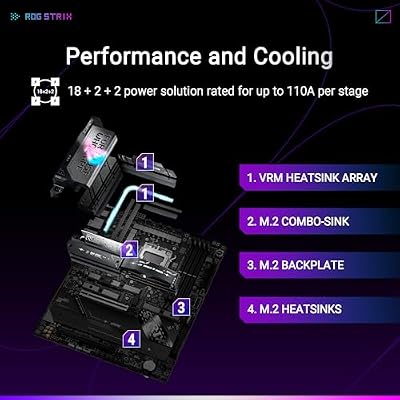
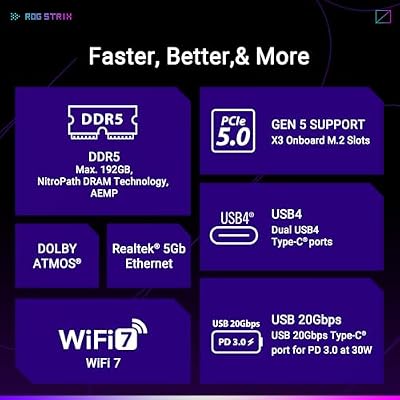
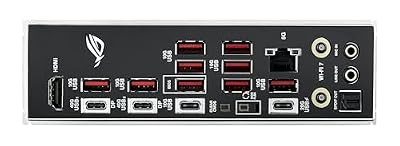
The ASUS ROG Strix X870-E pushes AM5 to its enthusiast limits. With an 18+2+2 phase VRM, this board delivers exceptional power delivery for aggressive overclocking and handles top-tier Ryzen 9 processors without compromise. Five M.2 slots accommodate multiple NVMe drives, while dual USB4 ports provide Thunderbolt 4 connectivity for external storage and displays. Wi-Fi 7 future-proofs your network, and the advanced BIOS offers granular control over voltages, clock speeds, and fan curves. The robust power delivery and thermal design make this a favorite among overclocking communities.
Best for: Overclocking enthusiasts, high-performance gaming builds, top-tier CPU users. If you’re building a $2000+ gaming PC with premium components, this board justifies its cost through superior power delivery and expansive M.2 capacity. Check compatibility with your gaming case due to its size and USB4 port positioning.

ASUS ROG Strix X870E-E Gaming WiFi AMD AM5 X870 ATX Motherboard 18+2+2 Power Stages, Dynamic OC Switcher, Core Flex, DDR5 AEMP, WiFi 7, 5X M.2, PCIe® 5.0, Q-Release Slim, USB4®, AI OCing & Networking



As an Amazon Associate we earn from qualifying purchases. Product prices and availability are accurate as of the date/time indicated.
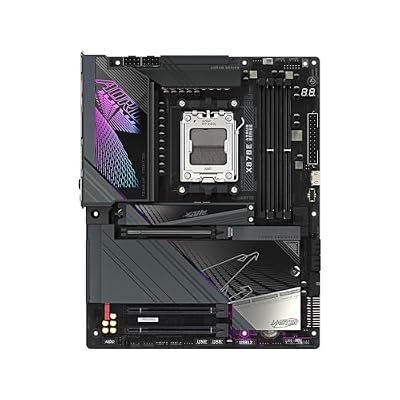
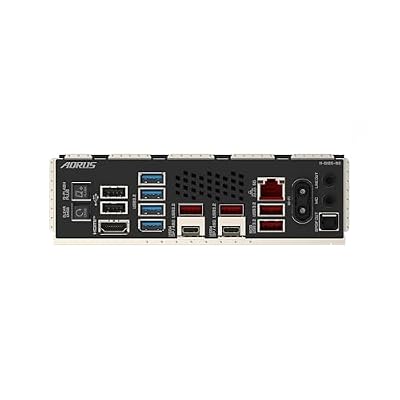
Gigabyte’s X870E Aorus Master represents peak AM5 performance. The 18+2+2 phase VRM delivers clean, stable power even under extreme overclocking loads. Four M.2 slots (supporting up to PCIe 5.0) with integrated heatsinks prevent thermal throttling during sustained performance. USB4 connectivity, 5GbE LAN, and Wi-Fi 7 provide cutting-edge connectivity. The Aorus brand signals Gigabyte’s commitment to gaming-first design, with aggressive styling and comprehensive RGB lighting integration through their Fusion software. Superior BIOS with Overclocking Stack Optimizer simplifies tweaking for users new to overclocking.
Best for: Extreme overclockers, high-performance streamers, content creators demanding maximum stability. The integrated M.2 heatsinks and generous phase count minimize thermal and electrical variance. Pair with premium cooling solutions like high-performance CPU coolers for the complete platform experience. Visit our 2026 gaming PC build guide for complete high-end configuration recommendations.

GIGABYTE X870E AORUS Master AMD AM5 LGA 1718 Motherboard, ATX, DDR5, 4X M.2, PCIe 5.0, USB4, WIFI7, 5GbE LAN, EZ-Latch, 5-Year Warranty




As an Amazon Associate we earn from qualifying purchases. Product prices and availability are accurate as of the date/time indicated.
Best Intel LGA1851 Motherboards for Gaming 2026
MSI’s PRO Z890-A Wi-Fi provides exceptional value for Intel platform builders. At $280, this Z890 board delivers features typically found at $350+: Thunderbolt 4 support, Wi-Fi 7, 5Gbps LAN, and solid 16+2+1 phase VRM suitable for Core Ultra 200 series processors. The three M.2 slots accommodate high-speed NVMe drives, while the clean black aesthetic appeals to builders seeking understated elegance over RGB bling. The Pro series targets professionals and serious gamers who prioritize stability over flashy RGB lighting.
Best for: Budget-conscious Intel gamers, Thunderbolt 4 users (creative professionals with external drives), stable mainstream builds. The Pro branding ensures conservative power delivery appropriate for non-overclocking scenarios. Excellent pairing with high-performance DDR5 RAM and mid-range Core Ultra processors for 1440p gaming builds.

MSI PRO Z890-P WiFi ProSeries Motherboard (Supports Core Ultra Series 2 Intel Processors, LGA 1851, DDR5, PCIe 5.0, M.2, SATA, 5Gbps LAN, USB Type-C, Wi-Fi 7, Bluetooth 5.4, Thunderbolt 4, ATX)


As an Amazon Associate we earn from qualifying purchases. Product prices and availability are accurate as of the date/time indicated.
Gigabyte’s Z890 Aorus Elite Wi-Fi 7 hits the sweet spot between performance and price in the Intel ecosystem. The 16+1+2 phase VRM comfortably handles Core Ultra 200 processors with room for light overclocking. Four M.2 slots with integrated heatsinks keep NVMe drives cool during sustained gaming sessions. Wi-Fi 7 connectivity, Thunderbolt 4, and 2.5GbE LAN provide modern I/O standards without premium pricing. The Aorus design language is less aggressive than ROG, making this board suitable for various build aesthetics from minimalist to gaming-focused.
Best for: Mainstream Intel gamers, streaming builds, users wanting four M.2 slots without premium pricing. The integrated M.2 heatsinks are especially valuable for high-speed Gen5 drives that can thermal throttle. Perfect complement to a mid-to-high-end GPU for balanced 4K gaming systems. Explore our complete 2026 build guide for specific Core Ultra pairings.

GIGABYTE Z890 AORUS Elite WIFI7 Intel Core Ultra (Series 2) LGA 1851 Motherboard, ATX, DDR5, 4X M.2, PCIe 5.0, Thunderbolt 4, 2.5GbE LAN, EZ-Latch


As an Amazon Associate we earn from qualifying purchases. Product prices and availability are accurate as of the date/time indicated.
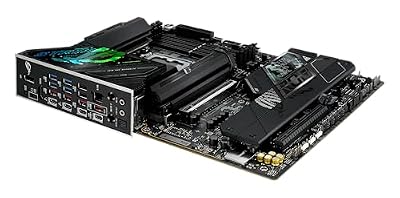
ASUS ROG Strix Z890-F Gaming Wi-Fi targets competitive gamers and high-performance streamers. The 16+2+1+2 stage power delivery (higher phase count than Gigabyte despite similar VRM specs) integrates advanced dPhase technology for lower ripple and cleaner power. Five M.2 slots—unprecedented for Z890 boards at this price—give content creators and prosumers incredible storage flexibility. Dual Thunderbolt 4 ports enable daisy-chaining external monitors and storage, while Wi-Fi 7 ensures lag-free wireless gaming. The ROG BIOS is arguably the most feature-rich in the industry, offering granular overclocking controls alongside AI-assisted optimization for beginners.
Best for: Enthusiast gamers, Twitch/YouTube streamers, professional content creators. Five M.2 slots are incredible for multi-drive setups (OS on Gen5, games on fast Gen4, content storage on another drive). The AI Overclocking feature simplifies tweaking for users nervous about BIOS adjustments. Top recommendation in our $1500+ gaming build guide.

ASUS ROG Strix Z890-F Gaming WiFi Intel® Z890 LGA 1851 ATX Motherboard, Advanced AI PC-Ready, 16+2+1+2 Stages, DDR5, WiFi 7, 5X M.2, Thunderbolt™ 4, USB Type-C®, AI Overclocking, Cooling & Networking




As an Amazon Associate we earn from qualifying purchases. Product prices and availability are accurate as of the date/time indicated.
ASRock’s Z890 Taichi stands at the pinnacle of Intel LGA1851 board design. The Phantom Spirit 20+2 phase power delivery is binned specifically for extreme overclocking, with superior component selection and circuit topology. The O.C. firmware includes experimental features and enhanced monitoring—essential for pushing silicon to its limits safely. Four M.2 slots with independent controls, Thunderbolt 4 for maximum I/O flexibility, and 10GbE networking (in select regions) position this as the flagship Intel platform. The Taichi design language is distinctly gamery—angular styling and comprehensive RGB integration attract the overclocking crowd. Premium BIOS with dedicated O.C. sections makes this board a favorite in global overclocking competitions.
Best for: Professional overclockers, extreme cooling enthusiasts (LN2, phase change), competition circuit participants. The binned VRM components and O.C. firmware justify the premium. Pair with extreme cooling solutions and binned silicon (cherry-picked processors) for record-breaking benchmarks. Explore advanced overclocking techniques in our advanced PC building guide.

Advanced Buying Guide: Features That Matter for Gaming
VRM Quality and Power Delivery
VRM (Voltage Regulator Module) quality is the single most important specification overlooked by casual builders. High phase-count VRMs (14+, 16+, 18+ phases) deliver stable, clean power with lower ripple, enabling higher clock speeds with better stability and efficiency. Gaming workloads benefit from this through:
- Voltage Stability: Cleaner power reduces crashes in demanding games like Cyberpunk 2077 at ultra settings
- Thermal Efficiency: Better power delivery means less heat dissipation, reducing fan noise
- Lifespan: Lower electrical stress extends motherboard lifespan under 24/7 gaming
- Overclocking Headroom: Superior VRM is prerequisite for any overclocking beyond +100 MHz
Mainstream boards (B650, Z890) with 14-16 phases handle gaming beautifully. High-end boards (X870-E, Z890 Taichi) with 18+ phases target overclocking or extreme workloads. Budget boards with 6-8 phases handle gaming at stock clocks—avoid them if overclocking interests you.
PCIe 5.0 and M.2 Expansion
PCIe 5.0 M.2 slots double the bandwidth of PCIe 4.0, enabling NVMe drives to reach 10+ GB/s read speeds. For gaming specifically, PCIe 4.0 is sufficient (most drives top out at 7 GB/s anyway), but PCIe 5.0 future-proofs your storage investment. Prioritize total M.2 slot count (3+ slots) over PCIe generation—most gamers never saturate bandwidth, but multiple drives for OS, games, and content storage are increasingly common.
USB4 / Thunderbolt 4 Connectivity
USB4 and Thunderbolt 4 provide 40 Gbps bandwidth for external displays, storage, and peripherals. For purely gaming-focused builds, these are optional. For content creators, streamers, or professionals also using gaming PCs, USB4 connectivity justifies board selection—it enables external M.2 enclosures for backing up massive game libraries without slowing down internal storage.
Wi-Fi Capability: 6E vs. Wi-Fi 7
Wi-Fi 6E reaches ~1.3 Gbps in real-world conditions; Wi-Fi 7 reaches ~3+ Gbps. For gaming specifically, both are overkill (gaming uses 5-50 Mbps bandwidth). Wi-Fi 7 becomes valuable if you:
- Stream 4K gaming to other devices simultaneously
- Download 100+ GB games frequently
- Have a Wi-Fi 7 router already (most people don’t)
Cheap onboard Wi-Fi (even Wi-Fi 7) can underperform dedicated wireless cards due to antenna placement. For serious gaming, ethernet is still king—invest in Cat6A cabling instead of relying on wireless.
RAM Compatibility and QVL Lists
Before purchasing, consult the motherboard’s QVL (Qualified Vendor List) to confirm your specific RAM model works reliably. Mismatches between board and RAM can cause mysterious crashes, especially at overclocked speeds. DDR5 adoption is still stabilizing—recommended configurations vary by chipset and BIOS revision. Check our DDR5 RAM guide for tested pairings.
BIOS Flashback and BIOS Update Support
BIOS flashback (via USB thumb drive) allows CPU-independent BIOS updates—critical when upgrading from a Ryzen 5000 CPU to Ryzen 9000 (older BIOS doesn’t recognize new CPUs). All modern boards support this, but verify before purchasing. Boards with older BIOS revisions may require pre-update procedures from retailers before shipping.
Warranty and Support
Reputable manufacturers offer 5-year warranties on X-series boards and 3-year on B-series. This is crucial for long-term stability assurance. ASRock and ASUS historically offer best-in-class support; MSI and Gigabyte are solid but historically slower on BIOS updates.
Frequently Asked Questions About Gaming Motherboards
Best Motherboards for Gaming 2026 — Final Roundup
Choosing the right motherboard balances platform commitment (AM5 vs. LGA1851), features (VRM, M.2 slots, USB4), form factor (ATX vs. mATX), and budget. Here’s our final recommendation summary:
As an Amazon Associate we earn from qualifying purchases at no extra cost to you.


Make Your Choice
Budget gamers ($130-200): ASRock B650M PG Lightning or MSI MAG B650 Tomahawk Wi-Fi deliver unbeatable gaming performance per dollar. AM5 ecosystem is mature, proven, and excellent for gaming.
Mainstream enthusiasts ($280-330): MSI PRO Z890-A or Gigabyte Z890 Aorus Elite offer Intel platform value with modern connectivity. Choose AM5 X870 boards if already committed to Ryzen ecosystem.

High-performance gamers ($420-550): ASUS ROG Strix boards (Z890-F or X870-E) provide overclocking headroom, expansive M.2 support, and premium BIOS features. Budget justifies itself through 5+ year platform longevity and superior stability.
Professional overclockers ($550+): ASRock Z890 Taichi and Gigabyte X870E Aorus Master are binned for extreme performance. Only recommended if overclocking/benchmarking is your primary use case.

Whichever board you choose, prioritize stable power delivery over RGB lighting. A $200 board with solid VRM and good BIOS beats a $300 board with flashy lights and weak power delivery every time. Your motherboard choice locks you into a 5-7 year platform; spend wisely and enjoy decades of gaming performance.
References and Further Reading
- Best CPUs for Gaming 2026: Complete Guide to Ryzen 9000 and Core Ultra 200
- AM5 vs LGA1851: Platform Comparison for Gaming PCs
- Best DDR5 RAM for Gaming: Speeds, Latency, and Compatibility Guide
- Best Gaming PC Build 2026: Complete Budget Breakdown
- How to Build a Gaming PC: Step-by-Step Assembly Guide
- Best Gaming Cases 2026: Airflow, Aesthetics, and Cable Management
- Best CPU Coolers for Gaming: Air vs. Liquid Comparison
- Best Budget Gaming PC 2026: High FPS Under $800
Related Articles
Looking for more on this topic? Browse the hand-picked guides below — each one applies the same scoring rubric used in this review.










