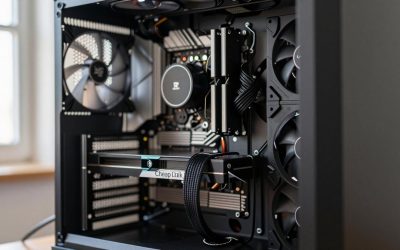
For 1080p at 240Hz, the ASUS Dual Radeon RX 6600 8GB and the GIGABYTE GeForce RTX 3060 Gaming OC 12G are the two listings with enough memory and bus width to take the target seriously. The three RTX 3050 6GB cards sit one step below, and the GT 1030, RX 550 and R7 350 are entry-level display cards that no listing ties to 240 frames per second. A fast monitor only helps if the card delivers matching frames, and that depends on the game as much as the model name. Everything here comes from listing titles and published specifications.
Quick picks

msi Gaming RTX 3050 Ventus 2X 6G OC Graphics Card (NVIDIA RTX 3050, 96-Bit, Boost Clock: 1492 MHz, 6GB GDDR6 14 Gbps, HDMI/DP, Ampere Architecture)


As an Amazon Associate we earn from qualifying purchases. Product prices and availability are accurate as of the date/time indicated.

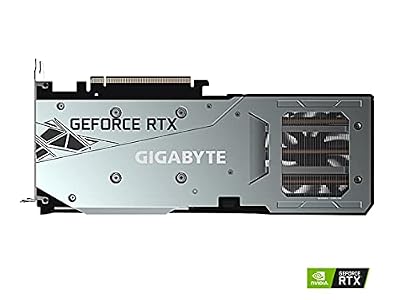
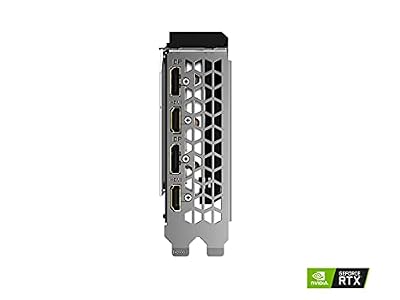
GIGABYTE GeForce RTX 3060 Gaming OC 12G (REV2.0) Graphics Card, 3X WINDFORCE Fans, 12GB 192-bit GDDR6, GV-N3060 Video Card




As an Amazon Associate we earn from qualifying purchases. Product prices and availability are accurate as of the date/time indicated.

maxsun AMD Radeon RX 550 4GB GDDR5 ITX Computer PC Gaming Video Graphics Card GPU 128-Bit DirectX 12 PCI Express X16 3.0 DVI-D Dual Link, HDMI, DisplayPort


As an Amazon Associate we earn from qualifying purchases. Product prices and availability are accurate as of the date/time indicated.
- Most headroom: GIGABYTE RTX 3060 Gaming OC 12G, with 12GB on a 192-bit bus
- Best listed balance: ASUS Dual RX 6600 8GB, with a 3-year warranty
- Entry NVIDIA route: the msi and GIGABYTE RTX 3050 6GB cards
- Small cases only: msi GT 1030 and MOUGOL R7 350, both low-profile designs
Side-by-side comparison
| Model | Key point from title | Best for |
|---|---|---|
| ASUS Dual Radeon RX 6600 | 8GB GDDR6, PCIe 4.0, HDMI 2.1, 3-year warranty | Best-balanced esports pick |
| GIGABYTE RTX 3060 Gaming OC 12G | 12GB, 192-bit, 3 fans, REV2.0 | Most memory headroom |
| msi RTX 3050 Ventus 2X 6G OC | 6GB GDDR6, 96-bit, 1492 MHz boost | Entry NVIDIA build |
| GIGABYTE RTX 3050 WINDFORCE OC V2 | 6GB GDDR6, 96-bit, 2 fans | Lowest-cost RTX 3050 listed |
| msi Gaming GeForce RTX 3050 6G | 6GB GDDR6, 96-bit, 1507 MHz boost | Entry NVIDIA build, alternative |
| msi GT 1030 4GB DDR4 | 64-bit, low profile, single fan | Compact office or media PC |
| MAXSUN Radeon RX 550 4GB | GDDR5, 128-bit, ITX, DVI-D, HDMI, DP | Light use in a small build |
| MOUGOL Radeon R7 350 4GB | GDDR3, low profile, not Windows 11 compatible | Old slim desktops only |
The cards, one by one
ASUS Dual Radeon RX 6600 8GB
The listing names RDNA 2, 8GB of GDDR6, PCIe 4.0, HDMI 2.1, DisplayPort 1.4a and an axial-tech fan design with 0dB technology, which the title presents as a fan-stop feature. A 3-year warranty is stated in the title. For a 240Hz target at 1080p, it pairs the most current output ports in this group with enough memory for competitive shooters on low to medium settings. How close it gets to 240 frames in a given game is not something the listing states. Check the product page for the card length and power connector, since neither appears in the title.
Pros
- 8GB of GDDR6 and a PCIe 4.0 interface are listed
- The 3-year warranty is named in the title
Cons
- Only the fan design is described, so cooling headroom is unclear
- Listed above the RTX 3050 cards in price
Who it’s for: Players who want the strongest all-round balance among the listed cards.
GIGABYTE GeForce RTX 3060 Gaming OC 12G (REV2.0)
This one lists 12GB of GDDR6 on a 192-bit bus, three WINDFORCE fans and the GV-N3060 part number. The REV2.0 tag matters because board revisions can differ in small ways, so match the revision to what you intend to buy. The wider bus and larger memory pool give it the most headroom here for games with big texture sets, or for streaming alongside play. The title gives no size or power figures, so check case clearance and power connectors on the listing. Because it has three fans, it is likely to be a longer card than the two-fan models, so measure your case before ordering.
Pros
- 12GB on a 192-bit bus, the largest in this group
- Three-fan cooler is named in the title
Cons
- Highest listed price of the eight
- Size and power needs are not in the title
Who it’s for: Players who also stream, record or play newer single-player games.
msi Gaming RTX 3050 Ventus 2X 6G OC
The title lists an RTX 3050 with 6GB of GDDR6 at 14 Gbps, a 96-bit bus, a 1492 MHz boost clock and HDMI plus DisplayPort outputs on an Ampere design. The 96-bit bus is narrower than the 192-bit bus on the RTX 3060 listing, so memory pool and bandwidth are the limits at higher settings. For low-setting esports at 1080p it is a plausible entry card. The title does not give port versions, so check them before pairing it with a 240Hz screen. The Ventus 2X name also appears on other msi variants, so confirm the 6G OC suffix to be sure you are looking at this exact card.
Pros
- Dual-fan Ventus 2X cooler named
- Sold as an overclocked edition
Cons
- 96-bit bus and 6GB limit headroom
- HDMI and DisplayPort versions are not stated
Who it’s for: Budget builders who play lighter competitive titles.
GIGABYTE GeForce RTX 3050 WINDFORCE OC V2 6G
Listed with two WINDFORCE fans, 6GB of GDDR6 on a 96-bit bus and the GV-N3050WF2OCV2-6GD part number. The V2 in the name signals a later revision, so be careful not to confuse it with earlier RTX 3050 listings. It carries the lowest listed price of the three RTX 3050 cards, which makes it the natural pick if you want NVIDIA features at the least cost in this group. As with the other 3050 cards, the title makes no frame-rate claims. Match the revision tag and the part number exactly to the listing before you order, since similar-looking cards can differ.
Pros
- Lowest listed price among the three RTX 3050 cards
- Two-fan cooler named in the title
Cons
- Same 96-bit, 6GB limits as the other 3050 cards
- Clock speed is not in the title
Who it’s for: Shoppers who want an RTX 3050 and put price first.
msi Gaming GeForce RTX 3050 6G
This msi listing is a second RTX 3050 6GB card, with a 1507 MHz boost clock, a 96-bit bus, 6GB of GDDR6 at 14 Gbps and HDMI/DP outputs. It does not name the cooler line, so the fan count is a question for the listing page. The boost clock is slightly higher than on the Ventus 2X listing, but a gap this small is a spec-sheet detail, not a promise of a visible gain. Treat the choice between the two msi cards as one of price and cooler.
Pros
- 1507 MHz boost is the higher of the two msi 3050 listings
- Same Ampere architecture as the rest of the RTX 3050 group
Cons
- Cooler design is not named in the title
- Narrow 96-bit bus
Who it’s for: Buyers comparing msi RTX 3050 variants on price.
msi Gaming GeForce GT 1030 4GB DDR4 (low profile)
Not an esports card for a 240Hz screen. The title lists 4GB of DDR4 on a 64-bit bus, a single fan, DirectX 12 and DP/HDMI outputs in a low-profile OC design. It is included because it appears under this search and because it suits compact PCs. The DDR4 memory type and 64-bit bus visible in the title point to light duty, not high frame rates in current competitive games. If the goal is a 240Hz esports setup, spend the difference on one of the RTX 3050 or Radeon RX 6600 listings instead.
Pros
- Low-profile design fits small cases
- Single-fan design aimed at compact builds
Cons
- Not a realistic 240Hz option
- 64-bit DDR4 memory is a clear limit
Who it’s for: Small office or media PCs that need a display output.
MAXSUN Radeon RX 550 4GB GDDR5 ITX
Another entry-level listing and, like the GT 1030, not a 240Hz option. The title lists 4GB of GDDR5, a 128-bit bus, PCI Express x16 3.0 and DVI-D, HDMI and DisplayPort outputs in an ITX form. The wider bus compared with the GT 1030 is notable, but the RX 550 is an older, low-end design. It earns a place as a compact fallback for older titles at modest refresh rates, not as a fast-monitor solution. The DVI-D output is the feature that sets it apart here, because some older monitors use that input, while fast modern screens normally rely on DisplayPort or HDMI.
Pros
- 128-bit bus and GDDR5 are listed
- Three video outputs, including DVI-D for older monitors
Cons
- Not a 240Hz-class card
- Older design; port versions are not named
Who it’s for: Small ITX builds and older displays with DVI-D.
MOUGOL Radeon R7 350 4GB GDDR3 low profile
Treat this as a legacy part. The title lists 4GB of GDDR3, a 128-bit bus, two HDMI ports and a half-height design for slim desktops, and it states plainly that it is not Windows 11 compatible. That alone rules it out for most current PCs. It is included only because it appears for this keyword. It is not suitable for 240Hz esports, and anyone running a modern Windows install should skip it. Even for an old slim desktop, check that the operating system and the power supply suit a card of this age before ordering.
Pros
- Half-height design for slim desktops
- Two HDMI outputs are listed
Cons
- Title says it is not Windows 11 compatible
- GDDR3 is the oldest memory type in this roundup
Who it’s for: Owners of very old slim desktops, and almost nobody else.
How we picked these
We worked from the eight listing titles supplied for this keyword, comparing the memory size, bus width, memory type, outputs and cooler details each one gives. We then ordered them by how far those published specifications support high frame rates at 1080p. Nobody on the team used or measured these units. Where a title omits a detail, this guide says to check the listing, and the last three cards are included with a clear warning because they appear for this search.
What to look for in a 240Hz esports graphics card
The frame-time budget
At 240 frames per second the card has about 4.2 milliseconds to finish each frame. At 144 it has about 6.9, and at 60 it has about 16.7. That is why a card that looks fine at 60Hz can fall short of a fast monitor. Esports games are light, but the budget shrinks quickly as settings rise, so most competitive players lower shadows and effects first.
Memory size, bus width and memory type
These three specs appear in nearly every title and say more than the model name. A 192-bit bus moves more data than a 96-bit or 64-bit one, and GDDR6 is newer than GDDR5 or GDDR3. Six gigabytes can work for low-texture competitive play, while eight or twelve leaves room for heavier titles. A DDR4 card such as the GT 1030 is a different class from a GDDR6 card.
Outputs and monitor support
A 240Hz signal needs an output and a cable that can carry it. DisplayPort is the safer route, and the ASUS RX 6600 lists DisplayPort 1.4a and HDMI 2.1. Several listings only say HDMI/DP without a version, so check the product page before assuming your monitor can run at 240Hz on that port.
A worked example
Suppose you play a lightweight shooter on a 240Hz screen and your current card averages 150 frames per second. You are about 90 frames short, so a card that is only modestly faster will not close the gap. In that case, look at the step up in memory and bus width in this list instead of a sideways move, and lower in-game settings first.
Power, size and case fit
Larger coolers tend to run quieter but need room. Check card length, slot width and the power connector against your case and power supply. Low-profile cards suit slim cases but come with a hard cap on performance.
A five-point checklist before you order
- Write down your monitor’s refresh rate and the main game you play.
- Match the card’s outputs to the monitor’s inputs.
- Check the power supply for the connector and wattage the maker lists.
- Compare the case space with the card size on the listing.
- Confirm the exact revision, such as REV2.0 or V2.
Mistakes buyers make
The first mistake is buying the monitor before the card, which leaves the screen waiting on frames the card cannot supply. The second is ignoring bus width, since two cards with the same chip name can have very different memory setups. A third is trusting a short listing title, because revision tags like REV2.0 and V2 point to different board versions. Finally, many shoppers overlook the cable: an old HDMI lead can hold a monitor below 240Hz even when the card is capable. A fifth is assuming that an OC label guarantees a large gain, when the clock gap between the two msi RTX 3050 listings is only a few dozen megahertz.
Verdict
The ASUS Dual Radeon RX 6600 8GB is the listing to start with for 1080p at 240Hz, and the GIGABYTE RTX 3060 Gaming OC 12G is the step up if you want more memory. The RTX 3050 cards are the budget fallback for lighter games, and the last three listings are best skipped for esports. For other budgets, see our guides to gaming GPUs in the 300-dollar tier, the 400-dollar tier or the budget list for smaller spending.
Related guides
- Wireless Gaming Headsets Under 100 For Pc
- Oled Gaming Monitors For Dark Rooms
- How To Undervolt A Gpu For Lower Temps
Frequently asked questions
Can a GeForce RTX 3050 6GB hold 240 frames per second at 1080p?
It depends on the game and the settings. Lightweight esports titles on low settings can run at very high frame rates on mid-range cards, while heavier games will not. The listings give no frame-rate figures, so treat 240 as a ceiling, not a promise, and check the games you actually play before you buy.
Is 6GB of video memory enough for esports?
For competitive shooters at 1080p with low or medium textures, 6GB is usually workable, and the three RTX 3050 listings carry 6GB. Newer single-player titles at high texture settings can ask for more, and so can streaming software running beside the game. The RTX 3060 listing offers 12GB and the Radeon RX 6600 offers 8GB, which gives more headroom.
Is a 240Hz monitor required to benefit from these cards?
No. Higher frame rates still lower input delay and make motion look cleaner on a 144Hz or 165Hz screen, so a faster card helps on slower monitors too. A 240Hz monitor simply raises the ceiling. If your card cannot reach 240 frames in the games you play, buying the monitor first will not change what you see.
Are the GT 1030, RX 550 and R7 350 worth buying for esports?
They are display-output and light-duty cards, and nothing in their titles points to 240Hz play. Narrow memory buses and older memory types are visible in the listings. They suit office PCs, small cases or a spare display output. For competitive play, the RX 6600, RTX 3060 or RTX 3050 listings are the more realistic starting points.
Which listing details should be checked before ordering?
Confirm the exact model name, the memory size, the video outputs, the power connector and the card length against your case. Check that your power supply has the required connector and enough wattage for the card. Look for revision tags such as REV2.0 or V2. For the low-profile R7 350, note the listing says it is not Windows 11 compatible.