- Top Pick: GIGABYTE B850M AORUS Elite WIFI6E ICE AMD AM5 mATX Motherboard, Support AMD Ryzen 9000/8000/7000 Series, DDR5, 12+2+2 Power Phase, 2X M.2, PCIe 5.0, USB-C, WIFI6E, 2.5GbE, EZ-Latch, 5-Year Warranty
- Best Value: GIGABYTE B850 AORUS Elite WIFI7 ICE AMD AM5 ATX Motherboard, Support AMD Ryzen 9000/8000/7000 Series, DDR5, 14+2+2 Power Phase, 3X M.2, PCIe 5.0, USB-C, WIFI7, 2.5GbE LAN, EZ-Latch, 5-Year Warranty
- Premium Choice: ASUS ROG Strix B850-A Gaming WiFi AMD AM5 B850 ATX Motherboard 14+2+2 Power Stages, DDR5 AEMP, 2.5G LAN, Wi-Fi 7 with Q-Antenna, 4X M.2, PCIe® 5.0, USB 20Gbps Type-C, AI Networking II, ASUS Advisor
A white motherboard is a styling decision with technical consequences. People who want one are almost always building an all-white or light-themed PC with a glass side panel, where a black PCB would break the look. But the color should not be the only filter. The same shopper still has to settle socket, size, memory type, storage slots, and wireless standard, and the white models available in 2026 are concentrated on AMD’s AM5 platform, which narrows the field in a helpful way.
This guide covers seven white or white-themed AM5 boards. Five are Gigabyte models carrying the ICE suffix, which is how that maker labels its white-themed boards, one is an ASUS model with a stated White PCB, and one is an ASRock model with White in its name. Everything below comes from the product titles: chipset, form factor, power phases, M.2 slots, wireless standard, and warranty. Details such as BIOS version or included accessories should be confirmed on the listing before ordering.
Quick Picks
As an Amazon Associate we earn from qualifying purchases at no extra cost to you.


| Product | Best for | Key spec from the title |
|---|---|---|
| GIGABYTE B850M AORUS Elite WIFI6E ICE | Compact white builds | mATX, 12+2+2 power phase, 2X M.2 |
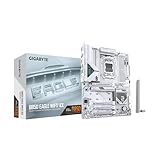
| GIGABYTE B850 AORUS Elite WIFI7 ICE | Full-size white gaming PCs | ATX, 14+2+2 power phase, 3X M.2, WIFI7 |
| GIGABYTE B850M Eagle WIFI6E ICE | Simple white mATX builds | mATX, 8+2+2 power phase, 3-year warranty |
| ASUS B650E MAX Gaming WiFi W | Stated white PCB with Wi-Fi | White PCB, 3X M.2, Wi-Fi 6E |
| ASRock B650M-HDV M.2 White | Lowest-complexity white build | Micro-ATX, dual M.2, DDR5 8200+(OC) |
| GIGABYTE B850 Eagle WIFI7 ICE | ATX white with Wi-Fi 7 | ATX, 8+2+2 power phase, 3X M.2 |
| GIGABYTE X870 AORUS Elite WIFI7 ICE | Feature-rich white flagship-lite | X870, 4X M.2, USB4, 5-year warranty |
How to Choose
Pick the chipset tier that matches your CPU plans
All seven boards use the AM5 socket; most titles name Ryzen 9000, 8000, and 7000 support, and the X870 title adds the LGA 1718 socket designation. B650 and B850 boards cover mainstream gaming builds. X870 adds extras such as USB4, which matters if you plan to connect fast external drives or docks. If you are not sure you need those extras, a B850 board is the more sensible fit.
Choose form factor before features
ATX boards offer more expansion slots and sometimes more M.2 positions; mATX and Micro-ATX boards fit smaller white cases. Check your case supports the size. A white mATX board in an oversized case works but leaves empty space, while an ATX board will not fit a compact chassis. Also think about the graphics card and cooler: a larger board gives wider spacing between the main slot and the M.2 positions, which can matter when a thick card sits above a drive.
Look at power phases, M.2 slots, and wireless
Power phase counts such as 8+2+2, 12+2+2, and 14+2+2 indicate how the voltage delivery is built; higher counts generally suit hotter processors and sustained loads, though they are not a ranking by themselves. For storage, count M.2 slots against the drives you own. Wi-Fi 7 is newer than Wi-Fi 6E, but it only helps if your router supports it.
Warranty and corners that budget boards cut
The titles show 3-year and 5-year warranties on different Gigabyte models. Budget boards typically trim power phases, M.2 slots, and onboard networking, so match those items to your needs. Also confirm the white finish covers what you see, since heatsinks and shrouds can differ from the PCB color. A glass-sided case shows the whole board, so check listing photos for the I/O cover, heatsinks, and any black accent pieces before committing to a theme.
The 7 Best Options
GIGABYTE B850M AORUS Elite WIFI6E ICE
This is a polished mATX choice for a compact white build. The title lists AM5, DDR5, a 12+2+2 power phase design, two M.2 slots, PCIe 5.0, USB-C, WIFI6E, 2.5GbE, EZ-Latch, and a 5-year warranty. It is the natural starting point for anyone who wants an all-white small-form build without giving up modern features, since it combines a respectable power design with current networking and a compact footprint that fits many mATX cases.
- Strength: the long warranty and 12+2+2 power design make it a considered mid-range option.
- Strength: WIFI6E and 2.5GbE cover wireless and wired networking.
- Trade-off: only two M.2 slots, which limits storage expansion.
Skip it if you plan to fill three or more NVMe slots or need full ATX expansion.
GIGABYTE B850 AORUS Elite WIFI7 ICE
The ATX version of the same family, stepping up in several ways. The title lists a 14+2+2 power phase design, three M.2 slots, PCIe 5.0, USB-C, WIFI7, 2.5GbE LAN, EZ-Latch, and a 5-year warranty. With the biggest power phase count among the B850 boards, it targets buyers pairing the board with a stronger Ryzen processor in a roomy white case, where the full ATX layout leaves space for a graphics card, extra storage, and clear cable routing.
- Strength: WIFI7 and a 14+2+2 design make it the more future-ready B850 ICE model.
- Strength: three M.2 slots suit a multi-drive setup.
- Trade-off: ATX size requires a larger case.
Skip it if you are building in a compact chassis.
GIGABYTE B850M Eagle WIFI6E ICE
The simpler mATX board in the Gigabyte group. The title lists an 8+2+2 power phase, two M.2 slots, PCIe 5.0, USB-C, WIFI6E, 2.5GbE LAN, EZ-Latch, and a 3-year warranty. It is the lower-effort route to a white mATX build: the board keeps the same ICE look as its AORUS sibling, and the listed specifications cover everyday gaming and office use without chasing the heaviest processors or the most storage.
- Strength: it keeps the white ICE styling in a smaller board.
- Strength: it includes the same networking as the higher-tier AORUS mATX model.
- Trade-off: a lighter power design and shorter warranty than the AORUS boards.
Skip it if you pair it with a high-end processor or want maximum coverage.
ASUS B650E MAX Gaming WiFi W
The only board here to spell out a White PCB. The title lists DDR5, PCIe 5.0, three M.2 slots, Wi-Fi 6E, 2.5Gb LAN, a USB 10Gbps Type-C port, DisplayPort and HDMI, BIOS Flashback, and Aura Sync. Builders already invested in ASUS lighting and software may like the ecosystem fit, and the Gaming WiFi name plus the W suffix signal a white variant of the Gaming WiFi family, which makes the explicit PCB wording valuable.
- Strength: BIOS Flashback simplifies updates for newer processors.
- Strength: Aura Sync suits lighting-matched builds.
- Trade-off: it uses the older B650E chipset rather than B850.
Skip it if you want the newer B850 platform or Wi-Fi 7.
ASRock B650M-HDV M.2 White
The most stripped-down choice, in Micro-ATX. The title lists a PCIe 5.0 x16 slot, DDR5 8200+ with overclocking, dual M.2 (Gen5 and Gen4), a USB 3.2 Type-C port, and 2.5G LAN, with no wireless named. It is the kind of board a builder chooses when the color and platform matter more than extras, for example an office or media PC in a white case that will mostly use wired networking and one or two drives.
- Strength: White is in the product name, which removes guesswork about finish.
- Strength: a Gen5 M.2 slot and a PCIe 5.0 x16 slot are included on a simple board.
- Trade-off: no Wi-Fi is listed, so you may need an adapter.
Skip it if you need built-in wireless or three M.2 slots.
GIGABYTE B850 Eagle WIFI7 ICE
An ATX board that trims power design while keeping the headline features. The title lists an 8+2+2 power phase, three M.2 slots, PCIe 5.0, USB-C, WIFI7, 2.5GbE LAN, EZ-Latch, and a 3-year warranty. It brings the newest wireless standard and three drive slots to a white ATX layout while trimming the power design, which makes sense for mainstream processors, mid-range graphics, and buyers who value connectivity over overclocking headroom.
- Strength: WIFI7 and three M.2 slots at the Eagle level.
- Strength: ATX size gives more flexibility for expansion cards.
- Trade-off: the 8+2+2 design is the lightest in the ATX group.
Skip it if you run a demanding processor and want a more robust power design.
GIGABYTE X870 AORUS Elite WIFI7 ICE
The most capable board in the list. The title lists the X870 chipset, ATX, DDR5, four M.2 slots, PCIe 5.0, USB4, WIFI7, 2.5GbE LAN, EZ-Latch, and a 5-year warranty. It is the board for a showpiece white build that may later add a lot of storage and fast external devices, since the title names USB4 and the most M.2 positions of any board in this guide, backed by the long warranty term.
- Strength: USB4 and four M.2 slots lead the group.
- Strength: the 5-year warranty and WIFI7 round out a premium feature set.
- Trade-off: it sits in the premium tier, which may exceed what a mid-range build needs.
Skip it if a B850 board already covers your storage and connectivity needs.
Which One Fits Your Situation
You are building a small white PC
The GIGABYTE B850M AORUS Elite ICE offers the best mix among the mATX boards, while the ASRock B650M-HDV is the simpler option.
You want a full-size white gaming build
The GIGABYTE B850 AORUS Elite WIFI7 ICE has the stronger power design and three M.2 slots, while the B850 Eagle WIFI7 ICE keeps the same wireless standard with a lighter power design and a shorter warranty.
You need maximum connectivity
The GIGABYTE X870 AORUS Elite WIFI7 ICE adds USB4 and four M.2 slots, making it the pick for a build that will gather lots of drives and fast external devices over time.
You want a confirmed white PCB with simple features
The ASUS B650E MAX Gaming WiFi W states the White PCB outright, and it adds BIOS Flashback and Aura Sync for builders who match lighting across components.
Common Mistakes
- Assuming every part of a white board is white, when the title may only describe the PCB.
- Buying ATX for a case that only accepts mATX.
- Counting power phases as a direct measure of performance.
- Forgetting that Wi-Fi 7 needs a compatible router.
- Overlooking the missing wireless on boards that do not list it, then discovering the case has no spare slot for an adapter card.
Related guides
- Combination Smoke And Carbon Monoxide Detectors
- Aio Liquid Coolers For High Performance Gaming
- Graphics Cards For Low Wattage Power Supplies
Frequently Asked Questions
What does ICE mean on a Gigabyte board?
It marks the maker’s white-themed version of the board. The listing images show exactly which parts are white.
Do these boards work with Ryzen 9000?
The Gigabyte B850 and B850M titles and the ASRock title name Ryzen 9000, 8000, and 7000 support. For any board, confirm BIOS support for your exact processor on the maker’s page.
Is Wi-Fi 7 worth choosing over Wi-Fi 6E?
Only if your router supports it. Otherwise, Wi-Fi 6E is a fine fit, and a wired 2.5G connection, which every board here lists, often matters more for steady gaming sessions than the wireless generation.
Can I use the ASRock board without Wi-Fi?
Yes, through the 2.5G LAN port, or by adding a separate wireless adapter later. The title lists no built-in wireless, so a wired connection or an add-in card is the plan.