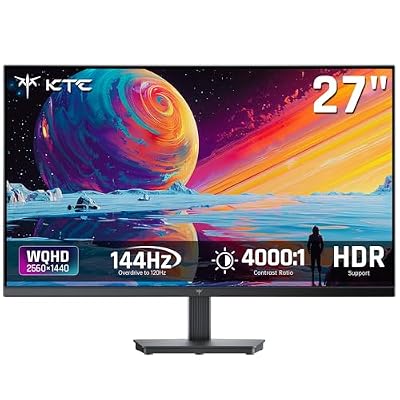
1440p at 144Hz is the sweet spot that most PC gamers settle into once they outgrow 1080p. It’s sharp enough to notice the jump in detail, light enough that a mid-range GPU can actually hit high frame rates, and the panel options at this resolution have matured to the point where you’re not making painful compromises anymore. The hard part isn’t finding a monitor that does 1440p/144Hz on paper. It’s figuring out which panel type and feature set actually matches how you play.
As an Amazon Associate we earn from qualifying purchases at no extra cost to you.


Panel types: the decision that matters more than the brand
Almost every 1440p 144Hz monitor you’ll find falls into one of three panel categories: IPS, VA, or (less commonly now) TN. Each has a real trade-off, not a marketing trade-off.
IPS panels give you the best color accuracy and the widest viewing angles. If you care about how games look, or you do any photo/video work on the side, IPS is the easy default. The failure mode is IPS glow: in dark scenes, especially in a dim room, you’ll see a faint gray or purple haze near the corners of the panel. It’s not a defect, it’s inherent to the technology, and it’s more noticeable on cheaper IPS panels with weaker anti-glare coatings.
VA panels trade some color accuracy and viewing angle for much better contrast, often 3000:1 or higher compared to roughly 1000:1 on IPS. Blacks look genuinely black. The catch is response time: VA panels are more prone to smearing in fast, dark-to-light transitions, which shows up as a trailing shadow behind moving objects in dark games. Fine for strategy games, RPGs, or casual shooters. More noticeable if you’re playing competitive FPS titles where every frame of clarity matters.
TN is mostly a budget/esports play at this point. Fastest pixel response, cheapest to manufacture, but washed-out color and narrow viewing angles. At 1440p specifically, TN options have thinned out because IPS has gotten fast enough to compete.
| Panel Type | Color Accuracy | Contrast | Motion Clarity | Best For |
|---|---|---|---|---|
| IPS | Excellent | Average (~1000:1) | Good to very good | Mixed use, color-sensitive work, general gaming |
| VA | Good | Excellent (3000:1+) | Average, can smear in dark scenes | Single-player, atmospheric games, movies |
| TN | Weak | Weak | Excellent | Budget competitive gaming |
What 144Hz actually buys you
Going from 60Hz to 144Hz is the single biggest visual upgrade you can make to a gaming setup, bigger than most resolution jumps. Motion gets dramatically smoother, input feels more responsive, and fast panning in shooters stops looking like a slideshow. But you only get the benefit if your GPU can push frame rates close to that number. A GPU that averages 80fps in a demanding title isn’t wasting a 144Hz panel, it’s still smoother than 60Hz, but you won’t see the panel’s full ceiling until you’re pairing it with hardware that can comfortably clear 100fps or more in your games.
This is where buyers overspend in the wrong direction. If your card is a mid-tier GPU from the last few generations, a 1440p 144Hz monitor is already a great match. Chasing a 1440p 240Hz panel on the same hardware mostly buys you a bigger number on the box, not a visibly different experience, because you’re not generating the frames to use it.
Adaptive sync and the Nvidia/AMD question
Variable refresh rate support (G-Sync Compatible or FreeSync) is close to mandatory at this point. It eliminates screen tearing without the input lag penalty of traditional V-Sync, and almost every modern 1440p 144Hz monitor supports one or both standards over DisplayPort or HDMI. The practical note: FreeSync-badged monitors generally work fine with Nvidia cards too, since Nvidia opened up G-Sync Compatible certification to many FreeSync panels. Don’t pay extra for a monitor specifically because it says “G-Sync” on the box unless you’ve confirmed the FreeSync alternative actually lacks support for your GPU brand.
What to actually buy
For most people, a 27-inch IPS panel at 1440p 144Hz is the default recommendation. It’s the resolution/size ratio that keeps pixel density comfortable without needing scaling adjustments in Windows, and IPS color quality holds up whether you’re gaming, browsing, or watching video. If you want to compare current options, browsing 27-inch IPS 1440p 144Hz monitors will show you the current price spread, which tends to be wide for very similar panels depending on brand and extras like USB-C or built-in speakers.
If you mostly play atmospheric single-player games or want deep contrast for movies and don’t mind slightly softer motion in dark scenes, a 1440p 144Hz VA monitor is a legitimate choice, and often cheaper than the IPS equivalent for the same size.
If budget is tight, don’t be afraid of the lower end of this category. A no-frills 1440p 144Hz monitor without HDR, curved screen, or RGB lighting does the core job just as well as a loaded one. HDR support in particular is often weak on budget panels (low peak brightness, no local dimming), so you’re not losing much by skipping it. Spend saved money on the GPU before you spend it on monitor extras; the panel will outlast two or three GPU upgrades. For anyone upgrading from a 1080p 60Hz setup, even checking budget 1440p 144Hz monitors will turn up panels that handle the resolution and refresh rate fine, just without the color calibration or build quality of pricier models.
One more practical note: check the actual input lag and response time numbers in independent reviews rather than trusting marketing claims like “1ms response time,” which almost always refers to a best-case gray-to-gray transition under specific overdrive settings, not real-world performance. A monitor with an honest 4-5ms response time and good overdrive tuning will often feel better in practice than one chasing a headline number with visible overshoot artifacts (ghosting with a bright outline instead of a dark smear).