

- Top Pick: JSAUX 65W Switch Dock with 4K@120Hz HDMI, 65W PD Fast Charging, USB A Port
- Best Value: JSAUX 4-in-1 Docking Station for ROG Xbox Ally X/Steam Deck/LegionGo-HB0503
- Premium Choice: JSAUX Switch Dock 7-in-1, Portable TV Dock with 4K@120Hz HDMI, Gigabit Ethernet, USB A and USB C 3.1, 100W PD Charging, Travel Docking Station Compatible with Switch – HB0704
The JSAUX Original Steam Deck Dock is the dock that put JSAUX on the map — a value-oriented six-in-one base that turns the Steam Deck into a couch-gaming console without paying Valve’s first-party-dock premium. At around $40 it remains one of the most popular Deck accessories sold. This JSAUX Original Dock review covers the port loadout, real-world use, OLED/LCD nuances, install and value verdict.
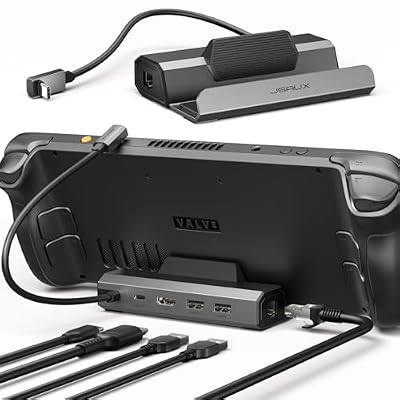
JSAUX 5-in-1 Docking Station for Steam Deck/ROG Ally X/Legion Go S-HB0602 | 4K@120Hz HDMI, 100Mbps Ethernet, 100W PD Fast Charging, 2 USB 2.0 Ports, Widely Compatible with SteamOS & Windows Handhelds


As an Amazon Associate we earn from qualifying purchases. Product prices and availability are accurate as of the date/time indicated.
🛒 Best Price Today on Amazon
Prime members get fast, free shipping on everything above, plus member-only deals. New members get a 30-day free trial — cancel anytime.
As an Amazon Associate we earn from qualifying purchases.



JSAUX Original Steam Deck Dock at a Glance
| Component | Specification |
|---|---|
| Compatibility | Steam Deck OLED & LCD, ROG Ally, Legion Go (via USB-C cable) |
| Material | Aluminium-and-ABS housing with rubberised base |
| Port count | 6 total (1x HDMI 2.0, 3x USB-A 3.0, 1x Gigabit Ethernet, 1x USB-C PD passthrough) |
| Display output | HDMI 2.0 — up to 4K@60Hz or 1440p@120Hz |
| Ethernet | Gigabit (RJ-45) |
| USB | 3x USB-A 3.0 (5Gbps) |
| Power passthrough | USB-C PD up to 100W (45W charges Deck at full speed) |
| Dimensions | approx 5.6 x 2.6 x 1.8 in / 142 x 66 x 46 mm |
| Approx price | around $40 |
Build Quality & Materials
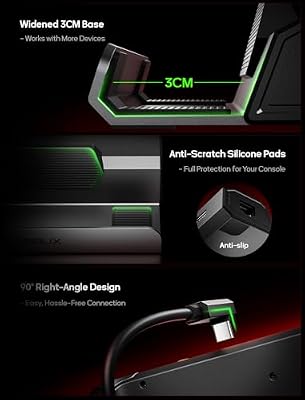
The Original Dock established the form factor JSAUX has used ever since — a compact rectangular base with a vertical cradle for the Deck, an aluminium-and-ABS shell and a rubberised base that grips firmly. For its category and price it is well-built: the cradle slot is lined with soft rubber that prevents grip-marks on the Deck’s body during many seating cycles, the captive short USB-C tether is firmly seated, and the dock feels appropriately weighty to stay put when peripheral cables tug on the back. JSAUX backs the dock with a 12-month warranty, which is a meaningful commitment at this price. The build is squarely in line with what $40 should buy in 2026 — not as premium as Valve’s official Deck dock, but considerably cheaper and just as featureful for typical use.
Functionality & Real-World Use
The Original Dock’s role is straightforward: turn the Deck into a couch-and-monitor experience. It does this well. HDMI 2.0 output reaches a TV or monitor at up to 4K@60Hz, three USB-A 3.0 ports take a wired controller (or wireless dongle), keyboard, mouse and external storage as needed, and the Gigabit Ethernet port stabilises online play in ways Wi-Fi cannot match for competitive games. USB-C PD passthrough charges the Deck at its full 45W while docked, so long sessions don’t drain the handheld’s battery.
The key honest qualification: this dock is capped at 4K@60Hz or 1440p@120Hz — it does not push the 4K@120Hz that the JSAUX Upgraded Dock can with a Steam Deck OLED. For most TVs and monitors that limit is academic (most non-gaming TVs are 4K@60Hz anyway), but if you specifically own a 4K@120Hz gaming TV and a Steam Deck OLED, the Upgraded Dock is the better choice. For everyone else — including the large majority of Deck LCD owners and anyone using a standard 4K TV — the Original Dock delivers all the functional benefit at a lower price.
Compatibility with Steam Deck / ROG Ally / Legion Go
The cradle is sized for the Steam Deck — both LCD and OLED — and the dock is sold primarily as a Deck accessory. ROG Ally and Legion Go owners can connect via the USB-C cable to use the dock’s ports without seating their handhelds in the Deck-shaped cradle; the port loadout is fully usable with either handheld. The dock also works as a general-purpose USB-C hub with any laptop or tablet supporting DisplayPort Alt Mode. For a comparison with the higher-bandwidth sibling dock, see the JSAUX Upgraded Dock review in this guide.
Installation / Setup
Plug-and-play with no software install required. Connect the dock’s captive USB-C cable to the Steam Deck’s top USB-C port, plug HDMI into your TV or monitor, plug in USB peripherals and a USB-C PD charger, and the Deck switches output automatically. SteamOS recognises external Ethernet and USB devices without any configuration. Total setup time is under a minute. To use the dock with ROG Ally or Legion Go, connect the same USB-C cable to those handhelds’ USB-C ports — the rest of the port loadout works identically.
What’s in the Box
The dock, the captive short USB-C cable (built into the base — not detachable), a quick start guide and warranty information. The USB-C PD charger and HDMI cable are not included; users supply their own. The Deck’s bundled 45W charger works perfectly with the dock’s PD passthrough.
Verdict
At around $40 the JSAUX Original Dock is the sensible default Steam Deck dock for the majority of buyers. The port loadout — HDMI 2.0, three USB-A 3.0, Gigabit Ethernet and 45W PD passthrough — covers every realistic couch-gaming need, the build is solid for the price, and the value proposition versus Valve’s official dock is excellent. The only buyers who should pay extra for the JSAUX Upgraded Dock are Steam Deck OLED owners with 4K@120Hz displays — for everyone else, the Original Dock is the right choice. For Deck protection during travel away from the dock, see the JSAUX carrying case in this guide. For couch-gaming peripherals, our best PC gaming controllers guide is a useful companion read.
Some historical context that buyers should appreciate: when the Steam Deck launched in 2022, Valve’s first-party dock did not ship simultaneously with the Deck itself, leaving a market gap that JSAUX filled with this Original Dock. The product became, very quickly, the de facto Steam Deck dock for the early Deck community — and JSAUX’s customer support reputation during that period built the brand trust that has carried through to the company’s wider Steam Deck accessory ecosystem. The Original Dock has now been in market for several years and remains a top-selling Deck accessory, which is the clearest possible signal that the product holds up in real-world use. JSAUX has not needed to discontinue or significantly redesign it, because the formula was right from the start: solid build, sensible ports, plug-and-play simplicity at a fair price. For buyers approaching the Deck dock category for the first time and unsure where to start, the Original Dock is the safe default — and if your needs grow later (4K@120Hz, SD card readers), you can step up to the Upgraded Dock or UGREEN 9-in-1 reviewed elsewhere in this guide. For travel away from the dock, the JSAUX carrying case is the pairing piece.
Frequently Asked Questions
What is the difference between the JSAUX Original Dock and Upgraded Dock?
The Upgraded Dock has higher HDMI bandwidth, enabling 4K@120Hz output with a Steam Deck OLED. The Original Dock is capped at 4K@60Hz or 1440p@120Hz. For most buyers without a 4K@120Hz display, the Original is the better value.
Does the JSAUX Original Dock work with Steam Deck OLED?
Yes, fully. The cradle fits the OLED’s chassis, the USB-C cable connects normally, and all port functions work. The OLED can also output 4K@120Hz via its USB-C — but the Original Dock does not relay that bandwidth (use the Upgraded Dock for that).
Will the dock charge the Steam Deck while gaming docked?
Yes. The USB-C PD passthrough delivers up to 100W to the Deck (which itself draws up to 45W during gaming), so the Deck charges and runs at full performance simultaneously.
Can I use the dock as a regular USB-C hub for my laptop?
Yes. The dock works as a general USB-C hub for any laptop or tablet supporting DisplayPort Alt Mode, delivering HDMI output, three USB-A ports and Gigabit Ethernet from a single USB-C connection.
More Steam Deck Reviews
- JSAUX PC0104 ModCase Review: Steam Deck Protection
- JSAUX Matte Screen Protector Review: Steam Deck Anti-Glare
- UGREEN Steam Deck Dock 9-in-1 Review: 4K HDMI Gigabit
- Spigen Rugged Armor Review: Steam Deck Case LCD/OLED
- JSAUX Carrying Case Review: Steam Deck / ROG Ally Travel
- JSAUX 45W USB-C Charger Review: Steam Deck PD 3.0
- Anker Steam Deck Dock 6-in-1 Review: OLED / ROG Ally
- SanDisk 1.5TB Ultra microSDXC Review: Steam Deck Storage
Affiliate Disclosure: As an Amazon Associate, we earn from qualifying purchases. If you click a link and make a purchase, we may earn a small commission at no extra cost to you. Prices and availability are accurate as of publication and may change.
Related Articles
Looking for more on this topic? Browse the hand-picked guides below — each one applies the same scoring rubric used in this review.










