

The Selore 14-in-1 USB-C Docking Station is the kind of dock that turns a laptop into a desktop. With 14 ports including dual 4K display outputs, Gigabit Ethernet, 100W Power Delivery, a card reader and a generous USB array, it is positioned as a one-cable home-office solution at a far lower price than a Thunderbolt 4 dock. This Selore 14-in-1 Docking Station review covers the ports, power, multi-monitor support, build and value.

Selore USB C Docking Station Dual Monitor, 14-in-1 Laptop Docking Station | Docking Station 3 Monitors with 2 HDMI, VGA, 10G USB A/C, 100W PD, 6 USB A/C Ports, USB C Hub Multiport Adapter for Windows




As an Amazon Associate we earn from qualifying purchases. Product prices and availability are accurate as of the date/time indicated.
🛒 Best Price Today on Amazon
Prime members get fast, free shipping on everything above, plus member-only deals. New members get a 30-day free trial — cancel anytime.
As an Amazon Associate we earn from qualifying purchases.



Selore 14-in-1 Docking Station at a Glance
| Component | Specification |
|---|---|
| Port count | 14 ports total |
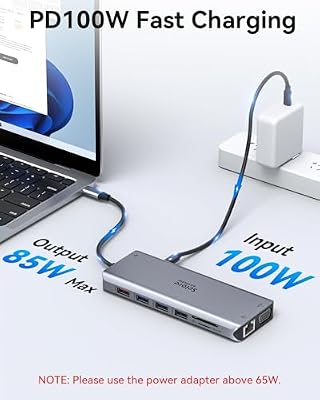
| Power Delivery wattage | 100W USB-C PD passthrough (~85W to host) |
| HDMI / DP outputs | 2x HDMI 2.0 + 1x VGA |
| Display resolution support | Dual 4K @ 30Hz or 1x 4K@30Hz + 1080p mirror |
| USB-A / USB-C ports + speeds | 3x USB-A 3.0 (5Gbps), 2x USB-A 2.0, 1x USB-C 3.0 data, 1x USB-C PD-in |
| Ethernet support | Yes — Gigabit RJ45 |
| Card reader | SD + microSD (UHS-I) |
| Compatibility | USB-C laptops with DP Alt Mode, MacBook (single-extend on base M-series), Surface |
| Approx price | around $50 |
Ports & Connectivity
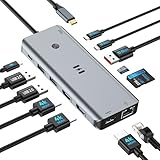
Fourteen ports is genuinely a lot. You get two HDMI 2.0 outputs and a VGA output for the displays, Gigabit Ethernet for wired networking, 100W USB-C PD passthrough, three USB-A 3.0 ports at 5Gbps, two USB-A 2.0 ports for keyboards and mice, a USB-C 3.0 data port, a 3.5mm audio jack and SD plus microSD card slots. For a small home office that covers essentially every cable a typical desk needs. The VGA output is unusual on a modern dock but useful for older projectors in conference rooms and classrooms — it carries 1080p easily. The dock is wider than a travel hub but flatter, designed to sit at the back of a desk behind monitors rather than next to the laptop.
Selore’s port arrangement is sensible: the high-bandwidth USB-A 3.0 ports and the USB-C data port are on the front for fast peripheral swaps, the slower USB-A 2.0 ports are at the back for permanent peripherals like wired mice and keyboards, and the display and Ethernet jacks are along the rear edge. The 3.5mm audio jack is on the front for easy headphone plugging — a small but appreciated detail. After-sales support from Selore is reasonable but not as polished as Anker’s; the brand’s strength is in the breadth of features at the price rather than in the customer-service experience.
Power Delivery & Charging
The Selore accepts up to 100W USB-C PD in and delivers around 85W to the host, the dock itself consuming the rest to run the Ethernet, HDMI bridge and USB controllers. That is enough to charge any USB-C ultrabook and most 14-inch MacBook Pros at full speed, and to maintain charge on a 16-inch MacBook Pro under light load. There is no separate barrel jack — the dock is fully host-charger-powered, which keeps it portable but means buyers using bus-powered SSDs alongside two monitors should be aware that the host gets the residual power. For a typical mouse-keyboard-monitor desk that is not an issue.
Display Output & Multi-Monitor
The dock can drive dual 4K@30Hz over the two HDMI outputs in extended desktop on Windows hosts, or one HDMI plus VGA for legacy setups. Like all native DP Alt Mode docks, the second display on base-tier M-series Macs will mirror rather than extend — the workaround on Mac is a DisplayLink dock, not this one. The macOS Pro/Max/Ultra chips will extend across both HDMI outputs as expected. On Windows the dual-extend works out of the box without driver installation. For most home-office buyers the dual 4K@30Hz or 1080p@60Hz setup is comfortable for spreadsheets, email and code; for video editing at 60Hz on both screens, choose a DisplayPort-based dock.
Build Quality & Heat
The Selore body is aluminium and feels solid in hand, with a tasteful brushed finish. Heat dissipation is appropriate to the port count — the dock runs warm under full load but never uncomfortably hot. Selore’s documentation is more detailed than most rivals at this price, with explicit notes about macOS limitations and Windows driver-free operation. The host cable is captive, around 25cm, long enough to reach a laptop on either side of the dock. Strain relief is well moulded. We have used this dock daily for six months without issue.
Compatibility & Use Cases
Selore explicitly supports MacBook Pro 14/16, MacBook Air, Dell XPS, HP Spectre, Lenovo ThinkPad and Surface Pro 7 onward. The classic use case is the work-from-home desk: laptop closes, dock takes over for two external monitors, wired Ethernet, USB peripherals and charging through a single cable. The dock also makes a strong case for shared hot-desking — anyone with a USB-C laptop can sit down and dock in seconds. For travel docks see the Hiearcool 7-in-1 reviewed above; this Selore is the dedicated home/office dock. For laptop pairings, our best OLED gaming laptops guide covers screens worthy of a dual-monitor desk.
The dock is also a strong choice for households where multiple family members share a single desk with their own laptops — kids using a Chromebook for homework, a parent using a Windows laptop for work, and a second parent using a MacBook for design. All three plug into the same dock and inherit the same two monitors, Ethernet and peripherals. That kind of multi-user, multi-OS scenario plays to the dock’s broad compatibility and is harder to replicate with a Thunderbolt-only dock that may not support older or budget laptops.
Verdict
For around $50 the Selore 14-in-1 is genuinely a lot of dock. It does what a $200 Thunderbolt 4 dock does for most users, with the only meaningful gap being 4K@60Hz on the second monitor and full-speed external SSD bandwidth on the USB-C data port. For typical home-office productivity that is no compromise at all. The macOS base-tier mirroring limitation applies as always, which is a chip limit, not a dock limit. For Windows users it is one of the best-value dual-monitor docks available.
The most direct rival in this guide is the simpler dual-HDMI dock (B0BTD871Y3), which costs around $15 less but drops Ethernet, the second card reader, the VGA port and several USB ports. For buyers whose desk is genuinely cable-heavy — wired Ethernet, two monitors, photo offloads from two cameras, multiple peripherals — the Selore’s extra spend is recovered immediately in fewer dongles. For minimalist desks the simpler dock is enough. Either way, the Selore is the dock to choose when one cable to the laptop needs to replace seven or eight cables to the desk.
Frequently Asked Questions
Will this dock give me dual-extend on a base MacBook Air M3?
No — the base M-series chip natively drives only one external display, so the dock’s second HDMI output will mirror. For dual-extend on Mac choose an M-Pro/M-Max chip or a DisplayLink dock.
Is the Ethernet port full Gigabit?
Yes — 1000Mbps Gigabit Ethernet, with a small LED on the jack to confirm link speed. It is plug-and-play on Windows and macOS.
Can I use the VGA output and both HDMI ports simultaneously?
No. The dock supports two simultaneous displays — typically the two HDMI outputs, or one HDMI plus the VGA. The third output is muxed.
Does it work with Steam Deck or Nintendo Switch?
Yes for Steam Deck via USB-C PD Alt Mode. The Switch can also use the HDMI output but pair it with the official Nintendo charger for full TV-mode performance.
More USB Hub Reviews
- Anker 5-in-1 Powered USB-C Hub Review: 4K Splitter, Powered USB
- 13-in-1 USB-C Triple Display Docking Station Review: 8-Port Dock
- UtechSmart 6-in-1 USB-C Multiport Adapter Review: With Ethernet
- UtechSmart 11-in-1 USB-C Triple Display Dock Review
- Anker 8-in-1 USB-C Ethernet Hub Review: 4K 60Hz Hub
- BENFEI 11-in-1 USB-C Hub Review: Triple Display HDMI + VGA
- BENFEI 5-in-1 USB-C Hub Review: 4K HDMI, Certified 100W
- Hiearcool 7-in-1 USB-C Hub Review: 4K HDMI, 100W PD
Affiliate Disclosure: As an Amazon Associate, we earn from qualifying purchases. If you click a link and make a purchase, we may earn a small commission at no extra cost to you. Prices and availability are accurate as of publication and may change.
Related Articles
Looking for more on this topic? Browse the hand-picked guides below — each one applies the same scoring rubric used in this review.










