

The UtechSmart 11-in-1 USB-C Triple Display Dock is the larger cousin of the popular 6-in-1 adapter. It adds two HDMI outputs and a DisplayPort for true triple-display Windows productivity, alongside Gigabit Ethernet, 100W PD, dual card readers and three USB-A 3.0 ports. This UtechSmart 11-in-1 triple display dock review covers the ports, power, multi-monitor support, build and value.
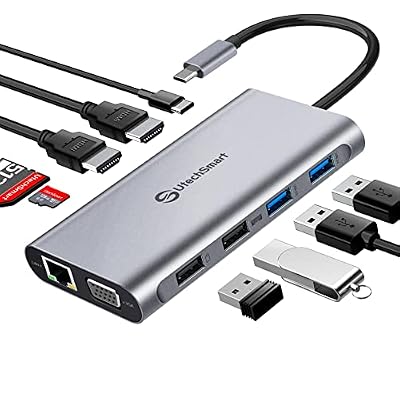
UtechSmart USB C Docking Station, Dual Monitor, Laptop Docking Station | 11 in 1 Triple Display USB C Hub with Dual HDMI, VGA, PD3.0, SD/TF, 4 USB Ports Adapter Compatible for MacBook and Windows



As an Amazon Associate we earn from qualifying purchases. Product prices and availability are accurate as of the date/time indicated.
🛒 Best Price Today on Amazon
Prime members get fast, free shipping on everything above, plus member-only deals. New members get a 30-day free trial — cancel anytime.
As an Amazon Associate we earn from qualifying purchases.



UtechSmart 11-in-1 Triple Display Dock at a Glance
| Component | Specification |
|---|---|
| Port count | 11 ports total |
| Power Delivery wattage | 100W USB-C PD passthrough (~85W to host) |
| HDMI / DP outputs | 2x HDMI 2.0 + 1x DisplayPort 1.2 |
| Display resolution support | Triple: 2x 4K@30Hz HDMI + 1x 4K@30Hz DP (Windows) |
| USB-A / USB-C ports + speeds | 3x USB-A 3.0 (5Gbps), 1x USB-C PD-in |
| Ethernet support | Yes — Gigabit RJ45 |
| Card reader | SD + microSD (UHS-I) |
| Compatibility | Windows USB-C laptops (triple-extend), Mac (limited by chip), Surface |
| Approx price | around $70 |
Ports & Connectivity
Eleven ports in a slim aluminium body. The three display outputs (two HDMI 2.0 plus one DisplayPort 1.2) are the headline, with Gigabit Ethernet, 100W USB-C PD passthrough, three USB-A 3.0 ports at 5Gbps, SD and microSD card readers, and a 3.5mm audio jack alongside. That is a productive port set, covering essentially every cable a modern multi-monitor desk needs. The DisplayPort 1.2 port is welcome — it is the most reliable way to drive a high-refresh or higher-resolution external monitor than HDMI on this dock, and it is increasingly the standard on professional monitors. The dock sits naturally at the back of a desk behind the monitors thanks to its low profile.
UtechSmart has clearly thought about cable management. The two HDMI ports sit at one end with the DisplayPort beside them, so monitor cables route cleanly across the back of the desk. The Ethernet jack and PD passthrough are on the same rear edge, keeping infrastructure cables together. The three USB-A ports plus the card readers and audio jack are on the front-facing edge for everyday peripheral access. The result is a permanent dock that needs no daily cable wrestling — exactly what you want from a single-cable desk solution.
Power Delivery & Charging
100W PD passthrough yielding about 85W to the host after the dock’s own consumption, the same as the other triple-display docks in this list. That is enough for any USB-C ultrabook to charge at full speed and enough to maintain a 16-inch MacBook Pro under typical desk loads. There is no separate barrel-jack input, so the dock is host-charger-powered — keep that in mind when planning power-hungry peripherals. The PD implementation negotiates correctly with all major chargers and supports USB-PD 3.0.
Display Output & Multi-Monitor
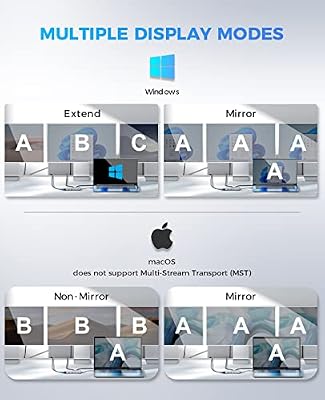
The dock’s triple-display capability is its reason for being. On a Windows USB-C laptop with DP Alt Mode, the dock will drive two HDMI outputs and the DisplayPort output in extended desktop simultaneously, at up to 4K@30Hz each or 1080p@60Hz each. The DP output can alternatively drive a single 4K@60Hz display if the other two are dropped to 1080p@60Hz. On macOS the usual limitations apply: base-tier M-series chips will mirror beyond the first display; Pro/Max/Ultra Macs will extend across two outputs but not three (triple-extend on Mac requires a DisplayLink dock). For Windows triple-monitor productivity this dock is a strong choice.
Build Quality & Heat
UtechSmart’s build standards are consistent across its hub range — the 11-in-1 has the same rigid aluminium body and reinforced captive cable as the smaller 6-in-1. The dock runs warm under triple-display load, as expected from the three display controllers, but never uncomfortably hot. There are no fans, so the dock is silent. UtechSmart’s after-sales support is among the better in the budget-dock category, and the brand has been refining this product line since the original USB-C hub launches. The dock is plug-and-play on Windows for all three displays — no driver installation needed.
Compatibility & Use Cases
The dock is best suited to a Windows USB-C laptop with DP Alt Mode for triple-extend. macOS users on base-tier M chips will see mirroring beyond the first display; Pro/Max chip Macs will get two extended displays plus a mirror. The classic use case is the developer or finance professional’s three-monitor home-office desk — code, browser, communications across three screens. With the dock’s Gigabit Ethernet and card readers, it covers a photographer or videographer’s import workflow too. For a Windows laptop to pair with this dock, our Intel Core Ultra laptop guide guide covers Intel Core Ultra options.
The dock also serves architects, engineers and analysts well — professionals whose workflows demand multiple reference panels alongside the primary working canvas. A CAD draftsman might run the model on a central 4K monitor and reference drawings on the two side panels; a financial analyst might run market data on one screen, the trading platform on a second and Excel on the third. The UtechSmart’s combination of three displays plus Gigabit Ethernet plus generous USB makes the typical multi-screen professional desk feel native rather than improvised.
Verdict
At around $70 the UtechSmart 11-in-1 is a strong-value triple-display dock for Windows users. The closest rival in this list is the 13-in-1 (B0BNTHWWMY); the UtechSmart trims a couple of USB ports to keep the price lower and adds the brand’s reputation for long-term reliability. Either way you get triple-display, Gigabit Ethernet, card readers and 85W of host charging — all from a single USB-C cable. The macOS triple-monitor limitation applies as always.
The DisplayPort 1.2 output is the UtechSmart’s quiet advantage over docks that ship with three HDMI ports or HDMI plus VGA. DisplayPort 1.2 carries cleaner signals over long cable runs, integrates more reliably with high-refresh monitors, and supports daisy-chained multi-monitor setups with compatible displays. For a professional desk that already runs DisplayPort cables to its monitors, the UtechSmart slots in without HDMI-to-DP adapter dongles or signal-conversion artefacts. That alone is worth the modest premium over a dual-HDMI dock for buyers in the right setup.
Compared with the BENFEI 11-in-1 (B0CTJBSBX7) reviewed below, the UtechSmart trades VGA legacy support for the modern DisplayPort output and costs about $25 more. For modern monitor fleets the UtechSmart is the better pick; for mixed-fleet environments with older VGA projectors the BENFEI is. Match the dock to the displays already on your desk and the choice is straightforward.
Frequently Asked Questions
Will it give me three extended displays on a MacBook Air?
No — base-tier M-series Macs natively drive one external display. For three on Mac you need a DisplayLink dock with the appropriate manager software; for two on Mac you need an M-Pro or M-Max chip.
Can the DisplayPort run 4K@60Hz?
Yes — the DP 1.2 output can drive a single 4K@60Hz monitor. If you use the two HDMI outputs simultaneously at 4K@30Hz each, the DP will share bandwidth and reduce accordingly.
Does it support HDR?
HDR pass-through is supported on the DisplayPort output at 4K@30Hz. The HDMI outputs do not advertise HDR formally, though most modern TVs will accept the signal.
Is the Ethernet really Gigabit?
Yes — full 1000Mbps Gigabit with plug-and-play operation on Windows, macOS, ChromeOS and modern Linux kernels.
More USB Hub Reviews
- Anker 8-in-1 USB-C Ethernet Hub Review: 4K 60Hz Hub
- BENFEI 11-in-1 USB-C Hub Review: Triple Display HDMI + VGA
- BENFEI 5-in-1 USB-C Hub Review: 4K HDMI, Certified 100W
- Hiearcool 7-in-1 USB-C Hub Review: 4K HDMI, 100W PD
- UGREEN 5-in-1 USB-C Hub Review: 4K HDMI, 100W PD
- Anker 7-in-1 USB-C Hub Review: 4K HDMI, 85W PD
- USB-C Dual HDMI Docking Station Review: Two-Monitor PD Dock
- Selore 14-in-1 USB-C Docking Station Review: Dual Monitor Dock
Affiliate Disclosure: As an Amazon Associate, we earn from qualifying purchases. If you click a link and make a purchase, we may earn a small commission at no extra cost to you. Prices and availability are accurate as of publication and may change.
Related Articles
Looking for more on this topic? Browse the hand-picked guides below — each one applies the same scoring rubric used in this review.










