

- Top Pick: Plugable USB-C Triple Monitor Docking Station: 13-in-1 Laptop Dock with 100W Charging for Mac (DisplayLink Driver Required), Windows, Chrome, 3 HDMI, Gigabit Ethernet, SD, USB-C 20W, 4 USB – UD-ULTCDL
- Best Value: Plugable 13-in-1 USB C Docking Station 4K Triple Monitor with 100W Power Delivery | USB C Dock for Windows, Mac, ChromeOS, Thunderbolt | Driver Required | 3X HDMI and 3X DisplayPort (UD-ULTC4K)
- Premium Choice: WAVLINK USB C Docking Station,13-in-1 Triple Display Type C Hub Adapter with HDMI,2 DisplayPort,Ethernet,4 USB 3.0,USB-C,SD/TF Card Reader,Phone Jack,DC Jack, PD 100W for Mac Windows and More
The 13-in-1 USB-C Triple Display Docking Station targets the power-user desktop: three external monitors, wired networking, 100W laptop charging, multiple USB ports and a card reader, all driven by a single USB-C cable. Triple-display docks remain rare at this price, so this is one of the more capable options for a multi-screen Windows productivity desk. This 13-in-1 triple display dock review covers the ports, power, multi-monitor support, build and value.

Docking Station Dual Monitor 4K HDMI 13-in-1 USB C Hub for Laptop MacBook | LIONWEI Triple 4K, Dual HDMI+DP, 10Gbps, 100W PD, Ethernet, 8 USB C/A Ports, Switching Mode Botton, Audio, for Dell,HP,Lenovo


As an Amazon Associate we earn from qualifying purchases. Product prices and availability are accurate as of the date/time indicated.
🛒 Best Price Today on Amazon
Prime members get fast, free shipping on everything above, plus member-only deals. New members get a 30-day free trial — cancel anytime.
As an Amazon Associate we earn from qualifying purchases.

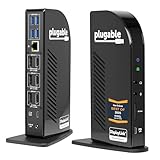


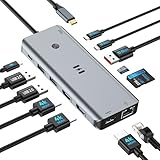


13-in-1 Triple Display Docking Station at a Glance
| Component | Specification |
|---|---|
| Port count | 13 ports total |
| Power Delivery wattage | 100W USB-C PD passthrough (~85W to host) |
| HDMI / DP outputs | 2x HDMI 2.0 + 1x DisplayPort 1.2 (or VGA on some SKUs) |
| Display resolution support | Triple display: 2x 4K@30Hz + 1x 1080p, or 1x 4K@60Hz via DP |
| USB-A / USB-C ports + speeds | 4x USB-A 3.0 (5Gbps), 1x USB-C data (5Gbps), 1x USB-C PD-in |
| Ethernet support | Yes — Gigabit RJ45 |
| Card reader | SD + microSD (UHS-I) |
| Compatibility | Windows USB-C laptops with DP Alt Mode (triple-extend), Mac base M-series (single-extend), Mac Pro/Max chips (dual-extend) |
| Approx price | around $80 |
Ports & Connectivity
Thirteen ports across a modest desk-back footprint. The three display outputs (two HDMI plus one DisplayPort) are the headline, followed by four USB-A 3.0 ports at 5Gbps each, a USB-C 3.0 data port, Gigabit Ethernet, 100W PD passthrough, SD and microSD card readers, and a 3.5mm headphone jack on the front. That covers essentially every cable a triple-monitor desk could need: three screens, two USB-C/USB-A external SSDs, wired keyboard and mouse, wired headphones and Gigabit networking, all from one cable to the laptop. The host cable is captive and around 25cm long, sensible for a back-of-monitor placement.
The four USB-A ports plus one USB-C data port give a useful range of attachment options for modern peripherals. A USB-C portable SSD plugs into the dedicated data port for fastest performance, while wired keyboard, wired mouse, USB headset and an external HDD live happily on the USB-A array. The dock’s USB controller handles independent port enumeration cleanly, so plugging and unplugging devices does not cause the rest of the dock to renegotiate. For a permanent productivity desk this kind of behaviour is the difference between a dock that fades into the background and one that needs occasional reboots.
Power Delivery & Charging
100W PD passthrough delivers around 85W to the laptop after the dock’s own consumption (the dock has more controllers than a basic hub — three display drivers, Ethernet PHY and a USB hub IC, all of which draw a few watts each). 85W is enough to fully charge a 14-inch MacBook Pro and any USB-C ultrabook, and to maintain charge on a 16-inch MacBook Pro during typical desk work. Unlike some Thunderbolt docks, there is no separate barrel-jack input — the dock is host-charger-powered, which keeps cabling simple but caps the total available power. For a typical productivity desk with three monitors and peripherals that is sufficient.
Display Output & Multi-Monitor
Three displays at once. On a Windows USB-C laptop with DP Alt Mode, the dock will drive two HDMI outputs at 4K@30Hz and the DisplayPort 1.2 output at 4K@30Hz or 1080p@60Hz in extended desktop. For higher refresh, the DisplayPort 1.2 can also run a single 4K@60Hz display, with the two HDMI outputs at 1080p@60Hz alongside — a useful mode for video editors who want one high-refresh primary. On macOS the same limit applies: base-tier M-series chips will mirror beyond the first display, Pro/Max/Ultra Macs will extend across two outputs. Triple-extend on Mac requires a DisplayLink dock instead. For Windows the triple-extend is the dock’s reason for being.
Build Quality & Heat
Build is solid for the price — aluminium body, well-organised port layout with the headphone jack and card reader on the front and everything else at the back. The dock runs warm under triple-display load, which is expected for a unit driving three display controllers from one USB-C alt-mode lane, but never to a worrying level. There are no fans, so it is silent. The host cable strain relief is well moulded. Drivers are not required on Windows for the HDMI plus DP outputs; some Linux distributions may need explicit kernel support for the third display.
Compatibility & Use Cases
The classic use case is the developer or trader’s three-monitor desk: code on the left, browser in the middle, terminal or chat on the right, with the laptop closed and acting as a server. The dock makes that setup trivial to assemble. Other use cases include creative pros with one 4K reference monitor and two 1080p side panels, and finance professionals running multiple data feeds. The macOS limitation is the main caveat — Mac users running three displays should pair this with a DisplayLink USB device for the third output, or choose a Thunderbolt dock with the same triple-display feature on Mac. For a Windows laptop to pair with this dock, see our best 240Hz gaming laptops guide for high-refresh options.
Customer-support, marketing-operations and analyst desks also benefit from the three-monitor layout — one screen for the CRM or analytics tool, one for the spreadsheet or email client, and one for chat and dashboards. With the 13-in-1’s USB ports, Gigabit Ethernet and card readers, the dock removes all the cabling headaches that typically come with such a setup. A single cable goes to the laptop and everything else is permanent. For a small business buying docks in bulk for a hybrid workforce, the 13-in-1 is a sensible standard issue.
Verdict
For around $80 the 13-in-1 triple-display dock is excellent value if you can use three monitors on your laptop. The macOS triple-monitor limit is a chip-level restriction, not a dock fault, and is the main reason to choose carefully on Mac. On Windows the dock delivers exactly what it promises: three external displays, Gigabit Ethernet, fast USB ports, card readers and 85W of charging — all from one cable. For multi-monitor productivity desks it is one of the most cost-effective options.
The closest comparison in this guide is the UtechSmart 11-in-1 (B07PRJJNGF), which is around $10 cheaper but drops one HDMI output and the second USB-C data port. For buyers who explicitly need three HDMI/DP outputs and a USB-C data port for an external SSD, the 13-in-1 is the right pick; for buyers happy with two HDMI plus a DisplayPort, the UtechSmart wins on price. Both docks are solid Windows productivity choices. For a Mac-friendly triple-display setup you should look instead at a DisplayLink-based dock, which is the only way to achieve native triple-extend on base-tier Apple Silicon.
Frequently Asked Questions
Will I get three extended displays on a base MacBook Air M3?
No. The base M-series Mac chips support a single external display natively. Pro/Max chips extend to two; for three on Mac you need a DisplayLink USB-C dock or external DisplayLink adapter.
How does the dock split bandwidth between three displays?
On native DP Alt Mode the dock multiplexes a single DisplayPort stream — typically two HDMI outputs at 4K@30Hz and the DP output at 4K@30Hz, or one DP at 4K@60Hz plus two HDMI at 1080p@60Hz. The dock handles this automatically.
Does the dock support 4K@60Hz on all three displays?
No. The single USB-C alt-mode lane carries enough bandwidth for one 4K@60Hz or three 4K@30Hz, not three 4K@60Hz. For that bandwidth a Thunderbolt 4 dock is required.
Is Ethernet really Gigabit?
Yes — full 1000Mbps Gigabit Ethernet with auto-negotiation. It works without driver installation on Windows and macOS.
More USB Hub Reviews
- UtechSmart 6-in-1 USB-C Multiport Adapter Review: With Ethernet
- UtechSmart 11-in-1 USB-C Triple Display Dock Review
- Anker 8-in-1 USB-C Ethernet Hub Review: 4K 60Hz Hub
- BENFEI 11-in-1 USB-C Hub Review: Triple Display HDMI + VGA
- BENFEI 5-in-1 USB-C Hub Review: 4K HDMI, Certified 100W
- Hiearcool 7-in-1 USB-C Hub Review: 4K HDMI, 100W PD
- UGREEN 5-in-1 USB-C Hub Review: 4K HDMI, 100W PD
- Anker 7-in-1 USB-C Hub Review: 4K HDMI, 85W PD
Affiliate Disclosure: As an Amazon Associate, we earn from qualifying purchases. If you click a link and make a purchase, we may earn a small commission at no extra cost to you. Prices and availability are accurate as of publication and may change.
Related Articles
Looking for more on this topic? Browse the hand-picked guides below — each one applies the same scoring rubric used in this review.










