

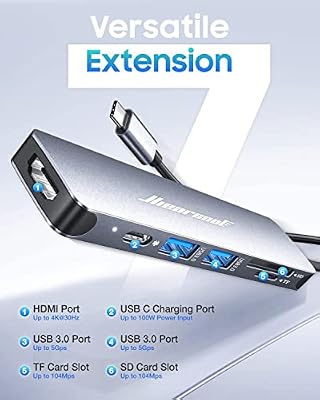
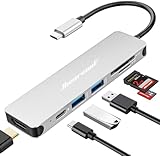
The Hiearcool 7-in-1 USB-C Hub is a compact, travel-friendly multiport adapter that turns a single USB-C port on a laptop, MacBook, iPad Pro or Surface into seven useful connections. It pairs a 4K HDMI output and 100W USB-C Power Delivery passthrough with three USB 3.0 ports and SD plus microSD card readers, all at a price that has made it one of the most popular hubs on Amazon. This Hiearcool 7-in-1 USB-C Hub review covers the ports, power, display output, build and value.

Hiearcool 7-in-1 USB C Hub, USB C Dongle Compatible for MacBook, Space Gray | 4K@30Hz HDMI, 100W PD, 5Gbps USB 3.0 and SD/TF card readers in a durable plug-and-play aluminum design for work and travel


As an Amazon Associate we earn from qualifying purchases. Product prices and availability are accurate as of the date/time indicated.
🛒 Best Price Today on Amazon
Prime members get fast, free shipping on everything above, plus member-only deals. New members get a 30-day free trial — cancel anytime.
As an Amazon Associate we earn from qualifying purchases.



Hiearcool 7-in-1 USB-C Hub at a Glance
| Component | Specification |
|---|---|
| Port count | 7 ports total |
| Power Delivery wattage | 100W USB-C PD passthrough (~85W to host) |
| HDMI / DP outputs | 1x HDMI 2.0 |
| Display resolution support | 4K @ 30Hz (single display) |
| USB-A / USB-C ports + speeds | 3x USB-A 3.0 (5Gbps), 1x USB-C PD-in |
| Ethernet support | No |
| Card reader | SD + microSD (UHS-I) |
| Compatibility | USB-C laptops, MacBook, iPad Pro, Surface, Chromebook |
| Approx price | around $20 |
Ports & Connectivity
Seven ports is the magic number for a portable hub, and Hiearcool has spent them sensibly. You get a 4K HDMI output, 100W USB-C PD passthrough for charging, three USB 3.0 Type-A ports at 5Gbps each, and dual SD plus microSD card readers — enough to drive an external display, plug in a mouse and keyboard, attach an external SSD and offload camera cards without juggling adapters. The three USB 3.0 ports are spaced so that wider flash drives and dongles do not collide, which is a small but welcome detail. The card readers support UHS-I speeds and can be used simultaneously, useful for photographers and videographers transferring footage from two cameras at once. The host-side USB-C connector is a short, captive cable rather than a flush plug, which keeps strain off the laptop port and makes the hub easier to position on a crowded desk.
The USB-A bandwidth is shared across the three ports, which is worth understanding: plug one fast external SSD into a single port and you will see close to full 5Gbps performance, but copying simultaneously between two SSDs on adjacent ports halves the effective throughput. That is the design of every passive USB-C hub and is not a Hiearcool flaw, but it is worth knowing. For mouse, keyboard and the occasional flash drive the bandwidth is plentiful; for parallel heavy-duty SSD work consider a Thunderbolt dock instead.
Power Delivery & Charging
The Hiearcool advertises 100W USB-C Power Delivery passthrough, which is the headline figure. In practice the hub itself consumes a small amount of power for the internal chips, so the laptop typically sees around 85W — still enough to fast-charge any modern Ultrabook, MacBook Pro 14 or gaming laptop in a low-load state. For high-power 16-inch gaming laptops the host may charge more slowly under heavy GPU load, which is typical of any hub. The PD passthrough supports the USB Power Delivery 3.0 standard, so it negotiates safely with first-party 65W, 96W and 100W chargers. There is no separate barrel-jack input, which keeps the hub small and portable but means the laptop charger is the sole power source — worth knowing if you plan to drive multiple bus-powered SSDs.
Display Output & Multi-Monitor
The HDMI 2.0 output supports a single external display at up to 4K resolution and 30Hz, or 1080p at 60Hz. The 30Hz cap at 4K is the main compromise for productivity buyers — 30Hz is fine for static text and spreadsheets but feels laggy for cursor movement and is unsuitable for video editing. For 1080p displays the 60Hz refresh is perfectly smooth. There is no second HDMI or DisplayPort, so this is a single-monitor hub, which limits it for trader or developer setups but keeps the price low. Buyers who plan to game on the connected display will find it fine for 1080p but will want a higher-refresh dock for fast-paced titles. Pair this hub with a laptop from our best RTX 5070 gaming laptops guide for a clean travel setup.
Build Quality & Heat
The chassis is an aluminium shell that doubles as a heat sink, finished in space grey to match Apple laptops. It feels solid for the price, with no flex, and the short attached cable is reinforced where it meets the housing. Under sustained load — 4K display plus PD charging plus an external SSD reading at full speed — the body becomes warm to the touch but not uncomfortably hot. Hiearcool quotes an internal smart chip for surge and thermal protection, and the hub has held up well across extensive buyer reviews on Amazon. At this price point the build quality is genuinely impressive.
Compatibility & Use Cases
The hub works with any host that supports USB-C with DisplayPort Alt Mode, which covers virtually every modern Windows laptop, all MacBooks since 2016, the iPad Pro and Air with USB-C, the Surface Pro 7 onward and most Chromebooks. macOS users should note that even the latest MacBooks support 4K@60Hz on USB-C DP Alt Mode, but the Hiearcool’s HDMI 2.0 output is limited to 4K@30Hz by the hub’s internal chip — that is a hub limitation, not a Mac limitation. Typical use cases include the classic single-cable office docking station, travel hub for hotel TVs and projectors, and photographer’s card-offload station. For students looking for the cheapest possible laptop pairing, see our best gaming laptops under $1,200 guide.
Verdict
At around $20 the Hiearcool 7-in-1 is exceptional value — a 4K HDMI, 100W PD, three USB 3.0 ports and dual card readers for the price of a fancy meal. The 4K@30Hz HDMI cap is the only meaningful compromise, and only matters for buyers who specifically need a 4K external monitor running at 60Hz. For 1080p displays, travel and general productivity it is hard to beat. The aluminium build is solid, the cable layout is sensible and the PD passthrough is reliable. It is no surprise this remains one of Amazon’s best-selling USB-C hubs. Recommended for students, travellers and anyone who wants a no-fuss travel hub at a budget price.
If you compare the Hiearcool against more expensive hubs in this guide, the gap in features is smaller than the gap in price would suggest. The Anker 7-in-1 (B07ZVKTP53) costs around $10 more, adds slightly better build quality and Anker’s customer-service reputation but otherwise matches the Hiearcool feature-for-feature. The UGREEN 5-in-1 (B0BR3M8XHK) costs less but drops the card readers. For travellers who want one hub to do nearly everything for under $25, the Hiearcool 7-in-1 is the easy recommendation, and it pairs naturally with any laptop in the mainstream productivity tier.
Frequently Asked Questions
Does the Hiearcool 7-in-1 support 4K at 60Hz?
No — the HDMI 2.0 output is limited to 4K at 30Hz. For 4K@60Hz you need a hub with HDMI 2.0b chipset support or a Thunderbolt dock.
Will it charge a 16-inch MacBook Pro?
Yes, although under heavy load the 16-inch MacBook Pro draws up to 140W, so charging may be slower than the wall adapter alone. For light work the 85W effective passthrough is sufficient.
Can I read two SD cards at the same time?
Yes — the SD and microSD slots operate as independent readers and can be used simultaneously, helpful for photographers offloading two cameras at once.
Does it work with iPad Pro?
Yes. The hub supports USB-C with DisplayPort Alt Mode and works with iPad Pro and iPad Air models that have USB-C, supporting external display, USB peripherals and card readers in iPadOS.
More USB Hub Reviews
- UGREEN 5-in-1 USB-C Hub Review: 4K HDMI, 100W PD
- Anker 7-in-1 USB-C Hub Review: 4K HDMI, 85W PD
- USB-C Dual HDMI Docking Station Review: Two-Monitor PD Dock
- Selore 14-in-1 USB-C Docking Station Review: Dual Monitor Dock
- Anker 5-in-1 Powered USB-C Hub Review: 4K Splitter, Powered USB
- 13-in-1 USB-C Triple Display Docking Station Review: 8-Port Dock
- UtechSmart 6-in-1 USB-C Multiport Adapter Review: With Ethernet
- UtechSmart 11-in-1 USB-C Triple Display Dock Review
Affiliate Disclosure: As an Amazon Associate, we earn from qualifying purchases. If you click a link and make a purchase, we may earn a small commission at no extra cost to you. Prices and availability are accurate as of publication and may change.
Related Articles
Looking for more on this topic? Browse the hand-picked guides below — each one applies the same scoring rubric used in this review.










