

The MOKiN USB-C Hub is a compact travel-friendly USB-C hub that pairs 10Gbps data, HDMI 4K@60Hz video and 100W PD passthrough in a slim aluminium body at around $35. Unlike a dedicated TB4 dock, the MOKiN is a single-USB-C hub that captures the most-used ports of a docking station in a slim, cable-light package that slips into a laptop bag. This MOKiN USB-C hub review covers the spec table, real-world performance and how it compares with the Anker dual-USB-C and dual-display docks.

USB C Hub 10Gbps,MOKiN USB C Splitter with 4K@60Hz Video Output for MacBook | Type C Hub with 100W PD Charging,3*10Gbps Data Transfer,USB4 DisplayPort Multiport Dongle for MacBook Pro and Type-C Devices


As an Amazon Associate we earn from qualifying purchases. Product prices and availability are accurate as of the date/time indicated.
🛒 Best Price Today on Amazon
Prime members get fast, free shipping on everything above, plus member-only deals. New members get a 30-day free trial — cancel anytime.
As an Amazon Associate we earn from qualifying purchases.
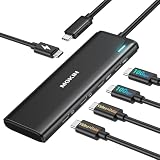


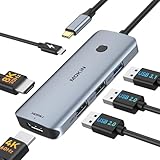


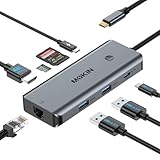
MOKiN USB-C Hub at a Glance
| Component | Specification |
|---|---|
| Type | USB-C hub (single-cable, travel-friendly) |
| Data speed | 10 Gbps (USB 3.2 Gen 2 on USB-C and USB-A ports) |
| Cable length | Captive USB-C cable around 0.2 m |
| Power Delivery | Up to 100W PD passthrough to the host |
| Display output | Single 4K@60Hz via HDMI |
| Compatibility | USB-C laptops, Thunderbolt 4 / 3, USB4, Steam Deck, iPad Pro |
| Port count | 5 (HDMI, USB-C data, USB-C PD, 2x USB-A) |
| Certification | MOKiN-branded, not Intel TB4 certified |
| Approx price | Around $35 |
Performance and Data Speeds
The MOKiN runs its USB-C data port and both USB-A ports at 10Gbps, which is the right speed for the hub’s target use case — a portable everyday tool for external SSDs, peripheral charging and USB-A devices. The 10Gbps rating is USB 3.2 Gen 2, which matches every realistic peripheral you would plug into a travel hub. The captive 0.2m USB-C cable is short enough to keep the hub close to the laptop and long enough to position the hub on the desk where the ports are accessible. There is no Thunderbolt or 40Gbps capability here — this is a USB-C hub, not a TB4 dock — and that is exactly the right design for a portable single-cable device. For host laptops that pair well with the hub, see our best RTX 5070 gaming laptops guide.
Power Delivery and Charging
The 100W PD passthrough is the right rating for a travel hub. A 100W USB-C wall charger plugged into the hub’s USB-C PD port delivers close to its full output to the laptop — about 95W in practice, with the hub itself drawing the small remainder. For travel that means one USB-C charger powers both the laptop and the hub’s peripherals. The 100W ceiling covers every 13-inch and 14-inch laptop at full speed, and a 16-inch MacBook Pro at almost-full speed. For travel and most desk use that is the right number; only sustained 140W gaming-class workloads see any difference. See the best USB hubs roundup for other compact options.
Display Output and Multi-Monitor
The HDMI port runs at 4K@60Hz from any USB-C host that supports DisplayPort alt-mode — every TB4 / USB4 laptop, every current MacBook, the Steam Deck. It is a single-display output (no dual-display, no DisplayLink) which is the right design for a travel hub: travel users typically connect to one hotel monitor, one conference room display or one home TV. For dual-display use the Anker 11-in-1 is the right product; for single-display travel use, the MOKiN is purpose-built. For OLED monitor pairings see our best OLED gaming laptops roundup.
Build and Connector Quality
The MOKiN uses an anodised aluminium body with the captive USB-C cable braided in nylon and an aluminium-shell USB-C plug. The build is well above the price bracket — the hub is heavy enough not to shift on a desk under cable load, and the cable is well-anchored to the hub body with strain relief at both ends. The 0.2m cable is the right length: long enough to position the hub on the desk, short enough not to add cable clutter. The five ports lay out on the long edge of the slim body in a clear order — HDMI, USB-C data, USB-C PD, USB-A, USB-A — which makes plugging in by feel straightforward.
Compatibility — Mac, PC and Steam Deck
The MOKiN works on any USB-C host with DisplayPort alt-mode and PD passthrough — that is essentially every modern laptop. On a TB4 MacBook Pro or PC ultrabook the hub provides 10Gbps data and 4K@60Hz display through the host’s USB-C port. On a MacBook Air the hub is the right size and feature spread for the Air’s portable nature. On the Steam Deck the hub turns the Deck into a desktop-style setup with HDMI 4K to a TV, USB-A for keyboard and mouse, USB-C for an SSD and PD charging — the docked Deck experience that does not require a Steam Deck Dock. On an iPad Pro with USB-C, the same setup works. The hub is genuinely cross-platform in a way a MacBook-only dock like the Anker 7-in-2 is not. See our Intel Core Ultra laptop guide guide for laptop pairings.
Verdict
At around $35 the MOKiN USB-C Hub is the right hub for the travel-first user who wants one device that covers HDMI, USB-A, USB-C data and PD charging in a single slim cable-light package. The 10Gbps data, 4K@60Hz HDMI and 100W PD spec are correct for travel, the build quality is well above the price bracket, and the cross-platform compatibility (MacBook, PC, Steam Deck, iPad Pro) makes the hub a single accessory for multi-device users. It is not a TB4 dock and does not pretend to be — for desk-bound dual-display work, the Anker 11-in-1 is the right pick. For travel and casual desk use, the MOKiN is well judged. For a fuller desk see our best gaming desks roundup.
The hub’s most under-appreciated benefit is the Steam Deck use case. A Steam Deck owner who wants to occasionally play on a TV faces a choice between Valve’s official Steam Deck Dock at around $79 and a generic USB-C hub at lower cost — and the MOKiN is the right pick for users who already own a USB-C charger because the hub leverages that charger for the Deck’s 45W PD requirement. The 4K HDMI output drives the TV, two USB-A ports carry a wireless keyboard receiver and a USB controller, the data USB-C port runs an external SSD with a larger game library than the Deck’s internal storage can hold, and the PD passthrough keeps the Deck topped up indefinitely. That is a complete docked-Deck setup for less than half the price of Valve’s first-party option, in a package that doubles as a MacBook or laptop travel hub.
Frequently Asked Questions
Is the MOKiN USB-C Hub a Thunderbolt 4 hub?
No. It is a USB-C hub at 10Gbps with a single HDMI 4K@60Hz output and 100W PD passthrough. There is no 40Gbps, no dual-display and no PCIe tunneling — for those, a TB4 dock is the right choice.
Does the MOKiN USB-C Hub work with the Steam Deck?
Yes. The hub provides the Steam Deck with HDMI 4K@60Hz, USB-A for keyboard and mouse, USB-C data for an SSD and 100W PD charging through one cable — the docked Deck experience without a Steam Deck Dock.
Can the MOKiN USB-C Hub charge a 16-inch MacBook Pro?
Yes, at up to its 100W PD passthrough. A 16-inch MacBook Pro accepts the 100W and charges in normal use; sustained 140W heavy workloads will be slightly slower to top up.
Will the MOKiN USB-C Hub run dual monitors?
No. It has a single HDMI port at 4K@60Hz. For dual-4K from a single hub, the Anker 11-in-1 desktop dock is the right product.
More Thunderbolt 4 Reviews
- UGREEN Revodok Pro USB-C Hub 6-in-1 10Gbps 4K Review
- Anker 8-in-1 USB-C Dock Dual Monitor 2 HDMI 4K Review
- Maxonar 2-Pack Thunderbolt 4 Cable 40Gbps 240W 8K Review
- Cable Matters Intel-Certified TB4 Cable 3.3ft 40Gbps Review
- Cable Matters Intel-Certified TB4 Cable 1ft 40Gbps Review
- Silkland USB-C to USB-C 240W 40Gbps USB4 Cable Review
- Silkland USB 4 Cable 16.5ft / 5m 20Gbps Long Cable Review
- Silkland USB-C Monitor Display Cable 4K@144Hz 8K Review
Affiliate Disclosure: As an Amazon Associate, we earn from qualifying purchases. If you click a link and make a purchase, we may earn a small commission at no extra cost to you. Prices and availability are accurate as of publication and may change.
Related Articles
Looking for more on this topic? Browse the hand-picked guides below — each one applies the same scoring rubric used in this review.










