

The Anker 8-in-1 USB-C Dock is a dual-HDMI compact dock that hits the dual-display use case at a notably lower price than the Anker 11-in-1 desktop dock. It runs two HDMI ports at 4K@60Hz (DisplayPort alt-mode through the host) alongside USB-A 3.0, USB-C data, gigabit Ethernet, SD plus microSD and 85W PD passthrough — in a slim portable body at around $90. This Anker 8-in-1 review covers the spec table and the trade-offs against the 11-in-1 desktop dock and the smaller MOKiN / Revodok Pro hubs.

Anker Laptop Docking Station Dual Monitor, 8-in-1 USB C Hub with 4K HDMI | Dual HDMI USB C Dock, 1Gbps Ethernet, 85W Max PD, SD/TF Card Reader, for USB C Laptops, XPS and More (Charger Not Included)





As an Amazon Associate we earn from qualifying purchases. Product prices and availability are accurate as of the date/time indicated.
🛒 Best Price Today on Amazon
Prime members get fast, free shipping on everything above, plus member-only deals. New members get a 30-day free trial — cancel anytime.
As an Amazon Associate we earn from qualifying purchases.





Anker 8-in-1 USB-C Dock at a Glance
| Component | Specification |
|---|---|
| Type | USB-C dock (dual-display compact, not full TB4) |
| Data speed | 5 Gbps (USB 3.0 / USB 3.2 Gen 1 on data ports) |
| Cable length | Captive USB-C cable around 0.25 m |
| Power Delivery | Up to 85W PD passthrough to the host |
| Display output | Dual 4K@60Hz (2x HDMI) |
| Compatibility | USB-C laptops, Thunderbolt 4 / 3, USB4, MacBook with multi-display support |
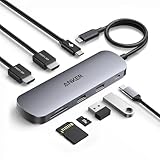
| Port count | 8 (2x HDMI, 2x USB-A, USB-C data, Ethernet, SD, microSD) |
| Certification | Anker-branded, not Intel TB4 certified |
| Approx price | Around $90 |
Performance and Data Speeds
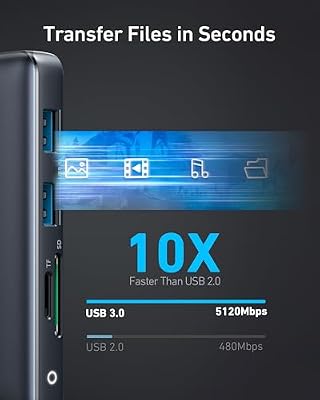
The 8-in-1 runs its data ports at 5Gbps over USB 3.0 / 3.2 Gen 1 — half the speed of the 10Gbps MOKiN and Revodok Pro hubs and the 11-in-1 desktop dock. That is a real spec downgrade and is the right thing to know up front: for SSD use, 5Gbps caps real-world transfer at about 450MB/s, while 10Gbps caps at about 1,000MB/s. For everyday peripheral use (mouse, keyboard, webcam, USB-A storage), 5Gbps is plenty; for users who run external SSDs heavily, the 10Gbps hubs and docks are a meaningful step up. The dual-HDMI display capability runs through DisplayPort alt-mode with no DisplayLink overhead, which is the area where the 8-in-1 out-specs the smaller single-display hubs. For host context see our best RTX 5070 gaming laptops guide.
Power Delivery and Charging
The 85W PD passthrough is also slightly below the 100W rating of the smaller hubs and the larger desktop docks. Eighty-five watts covers every 13-inch and 14-inch laptop at full speed, and a 16-inch MacBook Pro at moderate speed (full-load charging on a 16-inch is best from 100W+). For everyday MacBook Air, 14-inch ultrabook and standard PC laptop use, 85W is invisible against a 100W rating; for 16-inch MacBook Pro and high-power gaming-class ultrabooks, the difference is real. For 16-inch MacBook Pro buyers, the Anker 7-in-2 or 11-in-1 is the better pick. See the best USB hubs roundup for related options.
Display Output and Multi-Monitor
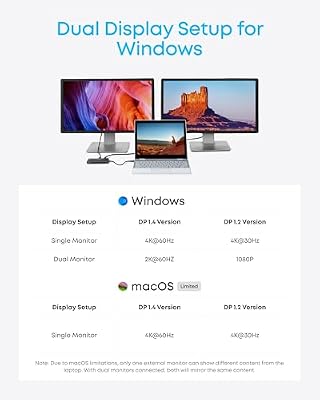
The dual HDMI 4K@60Hz output is the 8-in-1’s headline feature. Both HDMI ports run native through the host’s DisplayPort alt-mode with multi-stream transport (MST), which means there is no DisplayLink driver, no host CPU overhead and full refresh-rate support. The dual-HDMI design is particularly handy for buyers whose monitors only have HDMI inputs — many budget and mid-range monitors lack DisplayPort, and the dual-HDMI dock fits them naturally. On a TB4 MacBook Pro or PC ultrabook the dock delivers two real native displays; on a MacBook Air (M1 / M2 / M3) the dock mirrors due to the Air’s one-external-display limit. For dual-display gaming or productivity, the 8-in-1 hits the spec at a friendly price. See our best 240Hz gaming laptops guide for monitor pairings.
Build and Connector Quality
The 8-in-1 uses Anker’s classic slim aluminium body with a captive 0.25m USB-C cable. The build is comparable with the MOKiN and Revodok Pro hubs but slightly larger to accommodate the additional ports. The eight ports lay out on the long edge — two HDMI on one short end, the rest on the long edge. The dock is light enough for travel, which is the trade-off against the heavier desktop 11-in-1: the 8-in-1 fits a laptop bag, the 11-in-1 does not. See the best gaming desks roundup for desk-building.
Compatibility — Mac, PC and Steam Deck
The 8-in-1 works on any USB-C host with DisplayPort alt-mode and MST — every TB4 and USB4 laptop, every current PC ultrabook, and M-series MacBook Pro models that support multiple external displays. M-series MacBook Air (M1 / M2 / M3) supports only one external display and will mirror both HDMI outputs. On a TB4 PC laptop the dock provides two native 4K@60Hz HDMI outputs without driver installation. The Steam Deck supports the dock’s USB-C and one of its HDMI outputs at 4K@60Hz — the second display is mirrored due to the Deck’s display capability. For Core Ultra system context, see our Intel Core Ultra laptop guide guide.
Verdict
At around $90 the Anker 8-in-1 USB-C Dock is the right product for the buyer who wants native dual-HDMI 4K@60Hz in a compact, travel-friendly body. The dual-HDMI design fits monitors that lack DisplayPort, the eight-port spread covers everyday peripherals, and the compact form factor fits a laptop bag. The trade-offs against the more expensive 11-in-1 desktop dock are real — 5Gbps data instead of 10Gbps, 85W PD instead of 100W, fewer total ports — but for travel and home-office buyers who want dual-display in a compact package, the price-to-feature balance is well judged. For desk-bound 10Gbps SSD work the 11-in-1 is the right step up. For travel dual-display, the 8-in-1 is the right pick. See our best OLED gaming laptops roundup for premium monitor pairings.
The dual-HDMI design over dual-DisplayPort is the defining choice and the right call for the 8-in-1’s target buyer. Most home-office and hotel meeting-room displays are HDMI-only — TVs, projectors, conference-room screens, budget desktop monitors. A dual-HDMI dock plugs straight into them without an HDMI-to-DisplayPort adapter, which is the cable-bag tax that dual-DisplayPort docks impose on travel users. For buyers running pro-grade DisplayPort-only monitors at home and HDMI-only screens on the road, the 11-in-1’s mixed HDMI + DisplayPort spread is more flexible; for buyers who run HDMI everywhere, the 8-in-1 is more practical. The 5Gbps data ceiling is the genuine downside — buyers who run external SSDs heavily should choose the 10Gbps 11-in-1 or one of the compact 10Gbps hubs instead. For a dual-monitor travel dock, the 8-in-1 nails the brief.
Frequently Asked Questions
Can a USB-C dock run dual monitors?
Yes — a dock like the Anker 8-in-1 with dual HDMI can drive two external monitors from a single USB-C port, which is ideal for laptops. Check that both the dock and your laptop support the resolution and refresh rate you want, as some cap dual displays at 4K 30Hz.
Does the Anker 8-in-1 support dual 4K monitors natively?
Yes. Both HDMI ports run at 4K@60Hz through the host’s DisplayPort alt-mode with multi-stream transport — no DisplayLink driver and no host CPU overhead.
Will the Anker 8-in-1 mirror displays on a MacBook Air?
Yes. M-series MacBook Air (M1 / M2 / M3) supports only one external display, so both HDMI outputs will show the same content. For triple-display on a MacBook Air, the Anker 13-in-1 with DisplayLink is the right pick.
How fast are the USB ports on the Anker 8-in-1?
5 Gbps (USB 3.0 / USB 3.2 Gen 1). That is half the 10Gbps speed of the Anker 11-in-1, MOKiN and UGREEN Revodok Pro — for SSDs the 8-in-1 caps at about 450MB/s versus 1,000MB/s on the 10Gbps options.
Is 85W enough to charge a 16-inch MacBook Pro?
It will charge a 16-inch MacBook Pro in normal use, but sustained 140W heavy workloads will be slower to top up than with a direct Apple 140W charger. For 16-inch users who run heavy CPU and GPU load for extended periods, the 100W Anker 7-in-2 or 11-in-1 is the better fit. For 14-inch MacBook Pro and 13-inch / 14-inch ultrabook users the 85W rating is invisible against a 100W rating in everyday office, code and creative work.
More Thunderbolt 4 Reviews
- Maxonar 2-Pack Thunderbolt 4 Cable 40Gbps 240W 8K Review
- Cable Matters Intel-Certified TB4 Cable 3.3ft 40Gbps Review
- Cable Matters Intel-Certified TB4 Cable 1ft 40Gbps Review
- Silkland USB-C to USB-C 240W 40Gbps USB4 Cable Review
- Silkland USB 4 Cable 16.5ft / 5m 20Gbps Long Cable Review
- Silkland USB-C Monitor Display Cable 4K@144Hz 8K Review
- Anker 7-in-2 MacBook Dock TB-Compatible HDMI 4K Review
- Anker 13-in-1 USB-C Docking Station Triple Display Review
Affiliate Disclosure: As an Amazon Associate, we earn from qualifying purchases. If you click a link and make a purchase, we may earn a small commission at no extra cost to you. Prices and availability are accurate as of publication and may change.










