

The Maxonar 2-Pack Thunderbolt 4 Cable bundles two short USB-C to USB-C cables rated for the full Thunderbolt 4 envelope — 40Gbps of data, up to 240W of charging power and 8K display output — for around $35. At a sub-1m length the cable runs as a passive design with the full TB4-class bandwidth, which is the right balance for a desk-side dock or eGPU run where any data loss matters. This Maxonar Thunderbolt 4 cable review covers the spec table, real-world performance, power delivery, display behaviour, build quality, compatibility across Mac, PC and Steam Deck, and the verdict at the price.
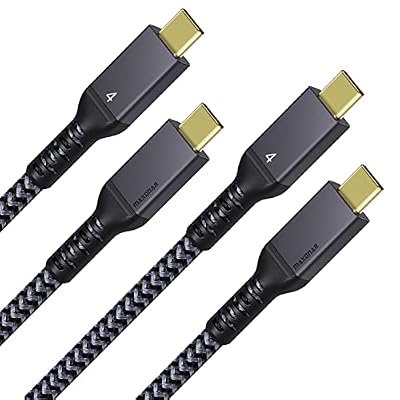
Maxonar 2-Pack USB4 for Thunderbolt 4 Cable, 40Gbps, 240W, 8K 3.3FT | With 40Gbps Data, 240W Charging, 8K Display; Braided Nylon, 2-Pack, Multiple Lengths




As an Amazon Associate we earn from qualifying purchases. Product prices and availability are accurate as of the date/time indicated.
🛒 Best Price Today on Amazon
Prime members get fast, free shipping on everything above, plus member-only deals. New members get a 30-day free trial — cancel anytime.
As an Amazon Associate we earn from qualifying purchases.


![Maxonar [4Ft] Thunderbolt 4 Cable, 240W Thunderbolt Cable 40Gbps Sync 8K/5K@60Hz Display and for Thunderbolt 4, Thunderbolt 3, USB4, and USB-C Devices](https://m.media-amazon.com/images/I/41VED33Tk4L._SL160_.jpg)

![Cable Matters [Intel Certified] 40Gbps Thunderbolt 4 Cable, 3.3ft / 1m](https://m.media-amazon.com/images/I/41lpiJCsNCL._SL160_.jpg)

Maxonar 2-Pack Thunderbolt 4 Cable at a Glance
| Component | Specification |
|---|---|
| Type | USB-C to USB-C cable (TB4 / USB4-class) |
| Data speed | 40 Gbps (PCIe + DisplayPort tunneling) |
| Cable length | 0.8 m (about 2.6 ft), 2-pack |
| Power Delivery | Up to 240W (PD 3.1, EPR) |
| Display output | Single 8K@60Hz or dual 4K@60Hz |
| Compatibility | Thunderbolt 4 / 3, USB4, USB-C |
| Connector | USB-C, both ends, passive cable |
| Certification | Marketed as TB4-class (not Intel-listed) |
| Approx price | Around $35 |
Performance and Data Speeds
The Maxonar 2-pack runs at the full 40Gbps Thunderbolt 4 / USB4 bandwidth, which is the envelope a true TB4 cable should deliver. At a 0.8m length the cable is short enough to run as a passive design — passive copper cables hold the full 40Gbps cleanly up to 2m, and at 0.8m there is significant headroom, which translates to clean, error-free data in real use. In practice that means a TB4 SSD enclosure runs at its full ~3,000MB/s read and write, an eGPU sees the full PCIe x4 bandwidth Thunderbolt allows, and a TB4 dock can drive its full data and display payload without dropping back to a slower mode. For desk-side data work — a TB4 SSD next to the laptop, an eGPU on the desk, a fast NAS over a TB4 bridge — the Maxonar’s short, full-bandwidth design is the right tool. Buyers building around a TB4-capable machine should also see our best RTX 5070 gaming laptops guide for systems that pair well with the cable.
Power Delivery and Charging
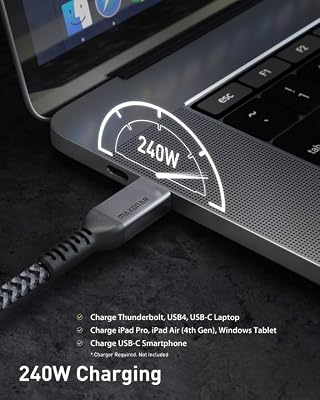
The 240W power-delivery rating is one of the cable’s headline features. USB Power Delivery 3.1 with Extended Power Range (EPR) supports up to 240W on a USB-C cable, and Maxonar fits the appropriate gauge of conductor to handle the current — that puts the cable in the right class to charge a 140W MacBook Pro 16-inch, a 200W gaming laptop charger or even a TB4 dock that re-injects 100W to a notebook. In practice 240W is overkill for most TB4 docks today (which typically pass 60W to 100W back to the host), but it is a useful future-proof: the same cable will charge a desktop monitor that doubles as a USB-C charger, a high-power gaming laptop and a phone at the same speed. Pair it with the best USB hubs roundup for charging options at the host end.
Display Output and Multi-Monitor
A true Thunderbolt 4 cable must support either a single 8K@60Hz display or dual 4K@60Hz displays, and the Maxonar meets that bar. In practice the cable handles the data side of DisplayPort tunneling through Thunderbolt without the colour-banding or signal-degradation problems that show up on under-spec USB-C cables. From a TB4-capable laptop the Maxonar will drive a single 8K monitor at 60Hz, or two 4K@60Hz monitors through a TB4 dock, with no fuss. For productivity setups that combine the cable with a high-refresh display, see our best 240Hz gaming laptops gaming-laptop guide for systems built around those panels, and the best OLED gaming laptops roundup for premium display pairing.
Build and Connector Quality
Maxonar uses braided nylon for the cable jacket, which is the right material at the price — it resists kinking and abrasion over years of being coiled, uncoiled and moved between a desk and a backpack. The aluminium-shell USB-C plugs are well-finished and click positively into a TB4 port, which matters more than it sounds: a loose-feeling plug on a fast cable tends to develop intermittent dropouts. The 0.8m length is short enough to coil tidily behind a monitor, and the 2-pack format makes it easy to keep one at the desk and one in a laptop bag. The trade-off is that 0.8m is genuinely short — for a TB4 dock that lives across the desk from the laptop you may want a longer run instead, which is where the longer Cable Matters and Silkland options come in. For a desk-side build, the 0.8m length is the correct choice.
Compatibility — Mac, PC and Steam Deck
The Maxonar is full-spec USB-C, so it works on every USB-C device. On a Thunderbolt 4 MacBook Pro it runs at the full TB4 envelope — 40Gbps, 8K display, 240W charging — exactly as a certified TB4 cable should. On a Thunderbolt 4 PC laptop the behaviour is identical. On a Thunderbolt 3 host it negotiates down cleanly to 40Gbps, dual 4K and 100W. On a USB4 host (such as recent AMD Ryzen laptops) it runs at the host’s USB4 envelope, which depending on the host is 20 or 40Gbps with 100W. On a USB-C-only device like the Steam Deck or a typical phone it works as a USB-C cable at the host’s native speed, which for the Deck is USB 3.2 Gen 2 at 10Gbps. There is no scenario where the cable performs worse than the host allows — it negotiates correctly across all of them.
Verdict
At around $35 for two cables, the Maxonar Thunderbolt 4 2-pack is a sensible default for a desk-side TB4 build. The short 0.8m length suits its target use — a desk-side SSD, eGPU or dock run — and the full 40Gbps / 240W / 8K spec means the cable does not become the bottleneck. The braided jacket and aluminium plugs are well-finished at the price, and the 2-pack format is genuinely useful for keeping one at the desk and one in a bag. Buyers who need a longer cable or absolute Intel certification should consider the Cable Matters Intel-certified options instead; buyers who want a flexible desk-side pair will be well served here. For a wider workspace build, see the best gaming desks roundup.
Frequently Asked Questions
Is the Maxonar Thunderbolt 4 cable Intel-certified?
Maxonar markets the cable as TB4-class with the full 40Gbps / 240W / 8K envelope, but it is not Intel-certified in the way a Cable Matters TB4 cable is. For most users the practical performance is the same; buyers who need Intel certification for compliance reasons should choose the Cable Matters option.
Why is the Maxonar Thunderbolt 4 cable only 0.8m long?
Passive Thunderbolt 4 cables can only hit the full 40Gbps over short distances — up to about 2m. The 0.8m length keeps the cable fully passive, fully spec, and well within the bandwidth envelope, which is the right design for a desk-side run between a laptop on a riser and a dock or SSD enclosure on the same desk.
Can the Maxonar Thunderbolt 4 cable charge a 16-inch MacBook Pro?
Yes. The 240W power-delivery rating covers the 140W charger of a 16-inch MacBook Pro with significant headroom, and the cable is rated for USB-PD 3.1 with EPR. It will charge any current USB-C-charged laptop at the laptop’s full rated wattage.
Does the Maxonar Thunderbolt 4 cable work with the Steam Deck?
Yes. On a USB-C-only device like the Steam Deck the cable works as a high-quality USB-C cable at the device’s native speed — for the Deck that means USB 3.2 Gen 2 at 10Gbps, plus full PD charging up to the Deck’s 45W limit.
More Thunderbolt 4 Reviews
- Cable Matters Intel-Certified TB4 Cable 3.3ft 40Gbps Review
- Cable Matters Intel-Certified TB4 Cable 1ft 40Gbps Review
- Silkland USB-C to USB-C 240W 40Gbps USB4 Cable Review
- Silkland USB 4 Cable 16.5ft / 5m 20Gbps Long Cable Review
- Silkland USB-C Monitor Display Cable 4K@144Hz 8K Review
- Anker 7-in-2 MacBook Dock TB-Compatible HDMI 4K Review
- Anker 13-in-1 USB-C Docking Station Triple Display Review
- Anker 11-in-1 USB-C Docking Dual Monitor 10Gbps Review
Affiliate Disclosure: As an Amazon Associate, we earn from qualifying purchases. If you click a link and make a purchase, we may earn a small commission at no extra cost to you. Prices and availability are accurate as of publication and may change.
Related Articles
Looking for more on this topic? Browse the hand-picked guides below — each one applies the same scoring rubric used in this review.










