

The Syntech Link Cable 16FT is a third-party USB-C cable designed for PC VR over Quest Link, supporting Meta Quest 3, Quest 3S, Quest 2 and Quest Pro headsets. At a fraction of the price of Meta’s official 5-metre Link cable, it is one of the most popular accessory upgrades for any Quest owner who plans to play PC VR. This Syntech Link Cable review covers compatibility, durability, ergonomics and the realistic limits of a third-party Link cable.
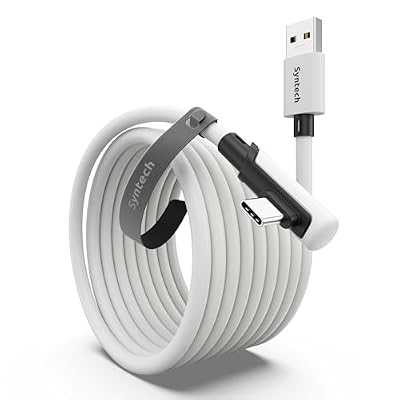
Syntech Link Cable 16FT, USB 3.0 to USB Cable for Meta Quest 3/3S/2, Pico 4 | USB 3.0 High Speed with up to 5Gbps Data Transfer for PCVR and SteamVR Gaming, Reinforced L-Shaped USB-C Connector



As an Amazon Associate we earn from qualifying purchases. Product prices and availability are accurate as of the date/time indicated.
🛒 Best Price Today on Amazon
Prime members get fast, free shipping on everything above, plus member-only deals. New members get a 30-day free trial — cancel anytime.
As an Amazon Associate we earn from qualifying purchases.





Syntech 16FT Link Cable at a Glance
| Component | Specification |
|---|---|
| Compatibility | Meta Quest 3, Quest 3S, Quest 2, Quest Pro and other USB-C VR headsets |
| Material | Nylon-braided outer with reinforced strain-relief ends |
| Battery capacity if applicable | N/A — passive cable, no battery |
| Cable length | 16 feet (approximately 5 metres) |
| Type | USB-C to USB-C, 90-degree angled headset connector |
| Color options | Black |
| Warranty | Manufacturer limited warranty |
| Approx price | around $24 |
| Data spec | USB 3.2 Gen 1, 5 Gbps |
Compatibility
The Syntech 16FT cable is designed for Meta’s Quest Link protocol and is broadly compatible with any USB-C VR headset that supports tethered PC VR — Quest 3, Quest 3S, Quest 2 and Quest Pro are the primary targets. Quest Link itself runs over a standard USB 3 connection on the PC side; the cable does not need to be exotic to work well. Buyers should make sure their PC has a free USB 3.0 or higher port — ideally a USB-A 3.x on the back of the desktop, with the included USB-C-to-USB-A adapter — for the most reliable connection. Buyers using a gaming laptop for PC VR can compare suitable laptops in our RTX 5070 laptop guide.
Cable Build & Durability
The 5-metre length is a deliberate match for Meta’s official Link cable and is the right length for room-scale PC VR — long enough to allow free movement without the cable becoming a tripping hazard, short enough that resistance and weight are manageable. Syntech wraps the cable in a nylon braid, with reinforced strain-relief at both ends. The headset end uses a right-angle connector that tucks the cable down the side of the headset towards the strap, reducing pull on the USB-C port — an important detail for long sessions and a point Meta’s own cable also addresses. The cable is moderately flexible without being whip-thin, balancing ergonomics and durability.
PC VR Performance
For Quest Link the relevant spec is USB 3 with at least 5 Gbps throughput, and the Syntech cable delivers exactly that — USB 3.2 Gen 1 at 5 Gbps. In practice Quest Link is more limited by the PC’s GPU and the headset’s compositor than by the cable, so a working 5 Gbps cable provides effectively the same PC VR experience as Meta’s official cable. Reports of poor Link cable performance are most often traced to either insufficient PC GPU performance, a flaky USB controller on the PC, or a cable that does not actually deliver USB 3 speeds. The Syntech delivers the correct spec and is widely reported as a like-for-like alternative to the Meta cable.
Use Cases
The primary use case is wired PC VR via Quest Link — connecting a Quest 3, 3S or 2 to a Windows gaming PC to play SteamVR titles such as Half-Life: Alyx, modded VR experiences, Microsoft Flight Simulator VR or Skyrim VR. The 5-metre length suits a typical living-room or office room-scale setup. A secondary use is reliable USB-C data and charging between the headset and PC for sideloading and file transfer. The cable is also useful as a known-good test cable when troubleshooting wireless Air Link performance issues — connecting via the Syntech cable rules out network problems.
Comfort & Practical Tips
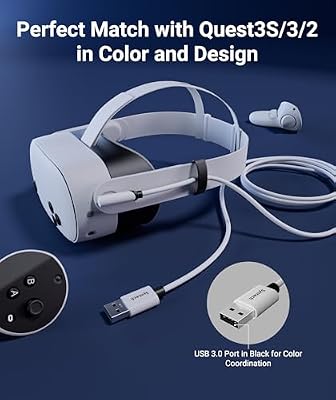
For long sessions, a cable management routing — over the shoulder, down the back, anchored to a belt clip or pulley — makes a meaningful difference to comfort. The Syntech cable is light enough not to require an active cable suspension system, but heavy users can pair it with an inexpensive ceiling pulley. The right-angle headset connector means the cable sits along the side of the head rather than projecting outward, which helps in fast movement games such as Beat Saber or Pistol Whip. As with any USB-C cable, the connectors are the failure point — protect them with strain relief and avoid yanking the cable from either end.
What’s in the Box
The package contains the 16-foot USB-C to USB-C cable with a right-angle headset connector, plus a small USB-C-to-USB-A adapter for desktops that lack a free USB-C port on the back panel. There is no PC-side host driver to install — Quest Link installation on the PC is handled via the Meta Quest desktop app, and the Syntech cable presents to the PC as a generic USB-C cable. No additional Syntech software is required, and the cable should work out of the box on any Quest headset paired with a Meta Quest desktop app installation.
Who Is the Syntech Cable For?
The Syntech 16FT Link cable is for any Quest 3, 3S, Quest 2 or Quest Pro owner who plans to play PC VR and does not want to pay Meta’s premium for the official Link cable. It is one of the best-value VR accessories available and a near-default purchase for PC VR users. It is less obviously needed for buyers who exclusively play standalone Quest titles and do not connect to a PC, or for buyers with a strong Wi-Fi 6/6E network who are happy with Air Link wireless PC VR — though even those buyers usually benefit from having a working Link cable for troubleshooting and large file transfers.
Verdict
At around $24 the Syntech 16FT Link Cable is one of the best-value accessory upgrades a Quest owner can make. It delivers the correct USB 3.2 Gen 1 throughput, the right 5-metre length and a sensible right-angle connector at a fraction of Meta’s first-party price. The trade-off is that it is a third-party cable — Meta’s official cable carries the official Meta warranty and is the safest choice for warranty-anxious buyers — but for the value-conscious PC VR user, the Syntech earns a strong recommendation. Buyers who already own a Quest 3 or 3S and a capable gaming PC should treat the Syntech cable as a near-default purchase, since PC VR access roughly doubles the headset’s effective content library and the cable is the cheapest component in that path.
Frequently Asked Questions
Will the Syntech cable work with Quest 3 and Quest 3S?
Yes. It is designed for the modern Quest family, including Quest 3, Quest 3S, Quest 2 and Quest Pro, and uses USB-C with USB 3.2 Gen 1 throughput as Quest Link requires.
How long is the cable?
16 feet, or approximately 5 metres — the same length as Meta’s official Link cable, which is well judged for room-scale PC VR.
Does the Syntech cable charge the headset while in use?
Yes. Connected to a PC USB 3 port it will trickle-charge the headset during use, though heavy PC VR sessions may still slowly drain the battery — a powered USB hub helps.
Is it as good as the official Meta Link cable?
In practice, yes. Quest Link is GPU- and compositor-limited rather than cable-limited at USB 3.2 Gen 1 speeds, and the Syntech delivers that spec at a fraction of the price.
More VR Reviews
- sarlar Hard Carrying Case Review: Quest 3 / 3S / 2 Travel Case
- BOBOVR S3 Pro Battery Strap Review: Quest 3 Comfort Upgrade
- BOBOVR M3 Pro Battery Strap Review: Quest 3 Comfort & Runtime
- Saqico Quest Head Strap Review: Budget Comfort for Quest 2/3/3S
- Meta Quest 2 128GB Review: Standalone VR Headset (2026)
- Meta Quest 2 256GB Review: Larger-Storage Standalone VR
- Meta Quest 3S 128GB Batman Arkham Shadow Bundle Review
- Meta Quest 3S 128GB Review: Standalone Mixed Reality VR
Affiliate Disclosure: As an Amazon Associate, we earn from qualifying purchases. If you click a link and make a purchase, we may earn a small commission at no extra cost to you. Prices and availability are accurate as of publication and may change.
Related Articles
Looking for more on this topic? Browse the hand-picked guides below — each one applies the same scoring rubric used in this review.










