

The TP-Link Archer AX55 is one of the most popular mid-range WiFi 6 routers, an AX3000 dual-band model with full Gigabit wired ports and an asking price around $80. It targets the buyer who has outgrown an entry-level AX1800 router but does not need WiFi 6E or WiFi 7. This Archer AX55 review covers the WiFi standard, range, ports, gaming features and overall value.
- TP-Link Archer AX55 at a Glance
- WiFi Standard and Speed Class
- Range, Coverage and Mesh Capability
- Ports, USB and Wired Backhaul
- Gaming Latency, QoS and Security Features
- Who Is the Archer AX55 For?
- Pros and Cons
- Is the Archer AX55 Worth It?
- Frequently Asked Questions
- More Gaming Router Reviews
- Related Articles
- Related Articles
- Related Guides
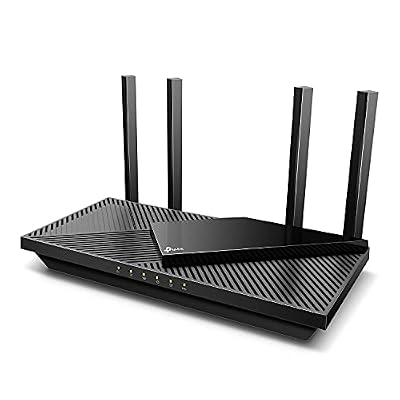
TP-Link Dual-Band AX3000 Wi-Fi 6 Wireless Gigabit Internet Router for Home | EasyMesh, VPN Clients & Server, HomeShield, OFDMA, MU-MIMO, USB 3.0, Secure by Design - Archer AX55


As an Amazon Associate we earn from qualifying purchases. Product prices and availability are accurate as of the date/time indicated.
🛒 Best Price Today on Amazon
Prime members get fast, free shipping on everything above, plus member-only deals. New members get a 30-day free trial — cancel anytime.
As an Amazon Associate we earn from qualifying purchases.



TP-Link Archer AX55 at a Glance
| Component | Specification |
|---|---|
| WiFi standard | WiFi 6 (802.11ax) |
| Band class | AX3000 |
| Bands | Dual-band (2.4 GHz + 5 GHz) |
| Coverage | Medium homes |
| WAN port | 1x Gigabit |
| LAN ports | 4x Gigabit |
| USB | 1x USB |
| Mesh-capable | Yes (EasyMesh) |
| Price | Around $80 |
WiFi Standard and Speed Class
The Archer AX55 is built on WiFi 6 (802.11ax) and sits one tier above the entry-level AX1800 class at AX3000 — roughly 3 Gbps of theoretical aggregate throughput across the 2.4 GHz and 5 GHz bands. In practical terms that means a faster 5 GHz radio than AX1800 routers and more headroom when many devices are connected at once. WiFi 6 features like OFDMA and improved MU-MIMO handling are particularly useful in households with a console, a gaming PC, several phones and a few smart-home devices all active simultaneously.
The AX55 does not include the 6 GHz band, so buyers who want clean WiFi 6E spectrum should look one tier higher — see our best WiFi 6E routers guide — but for typical gigabit broadband on dual-band, AX3000 is the practical sweet spot. There is a meaningful jump in real-world 5 GHz throughput versus AX1800 routers in side-by-side use, which buyers tend to notice most on file transfers between devices on the local network and when several 4K streams are running at once.
Range, Coverage and Mesh Capability
The AX55 targets medium-sized homes where a single well-placed router can reach most rooms with a strong signal, helped by four external antennas and beamforming. Like the AX21 it is EasyMesh-capable, so it can be combined with other TP-Link EasyMesh devices to extend coverage if a single router falls short. That flexibility is genuinely useful for buyers who are not sure whether they will need a node or two later: the AX55 starts as a standalone router and grows into a mesh without being replaced.
Real-world coverage always depends on building materials — drywall, brick and reinforced concrete each attenuate signal differently — so a router that comfortably covers a single-floor apartment may struggle on the far side of a multi-floor house. For larger or multi-floor homes, dedicated mesh kits remain a better starting point — see our best mesh WiFi systems guide.
Ports, USB and Wired Backhaul
The Archer AX55 carries one Gigabit WAN port and four Gigabit LAN ports, which is the standard wired layout for this class and the right set of ports for the vast majority of residential broadband plans. Unlike the AX21, the AX55 adds a USB port for sharing a storage drive or a printer over the network. For gamers, the wired Gigabit LAN ports remain the most important detail: a hardwired connection between the router and a gaming PC or console is the single biggest practical improvement for latency and stability, and the AX55 supports it out of the box.
The wired backbone is solid and the USB adds genuine flexibility over the AX21 for buyers who want a simple network-attached storage option without buying a dedicated NAS. As with the AX21, the AX55 caps at Gigabit on the WAN side, so buyers on broadband plans above 1 Gbps should look at routers with a 2.5 Gbps WAN port further along in this guide.
Gaming Latency, QoS and Security Features
The Archer AX55 includes the same TP-Link Tether app and HomeShield security features as the AX21, with QoS controls that let a gaming PC or console be prioritised over other devices. WiFi 6 reduces airtime contention versus older WiFi 5 hardware, which in a busy household translates to more consistent wireless latency for a gaming device.
As ever, the most effective single step for competitive gaming is to plug the device into a Gigabit LAN port; the AX55 is designed for exactly that. The higher AX3000 class also helps wireless gaming devices in particular, because the faster 5 GHz radio leaves more headroom for the gaming connection when other devices in the household are streaming or browsing. For deeper tuning of router settings, traffic shaping and queue management, our low-latency gaming network guide is a useful reference.
Who Is the Archer AX55 For?
The Archer AX55 is for the buyer who wants a step up from an entry-level WiFi 6 router without paying for tri-band or 6 GHz spectrum. If you have a medium-sized home, a gigabit or sub-gigabit broadband plan, a mix of gaming, streaming and smart-home traffic, and you want a USB port for shared storage or a printer, the AX55 is squarely your router.
With more than 10,500 customer reviews on Amazon it is a well-vetted mainstream choice — buyers can be confident the router is stable and well supported, which matters more than people often acknowledge in router shopping. It is not the right router if you need 6 GHz, multi-gig WAN or whole-home mesh from the start — for those buyers, see our best gaming routers guide.
Pros and Cons
Pros: Faster AX3000-class WiFi 6 than entry-level AX1800 routers; full Gigabit WAN and four Gigabit LAN ports; USB port for storage and printer sharing; EasyMesh-capable; popular and well-reviewed.
Cons: Dual-band only — no 6 GHz; not multi-gig; coverage best suited to medium homes rather than large multi-floor properties.
Is the Archer AX55 Worth It?
At around $80 the TP-Link Archer AX55 is a sensible mid-range pick for buyers who want more headroom than an AX1800 router without paying for 6 GHz or multi-gig wired ports. The combination of AX3000-class WiFi 6, full Gigabit wired ports, USB sharing and EasyMesh support covers the needs of the typical modern home well. Buyers who do want 6 GHz or multi-gig should look one or two tiers higher; for everyone else, the AX55 is good value.
The AX55 also has the practical advantage of being a known quantity: it has been on sale long enough for any teething issues with firmware to be ironed out, and the very large body of customer reviews makes its real-world behaviour well documented. Budget alternatives are covered in our best budget routers guide.
Frequently Asked Questions
Is the TP-Link Archer AX55 good for gaming?
Yes, especially with a wired Gigabit LAN connection. The AX3000 class gives more headroom than AX1800 routers when many devices share the network, and QoS allows gaming traffic to be prioritised.
Does the Archer AX55 have a USB port?
Yes. It includes a USB port for sharing a storage drive or a printer over the local network, which the cheaper AX21 omits.
Is AX3000 enough for a gigabit broadband plan?
Yes. AX3000-class WiFi 6 has more than enough theoretical headroom for a typical gigabit residential plan, especially on the 5 GHz band.
Does the Archer AX55 support mesh networking?
Yes. Like the AX21, it supports TP-Link EasyMesh and can be combined with other EasyMesh devices to extend coverage later.
More Gaming Router Reviews
- TP-Link Archer AXE75 WiFi 6E Router Review (AXE5400)
- TP-Link Archer BE550 WiFi 7 Router Review (BE9300)
- TP-Link BE400 WiFi 7 Router Review (BE6500)
- TP-Link Archer AX11000 Tri-Band Gaming Router Review
- NETGEAR Nighthawk RAX120 WiFi 6 Router Review (AX6000)
- NETGEAR Nighthawk RAXE300 WiFi 6E Router Review
- NETGEAR Nighthawk RS90 WiFi 7 Router Review (BE3600)
- Amazon eero Pro 6E Mesh WiFi Router Review
Affiliate Disclosure: As an Amazon Associate, we earn from qualifying purchases. If you click a link and make a purchase, we may earn a small commission at no extra cost to you. Prices and availability are accurate as of publication and may change.
Related Articles
Looking for more on this topic? Browse the hand-picked guides below — each one applies the same scoring rubric used in this review.










