

The TP-Link Archer AXE75 is a tri-band WiFi 6E router that adds the 6 GHz band on top of the familiar 2.4 GHz and 5 GHz radios, at an asking price around $100. It is the mainstream way into WiFi 6E and a 2025 PCMag Editors’ Choice winner, which is a meaningful endorsement in a price bracket usually dominated by basic dual-band routers. This Archer AXE75 review covers the WiFi standard, range, ports, gaming features and overall value.
- TP-Link Archer AXE75 at a Glance
- WiFi Standard and Speed Class
- Range, Coverage and Mesh Capability
- Ports, USB and Wired Backhaul
- Gaming Latency, QoS and Security Features
- Who Is the Archer AXE75 For?
- Pros and Cons
- Is the Archer AXE75 Worth It?
- Frequently Asked Questions
- More Gaming Router Reviews
- Related Articles
- Related Articles
- Related Guides

TP-Link AXE5400 Tri-Band WiFi 6E Router, 2025 PCMag Editors' Choice | 2.5Gbps WAN Port for Gaming & Streaming, 6GHz Band, 160MHz, OneMesh, Dual-Core CPU, VPN & WPA3 (Archer AXE75)





As an Amazon Associate we earn from qualifying purchases. Product prices and availability are accurate as of the date/time indicated.
🛒 Best Price Today on Amazon
Prime members get fast, free shipping on everything above, plus member-only deals. New members get a 30-day free trial — cancel anytime.
As an Amazon Associate we earn from qualifying purchases.






TP-Link Archer AXE75 at a Glance
| Component | Specification |
|---|---|
| WiFi standard | WiFi 6E (802.11ax with 6 GHz) |
| Band class | AXE5400 |
| Bands | Tri-band (2.4 GHz + 5 GHz + 6 GHz) |
| Coverage | Medium homes |
| WAN port | 1x Gigabit |
| LAN ports | 4x Gigabit |
| USB | 1x USB |
| Mesh-capable | Yes (EasyMesh) |
| Price | Around $100 |
WiFi Standard and Speed Class
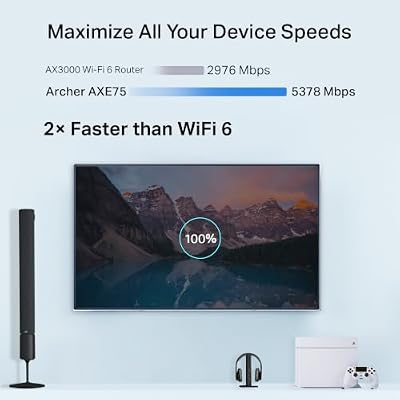
The Archer AXE75 is a WiFi 6E router, which means it includes the 6 GHz band in addition to the 2.4 GHz and 5 GHz radios found on standard WiFi 6 hardware. The 6 GHz band is the headline upgrade: it adds a large block of newly available spectrum that is largely free of older WiFi 4 and WiFi 5 traffic, which means much less airtime contention and noticeably lower latency for compatible WiFi 6E client devices such as recent phones, laptops and consoles.
Its AXE5400 class pools about 5.4 Gbps of theoretical throughput across the three bands, with the 6 GHz radio carrying a sizeable portion of that headroom. For households with WiFi 6E-capable devices, the AXE75 brings the most meaningful real-world step up over a dual-band AX router — buyers tend to feel the difference most clearly on devices that sit close to the router, where 6 GHz delivers its best speeds. See our best WiFi 6E routers guide for context.
Range, Coverage and Mesh Capability
The AXE75 is built for medium-sized homes and uses six external antennas with beamforming to direct signal toward client devices. The 6 GHz band has a slightly shorter effective range than 5 GHz in identical conditions, so it is best understood as a clean, high-throughput band for nearby devices rather than a coverage band — typical home use mixes 6 GHz for compatible nearby devices with the 5 GHz radio for the rest of the home.
Modern WiFi 6E client devices generally handle the band-steering decisions automatically through the router, so most users do not need to micro-manage which device connects to which radio. As with other modern TP-Link routers, the AXE75 supports EasyMesh, so it can be combined with other TP-Link EasyMesh devices to extend coverage. For larger homes, a dedicated mesh kit remains the better starting point — see our best mesh WiFi systems guide.
Ports, USB and Wired Backhaul
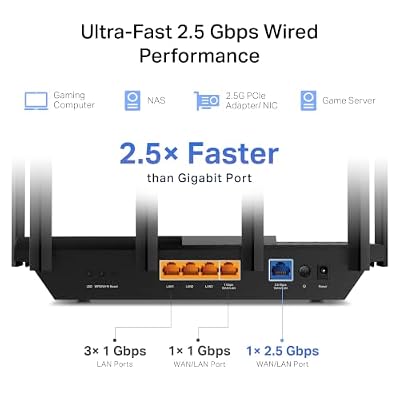
The AXE75 keeps the familiar Gigabit wired layout: one Gigabit WAN port for the modem connection and four Gigabit LAN ports for wired clients. It adds a USB port for sharing a storage drive or printer. For gamers, the wired Gigabit LAN ports remain the single most effective way to keep latency low and stable for a gaming PC or console — the WiFi 6E radios are a clear upgrade, but a wired link still wins for competitive play.
The AXE75 does not include a multi-gig WAN port; that step is reserved for the WiFi 7 tier covered later in this guide. For buyers on a typical Gigabit residential broadband plan, the Gigabit WAN port is not a limitation, but anyone on a 2 Gbps or faster plan will want to step up to a router with 2.5 Gbps WAN. The USB port supports basic file sharing and is a useful addition that broadens the router’s usefulness beyond pure networking.
Gaming Latency, QoS and Security Features
WiFi 6E genuinely helps gaming latency on compatible devices, because the 6 GHz band is far less congested than the legacy 2.4 GHz and 5 GHz radios. In practical terms that means more consistent ping times on wireless and lower jitter under load. The Archer AXE75 includes the TP-Link Tether app, HomeShield security and a full set of QoS controls so a gaming PC or console can be prioritised.
With more than 5,180 customer reviews on Amazon and a 2025 PCMag Editors’ Choice award, it is one of the best-vetted WiFi 6E routers in the mainstream price bracket. Editor recognition matters because it usually reflects real-world testing across a range of conditions rather than spec-sheet comparison alone. For wider context, see our low-latency gaming network guide.
Who Is the Archer AXE75 For?
The Archer AXE75 is for the buyer who wants genuine WiFi 6E spectrum without stepping up to the cost of a WiFi 7 router. If you have recent WiFi 6E-capable phones, laptops or consoles, want lower-latency wireless than standard WiFi 6 can offer, and value tri-band rather than just dual-band, the AXE75 is squarely your router.
It is also a strong pick for buyers who appreciate professional endorsement: the 2025 PCMag Editors’ Choice award is rare in this price bracket. It is not the right router if you specifically need WiFi 7 or multi-gig wired ports — for those buyers, see our best WiFi 7 routers guide.
Pros and Cons
Pros: True tri-band WiFi 6E with 6 GHz spectrum; AXE5400 class; six external antennas with beamforming; Gigabit WAN and four Gigabit LAN ports plus USB; EasyMesh-capable; 2025 PCMag Editors’ Choice.
Cons: No multi-gig WAN port; not WiFi 7; 6 GHz benefits depend on having WiFi 6E-capable client devices.
Is the Archer AXE75 Worth It?
At around $100 the TP-Link Archer AXE75 is the easiest WiFi 6E recommendation in 2026 for a mainstream home. It brings the home onto tri-band WiFi 6E with the 6 GHz band, retains a full set of Gigabit wired ports plus USB, supports EasyMesh and is backed by an enormous body of positive customer feedback.
Buyers who need WiFi 7 or multi-gig wired ports should step up a tier, but everyone else gets the most meaningful wireless upgrade for the money. The price-to-feature balance is the most attractive thing about the AXE75 — paying about $100 for true tri-band WiFi 6E with PCMag Editors’ Choice validation is rare in the router market. For more context, see our best gaming routers guide.
Frequently Asked Questions
Is WiFi 6E worth it over WiFi 6?
Yes, if you have devices that support it. The 6 GHz band is far less congested than 2.4 GHz and 5 GHz, which means lower wireless latency and higher real-world throughput on compatible client devices.
Does the Archer AXE75 work with older WiFi devices?
Yes. WiFi 6E routers are backwards compatible with WiFi 6, WiFi 5 and earlier standards on the 2.4 GHz and 5 GHz bands.
How does the Archer AXE75 compare with WiFi 7 routers?
WiFi 6E routers add the 6 GHz band but keep the WiFi 6 channel widths. WiFi 7 hardware adds wider 320 MHz channels and MLO (multi-link operation), which lowers latency further for compatible WiFi 7 devices.
Does the Archer AXE75 have a multi-gig WAN port?
No. The Archer AXE75 uses a Gigabit WAN port. For multi-gig WAN, step up to a WiFi 7 router or a higher-tier WiFi 6E model.
More Gaming Router Reviews
- TP-Link Archer BE550 WiFi 7 Router Review (BE9300)
- TP-Link BE400 WiFi 7 Router Review (BE6500)
- TP-Link Archer AX11000 Tri-Band Gaming Router Review
- NETGEAR Nighthawk RAX120 WiFi 6 Router Review (AX6000)
- NETGEAR Nighthawk RAXE300 WiFi 6E Router Review
- NETGEAR Nighthawk RS90 WiFi 7 Router Review (BE3600)
- Amazon eero Pro 6E Mesh WiFi Router Review
- Amazon eero 7 Dual-Band Mesh WiFi 7 Router Review
Affiliate Disclosure: As an Amazon Associate, we earn from qualifying purchases. If you click a link and make a purchase, we may earn a small commission at no extra cost to you. Prices and availability are accurate as of publication and may change.
Related Articles
Looking for more on this topic? Browse the hand-picked guides below — each one applies the same scoring rubric used in this review.










