

- Top Pick: Amazon eero 7 dual-band mesh Wi-Fi 7 router (newest model) – Supports internet plans up to 2.5 Gbps, Coverage up to 6,000 sq. ft., 3-pack
- Best Value: Amazon eero 7 dual-band mesh Wi-Fi 7 router (newest model) – Supports internet plans up to 2.5 Gbps, Coverage up to 4,000 sq. ft., 2-pack
- Premium Choice: Amazon eero 7 dual-band mesh Wi-Fi 7 router (newest model) – Supports internet plans up to 2.5 Gbps, Coverage up to 2,000 sq. ft., 1-pack
The Amazon eero 7 is a dual-band WiFi 7 mesh router that brings the new standard to Amazon’s entry mesh tier, at an asking price around $140. It pairs WiFi 7 with the mature eero app and Alexa integration that the eero ecosystem is known for, and offers buyers a sensible upgrade path within the eero family from older Gigabit-class hardware. This eero 7 review covers the WiFi standard, range, ports, gaming features and overall value, and explains how it compares with both the eero Pro 6E above and the WiFi 7 routers elsewhere in this guide.
- Amazon eero 7 at a Glance
- WiFi Standard and Speed Class
- Range, Coverage and Mesh Capability
- Ports, USB and Wired Backhaul
- Gaming Latency, QoS and Security Features
- Who Is the eero 7 For?
- Pros and Cons
- Is the eero 7 Worth It?
- Frequently Asked Questions
- More Gaming Router Reviews
- Related Articles
- Related Articles
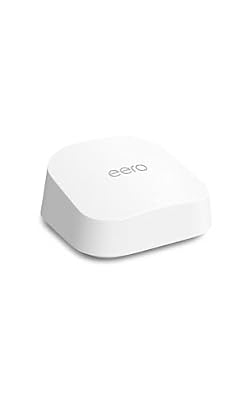
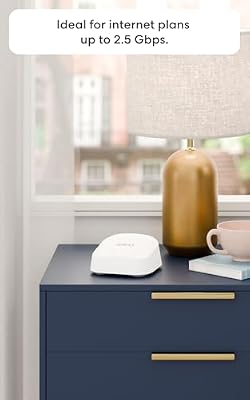
Amazon eero 7 dual-band mesh Wi-Fi 7 router (newest model) - Supports internet plans up to 2.5 Gbps, Coverage up to 2,000 sq. ft., 1-pack




As an Amazon Associate we earn from qualifying purchases. Product prices and availability are accurate as of the date/time indicated.
🛒 Best Price Today on Amazon
Prime members get fast, free shipping on everything above, plus member-only deals. New members get a 30-day free trial — cancel anytime.
As an Amazon Associate we earn from qualifying purchases.



Amazon eero 7 at a Glance
| Component | Specification |
|---|---|
| WiFi standard | WiFi 7 (802.11be) |
| Band class | eero 7 (dual-band) |
| Bands | Dual-band (2.4 GHz + 5 GHz) |
| Coverage | Medium homes per node |
| WAN port | Gigabit |
| LAN ports | Gigabit |
| USB | No |
| Mesh-capable | Yes (eero mesh) |
| Price | Around $140 |
WiFi Standard and Speed Class
The Amazon eero 7 is a dual-band WiFi 7 (802.11be) mesh router. WiFi 7 brings MLO (multi-link operation) and wider 320 MHz channels on 5 GHz compared with WiFi 6 hardware, which raises peak throughput and reduces tail latency on compatible client devices. Because the eero 7 is dual-band rather than tri-band, it does not include the 6 GHz radio found on higher-tier WiFi 7 mesh systems, but it still delivers the core WiFi 7 features at an entry price.
The trade-off of dual-band in a mesh context is that there is no dedicated backhaul radio, so the same band carries both client traffic and node-to-node traffic — running a wired Ethernet backhaul where possible substantially mitigates that. For households with new WiFi 7-capable phones, laptops or handhelds, the eero 7 is a sensible way to bring the home onto the new standard within the eero ecosystem; for households that specifically need 6 GHz, a tri-band WiFi 7 router or mesh is the better choice — see our best WiFi 7 routers guide.
Range, Coverage and Mesh Capability
The eero 7 is built around the same mesh approach as other eero hardware: nodes coordinate automatically, the network appears as one seamless WiFi name across the home, and devices roam between nodes without dropping the link. Single-node coverage is tuned for medium homes; multi-pack configurations extend coverage to larger and multi-floor homes.
Wired backhaul between nodes is supported and recommended where it can be run, because it removes any contention between client and backhaul traffic on the wireless radios — that is especially important on a dual-band mesh, where without wired backhaul the same 5 GHz radio carries both client and node-to-node data. For an overview of mesh options, see our best mesh WiFi systems guide.
Ports, USB and Wired Backhaul
The wired layout on the eero 7 is built around Gigabit rather than multi-gig ports, which matches its entry-tier price. There is no USB port. The eero approach throughout is deliberately minimal: clean design, simple wired configuration and most management handled through the eero app.
For gamers, a wired Gigabit connection between an eero 7 node and a gaming PC or console remains the most effective way to keep latency low and consistent. Buyers with a 2.5 Gbps broadband plan or 2.5G-equipped client devices should step up to a multi-gig eero or to one of the multi-gig BE-class routers covered earlier in this guide. Buyers who do not yet need multi-gig benefit from the simplicity and the lower price point that the Gigabit wired layout enables.
Gaming Latency, QoS and Security Features
WiFi 7’s MLO is the key feature for gaming on the eero 7. On compatible client devices it can use both bands simultaneously to lower tail latency and keep the link stable through brief congestion on a single band. The mesh nature of the system also helps gaming traffic because nodes coordinate automatically and devices stay associated with the strongest node as they roam through the home.
The eero app handles QoS and basic security; an eero Plus subscription adds advanced security and parental control features. As with the eero Pro 6E, the experience is built around simplicity rather than granular configurability — buyers who want manual band steering or detailed traffic shaping should look at enthusiast routers earlier in this guide instead. For wider context, see our low-latency gaming network guide.
Who Is the eero 7 For?
The eero 7 is for the buyer who wants WiFi 7 within the Amazon eero ecosystem at an entry price. If you already use eero hardware, you have a Gigabit or sub-Gigabit broadband plan, and you value the eero app and Alexa integration, the eero 7 is squarely your mesh router.
With more than 1,690 customer reviews on Amazon, the eero 7 has enough real-world feedback for buyers to be confident the system is stable and well supported despite being a newer product than the eero Pro 6E. It is not the right pick for buyers who specifically need multi-gig wired ports, the 6 GHz band, or USB connectivity — for those, see the BE-class routers reviewed earlier, the eero Pro 6E above, or our best WiFi 7 routers guide.
Pros and Cons
Pros: WiFi 7 standard at an entry mesh price; MLO and 320 MHz channels on 5 GHz; mature eero app and Alexa integration; clean industrial design; seamless mesh roaming; large body of positive customer reviews.
Cons: Dual-band only — no 6 GHz; Gigabit wired ports rather than multi-gig; no USB port; advanced security features require an eero Plus subscription.
Is the eero 7 Worth It?
At around $140 the Amazon eero 7 is an attractive way into WiFi 7 mesh for the buyer who values the eero ecosystem. The combination of dual-band WiFi 7 with MLO, mature eero software and Alexa integration covers the needs of the typical modern Gigabit-class household well. Buyers who do need 6 GHz or multi-gig wired ports should step up to a tri-band WiFi 7 mesh or to a BE-class router elsewhere in this guide; for everyone else who values the eero approach it earns a recommendation.
The eero 7 also makes a sensible add-on for households that already use other eero hardware — mixing eero models in a single mesh is straightforward through the eero app, so adding an eero 7 unit to an existing setup is easier than mixing routers from different brands. See also our best gaming routers guide.
Frequently Asked Questions
Is the Amazon eero 7 good for gaming?
Yes, especially on a wired connection. WiFi 7’s MLO lowers tail latency on compatible WiFi 7 client devices, and the mesh keeps the device on the strongest node as it roams.
Does the eero 7 support 6 GHz?
No. The eero 7 is a dual-band WiFi 7 router and does not include the 6 GHz radio found on higher-tier tri-band WiFi 7 mesh systems.
Does the eero 7 support multi-gig wired networking?
No. The eero 7 uses Gigabit WAN and LAN ports. Buyers with a multi-gig broadband plan should step up to a multi-gig eero model or to a BE-class router with 2.5 Gbps ports.
Do I need an eero Plus subscription with the eero 7?
No. The eero 7 works as a router and mesh without a subscription. eero Plus adds advanced security and parental control features for users who want them.
More Gaming Router Reviews
- ASUS RT-AX82U Gaming Router Review (AX5400)
- TP-Link Archer AX21 WiFi 6 Router Review (AX1800)
- TP-Link Archer AX55 WiFi 6 Router Review (AX3000)
- TP-Link Archer AXE75 WiFi 6E Router Review (AXE5400)
- TP-Link Archer BE550 WiFi 7 Router Review (BE9300)
- TP-Link BE400 WiFi 7 Router Review (BE6500)
- TP-Link Archer AX11000 Tri-Band Gaming Router Review
- NETGEAR Nighthawk RAX120 WiFi 6 Router Review (AX6000)
Affiliate Disclosure: As an Amazon Associate, we earn from qualifying purchases. If you click a link and make a purchase, we may earn a small commission at no extra cost to you. Prices and availability are accurate as of publication and may change.
Related Articles
Looking for more on this topic? Browse the hand-picked guides below — each one applies the same scoring rubric used in this review.










