

- Top Pick: ASUS ROG Strix GS-BE12000 WiFi 7 Gaming Router – Tri-Band, 12Gbps, Mesh
- Best Value: ASUS TUF Gaming BE6500 WiFi 7 Router – Dual-Band, Up to 6.5 Gbps Wireless, Game Accelerator, Multi-Link Operation (MLO), (x4) 2.5GbE Ports, Mesh + VPN Compatible, & Subscription-Free Network Security
- Premium Choice: TP-Link BE6500 Dual-Band WiFi 7 Router (BE400)
Affiliate disclosure: As an Amazon Associate we earn from qualifying purchases. This post contains affiliate links — if you buy through them we may earn a small commission at no extra cost to you. This never affects our recommendations.
- Best Overall: ASUS ROG Rapture GT-AX11000 Pro — Gaming Router King
- Best Wi-Fi 6E: TP-Link Archer AXE300 — 6GHz Band for Zero Interference
- Best Budget: TP-Link Archer AX55 — Wi-Fi 6 Without Breaking the Bank
- Best Mesh: ASUS ZenWiFi Pro ET12 — Whole-Home Gaming Coverage
- Gaming Router Buying Guide
- Frequently Asked Questions
- Related Articles
- Related Articles
Your internet connection is only as good as your router. The best gaming router reduces ping, eliminates packet loss, and prioritizes gaming traffic over other devices on your network — giving you a competitive edge in online multiplayer. In 2025, Wi-Fi 6E routers with 6GHz band support, advanced QoS (Quality of Service), and VPN acceleration represent the state of consumer networking for gaming households.
As an Amazon Associate we earn from qualifying purchases at no extra cost to you.

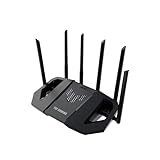


In a hurry? See the top-rated Gaming Router deals available right now:
🛒 Check Gaming Router Prices on Amazon →🛒 Best Price Today on Amazon
Prime members get fast, free shipping on everything above, plus member-only deals. New members get a 30-day free trial — cancel anytime.
Start 30-Day Prime Free Trial →See Today’s Amazon DealsBest Overall: ASUS ROG Rapture GT-AX11000 Pro — Gaming Router King
The ASUS ROG Rapture GT-AX11000 Pro is the most feature-complete gaming router available. Its tri-band Wi-Fi 6 delivers 11,000 Mbps total throughput, and the dedicated gaming port automatically prioritizes connected gaming devices. ASUS’s GameBoost QoS, Adaptive QoS, and free lifetime AiProtection security make it exceptional for gaming households. The 2.5GbE gaming port and dual USB 3.0 ports for network storage complete the package. Best gaming router for households where multiple people game, stream, and work simultaneously.

Best Wi-Fi 6E: TP-Link Archer AXE300 — 6GHz Band for Zero Interference
Wi-Fi 6E’s 6GHz band is uncongested in most neighborhoods — no competing devices, no interference, delivering the most consistent wireless gaming experience possible. TP-Link’s Archer AXE300 provides 19,200 Mbps total tri-band throughput across 2.4GHz, 5GHz, and 6GHz. The 6GHz band’s dedicated gaming bandwidth ensures gaming devices always have clean wireless channel access. Best gaming router for apartment dwellers in dense wireless environments where 2.4GHz and 5GHz bands are crowded.
Best Budget: TP-Link Archer AX55 — Wi-Fi 6 Without Breaking the Bank
TP-Link’s Archer AX55 brings Wi-Fi 6 (AX3000) to an accessible price point. AX55 provides OFDMA multi-user access, gaming QoS, and WPA3 security at a price that makes the Wi-Fi 6 upgrade financially justified. For gamers with a single gaming PC or console, the AX55 delivers Wi-Fi 6 gaming performance without paying for tri-band or Wi-Fi 6E features that smaller households don’t need. Best budget gaming router for single-device or small-household gaming setups.

Best Mesh: ASUS ZenWiFi Pro ET12 — Whole-Home Gaming Coverage
For large homes where signal strength varies room to room, ASUS’s ZenWiFi Pro ET12 mesh system extends Wi-Fi 6E coverage with backhaul on the uncongested 6GHz band. Each node includes a 2.5GbE port for wired backhaul option. Gaming devices throughout the home receive consistent, low-latency wireless connectivity regardless of distance from the primary router. Best gaming router system for homes exceeding 3,000 square feet or multi-floor gaming setups.
Gaming Router Buying Guide
Wired vs Wireless: The Honest Truth
A direct Ethernet connection always outperforms wireless for gaming — consistent sub-1ms latency versus 5–20ms for Wi-Fi, zero packet loss, and no interference from neighboring networks. Run a Cat6 cable from your router to your gaming PC or console if at all possible. If wiring isn’t feasible, Wi-Fi 6E on the 6GHz band provides the most wired-like wireless gaming experience.
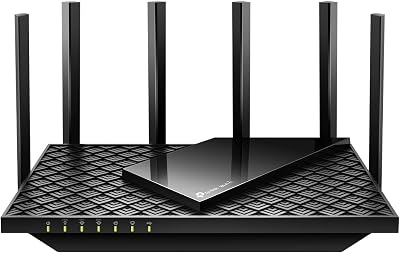
QoS: Gaming Traffic Prioritization
Gaming routers with QoS identify and prioritize gaming traffic over streaming, downloads, and web browsing. When a family member is watching 4K Netflix and another is downloading, QoS ensures your game traffic maintains low latency. Enable gaming QoS and set your gaming device’s IP as highest priority for consistent ping during peak household usage.
Frequently Asked Questions
Does a gaming router reduce ping?
A gaming router reduces ping primarily by prioritizing gaming traffic and reducing network congestion from other devices. It doesn’t improve your ISP’s latency to game servers — your ISP connection quality and server proximity are the primary ping determinants. A gaming router helps most in multi-device households during peak usage.
Is Wi-Fi 6 worth it for gaming?
Yes — Wi-Fi 6’s OFDMA technology reduces latency variance (jitter) significantly compared to Wi-Fi 5. Wi-Fi 6E’s 6GHz band adds interference immunity on top. For wireless gaming, Wi-Fi 6 or 6E is a meaningful upgrade over Wi-Fi 5. For wired gaming, your router’s Wi-Fi generation is irrelevant.
What internet speed do I need for online gaming?
Online gaming uses surprisingly little bandwidth: 3–25 Mbps for most games. Latency (ping) matters far more than bandwidth for gaming. A 50 Mbps connection with 15ms ping outperforms a 1 Gbps connection with 80ms ping for competitive gaming. Prioritize ISP choice based on ping to your region’s game servers, not download speed.
Related Articles
Looking for more on this topic? Browse the hand-picked guides below — each one applies the same scoring rubric used in this review.


