

An RGB mouse is where performance meets personality. Beyond the lighting that ties your setup together, a good gaming mouse gives you a precise sensor, programmable buttons, and switches that feel sharp under your fingers. This guide rounds up the best RGB mice in 2026 across the full range — from a single-digit-dollar wireless option to enthusiast-grade gaming mice with deep customization — so you can match the lighting and features to your budget and play style.
- Best RGB Mice at a Glance
- 1. Uiosmuph G12 Slim Rechargeable Wireless Mouse
- 2. Logitech G502 Hero High Performance Wired Gaming Mouse
- 3. Redragon S101M-KS RGB Keyboard and Mouse Combo (Tri-Mode Wireless)
- 4. Logitech G305 Lightspeed Wireless Gaming Mouse
- 5. Redragon M602 Griffin RGB Gaming Mouse
- 6. Redragon M602 Wired RGB Gaming Mouse (7200 DPI)
- How to Choose the Right RGB Mouse
- Frequently Asked Questions
- Related Guides
- Related Articles
Our picks were chosen on the things that matter for an RGB mouse specifically: the quality and customizability of the lighting, the software behind it, the sensor, the switches, and overall value. We have included wired and wireless options and prices from around $10 to around $55, because the right RGB mouse depends as much on your taste and grip as on your wallet. Below is an at-a-glance comparison of all six, then a closer look at each and a buyer’s guide focused on lighting, software and switches — the criteria that separate a great RGB mouse from a merely colorful one.
As an Amazon Associate we earn from qualifying purchases at no extra cost to you.






🛒 Best Price Today on Amazon
Prime members get fast, free shipping on everything above, plus member-only deals. New members get a 30-day free trial — cancel anytime.
Best RGB Mice at a Glance
| Mouse | Best For | Standout Spec | Approx Price |
|---|---|---|---|
| Uiosmuph G12 Wireless | Budget RGB on a wireless | Rechargeable, silent, 2.4G | around $10 |
| Logitech G502 Hero | Feature-packed RGB gaming | HERO 25K sensor, 11 buttons | around $32 |
| Redragon S101M-KS Combo | RGB keyboard + mouse set | Tri-mode wireless combo | around $55 |
| Logitech G305 Lightspeed | Wireless RGB-style minimalist | LIGHTSPEED wireless, HERO sensor | around $37 |
| Redragon M602 Griffin RGB | Best value RGB ergonomics | RGB spectrum, ergonomic shape | around $30 |
| Redragon M602 Wired RGB | Tightest budget RGB | 7200 DPI, RGB backlight | around $20 |
1. Uiosmuph G12 Slim Rechargeable Wireless Mouse

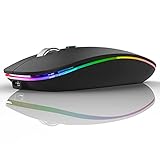
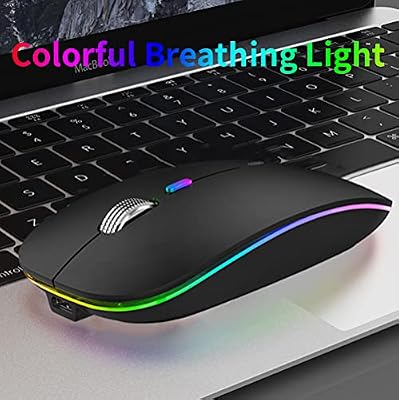
Uiosmuph LED Wireless Mouse, G12 Slim Rechargeable Silent Mouse Matte Black | 2.4GHz Optical, USB C Charging, Quiet Click, LED,Portable,1600DPI, USB Receiver,Type C Adapter, Compatible with PC,Laptop,Mac


As an Amazon Associate we earn from qualifying purchases. Product prices and availability are accurate as of the date/time indicated.
The Uiosmuph G12 is the budget surprise of this list — a slim, rechargeable 2.4G wireless mouse with LED lighting and silent clicks, all for around $10. It is not a hardcore gaming mouse, but as an affordable, good-looking wireless pointer with a touch of glow, it punches well above its price.
For an RGB-style mouse on the tightest budget, or as a tidy wireless option for a laptop or second machine, the G12 makes sense. The rechargeable battery means no constant AA swaps, the silent buttons are pleasant in shared spaces, and the slim profile travels well. Its intent is affordable, cable-free style rather than competitive performance — and on that brief it delivers.
Pros: Very cheap, wireless and rechargeable, silent clicks, slim and portable.
Cons: Lighting is simple, not full RGB; basic sensor for casual use.
2. Logitech G502 Hero High Performance Wired Gaming Mouse

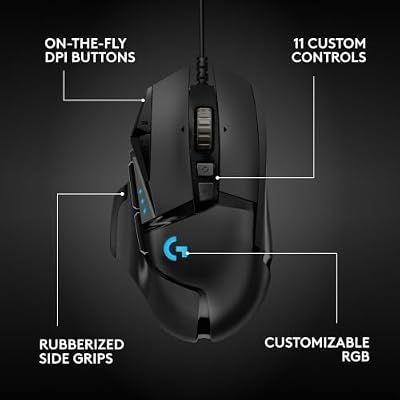
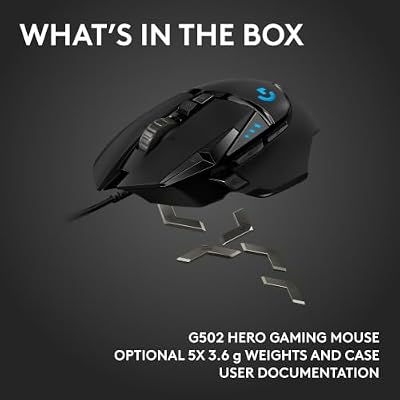
Logitech G502 Hero Wired Gaming Mouse - Black | High performance, 25,600 DPI, RGB, adjustable weights, 11 programmable buttons, on-board memory, PC/Mac





As an Amazon Associate we earn from qualifying purchases. Product prices and availability are accurate as of the date/time indicated.
The Logitech G502 Hero is a legend for good reason and the enthusiast pick of this list. It pairs Logitech’s excellent HERO 25K sensor with eleven programmable buttons, adjustable weights, and per-zone LIGHTSYNC RGB lighting you can tune in Logitech’s G HUB software. At around $32 it is one of the most feature-rich RGB gaming mice you can buy.
This is the mouse for the gamer who wants it all — deep customization, a top-tier sensor, a dedicated sniper button and tunable weighting — wrapped in rich, controllable RGB. The LIGHTSYNC lighting can sync across other Logitech gear for a coordinated setup, and G HUB lets you build per-game profiles. If your RGB mouse needs to be a serious gaming tool as well as a centerpiece, the G502 Hero is the standout.
Pros: Superb HERO 25K sensor, 11 programmable buttons, per-zone LIGHTSYNC RGB, tunable weights.
Cons: Heavier than minimalist mice; wired only.
3. Redragon S101M-KS RGB Keyboard and Mouse Combo (Tri-Mode Wireless)

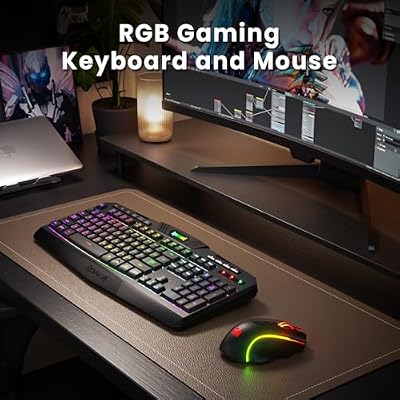
Redragon S101M-KS Gaming Keyboard and Mouse Wireless with Tri-Mode, RGB Keyboard and 4800 DPI Gaming Mouse, 10 Independent Multimedia Keys for Wins, PC, Computer, Wireless S101 Ideal for Gamer



As an Amazon Associate we earn from qualifying purchases. Product prices and availability are accurate as of the date/time indicated.
The Redragon S101M-KS is the odd-one-out in the best way: a tri-mode wireless RGB keyboard and mouse combo that lights up your whole desk at once. At around $55 for both pieces, it is the pick for anyone building or refreshing a setup who wants coordinated RGB across keyboard and mouse without buying them separately.
This suits the gamer or streamer who values a matched, glowing aesthetic and the flexibility of tri-mode connectivity. Buying the keyboard and mouse together guarantees the lighting and styling line up, and it is more cost-effective than two standalone RGB pieces. If your goal is a complete, color-coordinated desk in one purchase, the S101M-KS combo is the smart shortcut.
Pros: Matched RGB keyboard and mouse, tri-mode wireless, great combo value.
Cons: Combo, not a standalone mouse; mouse is simpler than dedicated flagships.
4. Logitech G305 Lightspeed Wireless Gaming Mouse

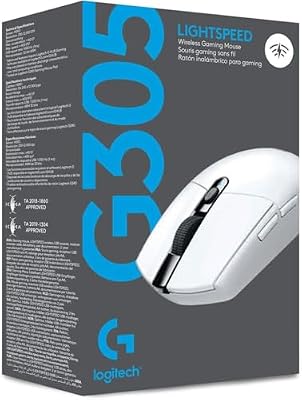
Logitech G305 Lightspeed Wireless Gaming Mouse - White | 12,000 DPI, Lightweight, 6 Programmable Buttons, 250h Battery, On-Board Memory, Compatible with PC and Mac





As an Amazon Associate we earn from qualifying purchases. Product prices and availability are accurate as of the date/time indicated.
The Logitech G305 Lightspeed is the wireless performance pick, and it represents a deliberate trade-off for some buyers. It uses Logitech’s acclaimed LIGHTSPEED wireless and a HERO sensor in a lightweight, minimalist shell. The catch for RGB fans: the G305 favors clean styling and long battery life over flashy lighting, so it is the pick if you want wireless precision in a tidy package.
This is the mouse for the competitive or wireless-first gamer who prioritizes a fast, reliable sensor and low weight over elaborate illumination. LIGHTSPEED wireless is genuinely competitive with wired connections, and the long battery life is a real convenience. If you like the idea of a sleek, high-performance wireless mouse and can live with restrained lighting, the G305 earns its place.
Pros: Excellent LIGHTSPEED wireless, accurate HERO sensor, lightweight, long battery life.
Cons: Minimal RGB lighting; styling is understated rather than flashy.
5. Redragon M602 Griffin RGB Gaming Mouse

Redragon M602 Griffin RGB Gaming Mouse, Tri-Mode 2.4G/USB-C/Bluetooth Mouse Gaming, RGB Spectrum Backlit Ergonomic Mouse with 7 Programmable Backlight Modes up to 8000 DPI for Win PC Gamers (Wireless)


As an Amazon Associate we earn from qualifying purchases. Product prices and availability are accurate as of the date/time indicated.
The Redragon M602 Griffin is the best-value RGB ergonomic mouse here. It wraps full RGB spectrum backlighting around a comfortable, contoured right-handed shape, adds programmable buttons, and asks only around $30. For vivid lighting and an ergonomic grip on a sensible budget, it is hard to beat.
This is the pick for the gamer who wants real, colorful RGB and a comfortable hand feel without spending flagship money. The spectrum backlighting cycles through rich colors, the ergonomic shape supports longer sessions, and the price leaves room in the budget for the rest of your setup. As an affordable RGB centerpiece that is genuinely comfortable to use, the Griffin is a standout value.
Pros: Vivid RGB spectrum lighting, comfortable ergonomic shape, programmable buttons, great price.
Cons: Wired; software is simpler than premium-brand suites.
6. Redragon M602 Wired RGB Gaming Mouse (7200 DPI)
![Redragon M602 Gaming Mouse, Ergonomic RGB Gaming Mouse Wired with 7200 Adjustable DPI, 9 Programmable Buttons, Professional Software for Gamer Office [Black]](https://m.media-amazon.com/images/I/4189L2UBl9L._SL400_.jpg)
Redragon M602 Gaming Mouse, Ergonomic RGB Gaming Mouse Wired with 7200 Adjustable DPI, 9 Programmable Buttons, Professional Software for Gamer Office [Black]


As an Amazon Associate we earn from qualifying purchases. Product prices and availability are accurate as of the date/time indicated.
Closing the list is the wired Redragon M602, the tightest-budget RGB pick at around $20. It delivers RGB backlighting, an adjustable sensor up to 7200 DPI, and an ergonomic gaming shape at a price that makes it an easy first gaming mouse or a colorful spare.
Its intent is simple: bring real RGB lighting and adjustable DPI to gamers on the smallest budget. You do not get the deep software or premium sensor of pricier mice, but the lighting livens up a desk, the DPI steps cover everyday gaming, and the ergonomic shell is comfortable. For a wallet-friendly RGB mouse that still feels like a proper gaming peripheral, the M602 is a dependable choice.
Pros: Affordable RGB lighting, adjustable up to 7200 DPI, ergonomic gaming shape.
Cons: Basic software; entry-level sensor and build.
How to Choose the Right RGB Mouse
For an RGB mouse, lighting is the first thing to scrutinize — and not all RGB is equal. The richest options, like the Logitech G502’s LIGHTSYNC and the Redragon Griffin’s full spectrum backlighting, offer multiple independently controllable zones and millions of colors, so you can match your mouse to the rest of your setup or run reactive effects. Cheaper mice may offer simpler single-zone glow or fixed color cycles. Decide how much lighting control you actually want before you spend.
Software is what brings that lighting — and the rest of the mouse — to life, and it varies hugely by brand. Logitech’s G HUB lets you customize LIGHTSYNC effects, sync lighting across other Logitech gear, remap buttons and store per-game profiles. Redragon’s utilities are simpler but still let you control RGB modes and DPI. If you want effects that react to games or sync across your whole desk, prioritize a mouse with capable software; if you just want it to look good out of the box, a simpler tool is fine.
Switches and sensor define how the mouse performs under the lights. Look at the click switches — crisp, responsive main buttons matter as much as the glow — and the sensor’s DPI range and tracking quality. A premium sensor like Logitech’s HERO tracks more accurately than a basic optical unit, which matters if you game seriously. Programmable buttons add value too: the G502’s eleven buttons suit MMO and MOBA players, while a simpler layout is fine for casual play.
Finally, weigh wired versus wireless, grip and budget. Wireless mice like the G305 add freedom but often trade away elaborate lighting for battery life, while wired RGB mice keep the lights blazing without charging. Match the shape to your grip — ergonomic shells like the Griffin suit palm grips and longer sessions — set your budget, and pick the mouse on this list whose lighting, software and switches line up with how you play. The best RGB mouse looks great and gets out of your way.
Frequently Asked Questions
Do RGB mice perform better than non-RGB mice?
RGB lighting is cosmetic and does not directly improve performance — what matters for play is the sensor, switches and shape. That said, many of the best-performing gaming mice, like the Logitech G502 Hero, also happen to offer excellent RGB, so you rarely have to choose between performance and lighting.
Can I control the RGB lighting with software?
On most of these mice, yes. Logitech’s G HUB offers deep LIGHTSYNC control and can sync lighting across other Logitech devices, while Redragon’s utilities let you switch RGB modes and adjust DPI. Very cheap mice may offer only on-board lighting cycles with no software, so check before buying if fine control matters to you.
Are wireless RGB mice worth it?
They can be, but there is a trade-off. Wireless mice such as the Logitech G305 Lightspeed prioritize battery life and low weight, so they often have more restrained lighting than wired RGB mice. If elaborate, always-on RGB is your priority, a wired mouse keeps the lights blazing; if cable-free freedom matters more, a wireless model is the better fit.
What DPI do I need for gaming?
Most gamers use far less DPI than the maximum a mouse advertises — common settings sit well below the 7200 to 25,600 DPI ceilings these mice list. What matters more is a sensor that tracks accurately and a DPI button so you can switch sensitivity on the fly. All the gaming mice here offer adjustable DPI; the premium HERO sensors simply track more precisely.
Related Guides
- Best Gaming Mouse
- Best Wireless Gaming Mouse
- Best RGB Keyboards
- Best Mouse Pads for Gaming
- Best Budget Gaming Setup
- Best Gaming Headsets
Affiliate Disclosure: As an Amazon Associate, we earn from qualifying purchases. If you click a link and make a purchase, we may earn a small commission at no extra cost to you. Prices and availability are accurate as of publication and may change.










