

Graphic design lives and dies on precision and control. Whether you are pulling vector paths in Illustrator, nudging layout elements by a pixel, or painting in Photoshop, the mouse you use shapes how fluidly you work. The best mice for graphic design track accurately, stay comfortable through long creative sessions, and put useful shortcuts at your fingertips. This guide rounds up the best mice for graphic design in 2026 across the range — from high-precision and programmable gaming mice to comfortable wireless and ergonomic options — so you can match accuracy, comfort and features to your workflow and budget.
- Best Mice for Graphic Design at a Glance
- 1. Logitech G502 Hero High Performance Wired Mouse
- 2. Anker 2.4G Wireless Vertical Ergonomic Mouse
- 3. Logitech M185 Wireless Mouse
- 4. Logitech G305 Lightspeed Wireless Gaming Mouse
- 5. Logitech M510 Wireless Mouse
- 6. Redragon M602 Wired Gaming Mouse (7200 DPI)
- How to Choose the Right Mouse for Graphic Design
- Frequently Asked Questions
- Related Guides
- Related Articles
- Related Guides
Our picks were chosen on what matters for design specifically: sensor accuracy and tracking for precise work, programmable buttons for shortcuts and tools, and comfort over long sessions. We have included wired and wireless options and prices from around $14 to around $32, because the best design mouse depends as much on your hand and habits as on your budget. Below is an at-a-glance comparison of all six, then a closer look at each and a buyer’s guide focused on precision, control and comfort — the criteria that separate a great design mouse from a merely functional one.
As an Amazon Associate we earn from qualifying purchases at no extra cost to you.




🛒 Best Price Today on Amazon
Prime members get fast, free shipping on everything above, plus member-only deals. New members get a 30-day free trial — cancel anytime.
Best Mice for Graphic Design at a Glance
| Product | Best For | Standout Spec | Approx Price |
|---|---|---|---|
| Logitech G502 Hero Wired | Precision and shortcuts | HERO 25K sensor, 11 buttons | around $32 |
| Anker 2.4G Wireless Vertical | Wrist comfort while designing | Vertical ergonomic design | around $22 |
| Logitech M185 Wireless | Affordable wireless design | 12-month battery, USB receiver | around $14 |
| Logitech G305 Lightspeed | Precise wireless control | HERO sensor, LIGHTSPEED wireless | around $37 |
| Logitech M510 Wireless | Comfortable full-size wireless | Unifying receiver, 1000 DPI | around $28 |
| Redragon M602 Wired | Programmable buttons on a budget | 7200 DPI, 7 buttons | around $20 |
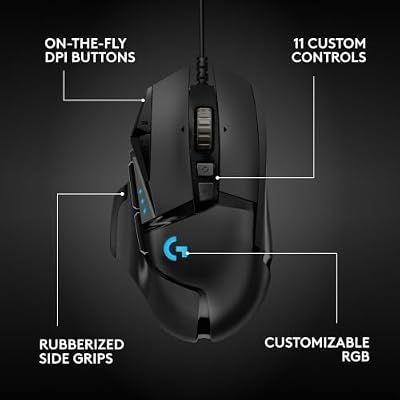
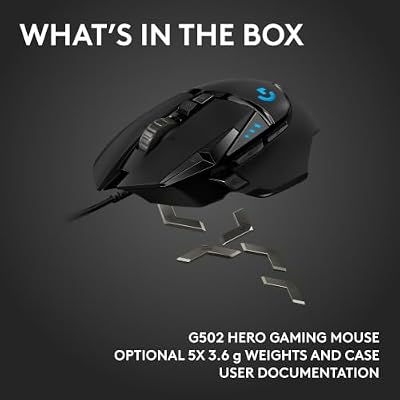
1. Logitech G502 Hero High Performance Wired Mouse

Logitech G502 Hero Wired Gaming Mouse - Black





As an Amazon Associate we earn from qualifying purchases. Product prices and availability are accurate as of the date/time indicated.
The Logitech G502 Hero is the top pick for graphic design and the most capable mouse on this list. Built for gaming but superb for design, it pairs the acclaimed HERO 25K sensor with eleven programmable buttons and adjustable weights, giving designers both pinpoint precision and a wealth of shortcuts. At around $32 its blend of accuracy and control is exceptional value.
This is the mouse for the designer who wants it all: precise tracking for vector work and fine selections, plus a bank of programmable buttons to map tools, undo, zoom and brush controls. Logitech’s G HUB software lets you build per-application profiles for Illustrator, Photoshop or InDesign, while the adjustable weights tune the feel. If precision and a fast, shortcut-driven workflow matter most, the G502 Hero is the standout.
Pros: Superb HERO 25K precision, 11 programmable buttons, per-app profiles, adjustable weights.
Cons: Heavier than minimalist mice; wired only.
2. Anker 2.4G Wireless Vertical Ergonomic Mouse

Anker 2.4G Wireless Ergonomic Mouse, Right Hand Vertical Mouse USB Receiver


As an Amazon Associate we earn from qualifying purchases. Product prices and availability are accurate as of the date/time indicated.
The Anker 2.4G wireless vertical mouse is the comfort pick for designers. Creative work means long, focused sessions, and the Anker’s vertical, ergonomic design holds your hand in a more natural ‘handshake’ position that eases the wrist and forearm strain those sessions can cause. With multi-device wireless connectivity, at around $22 it is a thoughtful choice for comfort-focused designers.
This is the mouse to choose if your design days are long and your wrist feels the strain of a conventional flat mouse. The vertical design is its whole purpose — a more neutral hand angle — while the 2.4G wireless keeps your desk clear for a tablet, sketchbook or keyboard shortcuts. For a designer who prioritises comfort through marathon creative sessions, the Anker vertical is the natural place to start.
Pros: Vertical ergonomic design eases wrist strain, multi-device wireless, comfortable for long sessions.
Cons: Vertical shape takes adjustment; aimed at comfort over rapid speed.
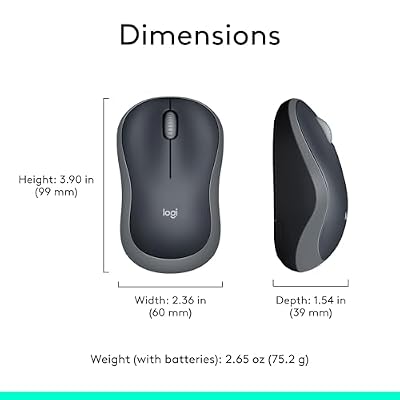
3. Logitech M185 Wireless Mouse

Logitech M185 Compact Ambidextrous 2.4 GHz Wireless Mouse - Swift Grey




As an Amazon Associate we earn from qualifying purchases. Product prices and availability are accurate as of the date/time indicated.
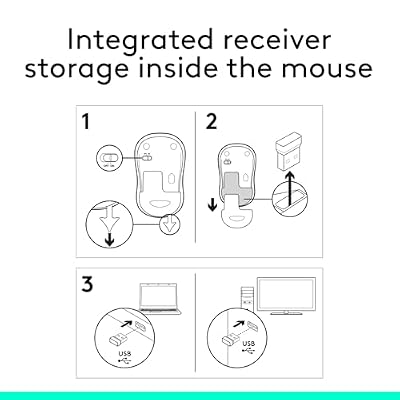
The Logitech M185 is the affordable wireless design pick. It uses a small 2.4GHz USB receiver and is rated for around twelve months of battery life, so you can keep working without worrying about charging. At around $14 it brings Logitech reliability to a design desk on a modest budget.
This is the mouse to choose if you want dependable, low-maintenance wireless for design without spending much. The plug-and-go receiver makes setup instant, the long battery life keeps it running for a year, and the compact shape suits most hands for layout work, browsing references and general design tasks. For a tidy, reliable wireless mouse on a budget, the M185 is a smart, well-proven choice.
Pros: Long 12-month battery, plug-and-go USB receiver, reliable Logitech build, very affordable.
Cons: Basic sensor and feature set; no programmable buttons for tools.
4. Logitech G305 Lightspeed Wireless Gaming Mouse

Logitech G305 Lightspeed Wireless Gaming Mouse - White





As an Amazon Associate we earn from qualifying purchases. Product prices and availability are accurate as of the date/time indicated.
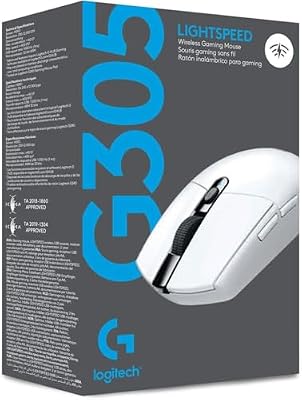
The Logitech G305 Lightspeed is the precise wireless pick for designers. Built as a gaming mouse, it brings a fast, accurate HERO sensor and Logitech’s LIGHTSPEED wireless to design work, delivering the tracking precision detailed work rewards without a cable. At around $37 it is the premium wireless choice here, and the accuracy justifies it.
This is the mouse for the designer who wants precise, responsive control wirelessly. The HERO sensor tracks accurately for vector paths and fine selections, LIGHTSPEED keeps the connection reliable, and the lightweight shell is easy to move precisely across a large canvas. If you want gaming-grade accuracy applied to your design work without the clutter of a cable, the G305 Lightspeed is the standout.
Pros: Accurate HERO sensor for precise work, reliable LIGHTSPEED wireless, lightweight and nimble.
Cons: Pricier than basic office mice; styling is understated.
5. Logitech M510 Wireless Mouse

Logitech M510 Full Size Ambidextrous 2.4 GHz Wireless Mouse




As an Amazon Associate we earn from qualifying purchases. Product prices and availability are accurate as of the date/time indicated.
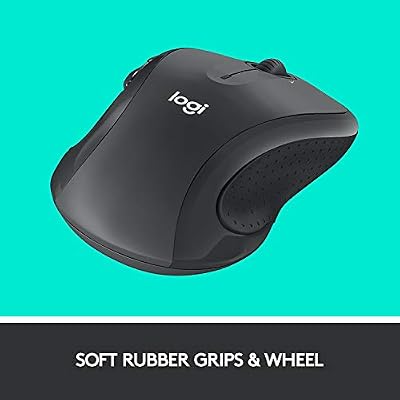
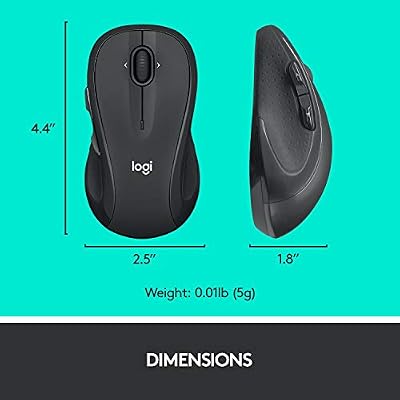
The Logitech M510 is the comfortable full-size wireless pick. Its larger, contoured shape fills the hand for a relaxed grip during long design sessions, and it connects via Logitech’s reliable Unifying receiver with a 1000 DPI sensor that is steady for everyday creative work. At around $28 it sits in the comfort-and-value sweet spot.
This is the mouse to choose if you want a roomy, comfortable wireless mouse for design rather than a compact travel model. The full-size shape supports the palm well over hours of work, the Unifying receiver can pair with other compatible Logitech devices, and the steady sensor handles layout and general design comfortably. For relaxed, full-size wireless design work, the M510 is a dependable choice.
Pros: Comfortable full-size shape, reliable Unifying receiver, steady tracking, good value.
Cons: Modest 1000 DPI sensor; less precise than a dedicated gaming sensor.
6. Redragon M602 Wired Gaming Mouse (7200 DPI)
![Redragon M602 Gaming Mouse, Ergonomic RGB Gaming Mouse Wired with 7200 Adjustable DPI, 9 Programmable Buttons, Professional Software for Gamer Office [Black]](https://m.media-amazon.com/images/I/4189L2UBl9L._SL400_.jpg)
Redragon M602 Gaming Mouse, Ergonomic RGB Gaming Mouse Wired with 7200 Adjustable DPI, 9 Programmable Buttons, Professional Software for Gamer Office [Black]


As an Amazon Associate we earn from qualifying purchases. Product prices and availability are accurate as of the date/time indicated.
Rounding out the list is the wired Redragon M602, the programmable-buttons pick on a budget. Built as a gaming mouse, it offers an adjustable sensor up to 7200 DPI and seven buttons you can put to work as design shortcuts, all for around $20. For a designer who wants extra control without spending much, it is excellent value.
This is the mouse to choose if you want to map common design actions to buttons and adjust sensitivity on the fly, without a premium price. The adjustable DPI lets you switch between broad movements and fine, precise work, the extra buttons can speed up repetitive tasks, and the wired connection is consistent. As an affordable, customisable design mouse, the M602 punches above its price.
Pros: Adjustable DPI up to 7200, seven buttons for shortcuts, consistent wired link, great value.
Cons: Entry-level sensor and software; gaming styling rather than office looks.
How to Choose the Right Mouse for Graphic Design
Choosing a mouse for graphic design starts with precision, because accurate tracking is what lets you place vector points, nudge elements and make fine selections cleanly. A quality sensor follows your movement faithfully without smoothing or jitter, which is why a gaming-grade option like the Logitech G502’s HERO 25K sensor suits exacting design work. General layout and browsing are comfortable on a steady everyday sensor, so judge how fine your work really gets before paying for maximum precision.
Programmable buttons are a bigger deal in design than in most tasks. Mapping tools, undo, zoom and brush controls to extra buttons keeps your hand on the mouse and speeds up a creative workflow noticeably, which is where the eleven buttons of the Logitech G502 Hero or the seven of the Redragon M602 earn their place. If your software relies on frequent tool switching and shortcuts, prioritise a mouse with buttons you can customise; if you work mostly from the keyboard, a simpler mouse is fine.
Comfort matters because design means long, focused sessions. A conventional contoured mouse like the M510 or M185 suits most hands, but if you feel wrist or forearm strain, a vertical ergonomic design like the Anker holds your hand in a more neutral position and can ease that fatigue. Match the shape to your hand and grip, and favour comfort if you spend many hours designing each day. An uncomfortable mouse will slow you down no matter how precise it is.
Finally, weigh connectivity and budget together. Wireless mice like the M185, M510 and G305 keep your desk clear for a tablet, sketchbook or reference material, while wired mice like the G502 Hero and M602 offer a consistent connection with nothing to charge. Decide your priority — precision, programmable control, comfort or a tidy desk — set a budget, and pick the mouse on this list that fits. The best design mouse becomes an extension of your hand and lets your ideas flow onto the canvas.
Frequently Asked Questions
What is the best mouse for graphic design?
It depends on your priority. For precision plus a wealth of shortcuts, the Logitech G502 Hero with its HERO 25K sensor and eleven programmable buttons is our top pick. If comfort over long sessions matters most, the Anker vertical mouse eases wrist strain, and for precise wireless control the Logitech G305 Lightspeed is excellent.
Do I need programmable buttons for design work?
They are very useful. Mapping tools, undo, zoom or brush controls to extra buttons keeps your hand on the mouse and speeds up tool-heavy workflows in apps like Illustrator and Photoshop. A mouse such as the Logitech G502 Hero or Redragon M602 gives you that flexibility, while a simpler mouse is fine if you rely mainly on keyboard shortcuts.
Is a gaming mouse good for graphic design?
Yes, often very good. Gaming mice like the Logitech G502 Hero and G305 Lightspeed offer precise sensors and programmable buttons that translate directly to design work — accurate tracking for fine selections and shortcuts for tools. The main trade-off is styling, which leans gaming rather than office, but the performance suits design well.
Should I choose wired or wireless for design?
Either works well. Wireless mice such as the Logitech M510 or M185 keep your desk clear for a tablet or reference material and are easy to live with, while wired mice like the G502 Hero and M602 give a consistent connection with nothing to charge. Choose based on whether a tidy desk or cable simplicity matters more to you.
Related Guides
- Best Mouse for Photo Editing
- Best Workstation Mouse
- Best Gaming Mouse
- Best Wireless Gaming Mouse
- Best Mouse Pads for Your Desk
- Best Monitors for Graphic Design
Affiliate Disclosure: As an Amazon Associate, we earn from qualifying purchases. If you click a link and make a purchase, we may earn a small commission at no extra cost to you. Prices and availability are accurate as of publication and may change.
Ready to decide? Our #1 pick for 2026 is the Logitech G502 Hero Wired.
Live price & availability on Amazon.


