

A workstation mouse is a tool you hold for hours at a time, so the right one matters more than its price tag suggests. The best workstation mice keep your hand comfortable through a full day, track precisely across spreadsheets and documents, and connect reliably whether you favour a cable or a tidy wireless receiver. This guide rounds up the best workstation mice in 2026 across the styles people actually shop for: budget wired pointers, dependable wireless models, an ergonomic vertical option, and a high-precision mouse for heavier control needs.
- Best Workstation Mice at a Glance
- 1. Amazon Basics 3-Button USB Wired Mouse
- 2. TECKNET 2.4G Wireless Ergonomic Optical Mouse
- 3. Logitech G502 Hero High Performance Wired Mouse
- 4. Anker 2.4G Wireless Vertical Ergonomic Mouse
- 5. Logitech B100 Wired Mouse
- 6. Logitech M185 Wireless Mouse
- How to Choose the Right Workstation Mouse
- Frequently Asked Questions
- Related Guides
- Related Articles
Our picks were chosen on a simple basis: real-world comfort over long sessions, build quality for the money, accuracy, and value. We have deliberately spread the price range — from around $7 to around $32 — because the best workstation mouse is the one that fits your hand, your desk and your budget. Whether you want the cheapest reliable clicker for a second machine, a wireless mouse to cut desk clutter, or an ergonomic vertical design to ease wrist strain, there is an option here. Below you will find an at-a-glance comparison, then a closer look at each mouse and a buyer’s guide covering what really matters at a desk.
As an Amazon Associate we earn from qualifying purchases at no extra cost to you.







🛒 Best Price Today on Amazon
Prime members get fast, free shipping on everything above, plus member-only deals. New members get a 30-day free trial — cancel anytime.
Best Workstation Mice at a Glance
| Product | Best For | Standout Spec | Approx Price |
|---|---|---|---|
| Amazon Basics 3-Button Wired | Tightest budgets | Plug-and-play USB, no setup | around $7 |
| TECKNET 2.4G Wireless Ergonomic | Wireless on a budget | 2.4G wireless, ergonomic shape | around $10 |
| Logitech G502 Hero Wired | High-precision control | HERO 25K sensor, 11 buttons | around $32 |
| Anker 2.4G Wireless Vertical | Wrist comfort | Vertical ergonomic design | around $22 |
| Logitech B100 Wired | Simple all-day reliability | Ambidextrous, USB corded | around $8 |
| Logitech M185 Wireless | Long battery wireless | 12-month battery, USB receiver | around $15 |
1. Amazon Basics 3-Button USB Wired Mouse
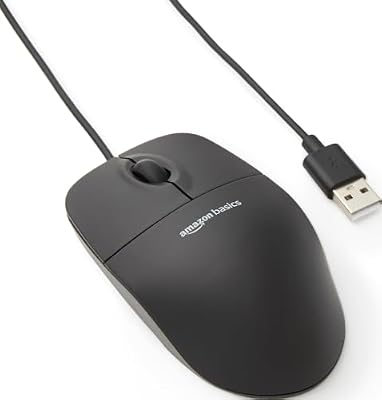
Amazon Basics 3-Button USB Wired Mouse with Responsive Tracking, Plug & Play, Compatible with Windows and Mac, Black


As an Amazon Associate we earn from qualifying purchases. Product prices and availability are accurate as of the date/time indicated.
The Amazon Basics 3-Button wired mouse is the pick for the tightest budgets. It is a no-nonsense plug-and-play USB mouse with responsive tracking and the three buttons most office work needs — left, right and a scroll wheel click. At around $7 it is the cheapest way to get a dependable pointer onto a workstation.
For a spare desk, a second machine, or simply a reliable backup that lives in a drawer, this mouse does exactly what it should. There is no software to install and no battery to manage: plug it in and it works. Its intent is affordable, fuss-free everyday control rather than gaming performance, and on that brief it is hard to fault for the price.
Pros: Extremely affordable, plug-and-play with no setup, responsive tracking, reliable wired connection.
Cons: Basic shape and feature set; not built for precision or gaming.
2. TECKNET 2.4G Wireless Ergonomic Optical Mouse

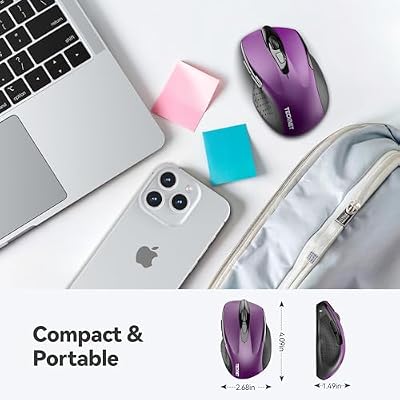
TECKNET Wireless Mouse, 2.4G Ergonomic Computer Mouse, 2600 DPI, Purple | Ergonomic Design with Side Grips, Adjustable DPI, 2-Year Battery, Compact Size, USB-A Plug & Play, Wide OS Compatibility


As an Amazon Associate we earn from qualifying purchases. Product prices and availability are accurate as of the date/time indicated.
The TECKNET 2.4G wireless mouse is the budget wireless workhorse. It pairs an ergonomic optical design with a small 2.4G USB receiver, cutting desk clutter without the price of a premium wireless model. At around $10 it brings cable-free convenience to a workstation on a modest budget.
This is the mouse to choose if you want a tidy desk and comfortable all-day use without spending much. The 2.4G connection is reliable for office work, the contoured shape supports the hand over long sessions, and it works across laptops and desktops alike. For dependable, affordable wireless control at a workstation, the TECKNET is an easy recommendation.
Pros: Cable-free 2.4G wireless, comfortable ergonomic shape, very affordable, works across laptops and desktops.
Cons: Entry-level sensor; lighting and software are minimal.
3. Logitech G502 Hero High Performance Wired Mouse

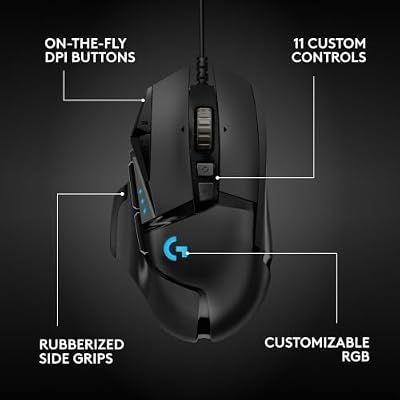
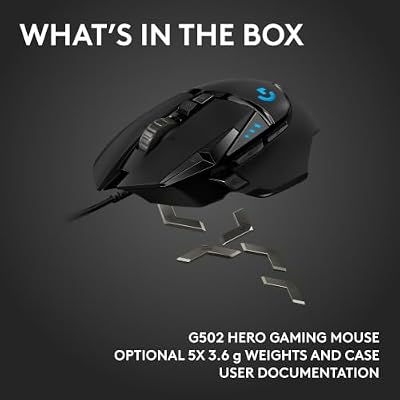
Logitech G502 Hero Wired Gaming Mouse - Black | High performance, 25,600 DPI, RGB, adjustable weights, 11 programmable buttons, on-board memory, PC/Mac





As an Amazon Associate we earn from qualifying purchases. Product prices and availability are accurate as of the date/time indicated.
The Logitech G502 Hero is the high-precision pick of this list. Although it is built as a gaming mouse, its acclaimed HERO 25K sensor and eleven programmable buttons make it a genuinely powerful workstation tool for anyone who values accuracy and customisation. At around $32 it is the premium choice here, and it earns the spot.
This is the mouse for the power user who works across detailed documents, large spreadsheets or precise selections and wants buttons mapped to shortcuts and macros. The HERO 25K sensor tracks with exceptional accuracy, Logitech’s G HUB software lets you build per-application profiles, and the adjustable weights let you dial in the feel. If your workstation work rewards precision and programmable control, the G502 Hero is the standout.
Pros: Superb HERO 25K sensor, 11 programmable buttons, per-application profiles, adjustable weights.
Cons: Heavier than basic office mice; wired only.
4. Anker 2.4G Wireless Vertical Ergonomic Mouse

Anker 2.4G Wireless Ergonomic Mouse, Right Hand Vertical Mouse USB Receiver | Multi-Device Connectivity, 800/1200/1600 DPI, Wireless Mouse for Laptop, Desktop, PC, 5 Buttons, Black (Batteries Required)


As an Amazon Associate we earn from qualifying purchases. Product prices and availability are accurate as of the date/time indicated.
The Anker 2.4G wireless vertical mouse is the comfort pick, and the most distinctive design on the list. Its vertical shape holds your hand in a more natural ‘handshake’ position, which can ease the wrist and forearm strain that builds up over long days at a conventional flat mouse. With multi-device wireless connectivity, it is at around $22 a thoughtful upgrade for comfort.
This is the mouse to choose if you spend many hours at a desk and want to reduce wrist fatigue. The vertical, ergonomic design is its whole reason for being — it changes how your hand sits to a more neutral angle — while the 2.4G wireless keeps the desk tidy. If comfort over a full working day is your priority, the Anker vertical is the obvious place to look.
Pros: Vertical ergonomic design eases wrist strain, multi-device wireless, comfortable for long days.
Cons: Vertical shape takes adjustment; not aimed at high-speed precision tasks.
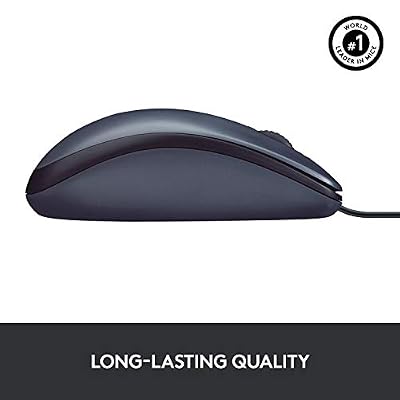
5. Logitech B100 Wired Mouse

Logitech B100 Ambidextrous Wired Mouse - Black | USB corded, right or left hand use, for computer and laptop




As an Amazon Associate we earn from qualifying purchases. Product prices and availability are accurate as of the date/time indicated.
The Logitech B100 is the simple, all-day-reliable pick. A corded USB mouse with an ambidextrous shape that suits right- or left-handed users, it covers the essentials with Logitech’s reputation for build quality behind it. At around $8 it is among the most affordable mice here and a dependable everyday choice.
This is the mouse for the workstation that just needs to work, day in and day out, with no software and no batteries. The ambidextrous design means it suits any hand, the wired connection is consistent, and Logitech’s build quality gives it longevity beyond its modest price. For a no-drama, low-cost office mouse, the B100 is a sensible staple.
Pros: Affordable and reliable, ambidextrous for any hand, consistent wired connection, trusted Logitech build.
Cons: Basic feature set; no programmable buttons or wireless.
6. Logitech M185 Wireless Mouse

Logitech M185 Compact Ambidextrous Wireless Mouse with Rubber Grips - Blue | Ambidextrous mouse with 2.4 GHz USB-A Nano Receiver, Optical Tracking, 12-Months Battery Life, PC, Mac, Laptop compatible




As an Amazon Associate we earn from qualifying purchases. Product prices and availability are accurate as of the date/time indicated.
Rounding out the list is the Logitech M185, the long-battery wireless pick. It uses a small 2.4GHz USB receiver and is rated for around twelve months of battery life, so you can largely forget about charging or swapping cells. At around $15 it is a popular, dependable wireless mouse for everyday work.
This is the mouse to choose if you want reliable wireless freedom with minimal maintenance. The plug-and-go USB receiver makes setup instant, the long battery life keeps it running for a year between changes, and the compact shape suits a wide range of hands. For tidy, low-fuss wireless at a workstation, the M185 is a smart, well-proven choice.
Pros: Long 12-month battery life, plug-and-go USB receiver, compact reliable shape, fair price.
Cons: Single AA cell rather than rechargeable; basic feature set.
How to Choose the Right Workstation Mouse
Choosing a workstation mouse comes down to matching the mouse to how you work and for how long. The first decision is comfort and shape, because you hold this tool for hours. A conventional contoured mouse like the TECKNET or M185 suits most people, but if you suffer wrist or forearm strain, a vertical ergonomic design like the Anker holds your hand in a more neutral position and can make a real difference over a long day. Match the shape to your hand and any comfort needs first.
Connectivity is the next big factor. A wired mouse like the Amazon Basics, Logitech B100 or G502 Hero gives a consistent connection with nothing to charge — ideal for a fixed desk. A wireless mouse like the TECKNET, Anker or M185 cuts desk clutter and travels well, with the M185’s twelve-month battery meaning very little maintenance. Decide whether a tidy, cable-free desk or the absolute simplicity of a cable matters more to you.
Precision and buttons are where workstation mice separate themselves. For general office work, a standard three-button mouse is plenty. But if your work involves detailed selections, large spreadsheets or repetitive shortcuts, a high-precision mouse with extra programmable buttons — like the Logitech G502 Hero with its HERO 25K sensor and eleven buttons — lets you map shortcuts and work faster. Consider how much accuracy and customisation your tasks actually reward before paying for it.
Finally, match the mouse to your budget and the rest of your setup. A spare or secondary workstation is well served by an inexpensive, reliable mouse, while your main desk may justify spending more on comfort or precision. Set a budget, decide whether comfort, connectivity or control matters most, and pick the mouse on this list that hits your priority. The best workstation mouse is simply the one you stop noticing because it fits your hand and your work.
Frequently Asked Questions
What makes a good workstation mouse?
A good workstation mouse is comfortable over long sessions, tracks reliably, and connects in a way that suits your desk. For general work a comfortable three-button mouse like the Logitech M185 is plenty; if you suffer wrist strain, a vertical ergonomic design like the Anker can help, and if your tasks reward precision, a high-accuracy mouse like the Logitech G502 Hero is worth the upgrade.
Is a wireless mouse good for a workstation?
Yes, for most people. A wireless mouse such as the Logitech M185 or TECKNET cuts desk clutter and is easy to live with, and the M185’s twelve-month battery means very little maintenance. A wired mouse like the Logitech B100 is the simplest option with nothing to charge, so the choice comes down to whether you prefer a tidy desk or absolute simplicity.
Are vertical ergonomic mice worth it?
If you spend many hours at a desk and feel wrist or forearm strain, they can be. A vertical mouse like the Anker holds your hand in a more neutral ‘handshake’ position, which reduces the twist of a conventional flat mouse. There is a short adjustment period, but for comfort over a full working day many users find the change worthwhile.
Do I need a high-DPI mouse for office work?
Not usually. General office tasks work fine at modest sensitivity, so a basic mouse is adequate. A high-precision sensor like the HERO 25K in the Logitech G502 Hero matters more if you do detailed design, large spreadsheets or precise selections, where accurate tracking and programmable buttons genuinely speed up your work.
Related Guides
- Best Gaming Mouse
- Best Wireless Gaming Mouse
- Best Mouse for Photo Editing
- Best Mouse for Graphic Design
- Best Mouse Pads for Your Desk
- Best Office Chairs for Working From Home
Affiliate Disclosure: As an Amazon Associate, we earn from qualifying purchases. If you click a link and make a purchase, we may earn a small commission at no extra cost to you. Prices and availability are accurate as of publication and may change.










