

The UGREEN Revodok Pro 6-in-1 USB-C Hub is a compact USB-C hub that pairs 10Gbps data, HDMI 4K@60Hz, 100W PD passthrough and gigabit Ethernet in a slim aluminium body. Where the MOKiN is the bare-minimum travel hub, the Revodok Pro adds Ethernet — which makes it the right pick for travel where hotel Wi-Fi is unreliable or for desk users who want one cable carrying both Ethernet and display. At around $50 it is a mid-spec compact dock; this UGREEN Revodok Pro 6-in-1 review covers the spec table and the verdict.

UGREEN Revodok Pro USB-C Hub 6 in 1 10Gbps 4K 60Hz HDMI | 100W PD charging, compatible with MacBook Neo/Pro/Air, iPad Pro, Thinkpad Rog Ally and More


As an Amazon Associate we earn from qualifying purchases. Product prices and availability are accurate as of the date/time indicated.
🛒 Best Price Today on Amazon
Prime members get fast, free shipping on everything above, plus member-only deals. New members get a 30-day free trial — cancel anytime.
As an Amazon Associate we earn from qualifying purchases.


UGREEN Revodok Pro 6-in-1 at a Glance
| Component | Specification |
|---|---|
| Type | USB-C hub (single-cable, travel/desk hybrid) |
| Data speed | 10 Gbps (USB 3.2 Gen 2 on USB-C and USB-A ports) |
| Cable length | Captive USB-C cable around 0.2 m |
| Power Delivery | Up to 100W PD passthrough to the host |
| Display output | Single 4K@60Hz via HDMI |
| Compatibility | USB-C laptops, Thunderbolt 4 / 3, USB4, Steam Deck, iPad Pro |
| Port count | 6 (HDMI, USB-C data, USB-C PD, 2x USB-A, Gigabit Ethernet) |
| Certification | UGREEN-branded, not Intel TB4 certified |
| Approx price | Around $50 |
Performance and Data Speeds
The Revodok Pro runs its USB-C and USB-A data ports at 10Gbps over USB 3.2 Gen 2, which matches the MOKiN and the Anker 11-in-1 for everyday peripheral and SSD work. The 1Gbps Ethernet port is the key spec over a basic travel hub — wired Ethernet is more reliable than hotel Wi-Fi and significantly faster than most Wi-Fi 5 hotel routers, which makes the Revodok Pro the right hub for video calls, large file transfers and online gaming on the road. Like the MOKiN it is not a TB4 dock — no 40Gbps, no PCIe tunneling — but at 10Gbps with Ethernet it covers more travel scenarios than a bare USB-C hub. For laptops that pair well with the hub, see our best RTX 5070 gaming laptops guide.
Power Delivery and Charging
The 100W PD passthrough is the same rating as the MOKiN and the Anker docks — enough for every 13-inch / 14-inch laptop at full speed, every M-series MacBook (including the 16-inch Pro in normal use), and most PC ultrabooks. The Ethernet draws a tiny amount from the passthrough budget; in practice the real-world delivery to a connected laptop is in the high 90s of watts. The Revodok Pro is the right hub for a hotel desk where you plug in a single USB-C charger and the hub takes over Ethernet, video and laptop power. See the best USB hubs roundup for other compact picks.
Display Output and Multi-Monitor
The single HDMI 4K@60Hz output is identical to the MOKiN — appropriate for travel and casual desk use, not for dual-display setups. From a TB4 / USB4 host the hub carries the DisplayPort alt-mode signal to the HDMI port at the host’s full DisplayPort 1.4 capability, which means 4K@60Hz with HDR. For dual-display desk setups the Anker 11-in-1 is the right product. The Revodok Pro is built for the user who carries one cable to one monitor. For OLED-class monitors see our best OLED gaming laptops roundup.
Build and Connector Quality
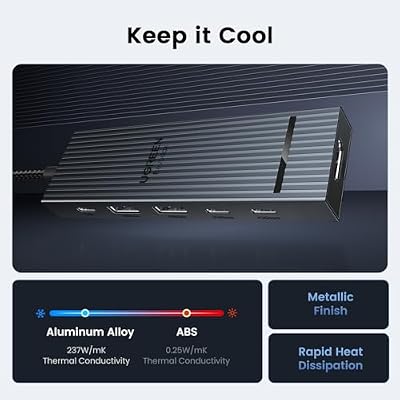
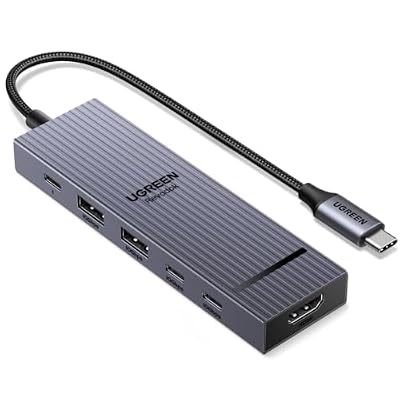
UGREEN uses a slim anodised aluminium chassis with a braided captive USB-C cable and an aluminium-shell USB-C plug. The build is comparable with the MOKiN — possibly slightly heavier due to the Ethernet port and its magnetics — and well above the price. The six ports lay out on the long edge in a clear order: HDMI, Ethernet, USB-C data, USB-C PD, USB-A, USB-A. The Ethernet port has a small pop-down door that protects the contacts when not in use, which is a nice quality touch the cheaper MOKiN does not offer. For desk integration see the best gaming desks roundup.
Compatibility — Mac, PC and Steam Deck
The Revodok Pro works on any USB-C host with DisplayPort alt-mode and PD passthrough — every TB4 / USB4 laptop, every current MacBook, the Steam Deck and the iPad Pro. The Ethernet is the most useful addition over the MOKiN for travel and desk use: on a hotel desk it provides reliable wired internet; on a Steam Deck dock setup it provides reliable online gaming; on an iPad Pro it adds wired networking for work. On a TB4 MacBook Pro the hub is a travel companion to a Thunderbolt 4 desk dock; the two are not mutually exclusive. The Revodok Pro is the genuine cross-platform pick. See our best 240Hz gaming laptops guide for monitor pairings.
Verdict
At around $50 the UGREEN Revodok Pro 6-in-1 is the right hub for the travel-first user who wants Ethernet alongside HDMI, USB and PD passthrough. The 10Gbps data, 4K@60Hz HDMI, 100W PD and gigabit Ethernet spec is well-judged for travel and casual desk use, the build quality is well above the price bracket, and the cross-platform compatibility makes the hub a single accessory for MacBook, PC, Steam Deck and iPad Pro users. The Ethernet is the meaningful upgrade over the MOKiN, and for buyers who use hotel and conference Wi-Fi often, the upgrade is worth the price difference. For desk-bound dual-display work the Anker 11-in-1 is the right pick. For travel use, the Revodok Pro is well judged. See our Intel Core Ultra laptop guide guide for host context.
The Ethernet decision deserves one more piece of context. Hotel and short-stay Wi-Fi networks are usually shared bandwidth across hundreds of guests, which means peak speeds of 10 to 30 Mbps in good conditions and noticeably worse in busy ones. Most hotel rooms still provide a wired RJ45 jack at the desk, and that wired connection typically runs at 100 Mbps to 1 Gbps with no contention — a measurably better experience for video calls, large file uploads and remote-desktop work. The Revodok Pro’s gigabit port turns that wired jack into the laptop’s primary connection without needing a dedicated USB-Ethernet dongle, and for buyers who travel for work the upgrade quickly justifies itself in fewer dropped Zoom calls and faster file uploads. Casual users will find the MOKiN’s no-Ethernet design slightly more elegant; travel-heavy users will want the Revodok Pro.
Frequently Asked Questions
Is the UGREEN Revodok Pro a Thunderbolt 4 dock?
No. It is a USB-C hub at 10Gbps with a single HDMI 4K@60Hz output, 100W PD passthrough and gigabit Ethernet. For TB4 features (40Gbps data, dual-4K, eGPU), choose a dedicated TB4 dock.
What is the advantage of the UGREEN Revodok Pro over a basic USB-C hub?
The Ethernet port. Wired gigabit Ethernet is more reliable than hotel Wi-Fi and faster than most Wi-Fi 5 routers, which makes the hub the right pick for travel video calls, file transfers and online gaming.
Does the UGREEN Revodok Pro support the Steam Deck?
Yes. The hub provides the Steam Deck with HDMI 4K, USB-A for peripherals, USB-C data, gigabit Ethernet and 100W PD charging — making it a genuine Steam Deck dock-replacement for travel.
Can the UGREEN Revodok Pro charge a 16-inch MacBook Pro?
Yes, at up to its 100W PD passthrough. A 16-inch MacBook Pro accepts the 100W and charges in normal use; sustained 140W workloads are slightly slower to top up than with a direct Apple 140W charger, but the difference is invisible for everyday office, code and content work. The Ethernet, HDMI and USB ports continue to operate at full speed regardless of charger wattage.
More Thunderbolt 4 Reviews
- Anker 8-in-1 USB-C Dock Dual Monitor 2 HDMI 4K Review
- Maxonar 2-Pack Thunderbolt 4 Cable 40Gbps 240W 8K Review
- Cable Matters Intel-Certified TB4 Cable 3.3ft 40Gbps Review
- Cable Matters Intel-Certified TB4 Cable 1ft 40Gbps Review
- Silkland USB-C to USB-C 240W 40Gbps USB4 Cable Review
- Silkland USB 4 Cable 16.5ft / 5m 20Gbps Long Cable Review
- Silkland USB-C Monitor Display Cable 4K@144Hz 8K Review
- Anker 7-in-2 MacBook Dock TB-Compatible HDMI 4K Review
Affiliate Disclosure: As an Amazon Associate, we earn from qualifying purchases. If you click a link and make a purchase, we may earn a small commission at no extra cost to you. Prices and availability are accurate as of publication and may change.
Related Articles
Looking for more on this topic? Browse the hand-picked guides below — each one applies the same scoring rubric used in this review.










