

- Top Pick: XPPen Artist 13.3 Pro V2 Drawing Tablet with Screen, 16K, Red Dial, 8 Keys
- Best Value: XPPen Artist 15.6 Pro V2 Drawing Tablet with Screen & Professional Artist Glove for Graphics Drawing Tablet
- Premium Choice: XPPen 4K UHD Artist Pro 19 Gen2 Drawing Tablet with Screen, 156% sRGB Graphic Tablet with 1.07 Billion Colors Anti-Glare Drawing Monitor with Dual 16384 Pen Pressure Stylus, Mini Keydial, 18.4"
The XPPen Artist 15.6 Pro V2 is the second-generation update of XPPen’s most popular mid-range pen display, and it sits at a sweet spot in the market that few rivals match. For around $330, it puts a 15.6-inch FHD screen under your stylus, paired with XPPen’s latest X3 Pro battery-free pen that delivers a full 16,384 pressure levels and accurate tilt response. This XPPen Artist 15.6 Pro V2 review covers the screen, pen, drivers and use cases for serious hobbyists and freelance illustrators.

XPPen 16K Artist 15.6 Pro V2 Drawing Tablet with Screen | Full-Laminated Anti-Glare Glass, Adjustable Stand, 8 Shortcut Keys, for PC/Mac/Linux/Android



As an Amazon Associate we earn from qualifying purchases. Product prices and availability are accurate as of the date/time indicated.
🛒 Best Price Today on Amazon
Prime members get fast, free shipping on everything above, plus member-only deals. New members get a 30-day free trial — cancel anytime.
As an Amazon Associate we earn from qualifying purchases.


XPPen Artist 15.6 Pro V2 at a Glance
| Component | Specification |
|---|---|
| Active area | 15.6-inch laminated IPS display, 1920 x 1080 (FHD) |
| Pressure levels | 16,384 (16K) |
| Stylus type | Battery-free X3 Pro Smart Chip Stylus |
| Resolution | 5,080 lpi |
| Report rate | approx 60 Hz display / 220+ pps pen |
| Tilt support | Yes (60 degrees) |
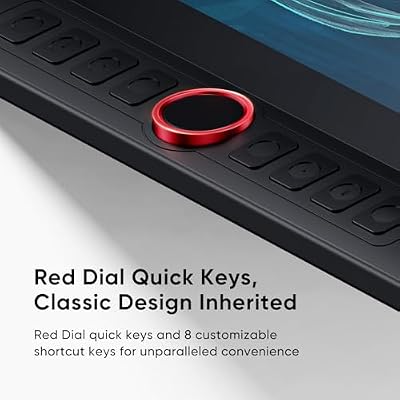
| Express keys | 8 ExpressKeys + roller wheel |
| Connection | USB-C (single-cable to compatible laptops) or HDMI + USB |
| Approx price | around $330 |
Pen Performance & Pressure
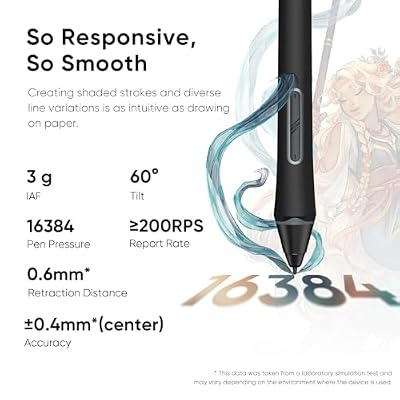
The headline upgrade on the Pro V2 is the X3 Pro Smart Chip Stylus. It is battery-free — power is drawn wirelessly from the display surface, so there is no charging, no batteries — and it now resolves a full 16,384 (16K) pressure levels with very low initial activation force. The pen also supports up to 60 degrees of tilt, which means tilt-aware brushes in Photoshop, Clip Studio Paint and Krita behave the way a real pencil or marker would. In day-to-day drawing, 16K pressure is well beyond what the human eye can perceive as discrete steps, so the real win is the smoother pressure ramp, lower IAF and longer pen life-cycle. The X3 Pro is a meaningful upgrade over older XPPen pens and one of the best non-Wacom styluses on the market.
Report rate is among the best in the bracket, and tracking accuracy is the area where the X3 Pro genuinely closes the gap to Wacom’s Pro Pen 2. Corner-to-corner pen alignment is tight after the standard four-point calibration, with edge-drift well controlled — important on a 15.6-inch active area where any tracking error is magnified. The pen-tip click feels firm and decisive, and the two side buttons fall comfortably under the thumb. For artists transitioning from a Wacom Cintiq, the X3 Pro is now close enough in behaviour that the switch does not feel like a downgrade — a meaningful sentence to write, given how far XPPen has come in recent generations.
Build & Materials
The Pro V2 has a noticeably premium feel. The 15.6-inch IPS display is fully laminated, meaning the LCD layer and the etched glass cover are bonded together — there is no visible gap between the pen tip and the on-screen line, which significantly improves the on-paper feel. Colour gamut coverage is wide enough for everyday creative work (XPPen quotes a generous percentage of the sRGB gamut). The chassis is slim, with 8 ExpressKeys and a tactile roller wheel on the left edge, both fully remappable. USB-C connection is supported as a single-cable solution from compatible laptops, which significantly tidies the workspace versus older HDMI-plus-USB setups. The display surface is the other big upgrade over the Artist 12. Lamination removes the visible gap between glass and LCD, so the pen tip and the on-screen line appear at the same depth — this is the single most important factor in making a pen display feel like drawing on paper, and it is the feature you pay more for. Brightness is generous, the panel covers a wide sRGB-class gamut suitable for most digital art workflows, and the anti-glare etched glass surface controls reflections well even in typical office lighting. Viewing angles are wide thanks to IPS technology, and uniformity is good across the panel.
Software Compatibility & Drivers
XPPen’s drivers cover Windows, macOS, ChromeOS, Linux and Android. In creative applications — Photoshop, Clip Studio Paint, Krita, Affinity Photo, SAI, Procreate-style Android apps — 16K pressure and 60-degree tilt are recognised after install. The driver utility offers per-application key mapping, configurable pressure curves and detailed area calibration. USB-C single-cable connection is genuinely useful where it is supported; otherwise the included three-in-one cable runs HDMI for video, USB for pen input and USB for power.
Use Cases — Art, 3D and Note Taking
The Pro V2 is the natural home of the serious hobbyist and the working freelance illustrator. The 15.6-inch screen is large enough for whole-arm strokes and complex pieces, the X3 Pro stylus is on par with much pricier styluses, and the lamination makes the on-screen-line offset minimal. For 3D artists, the screen and tilt support make sculpting in ZBrush and Blender feel natural. For educators and content creators, the size and pen response make on-camera demonstrations smooth. This is the tablet to choose when you want a working tool rather than a starter. The 8 ExpressKeys and roller can be remapped per-application in the driver, which means the workflow muscle memory you build up in one app does not interfere with shortcut sets in another. For photo editing in Lightroom or Affinity Photo, the roller maps beautifully to slider adjustments such as exposure or temperature.
What’s in the Box
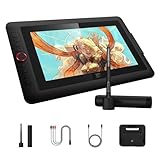
The package includes the Artist 15.6 Pro V2 display, the X3 Pro Smart Chip Stylus, a smart pen stand with nib storage, eight replacement nibs, a USB-C-to-USB-C cable, the three-in-one HDMI/USB cable, an artist glove, a cleaning cloth and a Quick Start guide. A separate adjustable display stand is available from XPPen but is not always included in the base bundle.
Verdict — Is the XPPen Artist 15.6 Pro V2 Worth It?
At around $330 the XPPen Artist 15.6 Pro V2 is one of the best-value working pen displays on the market. The laminated screen, X3 Pro stylus with 16K pressure and tilt, USB-C single-cable connectivity and 8 ExpressKeys plus roller add up to a tool that comfortably handles serious illustration, photo retouching and 3D work, at a price that comparable Wacom Cintiqs cannot match. If you have outgrown the Artist 12 or you are stepping up from a screenless tablet, this is the obvious choice. The combination of lamination, the X3 Pro stylus and a wide colour gamut puts the Pro V2 in the same conversation as Wacom’s Cintiq mid-range but at a noticeably lower price. Pair it with a strong build from our best RTX 5080 gaming laptops guide for ample creative headroom.
Frequently Asked Questions
Is the XPPen Artist 15.6 Pro V2 a pen display or a screenless tablet?
It is a pen display — the screen is built in, so you draw directly on the picture you are creating, just like with a Wacom Cintiq.
Does the XPPen Artist 15.6 Pro V2 pen support tilt?
Yes. The X3 Pro Smart Chip Stylus supports up to 60 degrees of tilt and is battery-free.
How many pressure levels does the XPPen Artist 15.6 Pro V2 have?
It supports 16,384 (16K) pressure levels, paired with very low initial activation force.
Can the XPPen Artist 15.6 Pro V2 run from a single USB-C cable?
Yes, on compatible laptops. With a laptop that supports DisplayPort over USB-C and enough power delivery, a single USB-C cable runs video, pen input and power.
More Drawing Tablet Reviews
- XPPen Deco 640 Review: 6×4 Drawing Tablet with 16K Pressure
- GAOMON M10K Review: 10×6 Drawing Tablet with Touch Ring
- GAOMON S620 Review: 6.5×4 Battery-Free Drawing Tablet
- HUION HS610 Review: Battery-Free Stylus, Tilt, and 8192 Pressure
- HUION Inspiroy 2 Large Review: 10×6 Scroll Wheel Drawing Tablet
- GAOMON PD1161 Review: 11.6″ FHD Pen Display for Hobbyists
- Wacom Intuos Small Bluetooth Review: Beginner-Friendly Drawing Tablet
- Wacom One by Wacom Medium Review: Larger Beginner Pen Tablet
Affiliate Disclosure: As an Amazon Associate, we earn from qualifying purchases. If you click a link and make a purchase, we may earn a small commission at no extra cost to you. Prices and availability are accurate as of publication and may change.
Related Articles
Looking for more on this topic? Browse the hand-picked guides below — each one applies the same scoring rubric used in this review.










