- Top Pick: TP-Link TL-SG108S-M2, 8-Port Multi-Gigabit 2.5G Unmanaged Ethernet Switch
- Best Value: TP-Link TL-SG108-M2, 8 Port Multi-Gigabit Unmanaged Ethernet Switch
- Premium Choice: TP-Link TL-SG108PE V3 | 8 Port Gigabit PoE Switch | Easy Smart Managed | 4 PoE+ Ports @64W | Plug & Play | Sturdy Metal w/ Shielded Ports | Fanless | QoS, Vlan & IGMP | Limited Lifetime Protection
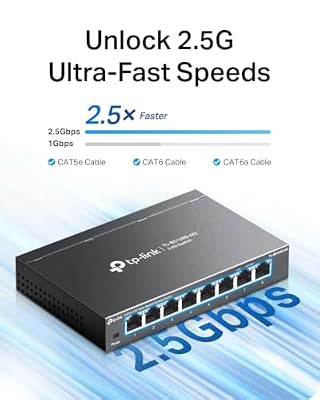
The TP-Link TL-SG108S-M2 is the 8-port sibling of the TL-SG105S-M2 — a multi-gigabit unmanaged switch that lifts every port to 2.5 Gbps. With Wi-Fi 7 access points, modern NAS units and many recent PCs now shipping 2.5GbE, an 8-port multi-gigabit switch is fast becoming the default home upgrade. This TP-Link TL-SG108S-M2 review covers the specifications, performance and value.

TP-Link TL-SG108S-M2, 8-Port Multi-Gigabit 2.5G Unmanaged Ethernet Switch | Multi Gigabit Network Switch, Ethernet Splitter, Plug & Play, Desktop/Wall Mount, Silent Operation


As an Amazon Associate we earn from qualifying purchases. Product prices and availability are accurate as of the date/time indicated.
🛒 Best Price Today on Amazon
Prime members get fast, free shipping on everything above, plus member-only deals. New members get a 30-day free trial — cancel anytime.
As an Amazon Associate we earn from qualifying purchases.


TP-Link TL-SG108S-M2 at a Glance
| Component | Specification |
|---|---|
| Port count | 8 ports |
| Port speed | 100M / 1G / 2.5G Multi-Gigabit |
| Switching capacity | 40 Gbps non-blocking |
| Management | Unmanaged (plug-and-play) |
| PoE support | No |
| SFP uplinks | None |
| Form factor | Desktop / wall-mount, steel case |
| Cooling | Fanless (silent) |
| Approx price | around $130 |
Throughput & Real-World Speed
Every one of the TL-SG108S-M2’s eight ports runs at up to 2.5 Gbps, which is 2.5x the gigabit ceiling and gives a real-world transfer rate of roughly 280 MB/s on a 2.5G end-to-end link. The switching fabric is non-blocking at 40 Gbps, so every port can run at 2.5G simultaneously. To actually achieve those speeds you need 2.5G-capable hardware at both ends of each link — a 2.5G NIC, a 2.5G NAS port, a 2.5G access point uplink — plus a CAT5e or CAT6 cable in good condition. Mixed-speed devices are no problem: the switch auto-negotiates each link to the best common speed, so legacy gigabit clients drop to 1G without affecting the 2.5G clients. For the wider network basics, see our low-latency gaming network guide.
Managed vs Unmanaged Capabilities
The TL-SG108S-M2 is fully unmanaged. No web interface, no VLANs, no QoS, no monitoring — and at this price for a multi-gigabit switch, that is a reasonable trade. Managed multi-gigabit switches at the same port count are still significantly more expensive. For a home or small office that simply wants a fast wired backbone for a NAS, a desktop PC and a WiFi 7 access point, the unmanaged SG108S-M2 keeps it simple. If the deployment genuinely needs VLAN segmentation, the buyer must step up to a managed multi-gig model and pay the corresponding premium.
PoE Power for IP Cameras / APs
The basic TL-SG108S-M2 does not include PoE. WiFi 7 access points and modern PoE cameras that benefit from 2.5G uplinks will therefore need either an inline PoE injector each, or a PoE multi-gigabit switch. This is the main reason a buyer might prefer one of TP-Link’s PoE multi-gigabit models — the SG108S-M2 keeps the price low by omitting PoE. For a desk install of a 2.5G PC, a 2.5G NAS and a 2.5G uplink to the router, the basic SG108S-M2 is the right tool; for a multi-camera or multi-AP install, look at the PoE variants.
Build Quality, Heat & Noise
TP-Link houses the SG108S-M2 in the same sturdy steel chassis used by its gigabit relatives, which is helpful for both heat dissipation and physical stability. Multi-gigabit silicon runs warmer than gigabit, so the heat-spreading metal shell is a real asset. The switch is fanless and therefore silent, well suited to a home office or media room. Under heavy load every port pushing 2.5G it runs noticeably warmer than a gigabit switch — to be expected — but never to the point of concern. CAT5e is acceptable for 2.5GbE at typical home distances, though CAT6 or CAT6a is the safer future-proof choice. See our best Ethernet cables for gaming guide for cable choice.
Best For – Gaming Home / SMB / Pro
The TL-SG108S-M2 is the natural choice for a 2026 home network with several modern devices. For the user with a 2.5G NAS, a 2.5G workstation, a WiFi 7 access point and a clutch of legacy gigabit devices, it provides the right number of ports and the right speed mix without any configuration. For a small office of one or two desks plus a fast NAS it is similarly well suited. For competitive gamers it is more about future-proofing than necessity — gigabit is still well ahead of online-game bandwidth needs — but the headroom is useful for streaming, large game downloads and file work. Pros who need PoE or VLANs should look at managed PoE multi-gigabit switches instead. For NAS pairings, see our best NAS for home and small office.
Verdict
At around $130 the TP-Link TL-SG108S-M2 is a sensible eight-port multi-gigabit upgrade for a modern home network. It is sturdy, silent, fully 2.5GbE on every port, plug-and-play, and from the default brand in this category. The combination of a 2.5G NAS, a 2.5G NIC, a Wi-Fi 7 access point and this switch transforms wired throughput compared with gigabit. Its limitations — no PoE, no management — are honest, and at this price point they are reasonable trade-offs. For home users moving the wired network beyond gigabit, it is an easy recommendation. Smaller deployments can save with the SG105S-M2. For matching wireless gear, see our best WiFi 7 routers guide.
Frequently Asked Questions
Is the TP-Link TL-SG108S-M2 worth the upgrade from gigabit?
Yes, if you have or plan to add 2.5G-capable devices — most commonly a 2.5G NAS, a 2.5G NIC, or a WiFi 7 access point with a 2.5G uplink. If every device is gigabit-only, the cheaper SG108 is fine.
Do I need new cables for the TL-SG108S-M2?
Usually no. CAT5e in good condition is fine for 2.5GbE at typical home distances, though CAT6 or CAT6a is the safe future-proof choice.
Does the TL-SG108S-M2 support PoE?
No. The TL-SG108S-M2 is a non-PoE multi-gigabit switch. For a PoE-capable 2.5G switch you must choose one of TP-Link’s PoE multi-gigabit models.
Is the TL-SG108S-M2 fanless?
Yes. It is fanless and silent, which makes it well suited to a home office or media room despite running warmer than a gigabit switch.
More Network Switch Reviews
- NETGEAR GS305 Review: 5-Port Gigabit Switch (2026)
- NETGEAR GS308 Review: 8-Port Gigabit Switch (2026)
- NETGEAR GS316 Review: 16-Port Gigabit Switch (2026)
- TP-Link TL-SG105E Review: 5-Port Easy Smart Switch (2026)
- D-Link DGS-105 Review: 5-Port Gigabit Switch (2026)
- TP-Link SG2428LP Review: 24-Port PoE+ Gigabit Switch (2026)
- Tenda 8-Port 2.5G Switch Review: Multi-Gigabit Network (2026)
- TP-Link TL-SG108 Review: 8-Port Gigabit Switch (2026)
Affiliate Disclosure: As an Amazon Associate, we earn from qualifying purchases. If you click a link and make a purchase, we may earn a small commission at no extra cost to you. Prices and availability are accurate as of publication and may change.
Related Articles
Looking for more on this topic? Browse the hand-picked guides below — each one applies the same scoring rubric used in this review.