

- Top Pick: TP-Link 5-Port Gigabit Ethernet Easy Smart Switch| Plug and Play | Desktop | Sturdy Metal w/Shielded Ports | Limited Lifetime Replacement (TL-SG105E), Black…
- Best Value: TP-Link TL-SG105, 5 Port Gigabit Unmanaged Ethernet Switch, Network Hub, Ethernet Splitter, Plug & Play, Fanless Metal Design, Shielded Ports, Traffic Optimization
- Premium Choice: TP-Link TL-SG1005P, 5 Port Gigabit PoE Switch, 4 PoE+ Ports @65W, Desktop, Plug & Play, Sturdy Metal w/ Shielded Ports, Fanless, QoS & IGMP Snooping
The TP-Link TL-SG105E is the Easy Smart version of the popular TL-SG105 — a five-port gigabit switch that keeps the same compact metal-cased, fanless form factor but adds a web management interface with VLANs, QoS, link aggregation and port mirroring. At around $30 it sits between the dumb unmanaged switches and full managed L2 hardware. This TP-Link TL-SG105E review covers the specifications, features and value.
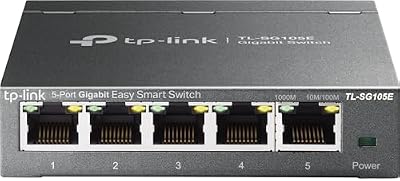
TP-Link 5-Port Gigabit Ethernet Easy Smart Switch| Plug and Play | Desktop | Sturdy Metal w/Shielded Limited Lifetime Replacement (TL-SG105E), Black…


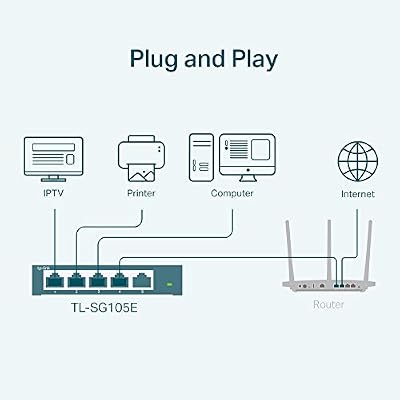

As an Amazon Associate we earn from qualifying purchases. Product prices and availability are accurate as of the date/time indicated.
🛒 Best Price Today on Amazon
Prime members get fast, free shipping on everything above, plus member-only deals. New members get a 30-day free trial — cancel anytime.
As an Amazon Associate we earn from qualifying purchases.


TP-Link TL-SG105E at a Glance
| Component | Specification |
|---|---|
| Port count | 5 ports |
| Port speed | 10/100/1000 Mbps (Gigabit Ethernet) |
| Switching capacity | 10 Gbps non-blocking |
| Management | Easy Smart (web-managed): VLAN, QoS, LAG, port mirroring |
| PoE support | No |
| SFP uplinks | None |
| Form factor | Desktop / wall-mount, steel case |
| Cooling | Fanless (silent) |
| Approx price | around $30 |
Throughput & Real-World Speed
The TL-SG105E is a true gigabit switch — every port runs at 1 Gbps full-duplex with a 10 Gbps non-blocking switching fabric. Raw speed is no different to the unmanaged TL-SG105; the value lies in what the management layer allows you to do with that speed. Link aggregation lets you combine two ports into a 2 Gbps virtual link to a NAS or a server, which can lift throughput beyond the gigabit ceiling for properly configured workloads — though many small-NAS implementations gain less than the theoretical doubling because typical clients open only one session at a time. For most home users the throughput story is identical to the SG105; the SG105E is bought for its management features rather than for extra speed. For the network basics, see our low-latency gaming network guide.
Managed vs Unmanaged Capabilities
The TL-SG105E is what TP-Link calls ‘Easy Smart’ — not a full L2 managed switch, but well above an unmanaged box. The standout features are 802.1Q VLAN support (so you can segment a guest, IoT or work VLAN onto separate ports), QoS (basic prioritisation of latency-sensitive traffic), port-based and tag-based VLANs, link aggregation, and port mirroring for monitoring. The web interface is reachable from a browser on the LAN. For a home advanced user who wants to keep IoT devices off the main network, or to prioritise gaming traffic to a particular console port, the SG105E unlocks meaningful capability at a very low cost. It is not a full enterprise managed switch — there is no CLI, no full L3 routing — but for home and small-office needs the feature set is generous.
PoE Power for IP Cameras / APs
The TL-SG105E does not provide PoE. As with the unmanaged SG105, any PoE-required device will need either an inline PoE injector or a PoE-capable switch. For a small VLAN deployment with a couple of cameras or an AP, the cleaner option is to choose a PoE switch that also offers Easy Smart features, or to pair the SG105E with a single inline injector per PoE device. The SG105E’s selling point is management at a budget price; PoE is a separate consideration.
Build Quality, Heat & Noise
The TL-SG105E ships in the same sturdy steel case as the unmanaged SG105 — a clear win at the price for heat dissipation, durability and stability. The switch is fanless and silent, well suited to a desk install. The web management adds no perceptible heat or power draw. For a small managed switch that needs to live on a desk in a quiet room, the silent fanless design is a real advantage. For matching cable, see our best Ethernet cables for gaming guide.
Best For – Gaming Home / SMB / Pro
The TL-SG105E is for the home advanced user or small office that wants management features at a budget price. For the gamer who wants to keep an IoT VLAN separate from the gaming network, or to set QoS for the gaming console, the SG105E is one of the cheapest ways to do it. For a small office that needs guest-network isolation it is equally useful. It is not a full enterprise managed switch — networks that need full L3 routing, SNMP, RADIUS authentication or production-grade monitoring need to step up to TP-Link’s Omada or other professional managed lines. For the wider gaming network setup, see our best gaming routers guide.
Verdict
At around $30 the TP-Link TL-SG105E is an excellent value ‘Easy Smart’ switch. It keeps the same sturdy fanless hardware as the popular SG105 and adds genuinely useful features — VLAN, QoS, link aggregation, port mirroring — for the price of a coffee chain visit. For the home advanced user, small business owner or learner who wants to experiment with VLANs and QoS, it is the obvious starting point. Buyers who do not need management should stick with the cheaper TL-SG105. For full-blown managed networking, look at TP-Link’s Omada line. For the wireless side, see our best WiFi 7 routers guide.
Frequently Asked Questions
What is an ‘Easy Smart’ switch?
It is TP-Link’s term for a tier between unmanaged and fully managed — a switch with a web interface and core features (VLAN, QoS, LAG, port mirroring) but without the full CLI, L3 routing or enterprise feature set of a fully managed switch.
Does the TL-SG105E support VLANs?
Yes. The SG105E supports both port-based and 802.1Q tag-based VLANs, which is genuinely useful for isolating IoT, guest or work traffic from the main network.
Can the TL-SG105E prioritise gaming traffic?
Yes, basic QoS is supported. You can assign higher priority to specific ports — for example the gaming console — to give gaming traffic better treatment during congestion.
Should I buy the TL-SG105E or the unmanaged TL-SG105?
If you want VLAN, QoS or link aggregation, the SG105E is worth the small extra cost. If you just need a plug-and-play switch with no settings, the unmanaged SG105 is fine.
More Network Switch Reviews
- D-Link DGS-105 Review: 5-Port Gigabit Switch (2026)
- TP-Link SG2428LP Review: 24-Port PoE+ Gigabit Switch (2026)
- Tenda 8-Port 2.5G Switch Review: Multi-Gigabit Network (2026)
- TP-Link TL-SG108 Review: 8-Port Gigabit Switch (2026)
- TP-Link TL-SG105 Review: 5-Port Gigabit Switch (2026)
- TP-Link TL-SG116 Review: 16-Port Gigabit Switch (2026)
- TP-Link TL-SG105S-M2 Review: 5-Port 2.5G Switch (2026)
- TP-Link TL-SG108S-M2 Review: 8-Port 2.5G Switch (2026)
Affiliate Disclosure: As an Amazon Associate, we earn from qualifying purchases. If you click a link and make a purchase, we may earn a small commission at no extra cost to you. Prices and availability are accurate as of publication and may change.
Related Articles
Looking for more on this topic? Browse the hand-picked guides below — each one applies the same scoring rubric used in this review.










