- Top Pick: Valve Steam Deck 512GB Handheld Console LCD
- Best Value: Valve Steam Deck OLED 512GB Handheld Gaming Console, 7.4" inch, 90Hz, SteamOS 3.0, 1280 x 800, with Carring case
- Premium Choice: Valve Steam Deck OLED 512GB Handheld Gaming Console, 7.4" inch, 90Hz, 1280 x 800, SteamOS 3.0, with Carring case, Tempered Film and Soft Silicone Protective Case
Buying a Used Steam Deck in 2026: The Short Answer
Updated October 2026 – seller terms, stock notes and price ranges below were rechecked against published sources this month.
Buying a used Steam Deck is worth it in 2026 if you pick the right source and check the unit inside the return window. For most buyers the best route is a Valve Certified Refurbished Steam Deck OLED 512GB: it carries the same one-year warranty as a new unit and costs roughly $160 less than a new one at Valve’s current prices. On a tighter budget, the Valve refurbished Steam Deck LCD 256GB is the value pick, because Valve has stopped building the LCD and every LCD you can still buy is refurbished or used. Our top three are the Steam Deck OLED 512GB, the Steam Deck LCD 256GB and the Steam Deck OLED 1TB, all from Valve’s refurbished store. Skip the 64GB LCD, and run the seven-point inspection below on arrival.
🛒 Best Price Today on Amazon
Prime members get fast, free shipping on everything above, plus member-only deals. New members get a 30-day free trial — cancel anytime.
Top Refurbished Steam Deck Picks for 2026: LCD, OLED and Must-Have Accessories
These are the Steam Deck models and accessories worth shortlisting for a used or refurbished setup, chosen from manufacturer specifications, published seller terms and recurring buyer feedback. Check the live listing for current price and condition before you buy.
As an Amazon Associate we earn from qualifying purchases at no extra cost to you.


The Steam Deck is now four years old, which means the refurbished market is finally mature enough to be worth taking seriously in 2026. After comparing the published terms and specifications of Valve Refurbished, GameStop, Decluttr, eBay’s refurbished tiers and private r/HardwareSwap sales, the picture is clear about which configurations save real money and which ones carry the most risk. The short answer is that refurbished Steam Decks are one of the best deals in handheld gaming right now, provided you know exactly which model to chase and which red flags to walk away from.
Valve’s certified refurbished store now covers both LCD and OLED models, and prices have settled into a predictable range. As approximate October 2026 prices, a Steam Deck LCD 256GB usually lands around $320 with a one-year warranty, while the OLED 512GB sits around $630 and the OLED 1TB around $760. Against the roughly $790 and $950 that Valve now asks for new 512GB and 1TB OLED units, that saves about $160 to $190, and a refurbished Steam Deck carries less lifespan risk than a refurbished GPU or laptop because the components are simpler and the thermal envelope is lower. This guide walks through every model worth considering, every inspection step worth running before you keep a unit, and the accessories that turn a budget refurb into a daily driver.
Why Buy a Refurbished Steam Deck in 2026
The economics changed once Valve added OLED models to its certified refurbished store (the first batches arrived in December 2024). Unlike most third-party refurbishers, Valve puts each returned unit through its own certification checks, includes a carrying case and power adapter, and ships with the same one-year warranty you would get on a new unit. That last point matters more than any discount, because the Steam Deck has two known wear failure modes, joystick drift and microSD slot wear, both of which become very expensive without warranty coverage. A used Deck from a private seller may save you a modest amount over Valve Refurbished but exposes you to both failure modes with zero recourse. We do not recommend that trade for most buyers.
The second reason refurb makes sense in 2026 is that Valve has not released a Steam Deck 2 and has announced no date. The company has said publicly that it wants a generational jump in performance before shipping a successor, so a Steam Deck OLED bought today is likely to remain Valve’s current handheld for a good while. Waiting for a Deck 2 announcement means paying full price for the new model and skipping months of handheld gaming. A refurbished OLED 512GB hits the sweet spot of capability versus cost.
The 2026 Steam Deck Market: What Changed for Used and Refurbished Buyers
Two shifts over the past year reshaped the used Steam Deck market, and both work in favor of anyone shopping refurbished. First, Valve ended production of the LCD Steam Deck in December 2025, and the last new LCD stock sold through in early 2026. Every LCD model you can buy today is therefore refurbished or used, which makes warranty coverage and a careful inspection more important than ever for that model.
Second, Valve raised the price of new OLED models in 2026, citing component and logistics costs. Memory in particular has been expensive across the whole PC industry this year. The new 512GB OLED now sits close to $800 and the 1TB model close to $950, so the gap between a new and a refurbished OLED is much wider than it was in 2024 and 2025. That is also why refurbished stock now tends to sell out faster after each restock.
Refurbished pricing has moved as well. During 2026, Valve’s certified refurbished OLED units have been listed anywhere from the mid-$400s before the May price increase to the low-$600s and above afterward (about $630 for the 512GB and $760 for the 1TB by October), while refurbished LCD models usually land in the $280–$360 range. Use the price points in this guide as targets to compare against, check the live listing before you commit, and expect a refurbished OLED to undercut a new one by roughly $160 to $190 rather than by a token amount.
- LCD buyers: refurbished or used is now the only route, so favor sellers that include a real warranty.
- OLED buyers: the saving from buying refurbished is the largest it has been since the OLED launched.
- Everyone: set restock alerts and be ready to buy quickly, because the popular configurations rarely last long.
Refurbished, Renewed, Pre-Owned or Used: What Each Label Means
Sellers use these words loosely, but the label tells you who inspected the unit and who stands behind it if something fails. Before comparing prices, make sure you are comparing like with like.
| Label | Who Inspects It | Typical Coverage | What to Expect | Best For |
|---|---|---|---|---|
| Valve Certified Refurbished | Valve | One year, same as new | Fully tested to factory standards; minor cosmetic marks possible | Most buyers |
| Marketplace “renewed” | Third-party refurbisher | Often 90 days, sometimes longer on premium tiers | Quality depends on the individual seller’s grading | Deal hunters when Valve is sold out |
| Retail pre-owned | Store staff | Store return window, optional paid protection | Basic function check; worn parts usually not replaced | Buyers who want to inspect in person |
| Private used sale | Nobody | None beyond payment protection | Anything from mint to heavily worn | Experienced buyers only |
The practical rule is simple: the further down this table you buy, the more of the inspection work in the next section falls on you, and the bigger the discount should be to justify the risk. A “renewed” or pre-owned unit that costs about the same as a Valve refurbished one is rarely the better deal.
What to Inspect on Every Used Steam Deck
This is the checklist worth running on any used or refurbished Deck. There are seven specific things to check within the return window, and missing any of them can leave you stuck with a unit that develops issues you could have caught immediately. Run through it on every unit that arrives, refurbished or private-sale, and send back any unit that passes a visual inspection but fails a stress check.
Joystick Drift Test
The original Steam Deck shipped with ALPS potentiometer joysticks, which develop drift over time as the carbon film wears. Refurbished units from Valve should have new sticks installed, but units sold through GameStop or Decluttr are inconsistent. To test, open Steam Big Picture mode, go to Controller Settings, and watch the input visualizer with your hands off the sticks. Any movement at all means drift is present. The fix is a hall-effect joystick replacement kit, which costs about $30 and takes thirty minutes to install. Any unit advertised as having hall-effect sticks already installed is genuinely future-proof, because hall-effect sensors do not wear and will outlast the rest of the device. Some private sellers price these mods into the unit, and a documented hall-effect modded LCD 256GB at a similar price to a stock Valve refurb can be the better buy.
Button Responsiveness Check
The face buttons and D-pad on the Steam Deck use rubber domes that wear unevenly. Use the controller test in Steam Settings and press each button thirty times in sequence, listening for inconsistent click feedback and watching the input log for missed presses. Bumpers and triggers also wear, and the right trigger in particular tends to lose its click on units with heavy Souls-game use. A unit with one mushy button is not a dealbreaker if everything else is solid, but a unit with three or more soft buttons signals heavy use and probably has wear issues elsewhere too.
Dock and USB-C Port Inspection
The single USB-C port on the Steam Deck handles charging, docking, and external storage, so it gets a lot of cycles. Plug and unplug a USB-C cable ten times and feel for looseness or any wobble. A loose port will cause intermittent charging issues and usually means a replacement USB-C port board. If the seller includes a dock, test HDMI output to a TV at 4K 60Hz to verify the dock chip is healthy. Third-party docks are cheap, but the official Valve dock is one of the few accessories worth paying retail for because of its reliability.
microSD Slot Test
Insert a microSD card you trust into the slot and run a SteamOS file copy of at least 20GB. The slot should mount within two seconds and sustain read speeds above 80MB/s. A dead microSD slot is a frequently reported refurb defect, and it turns a 256GB LCD into a unit with no expansion path. This is the single biggest reason to inspect within the return window.
Battery Cycle Count
SteamOS desktop mode exposes the battery’s reported capacity (see the FAQ for the exact terminal command). Compare the energy-full value with energy-full-design: above roughly 90 percent is healthy for a unit priced as new-condition, 80 to 90 percent is acceptable for a discount unit, and below 80 percent means noticeably shorter play sessions and a likely battery replacement, so the price should reflect that.
Speaker and Microphone Test
Play a video with stereo audio and listen for balance. The Steam Deck speakers are surprisingly good when working, but they crackle when blown out. The microphone is rarely used but should be tested if you plan to use Discord chat while docked.
Fan Noise Profile
Run a graphically demanding game like Cyberpunk 2077 for thirty minutes and listen to the fan ramp. A healthy fan sustains a steady whoosh at peak load. A failing fan grinds, ticks, or whines at a higher pitch. Fan replacement is a common do-it-yourself repair and the part is inexpensive, but a noisy fan should still drop the price of the unit by at least the cost of the part and your time.
Bonus Check: Screen Condition and Touch Response
The seven core tests above catch most hardware faults, but two extra checks are worth the ten minutes they take. Start with the display. Open a set of full-screen solid colors (white, black, red, green and blue) from any image viewer in desktop mode and look for stuck or dead pixels. On an LCD unit, view a black screen in a dark room at full brightness and look for uneven backlight glow along the edges. On an OLED unit, show a flat mid-gray image at around half brightness and look for faint ghosts of static interface elements, such as a game HUD or a menu bar, which point to burn-in from heavy use.
Next, drag an icon slowly into every corner of the touchscreen to confirm the digitizer responds evenly across the panel. Check the glass under bright light for scratches, and note whether the unit has the anti-glare etched glass that the 512GB LCD and 1TB OLED shipped with. A glossy screen protector applied over etched glass is harmless, but a seller who describes a glossy panel as etched is either mistaken or careless.
Bonus Check: Software, Account and Firmware
Make sure the previous owner has signed out of Steam and performed a factory reset from the system settings before you accept the device. Then connect to Wi-Fi, run every available SteamOS and firmware update, and pair a Bluetooth controller or headphones to confirm the wireless chip works properly. If the seller installed Windows or a dual-boot setup, that is not a defect in itself, but you will want to reimage the device with Valve’s official SteamOS recovery image so you start from a clean, supported install.
Finally, keep the receipt and order confirmation with the serial number visible. Warranty support depends on proof of purchase from an authorized source, and a Valve refurbished unit will also appear in your Steam account’s purchase history, which makes any later claim far smoother.
Best Places to Buy a Refurbished Steam Deck in 2026
Not all refurb sources are equal, and the warranty coverage varies wildly between them. Here is our ranked list of where to shop in 2026, based on each seller’s published warranty and return terms.
Valve Refurbished (Top Pick)
Direct from Valve through Steam, Valve Refurbished offers the best combination of price, warranty, and quality control. Every unit ships with a one-year warranty matching new units, comes in factory packaging, and has been tested through Valve’s certification process. Stock is intermittent, and the most popular configurations sell out within minutes when restocked. Use a restock tracker or the Steam store’s notification option and check often, since popular configurations sell out quickly. The OLED 512GB is the best-value refurb in handheld gaming right now.
GameStop Pre-Owned
GameStop sells refurbished Steam Decks that it refurbishes itself, so they are not Valve Certified Refurbished units and do not carry Valve’s warranty. GameStop attaches its own, much shorter coverage, and its published return window for pre-owned products is short, so read the current terms before you pay. The advantage is that you can sometimes inspect a unit in the store and run our seven-point checklist first. Buy from GameStop only if Valve is sold out and the price is close to Valve’s.
Decluttr
Decluttr resells refurbished electronics and states a 12-month limited warranty on its tech. Inventory of Steam Decks is irregular, and its published return window differs between pages, so confirm the current terms and the condition grade before you order. It can work as a backup when Valve is out of stock on the LCD 256GB.
eBay Certified Refurbished
eBay’s refurbished program grades listings (Certified Refurbished, Excellent, Very Good, Good). The Certified tier needs a manufacturer or authorized reseller and carries a two-year warranty, while the lower refurbished grades typically carry one year, serviced by a third-party warranty provider, plus eBay’s 30-day free returns. A Valve-made Certified Refurbished Deck is rare on eBay, so read the condition line and the warranty line on every listing. Prices vary wildly, and you can occasionally find an OLED 1TB listed below Valve’s refurbished price, but check the seller’s warranty before you trust the discount. Pay with PayPal or a credit card only, never with friends-and-family payment methods that bypass buyer protection.
Reddit r/HardwareSwap
For experienced buyers only. r/HardwareSwap private sales offer the lowest prices of any source, often well below Valve’s refurbished price for LCD 256GB units, but you get zero warranty and zero recourse if the unit fails the day after arrival. Always check the seller’s heatware profile, demand timestamped photos with the seller’s username, and pay only through PayPal Goods and Services or a credit card. Even careful sellers occasionally miss a dead microSD slot or a worn battery, so budget for a possible repair and keep the inspection checklist handy.
Refurbished Steam Deck at Best Buy, GameStop, eBay and Valve: Warranty Comparison
Searches for a refurbished Steam Deck at Best Buy, GameStop or eBay all come down to the same question: who stands behind the unit if it fails? This table summarizes the published terms as of October 2026. Terms change, so confirm them on the listing before you pay.
| Seller | Warranty | What to know |
|---|---|---|
| Valve Certified Refurbished | One year, same as a new Deck | Limited stock that sells out fast; ships with a carrying case and power adapter; the default choice |
| Best Buy | Set per listing | Refurbished and open-box Steam Deck consoles have appeared, including an OLED 512GB graded Excellent; stock varies by store, so check the listing and local availability |
| GameStop refurbished | GameStop’s own short coverage, not Valve’s | Units are refurbished by GameStop, not by Valve; check the return window and protection plan before buying |
| eBay Refurbished | One year on graded refurbished listings; two years on Certified Refurbished | The Certified tier needs a manufacturer or authorized seller; look for the warranty line and the 30-day return label |
| Decluttr | 12-month limited warranty | Steam Deck stock is irregular; published return terms differ between pages |
| Private sale | None | Payment protection is your only recourse; run the full inspection on arrival |
Valve’s own store is also the quickest place to check “Steam refurbished” stock, since units appear in limited batches and often disappear within hours. If a restock alert is not possible, check the refurbished page at the same time each day and keep your payment details saved so you can buy quickly.
At-a-Glance Comparison Table
| Model | Typical Refurb Price (Oct 2026) | Best Source | Warranty | Storage | Verdict |
|---|---|---|---|---|---|
| Steam Deck LCD 64GB | Varies by seller | Avoid | Varies by seller | eMMC, slow | Skip, eMMC is too slow for modern games |
| Steam Deck LCD 256GB | About $320 | Valve Refurbished | 1 year | NVMe SSD | Best budget pick, runs everything at low-medium |
| Steam Deck LCD 512GB | About $360 | Valve Refurbished | 1 year | NVMe SSD, etched glass | Decent value if OLED is sold out |
| Steam Deck OLED 512GB | About $630 | Valve Refurbished | 1 year | NVMe SSD | The sweet spot, our overall winner |
| Steam Deck OLED 1TB | About $760 | Valve Refurbished | 1 year | NVMe SSD, etched glass | Best for emulation and big libraries |
Our Top 7 Refurbished Steam Deck Picks for 2026
1. Steam Deck OLED 512GB Refurbished (Overall Winner)
The OLED 512GB from Valve Refurbished, at about $630 in October 2026, is the best handheld gaming deal of the year for most buyers. The OLED panel is genuinely transformative compared to the LCD, with deep blacks, vibrant colors, and a 90Hz refresh rate that makes scrolling menus feel modern. Valve rates the OLED’s battery life at 3-12 hours versus 2-8 hours for the LCD, helped by the larger 50Wh battery and the more efficient 6nm APU, and the unit runs cooler and quieter under load. For most buyers, this is the right Steam Deck to own in 2026, refurbished or new. With new OLED prices up in 2026, the savings over a new unit run to roughly $160, which covers a 512GB microSD card and a screen protector. If you can only buy one Steam Deck this year, make it this one.
The OLED also benefits from improved Wi-Fi 6E support, which matters more than it sounds when you are streaming from a desktop via Steam Link or downloading large updates on a gigabit connection. The improved haptics are subtle but noticeable in games with rumble support, and the redesigned thumbsticks have better tension than the LCD version even before any hall-effect mod.
A protective case is worth adding for travel; pick 7 below covers one.
2. Steam Deck LCD 256GB Refurbished (Budget Winner)
If the OLED price is out of reach, the LCD 256GB at about $320 is the right entry point. The LCD panel is dimmer and the colors are flatter than the OLED, but the underlying hardware is identical in terms of what games it can run. You are buying the same four-core, eight-thread Zen 2 APU with RDNA 2 graphics, the same 16GB of RAM, and an NVMe SSD that is much faster than the eMMC drive in the 64GB version. Battery life is shorter than the OLED (Valve rates the LCD at 2-8 hours versus 3-12 hours for the OLED), but for indie games and older titles it is more than adequate.
The biggest upgrade you can do to an LCD Steam Deck is a hall-effect joystick replacement, which costs about $30 and a Saturday afternoon. After that mod, the LCD is functionally identical to the OLED except for the screen and battery. Many buyers find this trade-off acceptable, especially if they primarily play docked or in well-lit environments where OLED contrast matters less.
Recommended accessory: a large microSD card to expand the 256GB storage.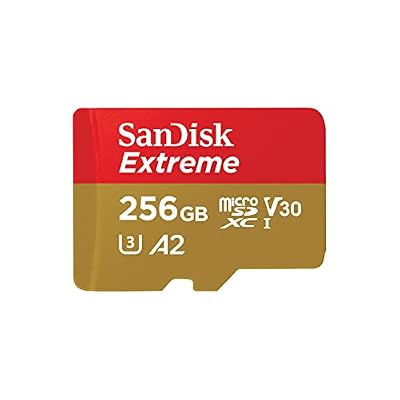
SANDISK 256GB Extreme microSD Card + Adapter, Up to 190MB/s Read Speeds | UHS-I, V30, 5K & 4K UHD, U3, C10, A2, Up to 130MB/s Write Speeds, Ideal for Action Cam, Drone, Smartphone- SDSQXAV-256G-GN6MA





As an Amazon Associate we earn from qualifying purchases. Product prices and availability are accurate as of the date/time indicated.
3. Steam Deck OLED 1TB Refurbished (Storage Winner)
The OLED 1TB at about $760 carries a premium of roughly $130 over the 512GB version for double the storage and an anti-glare etched glass screen. The etched glass alone is worth a good part of that premium, because it eliminates reflections in bright environments and feels significantly more premium under your fingertips. The extra storage matters most for emulation, where ROM libraries can easily eat 300GB, and for buyers who hate managing storage. If you have a 1TB microSD card already, the 512GB OLED is fine and you save roughly $130. If you do not, the 1TB OLED has the extra storage built in, which is faster than a card and leaves the microSD slot free.
A dock makes desk and TV play easier; pick 5 below is a budget option.
4. Hall-Effect Joystick Replacement Kit
This is the single best $30 you can spend on any Steam Deck, refurbished or not. Hall-effect joysticks use magnetic sensors instead of carbon-film potentiometers, which means they do not wear and will not develop drift no matter how many hours of gameplay you put in. The Gulikit-branded kits include both joysticks plus the tools needed for installation, and the procedure is well-documented in iFixit guides. Allow about thirty minutes for a first-time install, less once you have done one.
Buying a refurbished LCD and immediately installing hall-effect sticks turns a roughly $320 unit into a deck that will outlast the original hardware by years. Private sellers who have already done this mod and document it deserve a price premium. Buying a refurb Deck without this mod and installing it yourself is the smartest single thing most owners can do.
The hall-effect modules for LCD and OLED decks, plus a screen protector, are covered in the upgrades section below.
5. JSAUX 6-in-1 Docking Station (Budget Dock Pick)

The official Valve dock is reliable but expensive. JSAUX docks usually cost noticeably less than the official one and cover the common needs: 4K HDMI output, extra USB-A ports, Ethernet and pass-through charging (confirm the exact port list of the model you buy). For a refurb Steam Deck buyer trying to stretch the budget, this is the dock to pair with the unit.
6. SanDisk 512GB Extreme microSD

The single biggest quality of life upgrade after the device itself is a fast microSD card to expand storage and offload Linux-friendly titles. SanDisk Extreme cards rated A2 V30 sustain the read speeds the Steam Deck needs to run games directly from the card, and 512GB doubles the storage on a 256GB LCD without any internal modifications. Format the card to ext4 through SteamOS settings for best results, and avoid generic no-name cards that bottleneck load times.
7. Skull & Co GripCase SD (Protective Case Pick)

Valve’s refurbished units ship with a carrying case, but units from private sellers and some stores often arrive without one. The Skull & Co GripCase SD is a soft protective case with textured grips and a stand, and its listing describes shock-absorbing protection for the Steam Deck. It is a low-cost way to protect a used unit from scratches and everyday knocks. Confirm the listing fits your LCD or OLED model before you order, and add a separate hard travel case if the Deck regularly rides in a backpack.
Upgrades Worth Adding to a Used Deck: Hall-Effect Sticks and a Screen Protector
Three low-cost add-ons fix the most common weak points of a second-hand handheld: stick drift on LCD units, a different stick connector on OLED units, and a panel that may already have light wear.
GuliKit Hall Effect Joystick Module (Type A and B) – Best for Original LCD Decks

An LCD Deck is the model most likely to arrive with early stick drift, and this GuliKit module is the swap this guide recommends most. The listing covers both stick variants (Type A and Type B) found on the original LCD Deck, so check which type your unit uses before ordering.
- Hall-effect (magnetic) sensing instead of a carbon track that wears down
- Replacement module made for the Steam Deck LCD
- Listed for both Type A and Type B stick variants
- Allow about 30 minutes for a first install
Pros: removes drift as a long-term concern; costs far less than replacing a unit; repair guides are widely available. Cons: needs the back cover off; a mistake while the Deck is open is not covered by warranty. Skip it if you have a Valve-refurbished Deck whose sticks already read clean.
AKNES x GuliKit Hall Effect Joysticks for Steam Deck OLED – Best for OLED Decks

The OLED uses a different stick connector than the LCD, so an LCD kit will not fit it. This GuliKit-made set is listed specifically for the Steam Deck OLED, which makes it the safer choice if you bought a refurbished OLED 512GB or 1TB and want to future-proof the sticks.
- Hall-effect (magnetic) sensing for drift-free sticks
- Listed for the Steam Deck OLED only
- Made by GuliKit, the same maker as the LCD module above
- Follow an OLED-specific disassembly guide, since the internal layout differs from the LCD
Pros: matches the OLED connector; same drift-free design as the LCD kit. Cons: OLED disassembly takes a little longer; unnecessary on a unit with healthy sticks. Skip it if you own an LCD Deck or your OLED shows no drift in the Controller Settings test.
JSAUX 2-Pack Ultra HD Screen Protector – Best for Protecting a Used Panel

A used Deck may already carry light marks, and a protector stops new ones. This JSAUX two-pack is listed for both the OLED and LCD models, so one purchase covers either generation, with a spare sheet for a second attempt.
- Two protectors per pack
- Listed as compatible with Steam Deck OLED and LCD
- Ultra HD clarity film, aimed at keeping the picture sharp
Pros: inexpensive insurance; spare sheet included. Cons: does not hide scratches already on the glass; a glossy film changes the feel of the etched anti-glare finish on 1TB OLED and 512GB LCD units. Skip it if you prefer the etched glass finish bare.
Steam Deck LCD vs OLED: Full Spec Comparison for Used Buyers
Both generations run the same games at essentially the same frame rates, because they share the same four-core Zen 2 CPU and eight-unit RDNA 2 graphics design. What you pay extra for with the OLED is the screen, the battery, the wireless chip and a cooler, quieter chassis. This side-by-side view shows exactly what changes between the two models you will see on the refurbished market.
| Specification | Steam Deck LCD | Steam Deck OLED |
|---|---|---|
| Display | 7-inch IPS LCD, 1280 x 800 | 7.4-inch HDR OLED, 1280 x 800 |
| Refresh rate | 60Hz | Up to 90Hz |
| Peak brightness | About 400 nits | Up to 1,000 nits in HDR |
| Processor | 7nm AMD APU, Zen 2 CPU and RDNA 2 GPU | 6nm AMD APU, same CPU and GPU configuration |
| Memory | 16GB LPDDR5 at 5500 MT/s | 16GB LPDDR5 at 6400 MT/s |
| Storage options | 64GB eMMC, 256GB NVMe, 512GB NVMe | 512GB NVMe, 1TB NVMe |
| Anti-glare etched glass | 512GB model only | 1TB model only |
| Battery | 40Wh | 50Wh |
| Valve-rated battery life | 2–8 hours | 3–12 hours |
| Wireless | Wi-Fi 5, Bluetooth 5.0 | Wi-Fi 6E, Bluetooth 5.3 |
| Weight | About 669g | About 640g |
| Charger | 45W USB-C | 45W USB-C |
| 2026 availability | Refurbished and used only | New, refurbished and used |
The takeaway for a used buyer is that the LCD is not a slower machine, just a less pleasant one to hold for long sessions. If you mostly play docked to a TV or monitor, the screen and battery advantages of the OLED matter far less, and a well-inspected refurbished LCD with an NVMe drive is the smarter use of money. If you play handheld on commutes, flights or in bed, the OLED’s display, extra battery capacity and lighter weight are worth paying for.
Is a Used Steam Deck Still the Right Handheld in 2026?
For most people who already own a Steam library, yes. SteamOS remains the most console-like experience in PC handhelds: suspend and resume works reliably, the Verified program tells you which games run well before you install them, and the Proton compatibility layer keeps widening the list of playable Windows titles. The 1280 x 800 resolution also keeps demands modest, which is why a four-year-old design still runs a huge share of new releases at playable settings.
A used Deck is the wrong choice in a few specific cases. If you rely on games with kernel-level anti-cheat that blocks Linux, or on PC Game Pass and other Windows-only launchers, a Windows handheld with a newer chip and a sharper 1080p-class screen will serve you better, although these typically cost considerably more. If you like SteamOS but want a larger, higher-resolution display, Lenovo’s Legion Go S is also sold with SteamOS preinstalled. For everyone else, a refurbished Deck delivers the best balance of price, polish and battery life in handheld PC gaming right now.
When to Return a Refurbished Steam Deck (and What You Can Fix Yourself)
Send the unit back inside the return window if you find any of the problems below. Each one points to hardware that is costly or risky to repair yourself.
- A microSD slot that does not mount a card you trust, or fails the 20GB copy test
- A loose or non-charging USB-C port
- Battery capacity well under 80 percent of design capacity
- Dead pixels, heavy backlight bleed on an LCD, or burn-in ghosting on an OLED
- Touchscreen dead zones or a cracked panel the listing did not mention
- A serial number that is hidden or does not match the listing photos
Stick drift, a grinding fan, mushy face buttons and a worn battery are different: these are repairs most owners can do with spare parts, so treat them as price negotiation points on a private sale rather than automatic returns. On a Valve refurbished unit, though, any of these is a warranty claim, so return or claim it instead of opening the Deck.
Red Flags and Scam Warnings
The used Steam Deck market has matured, but the scams have evolved with it. Here are the patterns we have seen this year that should make you walk away from a deal immediately, no matter how attractive the price.
No serial number in photos. Legitimate sellers include the serial number sticker on the back of the unit in their photos, or in close-up shots, because the serial number is what Valve uses to validate warranty eligibility. Sellers who refuse to show the serial number are often selling stolen units or units that have already had a warranty claim filed against them.
Price far below market. A Steam Deck OLED 512GB listed for around $300 is a scam, full stop. Valve’s own refurbished price for that model sits near $630 in October 2026, and honest private sellers rarely go far below it. Anything much lower is either a Facebook Marketplace bait listing or a fake refurb with bootleg parts. The most common scam is a unit with a counterfeit battery that swells within three months.
Payment via Zelle, Venmo friends-and-family, or crypto. Always pay with credit card or PayPal Goods and Services. Anything else removes your buyer protection and your ability to chargeback if the unit arrives damaged or never arrives at all. A seller who refuses credit card payment is a seller you should not buy from.
No return window. Any legitimate refurbisher offers at least thirty days of returns. Valve offers a full year of warranty. A seller who insists on as-is no-returns sales is either a scammer or has personally experienced the unit failing and is trying to offload it before someone notices. Pass on these listings every time.
Heavily modded with non-reversible changes. Custom backplates are fine and even desirable, because they improve grip and aesthetics without affecting function. But custom shells, internal LED mods, and aftermarket cooling systems often void warranty coverage and can introduce reliability issues. If a unit has been modded in non-reversible ways, the seller should reduce the price significantly to account for the lost warranty value.
Frequently Asked Questions
Is a refurbished Steam Deck OLED worth it over a new one? Yes, for most buyers. With new OLED prices up in 2026, a refurbished OLED 512GB from Valve saves roughly $160 on hardware that has gone through Valve’s certification checks and carries the same one-year warranty as a new unit. The trade-offs are limited stock and possible minor cosmetic marks. Put the savings toward accessories or games.
Will my Steam Deck warranty transfer if I buy from a private seller? No. Valve’s one-year warranty applies to the original purchaser only and does not transfer to second-hand buyers. This is the single biggest reason to buy from Valve Refurbished or another retailer that offers a fresh warranty, rather than from a private seller. The warranty value alone justifies the premium over r/HardwareSwap prices.
How do I check battery health on a used Steam Deck? Open the SteamOS desktop mode, launch a terminal, and run the command upower -i /org/freedesktop/UPower/devices/battery_BAT1 and look for the energy-full and energy-full-design values. The ratio tells you remaining capacity, and a healthy battery should be above 90 percent.
Can I install hall-effect joysticks on an OLED Steam Deck? Yes, although the OLED uses a slightly different joystick connector than the LCD. Make sure to buy a hall-effect kit specifically rated for the OLED model, and follow the iFixit guide for OLED disassembly. The procedure is similar to the LCD but takes about ten minutes longer due to the different internal layout.
Will a discontinued Steam Deck LCD keep getting SteamOS updates?
Yes. The LCD and OLED models share the same software platform and the same core chip design, so SteamOS updates continue to roll out to both. Discontinuation affects the sale of new LCD units, not software support. Replacement parts for the LCD are still widely available through repair suppliers, which keeps out-of-warranty fixes such as joysticks, fans and batteries affordable.
Should I worry about burn-in on a used Steam Deck OLED?
It is worth checking but rarely a dealbreaker. OLED panels can retain faint images after very long sessions with static elements on screen, so run the gray-screen test described above before you accept the unit. To protect your own panel afterward, use a sensible brightness level, let the screen dim when idle and avoid leaving a paused game on screen for hours.
Can I upgrade the internal SSD in a refurbished Steam Deck?
Yes. The NVMe models of both generations use a compact M.2 2230 drive, so you can swap in a larger one and reinstall SteamOS from Valve’s recovery image. Follow a reputable step-by-step guide, use the correct screwdriver bits to avoid stripping screws, and keep in mind that any damage caused while the device is open will not be covered by warranty. For most owners, a fast microSD card is the easier way to add space.
Should I buy a used LCD now or save for a refurbished OLED?
If the price gap is small, save for the OLED, because its screen, battery and Wi-Fi improvements are noticeable every time you play handheld. If the gap is large, or you mainly play docked, a refurbished 256GB or 512GB LCD plays the same games and leaves money for a dock, a microSD card and a hall-effect stick upgrade.
Which refurbished Steam Deck is the best buy?
The Valve Certified Refurbished Steam Deck OLED 512GB is the best buy for most people. It adds the OLED screen, larger battery and Wi-Fi 6E to the same performance as the LCD, with a one-year warranty. If the price gap matters more than the screen, the refurbished LCD 256GB is the budget alternative.
Where does Steam sell refurbished Steam Decks?
Valve lists Certified Refurbished units on the Steam Deck pages of its own store. Stock arrives in limited batches and sells out quickly, and each unit carries the same one-year warranty as a new Deck. If it is sold out, check back or set a restock alert before moving to a third-party seller.
Is a refurbished Steam Deck from Best Buy or GameStop worth it?
It can be, if the price is close to Valve’s and the warranty is clearly stated. Best Buy has listed refurbished and open-box Steam Deck consoles and GameStop refurbishes its own units, but neither is Valve Certified Refurbished, so compare their coverage and return window against Valve’s one-year warranty first.
Is it safe to buy a refurbished Steam Deck on eBay?
It is reasonably safe when the listing is part of eBay’s refurbished program and shows a warranty line and free returns. Avoid listings with no return window, pay only through protected methods, and run the full inspection checklist the day the unit arrives.
Final Verdict
Our pick for 2026 is the Steam Deck OLED 512GB Refurbished from Valve direct at about $630 in October 2026. It delivers the best handheld hardware Valve currently sells at a meaningful discount to new pricing, with the same one-year warranty coverage as a new unit. The OLED panel makes a real difference in daily use, battery life is sufficient for any travel scenario, and 512GB of internal storage covers most libraries before you even add a microSD card. Pair it with a hall-effect joystick mod, a protective case, a 512GB microSD card, and a JSAUX dock for a complete handheld setup that should stay relevant until a Steam Deck successor eventually arrives. For buyers on a tighter budget, the LCD 256GB at about $320 from Valve Refurbished plus a hall-effect mod is the smart secondary pick. Avoid the LCD 64GB at any price because the eMMC storage is genuinely too slow for modern games. Buy from Valve first, GameStop or Decluttr second, and private sellers last.