

You do not need to spend a fortune to get reliable home Wi-Fi. The sub-$50 router market is full of capable models that handle everyday browsing, streaming, video calls, and online gaming for a small apartment or modest home — the trick is knowing which budget features actually matter. This guide rounds up the best routers under $50 in 2026, focused squarely on value: the most Wi-Fi performance, range, and reliability you can get without crossing the budget ceiling. Every primary pick here lands at or near $50 or below, so you get a clear sense of what your money buys at each rung.
- Best Routers under $50 at a Glance
- 1. TP-Link AC1200 Gigabit WiFi Router (Archer A6) – Dual Band MU-MIMO Wireless Inte
- 2. TP-Link Archer AC1750 WiFi Router – Dualband Gigabit, Qualcomm inside, Works wit
- 3. Tenda AC1200 Smart WiFi Router, High Speed Dual Band Wireless Internet Router wi
- 4. TP-Link N300 Wireless Extender, Wi-Fi Router (TL-WR841N) – 2 x 5dBi High Power A
- 5. TP-Link N450 WiFi Router – Wireless Internet Router for Home (TL-WR940N)
- 6. TP-Link AX1800 WiFi 6 Router (Archer AX21 V5) – Dual Band Wireless Internet, Gig
- How to Choose a Router under $50
- Frequently Asked Questions
- Related Guides
- Related Articles
Our picks were chosen on what genuinely matters for affordable networking: Wi-Fi standard and speed class, single versus dual band, antenna count and coverage, and raw value per dollar. We have included a deliberate spread — from a sub-$20 single-band workhorse up to a Wi-Fi 6 router that sits just above the line — and we are honest about where the budget ceiling bites. Prices run from around $20 to around $52, with most well under $50. Below is an at-a-glance comparison of all six, then a closer look at each and a buyer’s guide built around Wi-Fi standards, bands, and coverage for a tight budget.
As an Amazon Associate we earn from qualifying purchases at no extra cost to you.




🛒 Best Price Today on Amazon
Prime members get fast, free shipping on everything above, plus member-only deals. New members get a 30-day free trial — cancel anytime.
Best Routers under $50 at a Glance
| Router | Best For | Standout Spec | Approx Price |
|---|---|---|---|
| TP-Link Archer A6 AC1200 Gigabit (Archer A6) | Best dual-band value under $50 | AC1200 dual-band, MU-MIMO, Gigabit | around $40 |
| TP-Link Archer AC1750 (Dualband Gigabit) | More speed for busy homes | AC1750 dual-band, Gigabit | around $38 |
| Tenda AC1200 Smart WiFi Router | Cheapest dual-band pick | AC1200 dual-band, budget price | around $28 |
| TP-Link N300 Extender/Router (TL-WR841N) | Simple single-band basics | N300, dual 5dBi antennas | around $32 |
| TP-Link N450 WiFi Router (TL-WR940N) | Cheapest router here | N450 single-band, 3 antennas | around $20 |
| TP-Link Archer AX21 AX1800 Wi-Fi 6 (V5) | Wi-Fi 6 just over the line | AX1800 dual-band Wi-Fi 6, Gigabit | around $52 |
1. TP-Link AC1200 Gigabit WiFi Router (Archer A6) – Dual Band MU-MIMO Wireless Inte

TP-Link AC1200 Gigabit Dual Band WiFi Router (Archer A6) | MU-MIMO Wireless Internet Router, 4 x Antennas, OneMesh and AP Mode, Long Range Coverage


As an Amazon Associate we earn from qualifying purchases. Product prices and availability are accurate as of the date/time indicated.
The TP-Link Archer A6 is the best all-round value under $50 and the pick to start with. It is a dual-band AC1200 router with Gigabit wired ports and MU-MIMO support, meaning it splits traffic across 2.4GHz and 5GHz bands and serves multiple devices more efficiently than older single-band units. At around $40 it sits comfortably under the budget ceiling while delivering the modern essentials most homes actually need.
This is the router for the everyday household that wants dependable Wi-Fi for streaming, browsing, video calls, and online gaming without overspending. The 5GHz band gives faster, cleaner throughput for nearby devices like a gaming PC or console, the 2.4GHz band reaches further for the rest of the home, and Gigabit ports mean a wired connection is not bottlenecked. MU-MIMO helps when several devices are online at once. For the best balance of price, speed, and features under $50, the Archer A6 is the clear pick.
Pros: Dual-band AC1200, Gigabit ports, MU-MIMO, comfortably under $50, excellent all-round value.
Cons: AC-class rather than Wi-Fi 6; not built for very large homes.
2. TP-Link Archer AC1750 WiFi Router – Dualband Gigabit, Qualcomm inside, Works wit

TP-Link Archer AC1750 WiFi Router - Dualband Gigabit, Qualcomm inside, Works with Alexa(A7), Black
As an Amazon Associate we earn from qualifying purchases. Product prices and availability are accurate as of the date/time indicated.
The TP-Link Archer AC1750 is the pick for a busy home that wants more headroom while staying under budget. It steps up to the AC1750 speed class on dual bands with Gigabit ports and a Qualcomm chipset, giving a little more combined wireless throughput than the AC1200 tier. At around $38 it is remarkable value for an AC1750 router and a strong choice when several devices stream and game at once.
This is the router to choose when your household runs more devices than average and you want extra wireless capacity without crossing $50. The higher AC1750 rating provides more combined bandwidth across the two bands, which helps when multiple people stream 4K, game online, and video call simultaneously, and the Gigabit ports keep wired devices fast. It is a well-established, widely trusted model. For more speed-class headroom than the entry tier at a similar low price, the AC1750 is a smart budget step up.
Pros: AC1750 dual-band, Gigabit ports, Qualcomm chipset, great value, more headroom for busy homes.
Cons: Still AC-class, not Wi-Fi 6; coverage suits small-to-medium homes.
3. Tenda AC1200 Smart WiFi Router, High Speed Dual Band Wireless Internet Router wi

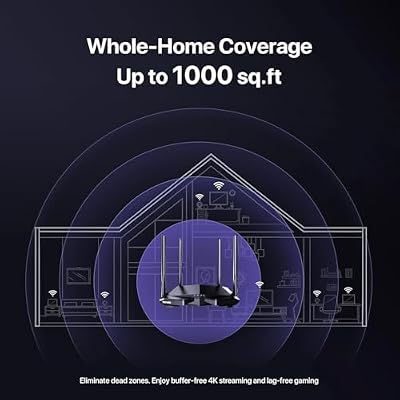
Tenda AC1200 Smart WiFi Router, High Speed Dual Band Wireless Internet Router with Smart APP, 4 x 100 Mbps Fast Ethernet Ports, Supports Guest WiFi, Access Point Mode, IPv6 and Parental Controls(AC6)

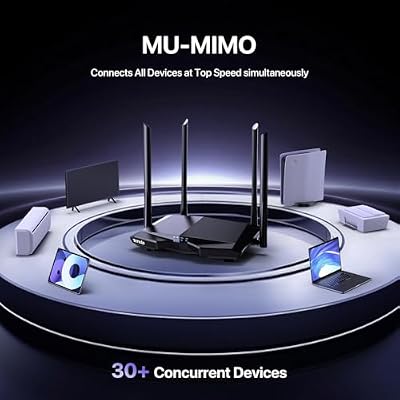


As an Amazon Associate we earn from qualifying purchases. Product prices and availability are accurate as of the date/time indicated.
The Tenda AC1200 is the pick for the lowest-cost dual-band Wi-Fi here. It offers the modern dual-band AC1200 standard — both 2.4GHz and 5GHz — at a rock-bottom price, making it an easy way to move off a single-band router without spending much. At around $28 it undercuts most AC1200 rivals and covers the essentials for a small home or apartment.
This is the router to choose when you want dual-band Wi-Fi on the tightest budget and do not need Gigabit-class extras or a big-name chipset. The 5GHz band handles faster nearby connections while 2.4GHz spreads coverage, the setup is beginner-friendly, and the price leaves room in the budget for other gear. It is a no-frills unit rather than a feature flagship, but for cheap, competent dual-band networking in a smaller space, the Tenda AC1200 is a sensible, wallet-friendly pick.
Pros: Dual-band AC1200 at a very low price, easy setup, good for small homes, strong value.
Cons: Budget chipset and features; best for smaller spaces and lighter loads.
4. TP-Link N300 Wireless Extender, Wi-Fi Router (TL-WR841N) – 2 x 5dBi High Power A

TP-Link N300 Wireless Extender, Wi-Fi Router (TL-WR841N) - 2 x 5dBi High Power Antennas, Supports Access Point, WISP, Up to 300Mbps


As an Amazon Associate we earn from qualifying purchases. Product prices and availability are accurate as of the date/time indicated.
The TP-Link TL-WR841N is the pick for simple, single-band basics, and it is a genuine long-time best-seller. It is an N300 (Wireless-N) router with two 5dBi high-power antennas, delivering reliable single-band 2.4GHz coverage for everyday tasks. At around $32 it is a proven, dependable unit, though it is worth being clear about what it is: a single-band N-class router rather than a dual-band performer.
This is the router to choose for a small household with light needs — browsing, email, standard-definition or basic HD streaming, and casual use — where simplicity and reliability matter more than peak speed. The dual 5dBi antennas help push the 2.4GHz signal through a small home, and the setup is famously straightforward. Be honest about the limits: on a single 2.4GHz band, it will not match the dual-band picks for speed or for handling many demanding devices. For basic, trouble-free Wi-Fi at a low price, it still does the job.
Pros: Proven reliability, dual 5dBi antennas for 2.4GHz reach, very easy setup, low cost.
Cons: Single-band N300 only — slower and less suited to heavy or multi-device use.
5. TP-Link N450 WiFi Router – Wireless Internet Router for Home (TL-WR940N)

TP-Link Deco S4 Whole Home Mesh WiFi System, Deco S4(2-Pack) | Up to 3,800 Sq.ft. Coverage, AC1900 WiFi Router and Extender Replacement, Parental Controls


As an Amazon Associate we earn from qualifying purchases. Product prices and availability are accurate as of the date/time indicated.
The TP-Link TL-WR940N is the cheapest router on the list and the pick for the absolute tightest budget. It is an N450 single-band router with three antennas, offering a step up in Wireless-N speed over the N300 model while staying on the 2.4GHz band only. At around $20 it is about as affordable as a brand-name router gets, and for the right user that low price is the whole appeal.
This is the router to choose when cost is the deciding factor and your needs are modest — a spare room, a first apartment, or a backup unit. The three antennas and N450 rating give slightly better single-band performance and reach than entry N300 hardware, and TP-Link’s setup is beginner-friendly. As with the WR841N, be realistic: this is single-band 2.4GHz networking, so it is not the choice for 4K streaming on many devices or low-latency competitive gaming. For the cheapest dependable Wi-Fi here, it delivers.
Pros: Cheapest pick here, N450 with three antennas, decent 2.4GHz reach, beginner-friendly setup.
Cons: Single-band only; not for heavy streaming, many devices, or serious gaming.
6. TP-Link AX1800 WiFi 6 Router (Archer AX21 V5) – Dual Band Wireless Internet, Gig
Rounding out the list is the TP-Link Archer AX21 (V5), the pick for anyone who can stretch just past the budget ceiling for Wi-Fi 6. In the interest of honesty, at around $52 it sits a touch above the strict under-$50 line — but it is included because it is the cheapest gateway to modern Wi-Fi 6 (AX1800), with dual bands, Gigabit ports, and OFDMA for better efficiency with many devices. If your budget can flex by a couple of dollars, it is the most future-proof option here.
This is the router to choose if you want the latest mainstream standard rather than older AC-class hardware and can accept that it nudges just over $50. Wi-Fi 6 brings better performance in busy, device-dense homes thanks to OFDMA and improved efficiency, the dual-band AX1800 rating handles modern speeds, and Gigabit ports keep wired gear fast. It is the only Wi-Fi 6 unit on the list and the best pick for longevity. Just go in knowing it is the one item here that technically breaks the under-$50 rule.
Pros: Modern Wi-Fi 6 (AX1800), dual-band, Gigabit, OFDMA efficiency, most future-proof option.
Cons: At around $52 it sits just above the strict under-$50 ceiling.
How to Choose a Router under $50
Shopping for a router under $50 means spending your limited budget where it matters most, and the first decision is the Wi-Fi standard. Most picks here are AC-class (Wi-Fi 5), like the Archer A6, AC1750, and Tenda AC1200, which is perfectly capable for everyday use. The TL-WR841N and TL-WR940N are older N-class (Wi-Fi 4) and cheaper still. The Archer AX21 is the only Wi-Fi 6 unit and the most future-proof, though it sits just over the budget line. For most buyers, a dual-band AC router is the value sweet spot under $50.
Single band versus dual band is the most important budget trade-off. A single-band router, like the TL-WR841N and TL-WR940N, broadcasts only on 2.4GHz — fine for browsing, email, and light streaming, and it reaches reasonably far, but it is slower and gets congested when many devices are online. A dual-band router adds a faster, cleaner 5GHz band for nearby high-demand devices like a gaming PC or 4K stream. If you stream, game, or run several devices, prioritise dual band even on a tight budget.
Coverage and antennas matter for getting signal across your home. More antennas and higher-gain designs — like the dual 5dBi antennas on the TL-WR841N or the three antennas on the TL-WR940N — help push signal through walls and across rooms. Budget routers are best suited to apartments and small-to-medium homes; for a large house or many walls, no sub-$50 router will fully cover it, and you may eventually need a mesh system. Match the router’s realistic range to the size of your space.
Finally, weigh wired ports, device count, and the budget ceiling itself. Gigabit ports, as on the Archer A6, AC1750, and AX21, keep wired connections fast for a desktop or console; older units may have slower 10/100 ports. Features like MU-MIMO and OFDMA help when many devices share the network. And be honest about the ceiling: if Wi-Fi 6 longevity matters, the AX21 is worth the couple of dollars over $50, but if you want to stay strictly under, the Archer A6 is the best pick. Decide your standard, insist on dual band unless your needs are truly basic, and choose the router on this list that fits your home and your limit.
Frequently Asked Questions
What is the best router under $50?
For most homes, the TP-Link Archer A6 is the best router under $50. It is a dual-band AC1200 router with Gigabit ports and MU-MIMO at around $40, giving you modern dual-band performance, fast wired connections, and efficient handling of multiple devices while staying comfortably under budget. If you want even more headroom, the AC1750 is a close second; if you want Wi-Fi 6 and can stretch slightly, the Archer AX21 is the future-proof option just over the line.
Can a cheap router handle online gaming?
Yes, within reason. A dual-band router like the Archer A6 or AC1750 gives a clean 5GHz band and Gigabit wired ports, so a wired or close-range gaming PC or console gets low-latency, stable internet for online play. Single-band N-class units like the TL-WR841N and TL-WR940N can work for casual gaming but are more prone to congestion. For the best budget gaming experience, choose a dual-band model and use a wired connection where you can.
Is dual-band worth it on a budget router?
Almost always, yes. A dual-band router adds a faster, less congested 5GHz band on top of the longer-reaching 2.4GHz band, which makes a real difference for streaming, gaming, and homes with several devices. Dual-band picks like the Archer A6, AC1750, and Tenda AC1200 cost only a little more than single-band units. Unless your needs are truly basic — light browsing on a couple of devices — dual band is the better budget choice.
Do I need Wi-Fi 6 in a budget router?
Not strictly, but it helps for the future. Wi-Fi 6 (as in the Archer AX21) improves efficiency in device-dense homes through OFDMA and offers better longevity than older AC-class hardware. The catch is price — the AX21 sits just above $50, so it breaks a strict budget. If you want the newest standard and can flex a couple of dollars, it is worth it; if you must stay under $50, a dual-band AC router like the Archer A6 still serves most homes well today.
Related Guides
- Best Wi-Fi Routers
- Best Gaming Routers
- Best Mesh Wi-Fi Systems
- Best Wi-Fi Extenders
- Best Ethernet Cables for Gaming
- Best Budget Gaming Setup
Affiliate Disclosure: As an Amazon Associate, we earn from qualifying purchases. If you click a link and make a purchase, we may earn a small commission at no extra cost to you. Prices and availability are accurate as of publication and may change.










