

The GAOMON PD1161 is GAOMON’s compact entry-level pen display, designed as a direct alternative to the XP-PEN Artist 12. It puts an 11.6-inch FHD IPS screen under your stylus with 8,192 pressure levels and a battery-free pen, plus a useful set of 8 ExpressKeys and a touch bar. At around $240 it is one of the most affordable comfortable ways to start drawing on a screen. This GAOMON PD1161 review covers the screen, pen, drivers and how it compares with rivals.

GAOMON PD1161 Drawing Tablet with Screen, Tilt, 8 Shortcut Keys, 11.6" FHD | Anti-Glare Screen, Battery-Free Stylus, 8192 Pressure Levels, for Digital Art, Design & Illustration, Works with Mac/Windows




As an Amazon Associate we earn from qualifying purchases. Product prices and availability are accurate as of the date/time indicated.
🛒 Best Price Today on Amazon
Prime members get fast, free shipping on everything above, plus member-only deals. New members get a 30-day free trial — cancel anytime.
As an Amazon Associate we earn from qualifying purchases.


GAOMON PD1161 at a Glance
| Component | Specification |
|---|---|
| Active area | 11.6-inch IPS display, 1920 x 1080 (FHD) |
| Pressure levels | 8,192 |
| Stylus type | Battery-free passive pen (GAOMON ArtPaint AP50) |
| Resolution | 5,080 lpi |
| Report rate | approx 60 Hz display / 266 pps pen |
| Tilt support | No |
| Express keys | 8 ExpressKeys + touch bar |
| Connection | HDMI + USB (wired) |
| Approx price | around $240 |
Pen Performance & Pressure
The PD1161 ships with GAOMON’s AP50 battery-free pen, which delivers 8,192 pressure levels and a confident, predictable feel for the price. The pen is battery-free — power is drawn wirelessly from the display — so there is nothing to charge and no cable to plug into the pen itself. There is no tilt support on this generation, which is the main feature compromise versus the pricier XPPen Artist 15.6 Pro V2 or modern Wacom Cintiqs; for lineart, lettering and note-taking it is rarely missed, but tilt-rich painting workflows will feel limited. The two pen side buttons are remappable in the GAOMON driver.
Report rate for the pen is around 266 reports per second, which is plenty for smooth, jitter-free lines and confident detail work. Pen-tip-to-cursor offset, sometimes called parallax, is a relevant consideration on this generation of pen display — there is a small but visible gap between the glass surface and the LCD layer below, as is typical at this price tier and one of the things you pay more for when you step up to a fully laminated panel such as the XPPen Artist 15.6 Pro V2. In practice the offset is small enough that you adapt to it within an hour of use, particularly if you tilt the display slightly toward you so your eye-line approaches the work surface perpendicular. Initial activation force is low, and the pressure response can be tuned in the driver’s pressure-curve editor.
Build & Materials
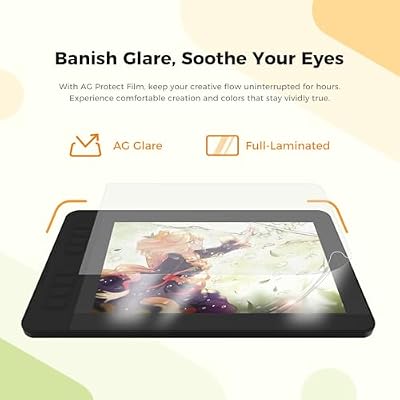
The PD1161 is a compact, well-built pen display. The 11.6-inch IPS panel is bright and reasonably colour-accurate for a hobbyist-grade display, with an anti-glare etched glass surface that gives the pen tip a satisfying paper-like resistance. Along the left edge are 8 ExpressKeys and a touch bar (used for brush-size or zoom control), and the orientation can be flipped in the driver for left-handed users. There is no integrated stand — the display lies flat by default — and a separate adjustable stand is available from GAOMON but not always bundled. Brightness on the panel is generous for indoor desk use, and colour gamut coverage is adequate for hobbyist digital art — the PD1161 is not a wide-gamut display in the way a professional reference monitor is, so colour-critical print work calls for a step up, but for online publishing and general illustration the panel is well chosen. Viewing angles are good thanks to IPS technology, and the anti-glare etched glass surface keeps reflections under control. The eight ExpressKeys are clearly labelled and have a clean tactile click, and the touch bar’s quick-access function (zoom and brush-size by default) is configurable in the driver. Underneath, two small foldout legs offer a shallow angle if you do not have a separate stand — a nice touch on a budget pen display.
Software Compatibility & Drivers
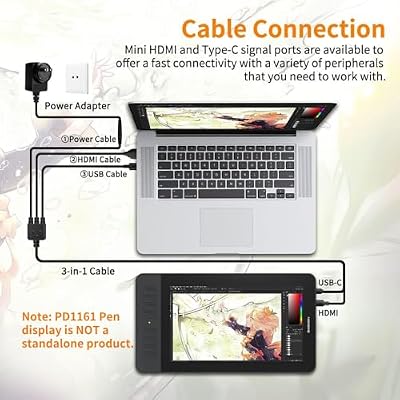
GAOMON drivers support Windows and macOS officially, with community Linux support. Inside Photoshop, Clip Studio Paint, Krita, MediBang, GIMP, SAI and other creative apps, pressure is recognised after driver install. Connection uses an included 3-in-1 cable (HDMI for video, USB-A for power, USB-A for pen input), which is more cabling than a screenless tablet but standard for entry-level pen displays. The drivers are competent and continue to receive updates, though they remain a step below Wacom in polish.
Use Cases — Art, 3D and Note Taking
The PD1161 is the natural choice for a hobbyist artist who wants to draw on-screen at a low price. The 11.6-inch FHD display is sharp enough for serious illustration work and the on-screen-line feel is good. For 3D artists, the FHD resolution and 11.6-inch size are tight for complex scene work, but useful for sculpting input in ZBrush and Blender. For educators and presenters, the screen makes whiteboarding and slide annotation more natural. For travel and small workspaces, the compact size is a clear advantage over larger pen displays such as the Artist 15.6 Pro V2. The 8 ExpressKeys can be remapped per-application, which means the muscle memory you build up across Photoshop, Krita and Clip Studio Paint can be tuned for each app’s preferred shortcut set without overwriting one another.
What’s in the Box
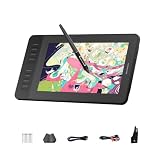
The PD1161 box includes the pen display, the AP50 battery-free pen, a pen stand with replacement nib storage, eight replacement nibs, a 3-in-1 HDMI/USB cable, a USB extension cable, an artist glove, a cleaning cloth and a Quick Start guide. A separate display stand is sold separately. There is no Bluetooth and no software bundle of note, so factor any commercial creative apps in separately.
Verdict — Is the GAOMON PD1161 Worth It?
At around $240 the GAOMON PD1161 is one of the most affordable comfortable ways to start drawing on a screen. The FHD IPS display, battery-free 8,192-level pen and 8 ExpressKeys plus touch bar add up to a competent entry-level pen-display package. The compromises — no tilt, no integrated stand, drivers a step behind Wacom — are reasonable at the price. If you are choosing between the PD1161 and the XP-PEN Artist 12, the two are closely matched; pick on price, software-bundle promotion and your personal preference for either brand. To upgrade later, the XPPen Artist 15.6 Pro V2 is the natural next step. The PD1161 has been around long enough that tutorial content, driver-tuning guides and community troubleshooting threads are easy to find online, which helps the first-time pen-display owner get comfortable with the workflow quickly. Build a capable creative PC for it with our best RTX 5070 gaming laptops guide.
Frequently Asked Questions
Is the GAOMON PD1161 a pen display or a screenless tablet?
It is a pen display — there is a built-in screen, so you draw directly on the picture you are creating, rather than next to it.
Does the GAOMON PD1161 pen support tilt?
No. The AP50 stylus supports 8,192 pressure levels but does not include tilt sensitivity on this generation.
Does the GAOMON PD1161 pen need charging?
No. The AP50 is battery-free — power is drawn wirelessly from the display, so the pen never needs charging or batteries.
Does the GAOMON PD1161 come with a stand?
No. A stand is not included by default. The display sits flat on the desk, and an adjustable stand is available from GAOMON separately.
More Drawing Tablet Reviews
- Wacom Intuos Small Bluetooth Review: Beginner-Friendly Drawing Tablet
- Wacom One by Wacom Medium Review: Larger Beginner Pen Tablet
- XPPen StarG640 Review: Ultra-Slim 6×4 Drawing Tablet for OSU and Sketching
- XPPen Deco 01 V3 Review: 10×6 Drawing Tablet with Tilt and Battery-Free Pen
- XP-PEN Artist 12 Review: 11.6″ FHD Pen Display for Beginners
- XPPen Artist 15.6 Pro V2 Review: 16K Pressure Pen Display
- XPPen Deco 640 Review: 6×4 Drawing Tablet with 16K Pressure
- GAOMON M10K Review: 10×6 Drawing Tablet with Touch Ring
Affiliate Disclosure: As an Amazon Associate, we earn from qualifying purchases. If you click a link and make a purchase, we may earn a small commission at no extra cost to you. Prices and availability are accurate as of publication and may change.
Related Articles
Looking for more on this topic? Browse the hand-picked guides below — each one applies the same scoring rubric used in this review.










