

The Wacom Intuos Small Bluetooth is one of the most widely recommended entry-level drawing tablets in the world, and for good reason. It carries the Wacom name and the company’s mature EMR (electromagnetic resonance) pen technology in a compact, beginner-friendly chassis at an accessible price of around $89. This Wacom Intuos Small review covers the active area, pen feel, software bundle and value for anyone starting out in digital art, photo retouching or note-taking. If you are weighing your first graphics tablet, the Intuos Small is the benchmark the rest of the market is measured against.
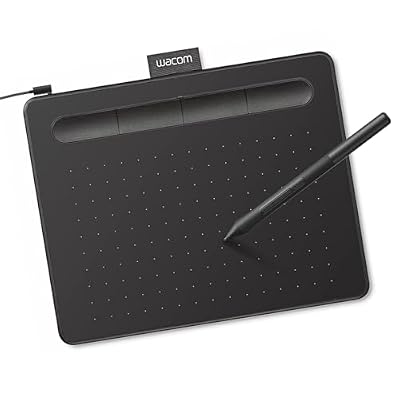
Wacom Intuos Small, Wired Graphic Drawing Tablet with Pen + Software | Battery-free pen, 4 ExpressKeys for shortcuts, works with Mac, Windows & Chromebook; Ideal for creators, students & teachers






As an Amazon Associate we earn from qualifying purchases. Product prices and availability are accurate as of the date/time indicated.
🛒 Best Price Today on Amazon
Prime members get fast, free shipping on everything above, plus member-only deals. New members get a 30-day free trial — cancel anytime.
As an Amazon Associate we earn from qualifying purchases.




Wacom Intuos Small at a Glance
| Component | Specification |
|---|---|
| Active area | 6.0 x 3.7 inches (152 x 95 mm) |
| Pressure levels | 4,096 |
| Stylus type | Wacom EMR battery-free pen (Wacom Pen 4K, LP-1100K) |
| Resolution | 2,540 lpi |
| Report rate | 133 pps (wired) |
| Tilt support | No |
| Express keys | 4 ExpressKeys |
| Connection | USB-C and Bluetooth (wireless) |
| Approx price | around $89 |
Pen Performance & Pressure
The defining feature of any Wacom tablet is the pen, and the Intuos Small uses Wacom’s battery-free EMR (electromagnetic resonance) stylus — the same fundamental technology that has set the standard in the graphics-tablet industry for decades. EMR means the pen draws power wirelessly from the tablet surface, so there is nothing to charge, nothing to swap, and the pen weight stays balanced for long drawing sessions. The Pen 4K supplied with this Intuos delivers 4,096 levels of pressure sensitivity, which is fewer than higher-end Wacom Pro Pens but more than enough for beginners and intermediate artists to render expressive line weight and shading. There is no tilt support, which is the main concession at this price — if you rely on tilt for natural brush dynamics in painting apps, you may eventually want to step up. For sketching, lineart, photo retouching, animation cleanup and note-taking, the response feels confident and predictable straight out of the box. Wacom’s tracking accuracy is the other quiet strength here: cursor placement matches pen position cleanly across the entire active area, with very low parallax or edge-drift, which is where many ultra-budget tablets struggle. The report rate of around 133 pps over USB is lower than rival 266 pps tablets on paper, but the smoothness of the resulting lines is genuinely better than the spec sheet suggests — a reminder that report rate alone is a misleading number.
Build & Materials
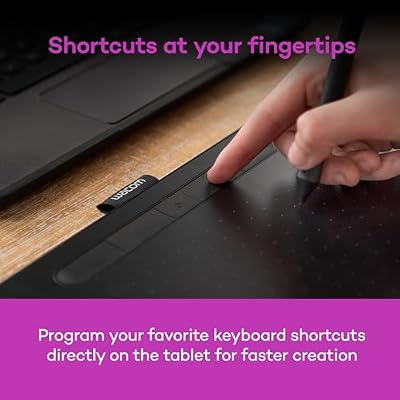
Wacom builds the Intuos Small to a noticeably higher standard than many of its budget rivals. The chassis is slim and lightweight, with a matte work surface that has a subtle paper-like texture — enough resistance to give the pen tip something to bite against, without the gritty drag that wears nibs down quickly. The four ExpressKeys along the top edge are tactile and clearly marked, and the pen rests neatly in a fabric loop on the side rather than rolling away across the desk. The included pen has a comfortable rubberised grip that does not get sticky over time, and Wacom supplies a small pouch with spare nibs. It is the kind of build that survives years of use, which is part of why used Intuos tablets keep their value better than almost any other budget tablet on the market. The chassis is rigid, with no flex under hand pressure, and the four ExpressKeys have a clean tactile click that lasts thousands of presses. Underneath, the tablet sits on small rubber feet that prevent sliding during heavy strokes.
Software Compatibility & Drivers
Software is where the Intuos Small punches well above its weight. Wacom’s drivers are the most mature in the industry, with full support for Windows 11, macOS, ChromeOS and most popular Linux distributions, and they receive regular updates years after a product launches. The tablet is recognised natively in every major creative application — Photoshop, Illustrator, Krita, Clip Studio Paint, Procreate-style apps on tablet OSes (when paired with a host computer), and a long list of others — with pressure sensitivity working immediately. Wacom also bundles a meaningful software offer: at the time of writing, new owners are eligible to claim a selection of creative applications (often including Clip Studio Paint, Corel Painter Essentials or similar), which can add real value on top of the hardware itself.
Use Cases — Art, 3D and Note Taking
For an entry-level chassis the Intuos Small is genuinely versatile. For 2D digital art, it is one of the most reliable first tablets you can buy: the 6.0×3.7-inch active area is well matched to laptop screens and small-to-mid desktop monitors, and the mature drivers mean drawing in Photoshop, Krita or Clip Studio Paint just works. For 3D artists, it is useful as a sculpting or texturing input in ZBrush or Blender, though the small active area means you may want to step up for serious work. For note-takers and educators, the Bluetooth connection makes it easy to live-annotate slides or write in OneNote and similar apps without a tethered cable. The compact footprint also suits travel — it slips into a laptop bag without complaint.
What’s in the Box
Inside the box you get the Intuos Small tablet, the Wacom Pen 4K (LP-1100K), three replacement nibs stored under the pen’s removable end-cap, a USB-C cable, a fabric pen loop already attached and a Quick Start guide with a code redemption card for the bundled creative software. Bluetooth is built into the tablet itself — no separate dongle is required to go wireless, which is one of the most useful upgrades over the older non-Bluetooth Intuos. You will need to provide your own USB-C-to-USB-A adapter only if your computer lacks USB-C, but most users will be plug-and-play.
Verdict — Is the Wacom Intuos Small Worth It?
At around $89 the Wacom Intuos Small Bluetooth is the safest, most easily recommended first drawing tablet on the market. You are paying a small premium over budget alternatives, and in return you get the most mature drivers, the longest-running pen technology, a build that lasts and a software bundle that takes the sting out of the price. The compromise is the modest 4,096 pressure levels and no tilt — both fine for beginners but limiting if you become a power user. For students, hobbyists, photo retouchers and anyone testing whether digital art is for them, the Intuos Small is a quietly excellent choice. Resale value is genuinely high too — Wacom’s reputation means used Intuos tablets keep their value years after launch, and if you decide to upgrade later the Intuos Small is one of the easiest tablets in the world to sell on. For more on the wider ecosystem, see our best RTX 5070 gaming laptops guide for hardware to pair it with.
Frequently Asked Questions
Does the Wacom Intuos Small pen need charging?
No. The Wacom Pen 4K uses EMR (electromagnetic resonance) technology and draws power wirelessly from the tablet, so it never needs charging or batteries.
Can the Wacom Intuos Small connect wirelessly?
Yes. The Intuos Small Bluetooth model includes built-in Bluetooth, so it can pair with your computer wirelessly. It also works tethered over USB-C.
Is the Wacom Intuos Small good for beginners?
Yes. It is widely considered the standard entry-level tablet thanks to its mature drivers, reliable EMR pen, accessible price and useful bundled software.
Does the Wacom Intuos Small support tilt?
No. Tilt sensitivity is reserved for higher-end Wacom Pro Pens. The Intuos Small offers 4,096 pressure levels but no tilt.
More Drawing Tablet Reviews
- Wacom One by Wacom Medium Review: Larger Beginner Pen Tablet
- XPPen StarG640 Review: Ultra-Slim 6×4 Drawing Tablet for OSU and Sketching
- XPPen Deco 01 V3 Review: 10×6 Drawing Tablet with Tilt and Battery-Free Pen
- XP-PEN Artist 12 Review: 11.6″ FHD Pen Display for Beginners
- XPPen Artist 15.6 Pro V2 Review: 16K Pressure Pen Display
- XPPen Deco 640 Review: 6×4 Drawing Tablet with 16K Pressure
- GAOMON M10K Review: 10×6 Drawing Tablet with Touch Ring
- GAOMON S620 Review: 6.5×4 Battery-Free Drawing Tablet
Affiliate Disclosure: As an Amazon Associate, we earn from qualifying purchases. If you click a link and make a purchase, we may earn a small commission at no extra cost to you. Prices and availability are accurate as of publication and may change.
Related Articles
Looking for more on this topic? Browse the hand-picked guides below — each one applies the same scoring rubric used in this review.










