

- Top Pick: GAOMON S620 Graphics Drawing Tablet, 6.5×4, 8192 Pressure & 4 Hot Keys
- Best Value: GAOMON 20-Pack Replacement Pen Nibs Only for Battery-Free Pen AP31 of M10K 2018 Drawing Tablets
- Premium Choice: GAOMON Battery-Free Pen AP31 with 8192 Levels Pressure Sensitivity for GAOMON M10K2018 Graphic Tablet Only
The GAOMON S620 is one of the most widely sold budget drawing tablets in the world, and for good reason — it offers a battery-free pen, 8,192 pressure levels and a comfortable 6.5×4-inch active area at a price that hovers around $25 to $35. This GAOMON S620 review covers the pen, build, drivers and where it stands against XPPen and Wacom rivals in the same bracket.

GAOMON S620 Graphics Drawing Tablet, 6.5x4, 8192 Pressure & 4 Hot Keys | Battery-Free Stylus, Ultra-Slim & Portable, for Beginners, Students & Creators in Digital Art, Note-Taking & OSU



As an Amazon Associate we earn from qualifying purchases. Product prices and availability are accurate as of the date/time indicated.
🛒 Best Price Today on Amazon
Prime members get fast, free shipping on everything above, plus member-only deals. New members get a 30-day free trial — cancel anytime.
As an Amazon Associate we earn from qualifying purchases.





GAOMON S620 at a Glance
| Component | Specification |
|---|---|
| Active area | 6.5 x 4.0 inches (165 x 102 mm) |
| Pressure levels | 8,192 |
| Stylus type | Battery-free passive pen (GAOMON ArtPaint AP20) |
| Resolution | 5,080 lpi |
| Report rate | 266 pps |
| Tilt support | No |
| Express keys | 4 ExpressKeys |
| Connection | USB (wired) |
| Approx price | around $29 |
Pen Performance & Pressure
The S620 ships with GAOMON’s AP20 battery-free pen — power drawn wirelessly from the tablet, no batteries to change. The pen offers 8,192 pressure levels, which is the same headline number as much pricier mid-range tablets and well beyond what beginners and intermediate users actually exhaust. Initial activation force is low, and the pen tip glides confidently on the matte work surface. There is no tilt support, which is the main concession at this price; for line art, OSU and note-taking it is not missed, but it does limit some painting workflows. The two side buttons are remappable in the driver. Report rate of 266 pps over USB is more than adequate for OSU’s demanding cursor-tracking expectations and for the steady lines that drawing needs. Pen-to-cursor tracking accuracy is good — the small 6.5×4-inch active area helps here, since smaller active areas magnify tracking errors less than larger ones. The pen’s pressure response feels notably smooth once you spend a few minutes in the driver tuning the pressure curve to your preferred touch, which is a sensible first step on any new tablet. For a tablet at this price, the pen experience is genuinely impressive.
Build & Materials
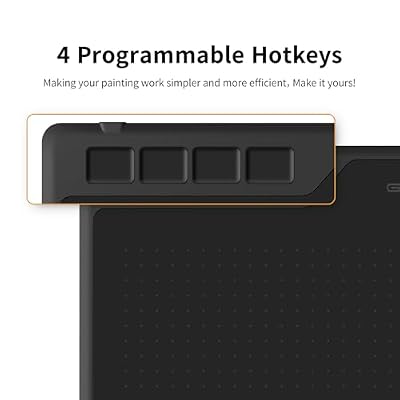
The S620 is a compact, slim tablet built around the same form factor as the XPPen StarG640 — easy to carry, easy to live with on a small desk. The four ExpressKeys are arranged along the top edge, which is a slightly unusual layout but works well in practice for both left- and right-handed users (the orientation can be flipped 180 degrees in the driver). The work surface is smooth-matte and pleasant under the pen. Build quality is plain-but-honest plastic — clearly built to a price, but with no obvious flaws. The active-area edges are clearly engraved on the surface, which helps with screen-to-tablet mapping muscle memory, and four small rubber feet keep the tablet from sliding around on a desk. The bundled pen has a comfortable rubberised grip and a balanced weight; nib wear is reasonable on the matte surface, and the included replacement nib pack (typically eight nibs) comfortably covers a year or more of hobbyist use.
The four ExpressKeys are arranged across the top edge, which is unusual but works well in practice. With the tablet upright, they fall under the off-hand index and middle fingers — a comfortable resting position for muscle-memory-driven shortcut use. In the driver they can be remapped per-application, which means you can keep undo, redo, brush-size up and brush-size down across all your apps as a baseline, then swap them for app-specific tools where needed. For a budget tablet, this is genuinely useful workflow flexibility. The top-edge placement also keeps the keys clear of your drawing hand, which is a small but practical ergonomic touch.
Software Compatibility & Drivers
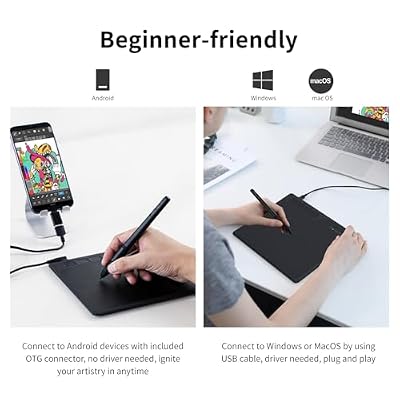
GAOMON drivers cover Windows and macOS officially, with community Linux support and Android support via OTG. In Photoshop, Clip Studio Paint, Krita, MediBang, GIMP, Inkscape and other major creative apps, pressure is recognised after driver install. For OSU players, the S620 is a long-running community favourite — the drivers behave well with OSU’s tablet handling, the active area is well sized, and the report rate keeps tracking tight. The driver utility lets you tune pressure curves, calibrate the working area and remap the pen and ExpressKey buttons per-application, which is a useful set of capabilities at this price tier. Driver installation is a quick process and GAOMON publishes driver updates several times a year.
Use Cases — Art, OSU and Note Taking
The S620’s natural home is the entry-level user — a student starting digital art, an OSU player, an online learner who needs an inexpensive whiteboard-style input. For those uses the S620 is, at the price, almost unbeatable. The 6.5×4-inch active area is large enough to draw with a comfortable wrist motion but small enough to slip into a laptop bag without complaint. For serious illustration work the lack of tilt and the small ExpressKey count will become limitations, but at this price those compromises are squarely the right ones. For students and online learners who simply need an inexpensive pen input for live whiteboarding, note-taking and PDF annotation, the S620 sits in a price bracket where most rivals make significantly more compromises. For absolute beginners testing whether digital art is for them, the S620 is one of the lowest-risk ways to find out cheaply, with the obvious option to upgrade later if you decide to commit.
What’s in the Box
The box contains the S620 tablet, the AP20 battery-free pen, a small pen case that doubles as nib storage, eight replacement nibs (commonly), a USB cable, an OTG adapter for Android use and a Quick Start guide. There is no Bluetooth, no software bundle of note and no carrying pouch, but the form factor is small enough that none of that is sorely missed.
Verdict — Is the GAOMON S620 Worth It?
At around $29 the GAOMON S620 is one of the most easily recommended ultra-budget drawing tablets you can buy. The combination of a battery-free pen, 8,192 pressure levels, broad app support and a comfortable compact form factor is genuinely impressive at the price. The compromises — no tilt, no Bluetooth, modest ExpressKey count — are exactly the right ones to make for this market. For students, OSU players and absolute beginners, the S620 is one of the best ways to find out cheaply whether digital art is for you. The long product life and broad community of users also mean tutorials, driver presets, OSU-specific configuration tips and replacement-nib sources are all easy to find online, which keeps long-term running costs and friction low. Resale value on the used market is reasonable, and the small footprint makes the S620 one of the easier tablets to keep around as a travel or backup setup even after you have upgraded to a larger tablet. Pair it with a capable laptop from our best gaming laptops under $1,200 roundup.
Frequently Asked Questions
Does the GAOMON S620 pen need charging?
No. The AP20 stylus is battery-free and draws power wirelessly from the tablet — no batteries, no cables to plug into the pen.
Does the GAOMON S620 support tilt?
No. Tilt sensitivity is not included on this model. For tilt at a low price, look at the XPPen Deco 640 instead.
Is the GAOMON S620 good for OSU?
Yes. It is one of the most popular budget OSU tablets and has a long-running community reputation.
Is the GAOMON S620 compatible with Android?
Yes, via the included OTG adapter. GAOMON’s Android support works with most modern Android phones and tablets.
More Drawing Tablet Reviews
- HUION HS610 Review: Battery-Free Stylus, Tilt, and 8192 Pressure
- HUION Inspiroy 2 Large Review: 10×6 Scroll Wheel Drawing Tablet
- GAOMON PD1161 Review: 11.6″ FHD Pen Display for Hobbyists
- Wacom Intuos Small Bluetooth Review: Beginner-Friendly Drawing Tablet
- Wacom One by Wacom Medium Review: Larger Beginner Pen Tablet
- XPPen StarG640 Review: Ultra-Slim 6×4 Drawing Tablet for OSU and Sketching
- XPPen Deco 01 V3 Review: 10×6 Drawing Tablet with Tilt and Battery-Free Pen
- XP-PEN Artist 12 Review: 11.6″ FHD Pen Display for Beginners
Affiliate Disclosure: As an Amazon Associate, we earn from qualifying purchases. If you click a link and make a purchase, we may earn a small commission at no extra cost to you. Prices and availability are accurate as of publication and may change.
Related Articles
Looking for more on this topic? Browse the hand-picked guides below — each one applies the same scoring rubric used in this review.










