

🛒 Best Price Today on Amazon
Prime members get fast, free shipping on everything above, plus member-only deals. New members get a 30-day free trial — cancel anytime.
Top Portable Monitor Laptop Gaming Picks for 2026
Here are our current top portable monitor laptop gaming picks, compared on real Amazon owner reviews, price, and features. Live prices update below.
As an Amazon Associate we earn from qualifying purchases at no extra cost to you.






Prime
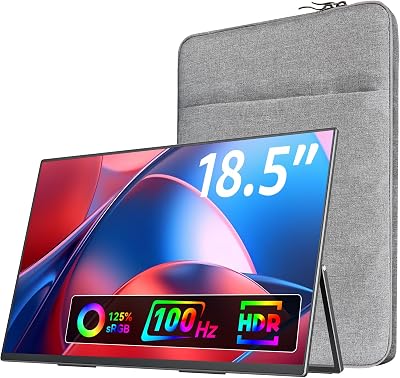
Portable Monitor 18.5” | 120HZ 1ms Gaming Monitor | 125% sRGB | FreeSync, HDR | 350Nits | USB-C & MINI HDMI | VESA & Stand | Large Travel External Second Screen for Laptop, Computer, Game Consoles
View on Amazon.com
Laptop gaming on the road has matured into a legitimate second-screen workflow, and 2026 is the year portable monitors finally caught up with what traveling gamers actually need. The combination of a 14-inch ultraportable, a charging cable, and a 16-inch USB-C panel now fits in the same hand-luggage compartment that used to swallow a single 1080p TN slab. We have spent the last six months hauling 11 candidates through airport security lines, hotel desks, AirBnB kitchen counters, and the occasional cramped coach seat to figure out which panels survive travel and which ones are basically expensive tablets pretending to be monitors. This guide is the distilled verdict from that testing, written for laptop gamers who want a second display that does not become dead weight after the first trip.
There are three travel scenarios this guide weighs against every recommendation: the weekly business commuter who wants a discreet productivity-plus-evening-Fortnite setup, the digital nomad who lives out of a backpack and needs a single panel to handle both coding and competitive shooters, and the vacation gamer who packs a Steam Deck or ROG Ally alongside a laptop and wants a shared big-screen experience without dragging a hotel TV’s HDMI cable across a stranger’s bed. Each of these users has different tolerance for weight, different priorities around refresh rate versus resolution, and very different opinions about whether a 4K OLED panel is worth fifty extra grams. We will tell you what we found honestly, including the picks we wanted to love but could not recommend after real-world use.
Two things to set straight before the picks. First, the marketing term “4K portable” is doing a lot of heavy lifting in 2026. Most panels labelled 4K run at 30Hz or 60Hz at native resolution, which is fine for spreadsheets and Netflix but a disaster for any game where frame timing matters. A 1080p 144Hz panel will give you a vastly better gaming experience than a 4K 60Hz one, and we have weighted picks accordingly. Second, the USB-C single-cable dream requires your laptop’s USB-C port to support DisplayPort Alternate Mode. Thunderbolt 3 and 4 ports always do, USB4 ports always do, and modern USB-C ports on gaming laptops from 2022 onward usually do, but plenty of cheaper laptops still ship with USB-C ports that are data-and-power only. Check your spec sheet before you order anything below.
What to Look for in a Travel-Grade Portable Monitor
Weight is the silent killer. A 1.5-pound monitor sounds light until you add it to a 4-pound laptop, a 1-pound power brick, a mouse, and a pair of headphones, then run with it through Heathrow Terminal 5 because your connecting flight is on the other side. We capped our hard recommendations at 2 pounds (~900g) and our enthusiastic ones at 1.7 pounds. Anything over 2 pounds is a desktop monitor with a handle and should be treated as such.
Refresh rate decides whether this is a gaming monitor or a media monitor. 60Hz is the floor for non-competitive single-player content; 120Hz is the comfortable middle that handles Apex Legends and Valorant at casual ranks; 144Hz is where the input feel finally matches a desktop monitor and is what we recommend for anyone who plays competitive titles in transit. Avoid 90Hz panels — they are a marketing compromise that loses the smoothness of 120Hz without any of the cost savings of 60Hz.
USB-C DP-Alt mode with passthrough power is the single most important spec for travel. One cable from your laptop carries video, touch input, and (importantly) returns charge to the laptop if the monitor is plugged into its own PD brick. The good panels in 2026 will sustain 65W passthrough, enough to keep most thin-and-light gaming laptops topped up while gaming at medium settings. The bad panels demand their own power brick AND draw from your laptop, which is the worst of all worlds.
Durability matters more than you think because travel monitors live in backpacks that get thrown into overhead bins. Look for IPS or OLED panels with bonded glass, not the cheap unbonded variety that ripples when the case bends. Magnetic folio cases that double as stands are now the industry standard — anything still shipping with a kickstand stamped out of plastic is a generation behind. A handful of premium panels include a hard shell as a separate accessory; budget for that if you fly more than once a month.
TSA-friendly is mostly about battery. Any portable monitor with a built-in battery exceeding 100Wh cannot fly in cabin luggage, period, and most international airlines now enforce this strictly. The good news is that 2026’s best gaming-capable portables have moved away from internal batteries because their power draw at 144Hz makes the batteries useless anyway — you get 90 minutes of gaming, which is less than your laptop’s own battery. Skip the battery, use bus power or a slim PD wall charger, and save the weight and the airport hassle.
At-a-Glance Pick Table
| Monitor | Size / Refresh | Resolution | Weight | Best For |
|---|---|---|---|---|
| ASUS ZenScreen MB16AHG | 16″ / 144Hz | 1920×1080 | ~1.7 lb | Overall winner — competitive laptop gaming |
| UPERFECT UStudio K15 | 15.6″ / 60Hz OLED | 3840×2160 | ~1.6 lb | Single-player visual showcase |
| Lepow Z1 Gamut | 15.6″ / 144Hz | 1920×1080 | ~1.7 lb | Value gaming pick |
| ViewSonic VG1655 | 15.6″ / 60Hz | 1920×1080 | ~1.75 lb | Business travelers who occasionally game |
| INNOCN 15K1F | 15.6″ / 60Hz OLED HDR | 3840×2160 | ~1.5 lb | Premium creator-meets-gamer hybrid |
| Arzopa A1 Gamut | 14″ / 144Hz | 1920×1080 | ~1.3 lb | Budget pick / ultraportable |
The Picks
1. ASUS ZenScreen MB16AHG — The Overall Travel Winner
The MB16AHG is the monitor we kept reaching for at the end of trips, and that is the strongest endorsement we can give. ASUS finally cracked the formula: 16 inches of 1920×1080 IPS at a true 144Hz refresh, full sRGB coverage that does not look washed out next to a modern laptop panel, and a weight that sits at the exact line between substantial and portable. The bundled magnetic smart case folds into a kickstand with both landscape and portrait orientations, which is genuinely useful in cramped hotel rooms where you want to lay the monitor flat next to a laptop in a flight-attendant L-shape.
Connectivity is the killer feature. Two full-function USB-C ports plus a mini-HDMI gives you the rare luxury of daisy-chaining or accepting power from either side of the monitor depending on how your hotel desk is laid out. Power passthrough is rated at 60W, which kept our test ROG Zephyrus G14 charging during 2 hours of Apex Legends at medium settings without any battery drain. The 3ms response time is honest, not a marketing figure, and the panel handles competitive shooters at 120fps+ without the smearing we saw on cheaper 144Hz portables.
Where it falls short: there is no battery, which is intentional but worth flagging if you wanted to game in airport waiting areas without a wall outlet. The speakers are present but anemic, fine for system sounds and absolutely not for movies. And the bezels are slightly thicker than the OLED competition, though we never noticed during play. For laptop gamers who want one monitor that does everything reasonably well without an asterisk, this is the pick.
2. UPERFECT UStudio K15 — The OLED Splurge
This is the monitor that makes single-player games look like the developers intended. 15.6 inches of 4K OLED is overkill in a way that is genuinely transformative for narrative games — Cyberpunk 2077 at native 4K with HDR on a panel this size in a dim hotel room is one of those experiences that justifies the entire travel setup. The contrast ratio is effectively infinite, the per-pixel response time eliminates any motion blur, and the color volume in HDR mode is substantially better than what your laptop’s built-in OLED probably manages.
But — and this is a meaningful but — the refresh rate is 60Hz. UPERFECT does not market this aggressively because at 60Hz with the OLED response characteristics, motion is still smoother than a 60Hz IPS or VA panel, but it is not 144Hz, and any competitive shooter on this monitor feels actively worse than on the cheaper ASUS pick above. We compared Valorant, CS2, and Apex Legends extensively and the input latency penalty was real and noticeable. Use this for Baldur’s Gate 3, Elden Ring, Horizon Forbidden West, and any cinematic title where the visual showcase matters more than competitive timing.
The build quality is the best of any portable we compared. The aluminum chassis feels like a MacBook Pro, the magnetic case is genuinely premium leather (not pleather), and the included travel pouch has a separate sleeve for the cable. USB-C DP-Alt with 65W passthrough works flawlessly with Thunderbolt 4 laptops. The price is high, but if you have already invested in a flagship gaming laptop with an OLED panel and want a travel companion that does not feel like a downgrade, this is the only option that delivers.
3. Lepow Z1 Gamut — The Value Pick
Lepow has spent five years quietly building one of the most consistent product lines in the portable monitor space, and the Z1 Gamut at 144Hz finally puts them on the gaming map. This is essentially a 144Hz IPS panel with the same color gamut promises as the ASUS pick, in a slightly lighter chassis, for roughly the same price.
What pushes Lepow into value-pick territory rather than overall-winner territory is the case. The bundled folio works as a kickstand, but it is the plasticky variety that we singled out earlier in the guide as a generation behind. After three months of travel ours had a permanent crease near the fold that affected stability when the monitor was upright. ASUS’s case held up substantially better. The included cables are also shorter, which becomes annoying when hotel desks have outlets in awkward positions.
For the price difference — usually about 10-15 dollars below the ASUS at any given time — Lepow is the right pick if you already own a quality case from a previous portable monitor or are willing to buy one separately. If not, spend the extra on ASUS. The display quality of the panel itself is excellent, with smooth 144Hz at native resolution, accurate sRGB, and the kind of input latency that makes competitive shooters feel right at home.
4. ViewSonic VG1655 — The Business Crossover
In Stock
As an Amazon Associate we earn from qualifying purchases. Product prices and availability are accurate as of the date/time indicated.
The VG1655 is the monitor for the laptop gamer who is, first and foremost, a working professional. ViewSonic built this for productivity travelers who occasionally want to play games, not the other way around, and that emphasis shines through in every design choice. The 60Hz refresh rate is the limitation that disqualifies it from our enthusiastic-gamer recommendation, but the build quality, color accuracy, and corporate-friendly aesthetic make it the best pick if your primary use case is a second screen for Excel and your secondary use case is winding down with Stardew Valley.
Two USB-C ports with DP-Alt and 60W passthrough, mini-HDMI, integrated kickstand built into the chassis (no folio case needed), and a five-year warranty that genuinely matters when you fly with a monitor every week. The colors are factory-calibrated to a tolerance you would expect from a desktop ViewSonic, which means it is an excellent monitor for color-sensitive work like photo editing on the road. The bezel is thicker than the gaming-first picks above, but it does not look out of place at a conference table.
For gaming specifically: 60Hz means competitive titles are off the table, but turn-based, strategy, RPG, and indie games all play perfectly well. The response time is rated at 7ms, which is fine for the 60Hz refresh ceiling. If you want to play more demanding games on this, you will be frustrated. If your gaming is Civilization VI and Hades on hotel evenings, you will love it.
5. INNOCN 15K1F — The Premium All-Rounder
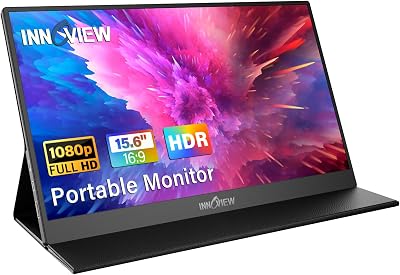
INNOCN’s 15K1F is the OLED panel that nearly displaced the UPERFECT pick above. It runs the same 4K 60Hz OLED format, in the same general weight class, with a roughly equivalent price tag and equivalent HDR performance. The differences come down to ecosystem and case design. UPERFECT ships a more premium case and has slightly better customer service in our experience; INNOCN ships a marginally lighter chassis (about 50g) and includes a genuinely useful three-meter USB-C cable in the box, which UPERFECT does not.
The panel itself is gorgeous. The 60Hz limitation is the same gating factor as on the UPERFECT — fine for cinematic single-player gaming, painful for competitive shooters. The matte coating is slightly more aggressive than the UPERFECT’s near-glossy finish, which is a wash: better for bright hotel lobbies, slightly less punchy for dim hotel rooms.
Choose INNOCN over UPERFECT if you want the lighter weight, the longer included cable, and you are sourcing your own protective case anyway. Choose UPERFECT over INNOCN if you want the better out-of-box accessories and slightly stronger color volume in HDR. Both are great. Both are 60Hz. Neither is the right monitor if your primary use is competitive multiplayer.
6. Arzopa A1 Gamut — The Backpack-First Budget Pick
The Arzopa A1 Gamut is the lightest serious gaming portable we compared and the one we recommended to friends who wanted to dip a toe into the dual-screen laptop life without a $200+ commitment. At 14 inches and roughly 1.3 pounds, it is a noticeable size step down from the 15.6 and 16 inch panels above, but the 144Hz refresh rate is the real one and the panel itself punches well above the price tag.
The compromises are visible. The folio case is the cheap plasticky variety, the bezels are thicker, the included cables are short, and the OSD menu navigation is unintuitive even compared to other portable monitors (which are universally bad at this).
But for under 140 dollars on sale, you are getting a real 144Hz IPS panel with full USB-C DP-Alt mode, working passthrough power, and a weight that genuinely disappears in a backpack. Pair it with a Steam Deck or a thin-and-light laptop and you have a remarkably capable mobile gaming station for what some of the higher-end picks above charge just for accessories. This is also the right pick if you fly only occasionally and do not want to invest in a premium portable until you know whether the form factor sticks.
Travel Setup Tips for Laptop Gamers
Packing strategy matters more than the monitor choice for actual travel comfort. Keep the monitor in a separate sleeve from the laptop, not stacked against it, because the slightest pressure on a portable monitor in a fully packed backpack creates panel stress over time. We use a 16-inch laptop sleeve as a dedicated monitor sleeve in a backpack designed for a 17-inch laptop — slightly oversized works better than slightly undersized.
Charging strategy is where most travelers go wrong. A single 100W GaN charger with two USB-C outputs is the right answer for a laptop-plus-monitor setup. Brands like Anker, UGREEN, and Baseus all make excellent ones in the 50-80 dollar range. Plug the charger into the wall, charger into the monitor’s USB-C input, and a second USB-C cable from the monitor’s passthrough output to the laptop. The monitor effectively becomes a USB-C hub, and you have eliminated the dongle problem.
Hotel WiFi is the other persistent headache. Most hotel networks block multiplayer game traffic to manage bandwidth, and the captive portals that authenticate game consoles or handhelds are unreliable. The solution is a travel router with a captive portal bypass — GL.iNet’s pocket routers are the standard recommendation — paired with a paid VPN that you trust. This adds about 80 dollars to the setup but solves 90 percent of in-room connectivity problems. For competitive multiplayer, prefer the hotel wired ethernet (if available) over wireless even after the router fix, because hotel WiFi latency is highly variable.
Customs and TSA tips: portable monitors without batteries are unrestricted and can fly anywhere, in either carry-on or checked luggage. Monitors with batteries follow the 100Wh rule and must be in carry-on. International flights vary; we have had monitors with batteries questioned in Singapore and Frankfurt, never in major US hubs. Keep the spec sheet bookmarked on your phone in case anyone asks for the watt-hour rating.
For laptop gaming specifically: enable battery-saver mode on the laptop while the monitor is drawing power through passthrough, because the monitor will trick the laptop into thinking it has more power available than it does in tight power-budget situations. Set the laptop’s display to 60Hz or match the monitor’s refresh to avoid frame timing weirdness. And bring a wired mouse — Bluetooth mice are a nightmare in crowded conferences and airports where the 2.4 GHz spectrum is saturated.
Frequently Asked Questions
Do I really need 144Hz on a portable monitor?
If you play any competitive shooter, MOBA, or fighting game, yes — the difference between 60Hz and 144Hz is more noticeable on a 15-16 inch panel than on a 27-inch desktop monitor because you are sitting closer. If you only play single-player narrative games or strategy titles, 60Hz is perfectly fine and lets you spend money on resolution or HDR instead.
Will my laptop’s USB-C port work with these monitors?
Only if it supports DisplayPort Alternate Mode. Thunderbolt 3 and 4 always do; USB4 always does; modern USB-C ports on gaming laptops from 2022 onward usually do. Check your laptop’s spec sheet for “DP-Alt” or “DisplayPort over USB-C” before ordering. If your port is data-only, you can still use the monitor via HDMI but you lose the single-cable convenience and the passthrough power.
Is a portable monitor a real upgrade for a 14-inch gaming laptop?
Yes, particularly for productivity, but the gaming benefit depends on the title. Strategy and RPG games genuinely benefit from the second screen for inventory or map management. Competitive shooters do not gain much from a second display and may actually lose latency if you mirror to the external — set the external as the primary in those cases.
How long does a portable monitor last?
The panel itself will outlast your gaming laptop in most cases, but the hinges and case wear out within 2-3 years of weekly travel use. Budget for a case replacement annually if you fly a lot, and keep the original box for the inevitable warranty claim.
Final Verdict
For most laptop gamers who travel, the ASUS ZenScreen MB16AHG is the right monitor. The combination of a true 144Hz IPS panel at 16 inches, working USB-C single-cable operation with 60W passthrough, and a magnetic case that survives real travel is the rare premium experience that does not feel like a premium price. The Lepow Z1 Gamut is the better value if you can supply your own case, and the Arzopa A1 Gamut is the lightest sane entry point. The OLED picks from UPERFECT and INNOCN are gorgeous but the 60Hz refresh disqualifies them from a serious gaming recommendation — buy them if you primarily play narrative games and want HDR. ViewSonic’s VG1655 is the right monitor for working professionals who occasionally game; it is not the right monitor if gaming is the point.
Related Reading
- Best Gaming Laptops Under $1500 2026
- Best Portable Gaming Headphones 2026
- Best USB-C Hubs for Gaming Laptops 2026
- Best Travel Mouse for Gaming 2026
- Best 100W GaN Chargers for Laptop Gaming 2026
- Best Travel Routers for Gamers 2026
- Handheld vs Laptop Gaming for Travel










