

- Top Pick: Thinlerain 23.8 inch Computer Monitor 1920×1080 Vertical PC Monitor with HDMI VGA AV BNC USB Ports, Multi-Function Stand, VESA, Display Frameless Build-in Speakers for Office Home
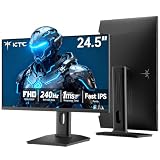
- Best Value: KTC 24.5 Inch 240Hz Gaming Monitor, FHD Computer Monitor Vertical, H25T7-3
- Premium Choice: CRUA 24.5" FHD 200Hz Vertical Monitor, Height/Pivot/Swivel/Tilt Adjustable
A vertical monitor is simply a display turned 90 degrees into portrait orientation, and for the right tasks it is transformational. Reading and writing code, scrolling long documents and articles, reviewing PDFs, and following vertical social and chat feeds all suit a tall, narrow screen far better than a wide one — you see more lines at once and scroll less. The honest catch worth stating up front: very few monitors are sold as dedicated ‘vertical’ displays. Almost every one is a normal landscape panel that you rotate into portrait, either on a pivoting stand or, more flexibly, on a VESA monitor arm. This guide rounds up the best monitors in 2026 to run in a vertical orientation, judged on the things that actually matter for portrait use.
- Best Vertical Monitors at a Glance
- 1. ASUS TUF Gaming 27″ 2K HDR Gaming Monitor (VG27AQ) – QHD (2560 x 1440), 165Hz
- 2. SANSUI Monitor 24 Inch 100Hz PC Monitor, HDMI VGA Ports VESA Mount, FHD
- 3. ASUS TUF 32 Inch Curved Gaming Monitor – QHD (2560 x 1440), 165Hz
- 4. SANSUI Gaming Monitor 27″ 1440P 200Hz 180Hz WQHD 2560×1440 AMD FreeSync 1ms
- 5. Acer Nitro KG241Y Sbiip 23.8″ Full HD (1920 x 1080) VA Gaming Monitor, AMD FreeSync
- 6. SANSUI 27 Inch Curved 240Hz Gaming Monitor FHD 1080P, 1500R Curve
- How to Choose a Vertical Monitor
- Frequently Asked Questions
- Related Guides
- Related Articles
Our picks were chosen on what genuinely makes a monitor work well in portrait: VESA mount compatibility so you can rotate it on an arm, panel quality and resolution for sharp text down a tall screen, a size and aspect ratio that suits vertical reading, and value. Be aware that none of these are special portrait-native panels — they are landscape monitors you pivot — so we are candid about that throughout, and several here are gaming-first displays whose high refresh rates are a bonus rather than the point. Prices run from around $80 up to around $285. Below is an at-a-glance comparison of all six, then a closer look at each in a vertical context and a buyer’s guide built around pivoting, mounting and the right panel for portrait work.
As an Amazon Associate we earn from qualifying purchases at no extra cost to you.





🛒 Best Price Today on Amazon
Prime members get fast, free shipping on everything above, plus member-only deals. New members get a 30-day free trial — cancel anytime.
Best Vertical Monitors at a Glance
| Monitor | Best For | Standout Spec | Approx Price |
|---|---|---|---|
| ASUS TUF Gaming 27″ 2K (VG27AQ) | Sharp portrait code + docs | QHD 1440p, 165Hz, VESA | around $264 |
| SANSUI 24″ 100Hz with VESA Mount | Budget portrait reading | FHD, VESA mount, compact | around $80 |
| ASUS TUF 32″ Curved QHD | Tall big-screen feeds | 32-inch, QHD, 165Hz | around $285 |
| SANSUI 27″ 1440P 200Hz WQHD | High-res vertical workspace | WQHD 1440p, 200Hz | around $170 |
| Acer Nitro KG241Y 23.8″ FHD | Affordable portrait sidekick | FHD VA, FreeSync, compact | around $110 |
| SANSUI 27″ Curved 240Hz FHD | Curved second screen | 27-inch, 240Hz, 1500R curve | around $129 |
1. ASUS TUF Gaming 27″ 2K HDR Gaming Monitor (VG27AQ) – QHD (2560 x 1440), 165Hz

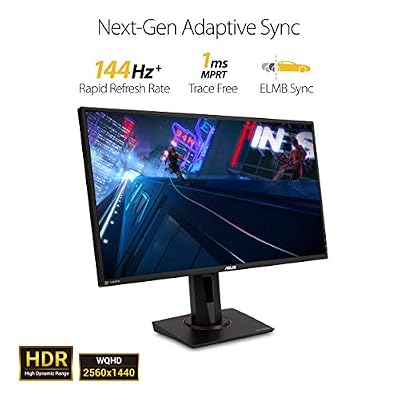
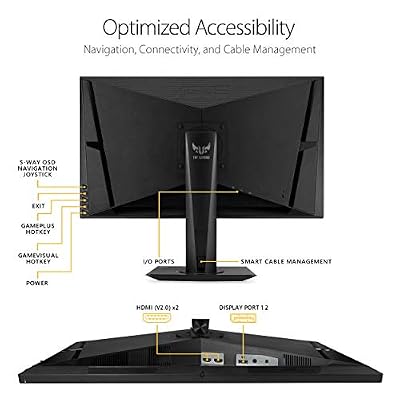
ASUS TUF Gaming VG27AQ 27 Inch QHD 165Hz 1ms G-SYNC Gaming Monitor | 27" 2K QHD, IPS Panel, 165Hz, 1ms, ELMB Sync, G-SYNC Compatible, HDR10, Built-In Speakers, Height Adjustable Stand



As an Amazon Associate we earn from qualifying purchases. Product prices and availability are accurate as of the date/time indicated.
The ASUS TUF Gaming VG27AQ is the pick for the best vertical experience, thanks to its resolution. It is a 27-inch QHD (2560×1440) panel with a 165Hz refresh rate, HDR support and — crucially for portrait use — a fully adjustable stand with pivot, plus standard VESA mounting. At around $264 it is one of the pricier options here, and the higher resolution is the reason it earns the top spot for vertical work.
Rotated into portrait, this monitor shines for code and documents. The QHD resolution puts plenty of sharp vertical pixels on screen, so text stays crisp and you see many more lines of code or document at once than on a 1080p panel turned vertical. The built-in pivot means you can rotate it without buying an arm, the VESA mount supports one if you prefer, and the IPS-class image looks good at the wide angles a tall screen demands. The 165Hz refresh is a gaming bonus rather than the point for portrait work. For the sharpest, most readable vertical workspace here, the VG27AQ leads.
Pros: QHD 1440p for sharp vertical text, built-in pivot stand, VESA mount, strong IPS-class image.
Cons: Among the priciest here; refresh rate is wasted in static portrait use.
2. SANSUI Monitor 24 Inch 100Hz PC Monitor, HDMI VGA Ports VESA Mount, FHD

SANSUI Monitor 24 inch 100Hz 120Hz PC Computer Monitor, FHD for Home Office | HDMI VGA Ports, Ergonomic Tilt, VESA Mout, Ultra-Slim, Eye Care for Home Office (ES-24F2, HDMI Cable Included)


As an Amazon Associate we earn from qualifying purchases. Product prices and availability are accurate as of the date/time indicated.
The SANSUI 24-inch is the budget portrait pick, and it has the one feature that matters most for vertical use: a VESA mount. It is a compact 24-inch FHD (1080p) panel with a 100Hz refresh rate and HDMI plus VGA inputs, and at around $80 it is the cheapest monitor here. Note that you will likely need a separate VESA arm or pivoting bracket to actually rotate it, as the included stand is basic.
For vertical reading and light coding on a budget, this is a sensible entry point. The VESA mount lets you attach it to a pivoting monitor arm and turn it into portrait, the compact 24-inch size suits a tall secondary screen beside a main display, and FHD is adequate for documents, chat and social feeds. Be realistic about the resolution: 1080p turned vertical is fine for text and feeds but less sharp than a QHD panel for dense code. As an affordable way to add a vertical screen via an arm, the SANSUI 24-inch does the job.
Pros: VESA mount for portrait rotation, compact size, affordable, fine for text and feeds.
Cons: Basic stand likely needs a separate arm to pivot; 1080p is less sharp vertically.
3. ASUS TUF 32 Inch Curved Gaming Monitor – QHD (2560 x 1440), 165Hz

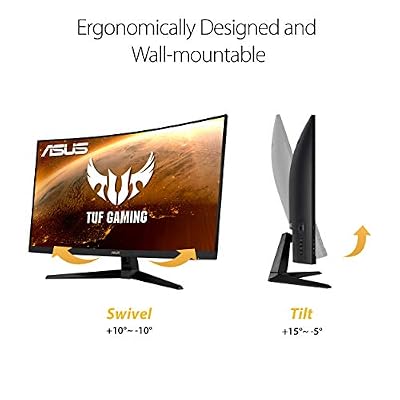
ASUS TUF Gaming VG32VQ1B 32 Inch 1440p 165Hz HDR Curved Gaming Monitor | ELMB Sync, 1ms, 1500R Curve, HDR10, Adaptive Sync, FreeSync, HDMI, DisplayPort, FreeSync Premium, for PS5 and Xbox




As an Amazon Associate we earn from qualifying purchases. Product prices and availability are accurate as of the date/time indicated.
The ASUS TUF 32-inch curved is the big-screen pick for a tall vertical feed, with an important honesty note: it is a curved panel, and curves are designed for landscape, so in portrait the curve bows left-to-right rather than ideally. It is a large 32-inch QHD (2560×1440) display at 165Hz with VESA mounting. At around $285 it is the most expensive option here.
Turned vertical on a sturdy arm, the 32-inch QHD panel gives an enormous, tall workspace — excellent for very long documents, side-by-side code and chat, or a towering social and monitoring feed, with the QHD resolution keeping text reasonably sharp over that height. The trade-offs are real: a 32-inch screen in portrait is tall enough to strain neck and eye movement, it needs a robust VESA arm rated for its size and weight, and the curve is optimised for landscape so it looks unusual rotated. If you specifically want the largest possible vertical canvas and can mount it properly, it delivers — just go in clear-eyed about the curve and the height.
Pros: Large QHD vertical canvas, sharp 1440p text, VESA mount for arm rotation.
Cons: Curve is meant for landscape and looks odd in portrait; very tall and needs a strong arm.
4. SANSUI Gaming Monitor 27″ 1440P 200Hz 180Hz WQHD 2560×1440 AMD FreeSync 1ms

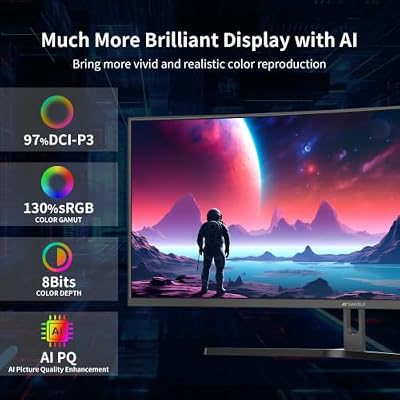
SANSUI 34-Inch Curved Gaming Monitor UWQHD 3440 x 1440P 200Hz Ultrawide | 34” Ultra Wide Gaming Computer Monitor-PBP, OD 1ms, HDR, 300nits, 130%sRGB, DCI-P3 97%,AI Crosshair,HDMI2.1x2,DP1.4




As an Amazon Associate we earn from qualifying purchases. Product prices and availability are accurate as of the date/time indicated.
The SANSUI 27-inch WQHD is the high-resolution value pick for a vertical workspace. It is a 27-inch WQHD (2560×1440) panel with a fast 200Hz refresh, 1ms response and AMD FreeSync, and it offers VESA mounting for portrait rotation. At around $170 it delivers QHD sharpness for noticeably less than the ASUS panels, making it a strong-value choice for vertical code and documents.
Rotated into portrait, the WQHD resolution is the key benefit: like the ASUS VG27AQ, it packs many sharp vertical pixels, so you read more lines of code and crisper text than any 1080p panel turned vertical can manage, at a lower price. The 27-inch size is a comfortable height for a portrait screen beside a main display, and VESA mounting lets you attach a pivoting arm. The 200Hz refresh and FreeSync are gaming extras that go largely unused in static vertical work. For a sharp, affordable vertical workspace, this SANSUI is an excellent-value option.
Pros: WQHD 1440p sharpness at a lower price, VESA mount, comfortable 27-inch portrait height.
Cons: Stand pivot not guaranteed — plan for a VESA arm; gaming features unused vertically.
5. Acer Nitro KG241Y Sbiip 23.8″ Full HD (1920 x 1080) VA Gaming Monitor, AMD FreeSync

Acer Nitro 23.8in FHD 1920x1080 180Hz Gaming Monitor KG241Y Sbiip | 1ms, AMD FreeSync Premium, 2xHDMI, DisplayPort, VESA Mountable, Bluelight Filter, Flickerless Technology


As an Amazon Associate we earn from qualifying purchases. Product prices and availability are accurate as of the date/time indicated.
The Acer Nitro KG241Y is the affordable portrait-sidekick pick. It is a compact 23.8-inch Full HD (1080p) VA panel with AMD FreeSync, supporting VESA mounting so it can be rotated into portrait on an arm. At around $110 it is a well-priced, sensibly sized secondary screen for vertical reading and feeds alongside a larger main monitor.
As a vertical companion display, the Acer’s compact size is its strength. A 23.8-inch panel in portrait is a manageable height that does not force excessive neck movement, making it comfortable for a continuous feed of chat, social posts, documentation or terminal output beside your primary screen. VESA mounting lets you pivot it on an arm, and the VA panel gives strong contrast for readable text. The 1080p resolution is fine for feeds and documents though less sharp than QHD for dense code. As an affordable, well-sized vertical sidekick, the KG241Y is a practical pick.
Pros: Compact comfortable portrait height, VESA mount, VA contrast for readable text, affordable.
Cons: 1080p is less sharp vertically than QHD; needs an arm or pivot bracket for portrait.
6. SANSUI 27 Inch Curved 240Hz Gaming Monitor FHD 1080P, 1500R Curve

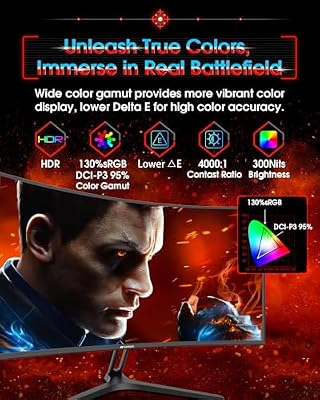
SANSUI 27 Inch Curved 240Hz Gaming Monitor FHD 1080P, 1500R Curve Computer Monitor, 130% sRGB, 4000:1 Contrast, HDR, FreeSync, MPRT 1Ms, Low Blue Light, HDMI DP Ports, Metal Stand, Cable Incl.




As an Amazon Associate we earn from qualifying purchases. Product prices and availability are accurate as of the date/time indicated.
Rounding out the list is the SANSUI 27-inch curved, the curved-second-screen pick — with the same honesty note as the other curved panel here: a 1500R curve is designed for landscape and bows oddly in portrait. It is a 27-inch FHD (1080p) curved display with a very fast 240Hz refresh and VESA mounting, available for around $129.
Turned vertical on an arm, the 27-inch height gives a tall feed for documents, chat and social timelines, and the VESA mount makes rotation possible. Be clear-eyed about two things, though: the 1080p resolution stretched down a 27-inch portrait screen is noticeably less crisp than the QHD options for detailed code, and the 1500R curve — built to wrap around you in landscape — looks unusual when the screen is vertical. The 240Hz refresh is a gaming feature that sits idle in static portrait use. If you want an inexpensive tall second screen and the curve and resolution do not bother you, it works, but the flat QHD panels here suit serious vertical work better.
Pros: Tall 27-inch portrait feed, VESA mount, very fast 240Hz for gaming, budget price.
Cons: Curve is meant for landscape and looks odd vertically; 1080p is soft for code in portrait.
How to Choose a Vertical Monitor
The first thing to understand is that you are almost never buying a dedicated vertical monitor — you are buying a landscape panel that you rotate into portrait. So the single most important feature is the ability to pivot. Some monitors include a stand that rotates 90 degrees (the ASUS VG27AQ here has a pivoting stand), but many do not, in which case you need a VESA mount and a separate monitor arm or pivoting bracket. Every pick on this list supports VESA mounting; confirm the monitor either pivots on its own stand or has the VESA holes for an arm before you buy.
Resolution matters more in portrait than people expect, because you are reading down the tall axis. A QHD (1440p) panel like the ASUS VG27AQ, the ASUS 32-inch or the SANSUI WQHD packs far more sharp vertical pixels than a 1080p screen, so text and code stay crisp and you fit more lines on screen. A 1080p panel turned vertical — the SANSUI 24-inch, the Acer KG241Y, the SANSUI curved — is perfectly readable for documents, chat and social feeds but looks softer for dense code. If portrait coding is your main goal, prioritise a QHD panel.
Size and panel shape decide comfort, and here bigger is not always better. A compact 24 or 23.8-inch monitor in portrait, like the SANSUI 24-inch or Acer KG241Y, is a comfortable height for a feed or document beside a main screen, whereas a 32-inch panel turned vertical becomes very tall and can strain your neck and eyes as you scan top to bottom. Be especially wary of curved panels: a curve is engineered to wrap around you in landscape, so rotated into portrait it bows side-to-side and looks unnatural. For serious vertical work, a flat panel in a moderate size is usually the better call.
Finally, plan the mount and match the screen to the job. A tall monitor on an arm needs an arm rated for its size and weight — particularly the 32-inch option — so budget for a sturdy VESA arm if the stand will not pivot. Ignore the high refresh rates on the gaming-first panels here for vertical purposes; 200Hz and 240Hz do nothing for static code and documents and are simply a bonus if you swing the screen back to landscape for gaming. Set a budget, decide whether sharpness, size or value matters most, confirm how you will pivot it, and pick the monitor on this list that best fits your portrait workflow. The best vertical monitor is a sharp, sensibly sized panel you can rotate and read comfortably all day.
Frequently Asked Questions
Are there monitors made specifically to be vertical?
Very few. Almost every ‘vertical monitor’ is a standard landscape panel that you rotate 90 degrees into portrait, either on a pivoting stand or on a VESA monitor arm. All the picks in this guide are landscape displays used vertically. The features that make one good in portrait are a pivot stand or VESA mount, a sharp resolution for tall text, and a sensible size — not a special ‘vertical’ design, which barely exists as a category.
What do I need to mount a monitor vertically?
Either a monitor whose stand rotates 90 degrees, like the ASUS VG27AQ here, or a VESA-compatible monitor plus a separate arm or pivoting bracket. Every monitor in this guide supports VESA mounting, so any of them can go portrait on a suitable arm. For larger panels like the 32-inch ASUS, make sure the arm is rated for the monitor’s size and weight, and check the VESA pattern (commonly 75x75mm or 100x100mm) matches your arm before buying.
Is a vertical monitor good for coding and reading?
Yes — that is where it excels. A portrait screen shows many more lines of code or text at once and reduces scrolling, which suits programming, long documents, PDFs and articles. For the sharpest results, choose a QHD panel like the ASUS VG27AQ or SANSUI WQHD, since the extra vertical pixels keep dense code crisp. A 1080p panel works for documents, chat and social feeds but looks softer for detailed code when turned vertical.
Should I buy a curved monitor to use vertically?
Generally no. A curve is engineered to wrap around your view in landscape, so when you rotate a curved panel like the ASUS 32-inch or SANSUI curved into portrait, it bows from side to side and looks unnatural. For vertical use a flat panel is almost always the better choice. If you already own a curved monitor it can still work as an occasional vertical screen, but do not buy one specifically to run in portrait.
Related Guides
- Best Monitors
- Best Monitor Arms for Pivoting
- Best Monitors for Content Creation
- Best Gaming Monitors
- Best Ultrawide Monitors
- Best Keyboards for Developers
Affiliate Disclosure: As an Amazon Associate, we earn from qualifying purchases. If you click a link and make a purchase, we may earn a small commission at no extra cost to you. Prices and availability are accurate as of publication and may change.










