

- Top Pick: iBUYPOWER Y70TI Gaming PC Desktop Computer with Hyte Y70 Touch Infinite Screen Case, AMD Ryzen 9 9900X3D, NVIDIA RTX 5080 16GB, 32GB DDR5 5200MHz RAM, 2TB SSD, Keyboard Mouse- Y70TIBA9N5801
- Best Value: Continuum Micro Gaming PC RTX 5060 Ti 8GB, AMD 8-Core Ryzen 7 5700X CPU, 32GB RAM, 1TB Gen4 NVMe SSD, Gamer Desktop w/Windows 11 Pro, 3-Year Warranty, RGB Keyboard+Mouse, Internal Wi-Fi
- Premium Choice: Mantis V2 – RTX 5080, Ryzen 7 9800X3D, 64GB DDR5 RAM, 2TB NVMe Gen4 SSD, Gaming Desktop PC w/Windows 11 Pro, 3-Year Warranty, RGB Gamer Keyboard+Mouse, Internal Wi-Fi 7 + BT, RJ45, 3X DP & HDMI
🛒 Best Price Today on Amazon
Prime members get fast, free shipping on everything above, plus member-only deals. New members get a 30-day free trial — cancel anytime.
- Top Cases Content Creation Picks for 2026
- Best PC Cases for Content Creation at a Glance
- 1. NZXT H6 Flow Compact Dual-Chamber Mid-Tower Airflow Case
- 2. Corsair iCUE 220T RGB Airflow Tempered Glass Mid-Tower ATX Case
- 3. Corsair 4000D RS ARGB Frame Modular Mid-Tower ATX Case
- 4. Cooler Master MasterBox Q300L Micro-ATX PC Case
- 5. Corsair 7000D Airflow Full-Tower ATX PC Case
- 6. HYTE Y70 Touch Infinite Modern Aesthetic Gaming PC Case
- How to Choose a PC Case for Content Creation
- Frequently Asked Questions
- Related Guides
- Related Articles
- Related Guides
Top Cases Content Creation Picks for 2026
Here are our current top cases content creation picks, compared on real Amazon owner reviews, price, and features. Live prices update below.
As an Amazon Associate we earn from qualifying purchases at no extra cost to you.


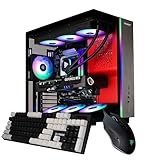

A content-creation PC asks more of its case than a pure gaming box does. Long renders and exports load the CPU and GPU for minutes or hours at a time, so the case has to move heat steadily without throttling, and it has to swallow the extra storage that photo, video and project files demand. Just as important, a creator’s machine often sits an arm’s length away during voiceovers and calls, so it needs to stay quiet under sustained load. This guide rounds up the best PC cases for content creation in 2026 with those three priorities — airflow, drive space and low noise — front and centre.
Our picks were chosen on what genuinely matters for an editing or studio rig: front-to-back airflow for sustained thermals, room for multiple drives and large radiators, and a layout that keeps fan noise down. We have included a deliberate price spread, from around $40 up to around $350, and a mix of compact mATX boxes, mainstream mid-towers and a roomy full-tower, so there is a fit for both a tidy desk and a dedicated workstation corner. Below you will find an at-a-glance comparison, then a closer look at each case and a buyer’s guide covering the cooling, storage and acoustics that decide how well a case serves long creative workloads.
Best PC Cases for Content Creation at a Glance
| Case | Best For | Standout Spec | Approx Price |
|---|---|---|---|
| NZXT H6 Flow | Quiet airflow with style | Dual-chamber, panoramic glass, mesh front | around $79 |
| Corsair iCUE 220T RGB Airflow | Cool creator rig with RGB | High-airflow front, tempered glass | around $180 |
| Corsair 4000D RS ARGB Frame | Modular mid-tower value | Modular frame, 3 pre-installed fans | around $99 |
| Cooler Master MasterBox Q300L | Compact budget editing box | Magnetic mesh, mATX footprint | around $39 |
| Corsair 7000D Airflow | Multi-drive workstation | Full-tower, huge storage and radiator room | around $270 |
| HYTE Y70 Touch Infinite | Showpiece studio centrepiece | Integrated 2.5K LCD touchscreen | around $350 |
1. NZXT H6 Flow Compact Dual-Chamber Mid-Tower Airflow Case

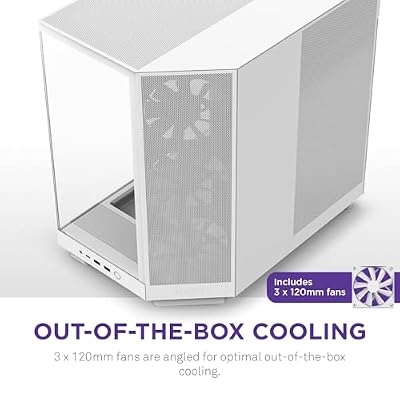
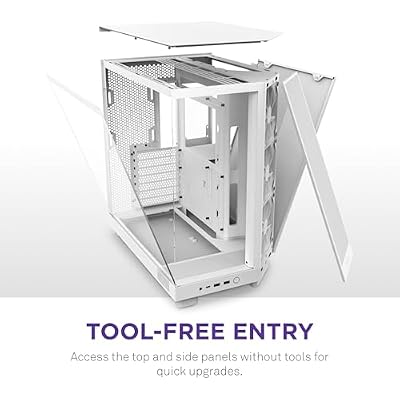
NZXT H6 Flow | CC-H61FW-01 | Compact Dual-Chamber Mid-Tower Airflow Case | Panoramic Glass Panels | High-Performance Airflow Panels | Includes 3 x 120mm Fans | Cable Management | White





As an Amazon Associate we earn from qualifying purchases. Product prices and availability are accurate as of the date/time indicated.
The NZXT H6 Flow is our lead pick for content creation because it strikes the balance creators most often want: strong, quiet airflow in a clean, modern shell. Its dual-chamber layout separates the components from the cabling, while a mesh front panel and panoramic glass corner let cool air pour over the hardware. At around $79 it is a compact mid-tower that looks at home on a desk rather than hidden under it.
For an editing rig this design pays off during long exports. The dual-chamber interior keeps the main airflow path unobstructed so the CPU and GPU stay cool through sustained load, and the open mesh intake lets fans run at lower, quieter speeds to do the same job. There is sensible room for a couple of drives and a 360mm radiator, and the tidy cable chamber makes a clean build easy. If you want a quiet, good-looking case that handles steady creative workloads without fuss, the H6 Flow is the obvious starting point.
Pros: Quiet high-airflow mesh design, clean dual-chamber layout, panoramic glass, fair price.
Cons: Compact mid-tower limits very large multi-drive arrays; airflow-first, not silence-padded.
2. Corsair iCUE 220T RGB Airflow Tempered Glass Mid-Tower ATX Case
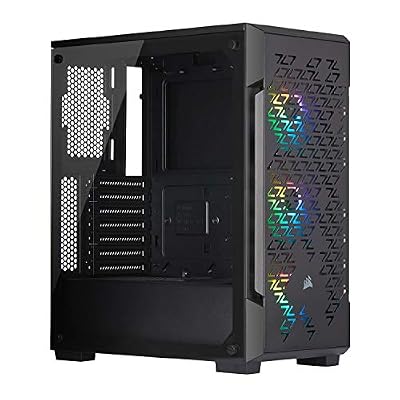
Corsair iCUE 220T RGB Airflow Tempered Glass Mid-Tower Smart ATX Case - High Airflow - Three Included SP120 RGB PRO Fans - Black


As an Amazon Associate we earn from qualifying purchases. Product prices and availability are accurate as of the date/time indicated.
The Corsair iCUE 220T RGB Airflow is the pick for a creator who wants cool, steady thermals with a dash of show. It pairs a high-airflow front intake with tempered glass and bundled iCUE RGB fans, so air moves freely over the components while the lighting ties into Corsair’s software. At around $180 it is a well-rounded mid-tower for an editing machine that also lives on display.
The airflow-first front panel is what makes it relevant here: it feeds cool air directly to the GPU and CPU cooler during long renders, helping the system hold its clocks instead of throttling. The included fans mean you can dial a quiet, balanced curve out of the box, the tempered glass shows off a clean build, and there is space for standard drive duties and a front radiator. For a creator who wants dependable cooling and coordinated RGB in one tidy case, the 220T is a comfortable choice.

Pros: High-airflow front intake, bundled iCUE RGB fans, tempered glass, balanced ATX layout.
Cons: RGB adds cost over plainer cases; glass front trades a little raw airflow for looks.
3. Corsair 4000D RS ARGB Frame Modular Mid-Tower ATX Case
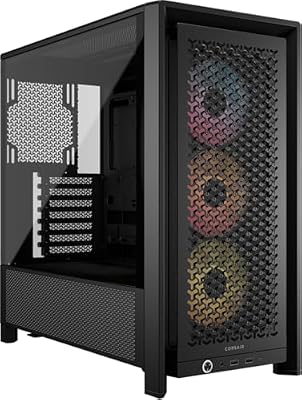


As an Amazon Associate we earn from qualifying purchases. Product prices and availability are accurate as of the date/time indicated.
The Corsair 4000D RS ARGB Frame brings the well-loved 4000D layout into a modular, airflow-led format. It ships with three pre-installed ARGB fans and a high-airflow design, and its modular frame panels make building and cable routing genuinely easy. At around $99 it is the value mid-tower of this list and a sensible default for a balanced creator build.
For content work the appeal is steady cooling out of the box at a fair price. Three included fans set up a solid front-to-back airflow path that keeps components cool through long exports, the modular frame speeds up clean cable management so airflow is not choked, and the roomy interior takes a couple of drives and a front radiator comfortably. It is less of a showpiece than the pricier options, but as a no-drama, well-cooled home for an editing rig, the 4000D RS ARGB Frame is hard to argue with.
Pros: Three pre-installed ARGB fans, modular easy-build frame, high airflow, strong value.
Cons: Mid-tower storage is generous but not workstation-scale; styling is understated.
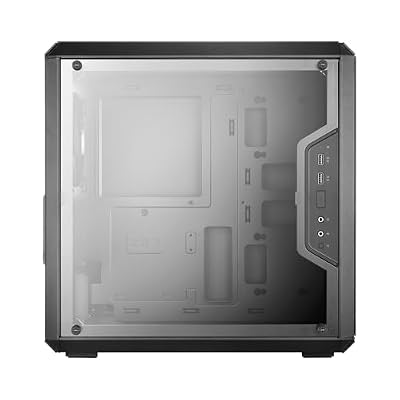
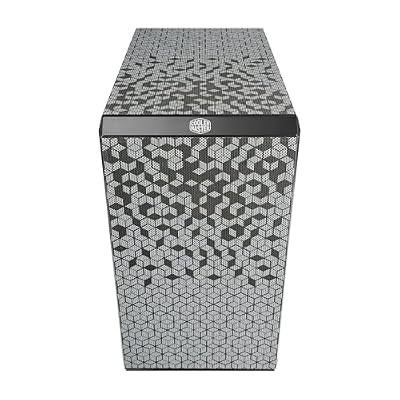
4. Cooler Master MasterBox Q300L Micro-ATX PC Case

Cooler Master Q300L V1 Micro-ATX PC Case, High Airflow, Transparent Panel
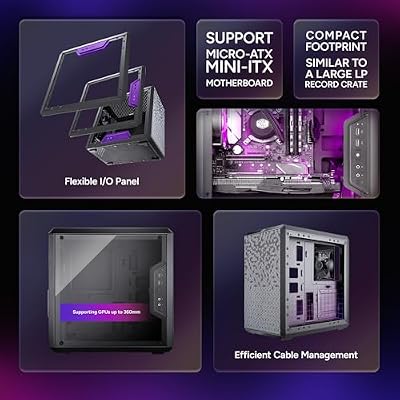







As an Amazon Associate we earn from qualifying purchases. Product prices and availability are accurate as of the date/time indicated.
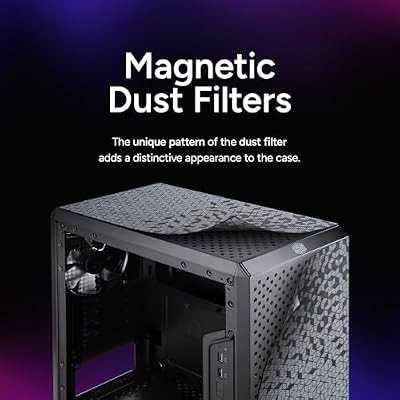
The Cooler Master MasterBox Q300L is the compact budget pick for a small creative box. It is a Micro-ATX case with a distinctive magnetic dust-filter mesh and a small footprint, and at around $39 it is by far the cheapest case here. For a tidy, space-saving editing or streaming machine on a strict budget, it covers the essentials.
This is the case to choose when desk space and cost matter more than maximum expansion. The perforated panels and magnetic mesh let air in to keep a modest creator build cool, the mATX footprint slips into tight spaces, and the flexible I/O and adjustable mounting help you lay out a clean small system. You will not fit a large drive array or a giant radiator, so it suits creators with lighter storage needs, but for an affordable, compact, reasonably ventilated chassis, the Q300L is a smart starter choice.

Pros: Very affordable, compact mATX footprint, magnetic mesh dust filters, flexible layout.
Cons: Limited room for many drives or large radiators; budget materials and stock cooling.
5. Corsair 7000D Airflow Full-Tower ATX PC Case

CORSAIR 7000D Airflow Full-Tower ATX PC Case – High-Airflow Front Panel – Spacious Interior – Easy Cable Management – 3X 140mm AirGuide Fans with PWM Repeater Included – Black


As an Amazon Associate we earn from qualifying purchases. Product prices and availability are accurate as of the date/time indicated.
The Corsair 7000D Airflow is the workstation pick for creators who hoard drives and run big cooling. It is a spacious full-tower with a high-airflow front panel and room for an enormous amount of storage, multiple large radiators and the longest GPUs. At around $270 it is built for a serious editing or rendering machine rather than a casual desktop.
For heavy content creation the extra size is the whole point. The full-tower interior accepts numerous 3.5-inch and 2.5-inch drives for large media libraries and scratch disks, the high-airflow front keeps a hot multi-GPU or high-core-count CPU cool under sustained renders, and there is space for generous radiator mounts to keep noise low even when the system works hard. Cable management is excellent thanks to the roomy chamber. If your workflow demands lots of storage and cooling headroom, the 7000D Airflow is the standout.
Pros: Full-tower space for many drives, huge radiator support, high-airflow front, superb cable room.
Cons: Large desk footprint and higher price; overkill for a simple single-drive build.
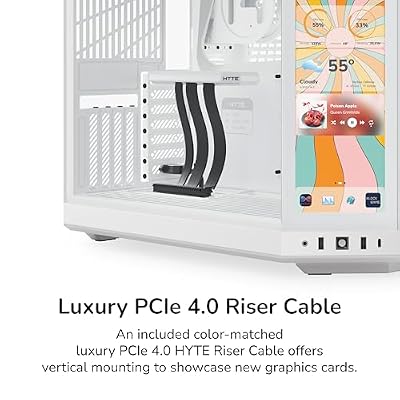
6. HYTE Y70 Touch Infinite Modern Aesthetic Gaming PC Case

HYTE Y70 Touch Infinite Modern Aesthetic Gaming PC Case - Integrated 2.5K LCD Touchscreen Screen Display - Dual Chamber ATX Desktop Chassis - 10 Fan Capacity - Luxury PCIe 4.0 Riser Cable - Snow White




As an Amazon Associate we earn from qualifying purchases. Product prices and availability are accurate as of the date/time indicated.
Rounding out the list is the HYTE Y70 Touch Infinite, the showpiece pick for a studio centrepiece. Its headline feature is an integrated 2.5K LCD touchscreen built into the chassis, wrapped in HYTE’s striking panoramic-glass aesthetic. At around $350 it is the premium case here, aimed at creators who want their rig to be part of the set, not hidden away.
For a content creator the built-in touchscreen is genuinely useful, not just decorative: it can surface system stats, media controls or custom widgets right on the case, which suits a streaming or on-camera setup. The expansive glass and modern lines make it a true desk centrepiece, and there is room inside for a capable build with sensible cooling. It prioritises presentation and features over raw drive capacity, so pair it with the storage you need, but as a head-turning studio case with a practical screen, the Y70 Touch Infinite stands alone.

Pros: Integrated 2.5K LCD touchscreen, striking panoramic glass, premium build, real desk presence.
Cons: Highest price here; presentation-first, so storage and pure airflow take a back seat.
How to Choose a PC Case for Content Creation
Airflow is the first thing to weigh, because content creation means sustained load rather than short bursts. Long renders and exports keep the CPU and GPU hot for extended periods, so a case with a mesh or high-airflow front intake — like the NZXT H6 Flow, the Corsair Airflow models or the 7000D — moves heat out steadily and helps the hardware hold its clocks. Prioritise an unobstructed front-to-back airflow path over a sealed, looks-first design if you care about consistent performance.
Drive space comes next, and it is where creator needs diverge from gamers. Photo, video and project files pile up fast, and many creators run a fast OS drive plus high-capacity storage and a scratch disk. A full-tower like the 7000D Airflow takes a large array of 3.5-inch and 2.5-inch drives, mid-towers such as the 4000D RS and 220T cover typical multi-drive setups, while compact boxes like the Q300L suit lighter storage. Count the drives your workflow needs and confirm the case has the bays and mounts.
Noise is the priority creators often overlook until it ruins a recording. A machine that sits near a microphone during voiceovers or calls should stay quiet under load, and the trick is letting big, slow fans do the work behind good airflow rather than forcing small fans to scream. A roomy, well-ventilated case lets you run a quieter fan curve, and generous radiator support — as in the 7000D and the mid-towers here — keeps temperatures and noise down together. Balance airflow and acoustics rather than chasing one at the expense of the other.
Finally, match size and features to your space and your workflow, then set a budget. A compact mATX box like the Q300L saves desk space for a modest rig, a mid-tower covers most creator builds, and a full-tower is for serious storage and cooling. If your rig is part of an on-camera setup, a feature-led case like the HYTE Y70 Touch Infinite earns its keep, while value-focused builders are well served by the 4000D RS. Decide how much airflow, storage and quiet you actually need, and pick the case on this list that lands on your priority.
Frequently Asked Questions
What matters most in a PC case for content creation?
Sustained airflow, drive space and low noise, in that rough order. Long renders and exports keep components hot, so a high-airflow case like the NZXT H6 Flow or a Corsair Airflow model helps the hardware hold its clocks. After that, make sure the case has the drive bays your media library needs, and a layout that lets fans run quietly so it does not intrude on recordings.
Do I need a full-tower for an editing PC?
Only if you run a lot of storage or large cooling. A full-tower like the Corsair 7000D Airflow shines when you need many drives, multiple radiators or the longest GPUs. For most creators a mid-tower such as the 4000D RS ARGB Frame or iCUE 220T has plenty of room, and a compact mATX box like the Q300L works for a tidy rig with modest storage needs.
How important is a quiet case for recording and calls?
Very, if the PC sits near your microphone. Fan noise can bleed into voiceovers and video calls, so a case that supports large, slower-spinning fans and good radiators — letting you run a gentle fan curve while keeping temperatures in check — makes a real difference. The roomy 7000D and the airflow mid-towers here all allow quieter setups under sustained load.
Is a case with a built-in screen worth it for creators?
It can be for an on-camera or streaming setup. The HYTE Y70 Touch Infinite’s integrated 2.5K touchscreen can display system stats, media controls or custom widgets, which is handy when your rig is part of the set rather than hidden away. It is a premium, presentation-first feature, so weigh it against your storage and cooling needs before paying for it.
Related Guides
- Best PC Cases
- Best Mini-ITX Cases
- Best Case Fans for Airflow
- Best NVMe SSDs for Storage
- Best Power Supplies
- Best Gaming PC Builds
Affiliate Disclosure: As an Amazon Associate, we earn from qualifying purchases. If you click a link and make a purchase, we may earn a small commission at no extra cost to you. Prices and availability are accurate as of publication and may change.
Ready to decide? Our #1 pick for 2026 is the NZXT H6 Flow.
Live price & availability on Amazon.


