

🛒 Best Price Today on Amazon
Prime members get fast, free shipping on everything above, plus member-only deals. New members get a 30-day free trial — cancel anytime.
- Top Thermal Paste Content Creation Picks for 2026
- Best Thermal Paste for Content Creation at a Glance
- 1. ARCTIC MX-4 (4 g) Premium Performance Thermal Paste
- 2. ARCTIC MX-4 with Spatula (4 g) Premium Performance Thermal Paste
- 3. Thermal Grizzly Kryonaut (1 Gram) High Performance Thermal Paste
- 4. Noctua NT-H1 (3.5 g) Pro-Grade Thermal Compound
- 5. Arctic Silver 5 (AS5-3.5G) Thermal Paste
- 6. Corsair TM30 Performance Thermal Paste
- How to Choose Thermal Paste for Content Creation
- Frequently Asked Questions
- Related Guides
- Related Articles
Quick answer: For most people in 2026, the best thermal paste for content creation is the ARCTIC MX-4 (4 g) — our #1 rated choice. See the full ranked comparison, alternatives and buying advice below.
Top Thermal Paste Content Creation Picks for 2026
Here are our current top thermal paste content creation picks, compared on real Amazon owner reviews, price, and features. Live prices update below.


Content creation hammers a processor differently from gaming. A render, an export, or a long encode pins the CPU at high load for minutes or hours at a stretch, generating sustained heat rather than the bursty spikes of a game. That makes the thermal interface between your chip and its cooler quietly important: the right paste keeps temperatures in check under prolonged load, stays stable for years without drying out, and lets your cooler do its job so your CPU holds its boost clocks instead of throttling mid-export. This guide rounds up the best thermal paste for content creation in 2026, focused on compounds proven to perform reliably under sustained workloads.
Our picks were chosen on what matters for a workstation that runs hard: strong thermal conductivity, long-term stability so you are not reapplying every year, ease and safety of application, and value. We have included trusted non-conductive ceramic and metal-oxide pastes ideal for everyday use, a premium enthusiast compound, and one older conductive paste we flag clearly. Prices run from around $5.49 to around $8.99, so good thermal paste is inexpensive insurance for an expensive build. Below is an at-a-glance comparison, then a closer look at each and a buyer’s guide built around performance, longevity and application.
Best Thermal Paste for Content Creation at a Glance
| Thermal Paste | Best For | Standout Spec | Approx Price |
|---|---|---|---|
| ARCTIC MX-4 (4 g) | Reliable everyday workstation | Non-conductive, long-lasting | around $8.99 |
| ARCTIC MX-4 with Spatula (4 g) | Easy first application | Includes spatula, non-conductive | around $5.49 |
| Thermal Grizzly Kryonaut (1 g) | Max sustained-load cooling | High-performance, enthusiast | around $8.99 |
| Noctua NT-H1 (3.5 g) | Foolproof, generous tube | Pro-grade, non-curing, 3.5 g | around $8.95 |
| Arctic Silver 5 (3.5 g) | Legacy silver compound | Silver-based, high capacity | around $7.50 |
| Corsair TM30 (Performance) | Budget brand-name option | Low thermal impedance | around $7.76 |
1. ARCTIC MX-4 (4 g) Premium Performance Thermal Paste
ARCTIC MX-4 (4 g) - Premium Performance Thermal Paste for All Processors


As an Amazon Associate we earn from qualifying purchases. Product prices and availability are accurate as of the date/time indicated.
The ARCTIC MX-4 is the reliable everyday pick for a content-creation workstation, and one of the most trusted compounds ever made. It is a non-conductive, non-capacitive carbon-based paste that delivers strong thermal transfer, applies easily, and is renowned for staying stable for years without drying out or needing a cure time. At around $8.99 for a generous 4g tube, it is the default choice for most builds.
For sustained creative loads, the MX-4’s headline strength is longevity: a workstation that renders and exports daily benefits from a paste that holds its performance for the long haul, and the MX-4 is famous for exactly that. Being non-conductive, it is also forgiving — a stray smear will not short a component — which makes it ideal whether you are an experienced builder or applying paste for the first time. As a fit-and-forget thermal compound for a hard-working PC, it is the safe, sensible standard.
Pros: Excellent longevity, non-conductive and safe, strong thermal transfer, generous 4g tube.
Cons: Not the absolute peak performer enthusiasts can find at higher cost.
2. ARCTIC MX-4 with Spatula (4 g) Premium Performance Thermal Paste
ARCTIC MX-4 (incl. Spatula, 4 g) - Premium Performance Thermal Paste


As an Amazon Associate we earn from qualifying purchases. Product prices and availability are accurate as of the date/time indicated.
This is the same acclaimed ARCTIC MX-4 compound, here bundled with an application spatula and, at around $5.49, often the best value way to buy it. You get the identical non-conductive, long-lasting carbon-based paste plus a small spreader, which makes it the easiest entry point for anyone applying thermal paste for the first time. For the money, it is hard to beat.
The spatula matters more than it sounds for a creator setting up a new workstation. While many builders use the pea-dot method and let cooler pressure spread the paste, a spatula lets you apply a thin, even layer with confidence — useful on larger workstation CPUs where good coverage helps with sustained-load temperatures. You get all the MX-4’s proven longevity and safety with a little extra help applying it. For a first build or a careful reapplication, this bundle is the practical, value-led choice.

Pros: Same proven MX-4 paste, included spatula for easy application, excellent value.
Cons: Spreading by hand is optional; many prefer the simple pea-dot method.
3. Thermal Grizzly Kryonaut (1 Gram) High Performance Thermal Paste

Thermal Grizzly Kryonaut - 1 Gram - Extremly High Performance Thermal Paste - for Demanding Applications and Overclocking CPU/GPU/PS4/PS5/Xbox


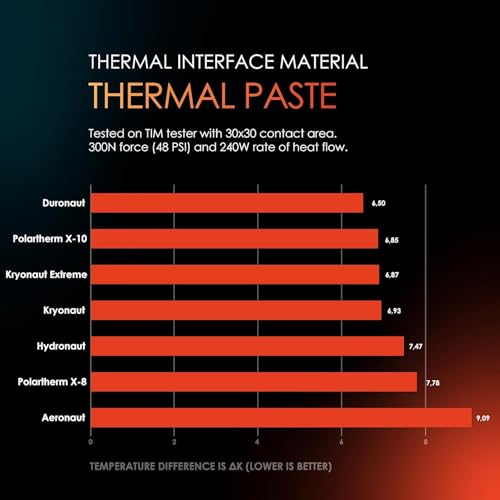


As an Amazon Associate we earn from qualifying purchases. Product prices and availability are accurate as of the date/time indicated.
The Thermal Grizzly Kryonaut is the maximum-performance pick for creators who want the lowest temperatures they can get from a standard paste. It is an enthusiast-favourite compound engineered for high thermal conductivity and stable performance even under heavy, sustained heat, which is precisely the condition a long render or encode creates. At around $8.99 for a 1g syringe it is a premium choice for a hot-running workstation.
This is the paste to choose when your CPU runs hard and you want every degree of headroom — a high-core-count chip under prolonged all-core load, paired with a serious air or liquid cooler. Kryonaut is known for holding its performance under continuous high temperatures rather than degrading quickly, making it well suited to a machine that renders for hours. The 1g tube is smaller, so it is best when you want top-tier cooling for one or two careful applications rather than a big stockpile.
Pros: Top-tier thermal performance, stable under sustained heat, enthusiast favourite.
Cons: Small 1g tube; premium price per gram versus everyday pastes.
4. Noctua NT-H1 (3.5 g) Pro-Grade Thermal Compound
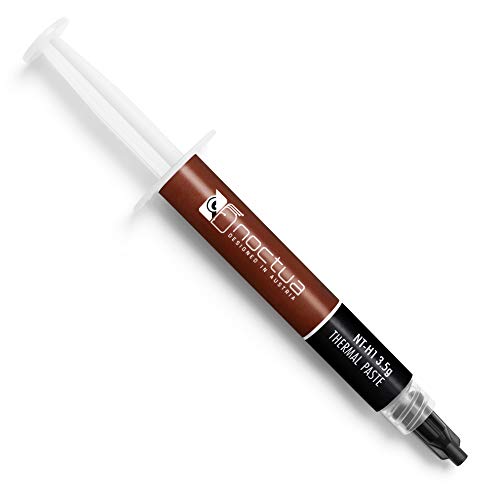
Noctua NT-H1 3.5g, High-Performance Thermal Paste


As an Amazon Associate we earn from qualifying purchases. Product prices and availability are accurate as of the date/time indicated.
The Noctua NT-H1 is the foolproof pick, beloved for being almost impossible to get wrong. It is a pro-grade, non-conductive, non-curing compound that delivers excellent, reliable thermal transfer, requires no special handling or burn-in period, and stays stable for years. At around $8.95 for a generous 3.5g tube — enough for many applications — it is superb value from a brand synonymous with cooling.
For a content creator, the NT-H1’s appeal is dependability and quantity. The non-curing formula performs at its best from the moment you power on, with no cure time to wait through, and its forgiving, non-conductive nature makes it safe and easy to apply on any CPU or GPU. The large tube means you can repaste a workstation, a gaming rig and a couple of GPUs and still have plenty left. As a reliable, generous, fuss-free thermal paste for a hard-working PC, it is an outstanding all-rounder.

Pros: Foolproof non-curing formula, reliable performance, non-conductive, large 3.5g tube.
Cons: Not chasing the absolute lowest temperatures of premium enthusiast pastes.
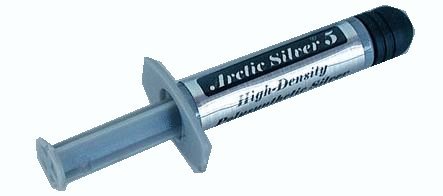
5. Arctic Silver 5 (AS5-3.5G) Thermal Paste

Arctic Silver 5 AS5-3.5G Thermal Paste,Black, Grey




As an Amazon Associate we earn from qualifying purchases. Product prices and availability are accurate as of the date/time indicated.
The Arctic Silver 5 is a long-running classic, and we will be straight about its quirks. It is a silver-based, high-thermal-capacity compound that has been a staple for many years and still cools well. The important caveat: it is slightly capacitive and ever so slightly conductive, and it needs a break-in period of several heat cycles to reach its best performance. At around $7.50 for a 3.5g tube it remains a familiar option.
For a creator, those characteristics are worth understanding before you buy. Because Arctic Silver 5 is mildly conductive, you must apply it carefully and avoid contact with pins or surrounding components — it is less forgiving than the fully non-conductive MX-4 or NT-H1. It also needs a cure period to settle, so temperatures improve over the first days of use rather than immediately. If you know its requirements and apply it cleanly, it performs respectably; if you want a safer, instant-performance paste, the non-conductive options here are the easier call.
Pros: Proven silver-based compound, high thermal capacity, long track record.
Cons: Slightly conductive — apply carefully; needs a cure-in period to reach peak.
6. Corsair TM30 Performance Thermal Paste

Corsair TM30 Performance Thermal Paste | Ultra-Low Thermal Impedance CPU/GPU | 3 Grams|w/applicator, Silver for Desktop


As an Amazon Associate we earn from qualifying purchases. Product prices and availability are accurate as of the date/time indicated.
Rounding out the list is the Corsair TM30, the budget brand-name pick. It is a performance compound built for low thermal impedance between a CPU or GPU and its cooler, carrying the Corsair name and aimed at builders who want a dependable paste from a familiar brand without paying a premium. At around $7.76 it is a reasonable, no-drama option for a fresh installation or a cooler swap.
For sustained creative workloads, the TM30 covers the fundamentals: solid thermal transfer to keep a hard-working chip cool, and easy application for a tidy job. It is a sensible choice if you are already buying Corsair cooling or components and want a matching paste, or simply prefer a recognised brand. While the ARCTIC and Noctua compounds have longer reputations for longevity specifically, the TM30 is a perfectly capable performer for a workstation and rounds out the list as a solid value option.

Pros: Low thermal impedance, recognised brand, easy to apply, fair price.
Cons: Less of a long-term-longevity reputation than the ARCTIC and Noctua staples.
How to Choose Thermal Paste for Content Creation
For content creation the single most important quality is longevity, because a workstation that renders, encodes and exports regularly keeps the CPU hot for long stretches, day after day. A paste that holds its performance for years without drying out — like the ARCTIC MX-4 or Noctua NT-H1, both famous for exactly this — means you set it once and forget it, rather than watching temperatures creep up and reapplying annually. Raw peak performance matters, but for a hard-working machine, stable long-term behaviour matters more.
Thermal performance is the next factor, and it determines how much heat the paste can move under sustained load. All six compounds here cool well, but a premium enthusiast paste like Thermal Grizzly Kryonaut is engineered for the lowest temperatures and the most stable behaviour under continuous high heat, making it the pick if you run a hot, high-core-count chip flat out for hours. For most builds the difference between a great everyday paste and a premium one is a handful of degrees — useful headroom, but rarely the deciding factor on its own.
Conductivity and safety should guide which paste you trust on your hardware. Most modern pastes — the MX-4, NT-H1, Kryonaut and TM30 here — are non-conductive, so a stray smear will not short a component, which makes them forgiving and ideal for any builder. We have flagged the Arctic Silver 5 specifically because it is mildly conductive and capacitive: it performs well but demands careful, clean application away from pins and components. If you want the safest, most forgiving experience, choose a fully non-conductive compound.
Finally, weigh application and quantity against how you will use it. A bundled spatula, as with the MX-4 spatula kit, helps first-timers apply an even layer, while a generous tube like the 3.5g NT-H1 lets you repaste several machines and GPUs from one purchase. Note that a few pastes, notably Arctic Silver 5, need a cure-in period before reaching peak performance, whereas non-curing formulas like the NT-H1 are at their best immediately. Decide whether you prioritise longevity, peak cooling, safety or value, and pick the compound on this list that fits your workstation and your comfort level.
Frequently Asked Questions
Why does thermal paste matter more for content creation than gaming?
Because creative workloads sustain heat. A render, export or long encode pins the CPU at high load for minutes or hours, generating prolonged heat rather than the short spikes of gaming. A paste that performs and stays stable under sustained load — and lasts for years without drying out, like the ARCTIC MX-4 or Noctua NT-H1 — helps your CPU hold its clocks instead of throttling during long jobs.
Which thermal paste lasts the longest?
The ARCTIC MX-4 and Noctua NT-H1 are both renowned for long-term stability, holding their performance for years without drying out — ideal for a workstation that runs hard daily. The NT-H1 is also non-curing, so it performs at its best immediately. For a fit-and-forget paste on a hard-working machine, either is an excellent, low-maintenance choice.
Is conductive thermal paste safe to use?
It can be, but it demands care. The Arctic Silver 5 on this list is mildly conductive and capacitive, so a stray smear onto pins or components could cause problems — you must apply it cleanly and precisely. The non-conductive pastes here (MX-4, NT-H1, Kryonaut, TM30) are far more forgiving and a safer choice for most builders, especially first-timers.
How much thermal paste do I need and how often should I reapply?
A small pea-sized amount in the centre of the CPU is plenty for most chips; cooler pressure spreads it. A generous tube like the 3.5g NT-H1 covers many applications across multiple machines. With a long-lasting paste like the MX-4 or NT-H1 you may not need to reapply for years; only repaste if you remove the cooler or temperatures noticeably climb over time.
Related Guides
- Best CPU Coolers
- Best AIO Liquid Coolers
- Best CPUs for Your Build
- Best PC Case Fans
- Best PC Cases for Airflow
- Best Budget Gaming Setup
Affiliate Disclosure: As an Amazon Associate, we earn from qualifying purchases. If you click a link and make a purchase, we may earn a small commission at no extra cost to you. Prices and availability are accurate as of publication and may change.
Ready to decide? Our #1 pick for 2026 is the ARCTIC MX-4 (4 g).
Live price & availability on Amazon.


