

- Top Pick: TP-Link AX1800 WiFi 6 Router (Archer AX21 V5)
- Best Value: NETGEAR Nighthawk Dual-Band WiFi 7 Router (RS90) – Router Only, BE3600 Wireless Speed (up to 3.6 Gbps) – Covers up to 2,000 sq. ft., 50 Devices – 2.5 Gig Internet Port – Free Expert Help
- Premium Choice: TP-Link AC1900 Smart WiFi Router Dual Band Router for Wireless Internet
A smart home lives or dies by its network. Once you add smart bulbs, plugs, cameras, doorbells, speakers and sensors, your router is no longer juggling a few laptops and phones — it is handling dozens of simultaneous connections, many of them on the 2.4GHz band that IoT devices favour for range and wall-penetration. The right router or mesh system keeps every device connected reliably in every corner of the house. This guide rounds up the best routers for a smart home in 2026, leading with whole-home mesh systems built for high device counts and broad coverage.
- Best Routers for Smart Home at a Glance
- 1. TP-Link Deco S4 Mesh AC1900 WiFi System – Up to 5,500 Sq.ft. Coverage
- 2. Amazon eero 6 mesh wifi system – Supports internet plans up to 500 Mbps
- 3. TP-Link Deco M5 Mesh WiFi System – Up to 5,500 sq. ft. Whole Home Coverage
- 4. TP-Link AX1800 WiFi 6 Router (Archer AX21 V5) – Dual Band Wireless Internet
- 5. TP-Link Deco X55 AX3000 WiFi 6 Mesh System – Covers up to 2500 Sq.Ft.
- 6. TP-Link Archer AC1750 WiFi Router – Dualband Gigabit, Works with Alexa
- How to Choose a Router for a Smart Home
- Frequently Asked Questions
- Related Guides
- Related Articles
Our picks were chosen on what genuinely matters for a connected home: how many devices the system can comfortably handle, whole-home coverage and the ability to mesh across a large area, solid 2.4GHz performance for far-flung IoT gadgets, and value. We have included a price spread from around $38 to around $140, spanning affordable single routers and whole-home mesh kits. We are also clear about which picks are full mesh systems versus single routers, since that shapes how well they blanket a smart home. Below is an at-a-glance comparison of all six, then a closer look at each and a buyer’s guide built around device capacity, mesh coverage and band support.
As an Amazon Associate we earn from qualifying purchases at no extra cost to you.



🛒 Best Price Today on Amazon
Prime members get fast, free shipping on everything above, plus member-only deals. New members get a 30-day free trial — cancel anytime.
Best Routers for Smart Home at a Glance
| Router / System | Best For | Standout Spec | Approx Price |
|---|---|---|---|
| TP-Link Deco S4 (AC1900 Mesh) | Whole-home IoT coverage | Up to 5,500 sq.ft mesh | around $96 |
| Amazon eero 6 Mesh | Alexa-friendly smart home | Built-in Zigbee smart hub | around $140 |
| TP-Link Deco M5 (Mesh) | Many connected devices | Up to 5,500 sq.ft, 100+ devices | around $140 |
| TP-Link Archer AX21 (WiFi 6) | Single-router upgrade | WiFi 6, more device headroom | around $52 |
| TP-Link Deco X55 (AX3000 Mesh) | WiFi 6 mesh value | WiFi 6 mesh, 2,500 sq.ft | around $70 |
| TP-Link Archer AC1750 | Budget smart-home start | Dual-band, Alexa-compatible | around $38 |
1. TP-Link Deco S4 Mesh AC1900 WiFi System – Up to 5,500 Sq.ft. Coverage

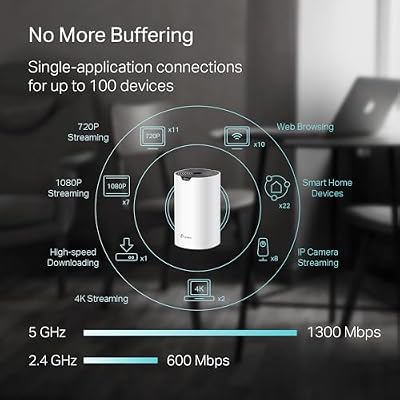
TP-Link Deco S4 Mesh AC1900 WiFi System, Deco S4(3-Pack)



As an Amazon Associate we earn from qualifying purchases. Product prices and availability are accurate as of the date/time indicated.
The TP-Link Deco S4 is the lead pick for a smart home because it pairs broad whole-home mesh coverage with strong device-handling at an approachable price. This AC1900 mesh kit blankets up to 5,500 square feet, replacing dead spots with seamless roaming so your smart devices stay connected as you move around the house. At around $96 it is a well-rounded foundation for a connected home.
For a smart home, the intent this serves is coverage and capacity together. The mesh design means a smart plug in the garage or a sensor in the attic gets the same reliable signal as devices near the main unit, the system supports a large number of simultaneous connections without buckling, and a single network name makes onboarding new gadgets simple. If your priority is a dependable mesh that keeps dozens of IoT devices online across a whole house, the Deco S4 is the obvious starting point.
Pros: Whole-home mesh up to 5,500 sq.ft, strong device handling, single seamless network.
Cons: AC (WiFi 5) class rather than WiFi 6; no dedicated smart-home hub radio.
2. Amazon eero 6 mesh wifi system – Supports internet plans up to 500 Mbps
The Amazon eero 6 is the pick for a smart home built around Alexa, because it doubles as a smart-home hub. Beyond being a WiFi 6 mesh system that supports internet plans up to 500 Mbps and covers a wide area, it includes a built-in Zigbee smart-home hub, letting it connect and control compatible smart devices directly. At around $140 it is the most smart-home-integrated option here.
This is the system to choose if your home runs on Alexa and Zigbee accessories. The built-in hub means you can connect compatible bulbs, plugs and sensors without a separate bridge, the WiFi 6 mesh handles a busy connected household smoothly, and eero’s app makes setup and management genuinely simple. For a smart home where tight integration with Alexa and a reduced gadget pile matter as much as raw coverage, the eero 6 is the standout, and the integrated Zigbee hub is a feature none of the other picks offer.
Pros: WiFi 6 mesh, built-in Zigbee smart-home hub, very simple app-based setup.
Cons: Higher price; coverage tier suits up to mid-size homes.
3. TP-Link Deco M5 Mesh WiFi System – Up to 5,500 sq. ft. Whole Home Coverage

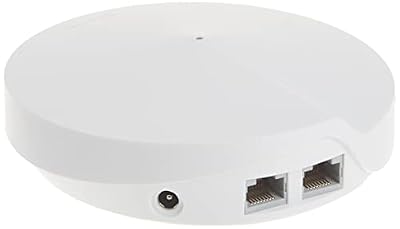
TP-Link Deco M5 Mesh WiFi System Deco M5 3-Pack




As an Amazon Associate we earn from qualifying purchases. Product prices and availability are accurate as of the date/time indicated.
The TP-Link Deco M5 is the pick for households packed with connected devices. This mesh system covers up to 5,500 square feet and is explicitly built to handle a large number of simultaneous connections — TP-Link rates it for 100 or more devices — making it well suited to a home full of smart gadgets. At around $140 it also bundles security features for the network.
This is the system to choose when device count, not just coverage area, is your concern. A modern smart home can easily run 50-plus connected devices between lights, plugs, cameras and sensors, and the Deco M5 is engineered to keep them all online without the slowdowns a basic router would suffer. The mesh blankets a large home, the included security tools help protect the many IoT devices that often lack their own defences, and setup is app-driven and straightforward. For a busy, gadget-heavy smart home, the M5 is a strong pick.
Pros: Built for 100+ devices, whole-home mesh up to 5,500 sq.ft, network security tools.
Cons: WiFi 5 class; priced at the top of the range here.
4. TP-Link AX1800 WiFi 6 Router (Archer AX21 V5) – Dual Band Wireless Internet
The TP-Link Archer AX21 is the pick for upgrading a smart home with a single router rather than a mesh. This AX1800 WiFi 6 router brings the newer standard to a smaller or single-floor home, and WiFi 6 is genuinely helpful for connected homes because it handles many simultaneous devices more efficiently than WiFi 5. At around $52 it is an affordable capacity upgrade.
This is the router for a smart home that does not need whole-house mesh but wants more headroom for its gadgets. WiFi 6’s improved handling of crowded networks means smart bulbs, plugs and sensors compete less for airtime, the dual-band design keeps the IoT-friendly 2.4GHz band available for far devices, and the price is hard to argue with for a WiFi 6 router. If your home is compact enough for one strong router and you want modern device efficiency, the Archer AX21 is an excellent-value choice — just note it is a single unit, not a mesh.
Pros: WiFi 6 efficiency for many devices, affordable, dual-band with strong 2.4GHz.
Cons: Single router, not a mesh; coverage limited to smaller homes.
5. TP-Link Deco X55 AX3000 WiFi 6 Mesh System – Covers up to 2500 Sq.Ft.

TP-Link Deco X55 AX3000 WiFi 6 Mesh System, Deco X55(1-Pack)



As an Amazon Associate we earn from qualifying purchases. Product prices and availability are accurate as of the date/time indicated.
The TP-Link Deco X55 is the WiFi 6 mesh value pick. It combines the device-handling efficiency of WiFi 6 with a mesh design that covers up to 2,500 square feet, giving a smart home both modern capacity and seamless roaming. At around $70 it is the most affordable WiFi 6 mesh on this list and a sweet spot between the budget routers and the pricier kits.
This is the system to choose for a smart home that wants WiFi 6 efficiency and true mesh coverage without paying flagship money. WiFi 6 lets the network juggle a houseful of IoT devices more gracefully, the mesh nodes extend a single seamless network into the corners where smart sensors and cameras often live, and the price keeps it accessible. For a mid-size connected home that values both modern standards and whole-home reach on a budget, the Deco X55 is a compelling pick.
Pros: WiFi 6 mesh with seamless roaming, efficient with many devices, strong value.
Cons: Coverage tier (2,500 sq.ft) suits small-to-mid homes.
6. TP-Link Archer AC1750 WiFi Router – Dualband Gigabit, Works with Alexa

TP-Link Archer AC1750 WiFi Router - Dualband Gigabit, Qualcomm inside, Works with Alexa(A7), Black
As an Amazon Associate we earn from qualifying purchases. Product prices and availability are accurate as of the date/time indicated.
Rounding out the list is the TP-Link Archer AC1750, the budget smart-home starting point. This dual-band gigabit router is Alexa-compatible and a long-standing best-seller, offering reliable AC1750 wireless and wired gigabit ports for a single unit. At around $38 it is by far the cheapest pick here and a solid entry into a more capable home network.
This is the router to choose for a smaller smart home or as a first upgrade from an ISP-supplied box. The dual-band design keeps the IoT-friendly 2.4GHz band free for far-flung sensors and plugs while the 5GHz band serves phones and laptops, Alexa compatibility allows simple voice control of the network, and the price is unbeatable. It is a single router rather than a mesh, so it suits compact homes, but for an affordable, dependable foundation for a growing smart home, the Archer AC1750 earns its place.
Pros: Very affordable, dual-band gigabit, Alexa-compatible, reliable proven router.
Cons: WiFi 5 single router; not ideal for large homes or huge device counts.
How to Choose a Router for a Smart Home
The defining requirement for a smart-home router is device capacity, not just speed. A modern connected home can run dozens of devices at once — bulbs, plugs, cameras, doorbells, speakers, sensors and more — and many cheaper routers strain under that many simultaneous connections. Look for systems that advertise high device counts, like the TP-Link Deco M5 with its 100-plus device rating, and favour WiFi 6 models such as the Archer AX21 or Deco X55 where you can, since WiFi 6 handles crowded networks far more efficiently than WiFi 5.
Coverage and the case for mesh come next. Smart-home devices tend to live everywhere — a doorbell at the front, a camera in the garage, a sensor in the attic — so dead spots are a real problem. A mesh system like the Deco S4, Deco M5, Deco X55 or eero 6 uses multiple units to blanket a whole home with one seamless network, so devices stay connected as coverage hands off between nodes. A single powerful router like the Archer AX21 or AC1750 can suit a smaller or single-floor home, but for larger spaces, mesh is the answer.
Band support matters more for IoT than people expect. Many smart-home gadgets connect only on the 2.4GHz band, which travels further and penetrates walls better than 5GHz — exactly what a sensor at the edge of the house needs. Every router here is dual-band, keeping 2.4GHz available for those devices while 5GHz serves bandwidth-hungry phones and laptops. If you have many far-flung or older smart devices, strong 2.4GHz performance is something to prioritise rather than overlook.
Finally, consider integration and management. Some systems do more than route traffic: the eero 6 includes a built-in Zigbee hub that connects compatible smart devices directly, reducing the number of separate bridges you need, and most modern systems offer app-based setup and built-in security that helps protect IoT devices that often lack their own defences. Decide whether tight Alexa or smart-hub integration matters to you, set your coverage needs and budget, prioritise device capacity, and pick the router or mesh on this list that fits your connected home.
Frequently Asked Questions
How many smart devices can these routers handle?
It varies by model. The TP-Link Deco M5 is explicitly rated for 100 or more devices, making it a strong choice for gadget-heavy homes, and WiFi 6 systems like the Archer AX21 and Deco X55 handle crowded networks more efficiently than older WiFi 5 routers. A modern smart home can easily run 50-plus devices, so favour systems that advertise high device counts rather than a basic router that may struggle.
Do smart-home devices need the 2.4GHz band?
Many do. A large share of smart bulbs, plugs and sensors connect only on 2.4GHz because it travels further and passes through walls better than 5GHz — ideal for devices at the edge of the house. Every router on this list is dual-band, so the 2.4GHz band stays available for IoT gadgets while 5GHz serves phones and laptops. Strong 2.4GHz performance is worth prioritising if you have many far-flung smart devices.
Is a mesh system better than a single router for a smart home?
For larger homes, usually yes. Smart devices live all over the house, so dead spots cause dropouts. A mesh like the Deco S4, Deco M5 or eero 6 uses multiple units to cover a whole home with one seamless network and hand devices off between nodes. A single strong router like the Archer AX21 or AC1750 is fine for a small or single-floor home, but mesh is the better answer when coverage is the challenge.
Which router doubles as a smart-home hub?
The Amazon eero 6 is the standout here because it includes a built-in Zigbee smart-home hub. That lets it connect and control compatible Zigbee devices directly, reducing the need for a separate bridge — a real advantage if your home runs on Alexa and Zigbee accessories. The TP-Link picks are routers and mesh systems rather than smart hubs, though they handle smart-device traffic well.
Related Guides
- Best Routers
- Best Mesh WiFi Systems
- Best WiFi 6 Routers
- Best WiFi Extenders
- Best Smart Home Devices
- Best Gaming Routers
Affiliate Disclosure: As an Amazon Associate, we earn from qualifying purchases. If you click a link and make a purchase, we may earn a small commission at no extra cost to you. Prices and availability are accurate as of publication and may change.
Ready to decide? Our #1 pick for 2026 is the TP-Link Deco S4 (AC1900 Mesh).
Live price & availability on Amazon.


