- Top Pick: STANDOPIA Dual Ultrawide Monitor Mount for 17-40'', up to 19.8lbs/arm
- Best Value: WALI Vertical Dual Monitor Mount for 17-49 inch Curved Screens, up to 33lbs
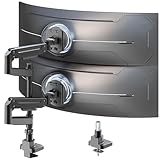
- Premium Choice: VIVO Premium Aluminum Heavy Duty Dual Monitor Arm for Ultrawide Monitors up to 40 inches and 30 lbs Each, Desk Mount Stand, Pneumatic Height, Max VESA 100×100, Black, STAND-V220Q
🛒 Best Price Today on Amazon
Prime members get fast, free shipping on everything above, plus member-only deals. New members get a 30-day free trial — cancel anytime.
Top Monitor Arms Dual Ultrawide Setups Picks for 2026
Here are our current top monitor arms dual ultrawide setups picks, compared on real Amazon owner reviews, price, and features. Live prices update below.
As an Amazon Associate we earn from qualifying purchases at no extra cost to you.





Top Picks at a Glance

ARES WING
ARES WING Dual Monitor Wall Mount for 24-57 Inch Ultrawide Screen, Black

HUANUO
HUANUO FlowLift™ Pro Monitor Arm for 13–32" Screens, MechaSpring Monitor Mount, Fully-Adjustable Monitor Stand with Tilt/Swivel/Rotation, Tool-Free VESA Mount, C-Clamp/Grommet Base, Max Load 19.8 lbs
Ergotron
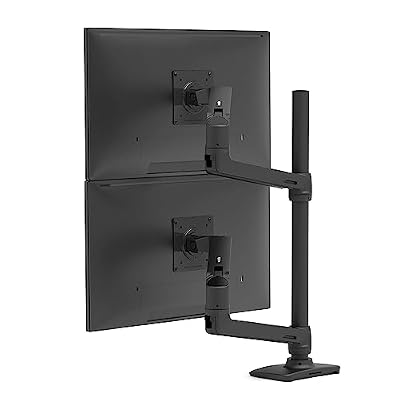
Ergotron – LX Vertical Stacking Dual Monitor Arm, VESA Desk Mount – for 2 Monitors Up to 40 Inches, 7 to 22 lbs Each – Tall Pole, Matte Black

Ergotron
Ergotron – MXV Single Monitor Arm, VESA Wall Mount – for Monitors Up to 34 Inches, 7 to 20 lbs – Matte Black

Ergotron
Ergotron – LX Monitor Arm, Single Monitor Desk Mount – fits Flat Curved Ultrawide Computer Monitors up to 34 Inches, 7 to 25 lbs, VESA 75x75mm or 100x100mm – White
As an Amazon Associate we earn from qualifying purchases. Product prices and availability are accurate as of the date/time indicated.
Why Your Monitor Arm Matters More Than You Think
Most gaming desks ship with monitors sitting flat on their stands, eating valuable real estate and forcing your neck into unnatural angles after a few hours. A quality monitor arm solves all of that: it lifts screens to eye level, lets you tilt and swivel on the fly, and clears space for a keyboard, mouse mat, or whatever else belongs on a battlestation. In 2026 the options range from wall-mount slabs built for 57-inch ultrawides down to nimble single-arm desk mounts for compact setups.
Here are the six best picks for every setup, with honest notes on where each one shines.
What to Look for Before You Buy
- Weight capacity and screen size range. Arm specs list a maximum weight and a screen-size window. Match these to your actual monitor before ordering — an arm rated for 25 lbs that holds a 38-inch ultrawide will sag within weeks.
- Mount type: desk clamp vs. wall mount vs. grommet. Desk clamps are easiest to install and rearrange. Wall mounts are rock solid and save desk depth. Grommets anchor through a hole in the desk for a clean look but commit you to one spot.
- VESA compatibility. Check the back of your monitor for a 75×75mm or 100×100mm VESA pattern. A few ultra-budget monitors use proprietary stands with no VESA holes — those can’t use any third-party arm.
- Adjustment range. Look for full pan, tilt, and rotation so you can fine-tune eye level and switch between landscape and portrait without swapping hardware.
- Cable management. Integrated routing channels keep USB, DisplayPort, and power cables hidden — a small detail that makes a big difference in a clean build.
The Best Monitor Arms in 2026
ARES WING Monitor Wall Mount for 24–57 Inch Ultrawide Gaming
Built from the ground up for ultrawide gaming, this single-arm wall mount handles screens from 24 to 57 inches with confidence. At around $79 and a 4.8-star rating, it punches well above its price: the mounting bracket is beefy, the tilt tension holds firmly after adjustment, and the profile stays thin against the wall. Best suited for builders who want a permanent, low-flex solution for a single large display.
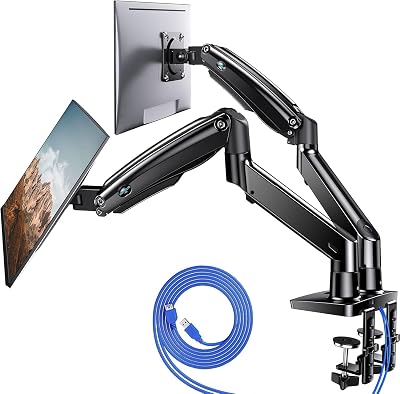
ARES WING Dual Monitor Wall Mount for 24–57 Inch Ultrawide
The dual-panel version of the same wall mount, rated 4.8 stars at around $150. Two independent arms allow each screen to pivot independently, which is essential if you mix an ultrawide gaming monitor with a standard portrait second screen. The steel bracket distributes load evenly across wall studs, and the assembly takes about 30 minutes with standard hardware.
HUANUO FlowLift Pro Monitor Arm for 13–32″ Screens
A perfect 5-star score at under $30 — the FlowLift Pro earns it by nailing the basics without overcharging. Gas-spring lift handles up to 32-inch panels, the desk clamp installs in under ten minutes, and the arm’s reach is more than sufficient for standard desktop depths. Ideal for budget builds, dorm setups, or anyone adding a second monitor to an existing rig without spending big.
Ergotron LX Vertical Stacking Dual Monitor Arm
Ergotron’s LX Stacking arm is the gold standard for productivity-meets-gaming dual-screen setups. It stacks two displays vertically on a single desk pole, which keeps your horizontal sight line clear while giving you a secondary screen above. The 4.6-star rating from a large review base reflects its precision engineering: tension adjustments are smooth, cable routing is fully hidden, and the arm has lasted years in real workstation use. A premium investment for serious dual-screen gamers who also work from home.
Ergotron MXV Single Monitor Arm — Wall Mount
The MXV wall mount from Ergotron targets the sweet spot between the brand’s consumer and commercial tiers. Rated 4.7 stars, it locks a single monitor exactly where you want it with minimal wobble — critical during fast-paced gameplay. The wall mount configuration frees up every centimeter of desk depth, which matters in tighter setups. Best for dedicated gaming rooms where monitors don’t move once positioned.
Ergotron LX Single Monitor Arm — Desk Mount
The classic LX desk arm is one of the most recommended monitor mounts on the internet, and it keeps earning that reputation in 2026. A 4.6-star average across thousands of reviews reflects consistent quality: tension-adjustable gas spring, generous reach and height range, and near-silent repositioning. At around $200 it’s not cheap for a single arm, but if you plan to move your monitor position often — switching from upright gaming to reclined couch play — the LX is worth every dollar.
Quick Verdict
Budget one-screen setups: HUANUO FlowLift Pro at around $29, no contest. Single ultrawide on a wall: either ARES WING single. Dual-screen desk build: Ergotron LX Stacking if you want quality, ARES WING dual wall mount if you want to save $320. The premium Ergotron LX desk arm is the move for anyone who repositions frequently.
FAQ
Frequently Asked Questions
How do I check my monitor will fit the arm?
You need three matches: VESA pattern, usually 100x100mm or 75x75mm, screen weight in kilograms, and screen size range. Heavy 34 inch ultrawides often exceed the 8kg limit of budget gas spring arms, so check the panel weight without its stand on the spec sheet. Some slim monitors also need a VESA adapter plate sold separately.
Are gas spring arms better than mechanical spring ones?
Gas spring arms adjust smoothly with one hand and hold position across a wide range, which suits people who move between sitting and standing. Mechanical spring arms are cheaper and hold heavy loads well but need tool adjustment to retension. If your monitor sits at the very top of an arms rated capacity, it will drift downward over time regardless of type.
Will a clamp damage my desk?
A C-clamp spreads load across the desk edge and is fine on solid wood, plywood, and steel frames. Thin hollow core, laminate over particleboard, and glass tops are the risk cases, and glass generally requires the grommet mount option through a drilled hole instead. Check your desk edge thickness against the clamp range, typically around 10 to 85mm.
Can one arm handle a 49 inch super ultrawide?
Only heavy duty single arms rated for 15kg or more with a reinforced pole, and even then the leverage from a metre wide panel puts real stress on the desk edge. Many people prefer a dedicated heavy monitor stand or a pole mount bolted through the desk. Always check both the weight rating and the maximum supported screen width.
Do monitor arms actually improve ergonomics?
Yes, mainly by letting you raise the top of the screen to eye level and push it back to a proper viewing distance, which most stock stands cannot do. That corrects the forward head posture that causes neck strain during long sessions. The reclaimed desk space underneath is a genuine bonus but the height and depth adjustment is the real win.