

- Top Pick: Elgato Cam Link 4K Capture Card for DSLR, Camcorder, Action Cam, USB-A Connector, USB 3.0 Hardware Interface, Black, Windows 10/11 and macOS
- Best Value: Mwin Cam Link 4K, External Camera Capture Card, 4K30/1080p120 for Streaming and Record via DSLR, Camcorder, Actioncam, Low-Latency for Video Conferencing, Live Streaming, Gaming, on OBS, Zoom, Windows
- Premium Choice: VIXLW Cam Link 4K – External Capture Card for DSLR Camcorder ActionCam as Webcam, HDMI to USB 3.0, Meet/Stream/Record in 4K60/1080p120, Easy Connect for OBS/Zoom, Windows/Mac
The Elgato Cam Link 4K is a purpose-built capture card designed not for gameplay capture but for one job: turning a DSLR, mirrorless camera, camcorder or action cam into a webcam. With more than 13,800 reviews on Amazon it became the default solution during the remote-work era and remains the go-to for any streamer or video professional who wants the look of a real camera in their stream. At around $90 it is the most affordable card in Elgato’s range. This Elgato Cam Link 4K review covers the capture resolution, pass-through, connection, software integration and intended use.
- Elgato Cam Link 4K at a Glance
- Capture Resolution and Frame Rate
- HDR, Pass-Through and Display Compatibility
- Connection Type and Latency
- Software, OBS Integration and Streaming Features
- Who Is the Elgato Cam Link 4K For?
- Pros and Cons
- Is the Elgato Cam Link 4K Worth It?
- Frequently Asked Questions
- More Capture Card Reviews
- Related Articles
- Related Articles

Elgato Cam Link 4K Capture Card for DSLR, Camcorder, Action Cam | HDMI to USB 3.0, Stream in 1080p60 or 4K30/60, Ultra-low latency, Works with OBS, Zoom, Discord, PC/Mac/iPad compatible




As an Amazon Associate we earn from qualifying purchases. Product prices and availability are accurate as of the date/time indicated.
🛒 Best Price Today on Amazon
Prime members get fast, free shipping on everything above, plus member-only deals. New members get a 30-day free trial — cancel anytime.
As an Amazon Associate we earn from qualifying purchases.




Elgato Cam Link 4K at a Glance
| Component | Specification |
|---|---|
| Type | External capture card / camera-to-webcam adapter |
| Connection | USB 3.0 |
| Max capture resolution | 4K30 |
| HDR support | Not on capture (SDR) |
| Pass-through resolution | No pass-through (camera capture device) |
| Compatibility | Cameras with clean HDMI out; Windows and Mac |
| Latency class | Low latency for live use |
| Price | Around $90 |
Capture Resolution and Frame Rate
The Cam Link 4K captures at up to 4K30 from any HDMI source — that is its headline figure, and it is generous given the price. In practice most camera-as-webcam workflows run at 1080p60 because that is the resolution at which video calls, Twitch streams and YouTube live streams actually deliver, and the Cam Link supports 1080p60 perfectly. The 4K30 ceiling is there for the videographer who wants to feed 4K30 from a camera into a recording workflow or into a higher-end production stream. Importantly, the Cam Link is built for the specific resolutions that broadcast cameras output cleanly, and Elgato have made the firmware tolerant of the slightly idiosyncratic HDMI signals that DSLRs sometimes produce — which is exactly what makes it the standard choice for this job.
The Cam Link’s resolution flexibility matters because real cameras output a wider range of frame rates and resolutions than consoles do — 24p for cinematic recording, 30p for general video, 50p and 60p for higher-motion footage. The card handles all of these, and Elgato’s firmware is good at negotiating the exact signal a connected camera is sending without forcing the user to dig through menus. For a non-technical creator using the card as a webcam, that just-works behaviour is the single most important attribute, and it is the area where cheaper generic HDMI-to-USB dongles tend to struggle most.
HDR, Pass-Through and Display Compatibility
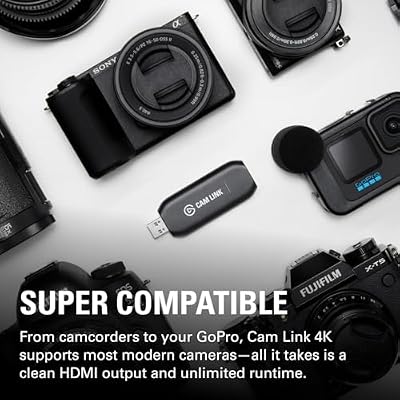
The Cam Link is not a gameplay capture card and does not provide pass-through — there is no second HDMI output to feed your gaming monitor, because it is not designed for that use case. Captured footage is SDR; HDR is not part of the camera-as-webcam workflow. On compatibility, the Cam Link is built around the assumption that the source is a camera with clean HDMI output, which is now standard on most Sony, Canon, Fujifilm and Panasonic mirrorless and DSLR bodies of the last several years. If you are unsure whether your camera supports clean HDMI out, that is worth checking before buying — it is the single biggest source of compatibility frustration with this card.
The absence of pass-through is a feature, not a flaw, given the intended use case. A camera-as-webcam workflow has no second monitor to feed — the camera output goes into the streaming PC, the PC drives the user’s normal displays, and the camera operator looks at the same monitor as the rest of their work. Building pass-through into a card this size would add cost and complexity for zero practical benefit to the target buyer, and Elgato have correctly chosen not to.
Connection Type and Latency
The Cam Link is an external USB 3.0 device, and that is the right format for the job. Camera-as-webcam workflows naturally involve a camera on a tripod feeding a PC, and an external dongle is the most flexible way to do that. Latency is low enough for live calls and streams — viewers and meeting participants will not see a perceptible delay. Because it uses standard USB Video Class drivers, the Cam Link appears in every video app — OBS, Zoom, Teams, Meet, Discord, Streamlabs — as a normal webcam, with no app-specific setup required. That universal compatibility is one of the reasons it became the default.
Software, OBS Integration and Streaming Features
The Cam Link integrates with OBS Studio as a standard webcam source and works in every video-call app without any Elgato software needed. For streamers, that means adding a real camera to an OBS scene takes one click. For remote workers, it means the camera shows up in Zoom and Teams as a webcam choice. Elgato’s own software exists for firmware updates and is useful but not required for day-to-day use. The Cam Link sits inside the OBS workflow alongside an HD60 S or HD60 X for gameplay capture — and many streamers run that exact combination.
Who Is the Elgato Cam Link 4K For?
The Cam Link 4K is for one specific person: the streamer, content creator or remote worker who already owns a good DSLR or mirrorless camera and wants to use it as a webcam. If that describes you, the Cam Link is the single most effective $90 you can spend on your stream’s image quality — a real camera with a real lens looks dramatically better than any USB webcam. It is not the right card for capturing gameplay from a console — for that you want an HD60 S or HD60 X. And it is not the right card for anyone who does not already own a compatible camera. For its specific job it has no real competitor at this price.
Pros and Cons
Pros: Transforms any clean-HDMI camera into a webcam; up to 4K30 capture; works in every video-call and streaming app without app-specific setup; affordable entry point in the Elgato range; mature firmware tolerant of camera HDMI quirks.
Cons: Not a gameplay capture card — no pass-through; requires a camera with clean HDMI output; SDR only; positioned for camera workflow, not console capture. For broader streaming-PC context see our best 240Hz gaming laptops guide.
Is the Elgato Cam Link 4K Worth It?
At around $90 the Elgato Cam Link 4K is a category-defining product for the specific job it does. If you own a DSLR or mirrorless camera and want to use it as a webcam, there is nothing better at this price — and the image-quality improvement over any USB webcam is dramatic. It is squarely recommended for that buyer. For everyone else — anyone capturing gameplay from a console, anyone without a compatible camera — different Elgato models in this same review series will serve you better. Builders who want a streaming-PC host can compare options in our best gaming laptops under $1,200 guide.
Frequently Asked Questions
Does the Elgato Cam Link 4K work with my camera?
It works with any camera that has a clean HDMI output — most Sony, Canon, Fujifilm and Panasonic mirrorless and DSLR cameras of the last several years qualify. Check your specific camera model for clean HDMI support before buying.
Can I use the Cam Link 4K to capture from a PS5 or Xbox?
It is not the intended use. The Cam Link has no pass-through, so you cannot keep playing on the console while capturing. For console gameplay capture choose an HD60 S, HD60 X or 4K X.
Does the Cam Link 4K capture in HDR?
No. The Cam Link captures SDR up to 4K30. HDR is not part of the camera-as-webcam workflow it is designed for.
Does the Cam Link 4K work with Zoom, Teams and OBS?
Yes. It appears as a standard webcam in every video-call and streaming app on Windows and Mac, including Zoom, Teams, Meet, Discord, OBS and Streamlabs.
More Capture Card Reviews
- Elgato HD60 X External Capture Card Review (HDR10)
- Elgato 4K X Capture Card Review (4K144 Flagship)
- Elgato 4K S External Capture Card Review
- EVGA XR1 Pro Capture Card Review (1440p/4K HDR)
- AVerMedia GC573 Live Gamer 4K Internal Capture Card Review
- UGREEN 1080P HDMI Capture Card Review (Budget)
- UGREEN 4K@30Hz HDMI Capture Card Review
- Elgato HD60 S External Capture Card Review
Affiliate Disclosure: As an Amazon Associate, we earn from qualifying purchases. If you click a link and make a purchase, we may earn a small commission at no extra cost to you. Prices and availability are accurate as of publication and may change.
Related Articles
Looking for more on this topic? Browse the hand-picked guides below — each one applies the same scoring rubric used in this review.










