

Developers ask more of a keyboard than almost anyone: hours of continuous typing, a need for crisp tactile feedback to catch keypresses, programmable keys and macros to streamline repetitive commands, and a layout — usually with a number pad — that keeps the fingers efficient. The right coding keyboard reduces fatigue, speeds up workflows, and feels reliable through marathon sessions. This guide rounds up the best keyboards for developers in 2026 across the things that matter at the keyboard: tactile and mechanical-feel boards, programmable layouts, and an ergonomic option for those who type all day.
- Best Keyboards for Developers at a Glance
- 1. Logitech G PRO Mechanical Gaming Keyboard, Ultra Portable Tenkeyless Design, Detachable Cable
- 2. Logitech Ergo K860 Wireless Ergonomic Keyboard – Split Keyboard, Wrist Rest, Natural Typing
- 3. Razer Ornata Chroma Gaming Keyboard: Hybrid Mechanical Key Switches – Customizable
- 4. Logitech G213 Prodigy Gaming Keyboard – Wired RGB Backlit Keyboard with Mech-Dome Keys
- 5. SteelSeries Apex 3 RGB Gaming Keyboard – 10-Zone RGB Illumination – IP32 Water Resistant
- 6. Redragon S101-3 PRO Gaming Keyboard and Mouse, RGB Backlit Programmable Keyboard
- How to Choose a Keyboard for Coding
- Frequently Asked Questions
- Related Guides
- Related Articles
Our picks were chosen on what genuinely helps when you write code for a living: switch feel and key feedback, programmable keys and macro support, build quality for daily abuse, comfort over long sessions, and value. We have led with the boards that best serve focused, tactile, programmable typing and included a true ergonomic option, with prices from around $40 up to around $200. The list spans affordable mechanical-feel and full mechanical boards, a split ergonomic keyboard, and durable membrane workhorses. Below is an at-a-glance comparison of all six, then a closer look at each and a buyer’s guide built around switches, programmability and comfort — the criteria that actually separate a great developer keyboard from an ordinary one.
As an Amazon Associate we earn from qualifying purchases at no extra cost to you.





🛒 Best Price Today on Amazon
Prime members get fast, free shipping on everything above, plus member-only deals. New members get a 30-day free trial — cancel anytime.
Best Keyboards for Developers at a Glance
| Keyboard | Best For | Standout Spec | Approx Price |
|---|---|---|---|
| Logitech G PRO TKL Mechanical | Tactile compact coding | Mechanical, tenkeyless, detachable | around $86 |
| Logitech Ergo K860 Split Ergonomic | All-day wrist comfort | Split curve, wrist rest | around $150 |
| Razer Ornata Chroma Hybrid | Soft tactile feedback | Hybrid mech-membrane switches | around $200 |
| Logitech G213 Prodigy | Durable full-size workhorse | Mech-dome, full-size, spill-resistant | around $57 |
| SteelSeries Apex 3 RGB | Quiet water-resistant typing | Whisper-quiet, IP32 resistant | around $50 |
| Redragon S101-3 PRO Programmable | Budget programmable combo | Programmable keys, mouse included | around $40 |
1. Logitech G PRO Mechanical Gaming Keyboard, Ultra Portable Tenkeyless Design, Detachable Cable

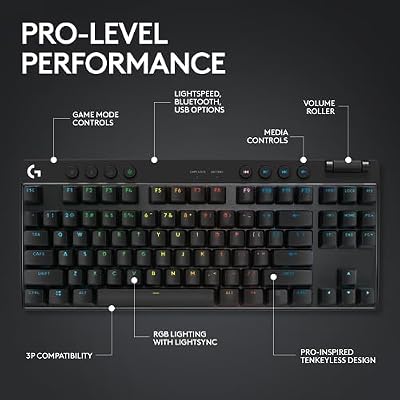
Logitech G PRO Mechanical TKL Tenkeyless Gaming Keyboard (Clicky) - Black | Ultra portable, detachable Micro USB cable, 16.8 million color Lightsync backlit keys




As an Amazon Associate we earn from qualifying purchases. Product prices and availability are accurate as of the date/time indicated.
The Logitech G PRO is the tactile, focused pick for developers who want a real mechanical board in a compact footprint. It is a tenkeyless mechanical keyboard with crisp, responsive switches, a sturdy build, and a detachable USB cable that makes it easy to carry between home and office. At around $86 it delivers genuine mechanical typing feel and quality without a flagship price.
For coding this is an excellent fit. The mechanical switches give clean, positive feedback so you feel every keypress register — valuable when you are typing fast and want confidence in your input — and the tenkeyless layout removes the number pad to bring the mouse closer for a more comfortable, centred posture during long sessions of editing and navigation. The detachable cable and portable design suit a developer who moves between desks. If you want crisp, reliable mechanical feel in a compact, well-built coding board, the G PRO leads the list.
Pros: Crisp mechanical switches, compact tenkeyless layout, detachable cable, sturdy portable build.
Cons: No number pad for heavy numeric entry; mechanical keys are louder than membrane.
2. Logitech Ergo K860 Wireless Ergonomic Keyboard – Split Keyboard, Wrist Rest, Natural Typing

Logitech Ergo K860 Wireless Ergonomic Split Keyboard with Wrist Rest | Curved split keyframe, pillowed wrist rest, Bluetooth, USB connectivity with included USB Receiver, Windows Mac compatible


As an Amazon Associate we earn from qualifying purchases. Product prices and availability are accurate as of the date/time indicated.
The Logitech Ergo K860 is the comfort-first pick for developers who type all day, every day. It is a split, curved ergonomic keyboard with a generous integrated wrist rest, designed to hold your hands, wrists and forearms in a more natural, neutral posture. It connects wirelessly via Bluetooth or Logitech’s Unifying receiver and includes a full number pad. At around $150 it is an investment in long-term comfort.
This is the keyboard to choose if repetitive strain or end-of-day wrist fatigue is a real concern — a frequent reality for people who code for hours. The split, curved key wells reduce the awkward inward angle of a flat board, the cushioned wrist rest supports your hands, and the gentle tenting lifts the palms to a more comfortable position. It retains the full layout with a number pad for any numeric work, and wireless keeps the desk tidy. For developers who prioritise ergonomics and want to protect their hands over a long career, the Ergo K860 is the standout.
Pros: Split ergonomic curve, supportive wrist rest, full-size with number pad, wireless and tidy.
Cons: Highest price tier; the split layout takes time to adapt to.
3. Razer Ornata Chroma Gaming Keyboard: Hybrid Mechanical Key Switches – Customizable
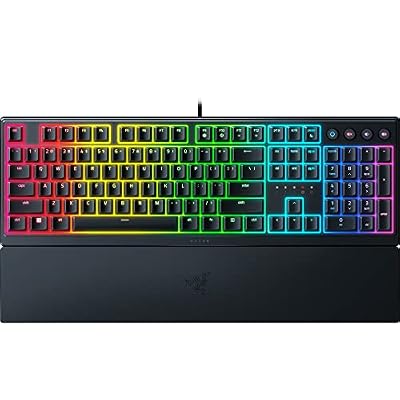
Razer Ornata V3 Gaming Keyboard, Low-Profile Keys, Black | Mecha-Membrane Switches, UV-Coated Keycaps, Backlit Media Keys, 10-Zone RGB Lighting, Snap Tap, Magnetic Wrist Wrest


As an Amazon Associate we earn from qualifying purchases. Product prices and availability are accurate as of the date/time indicated.
The Razer Ornata Chroma offers a distinctive middle ground that some developers love: hybrid mechanical-membrane switches. These pair a soft, cushioned membrane feel with a tactile, clicky mechanical-style bump, aiming for the best of both — comfort underneath, crisp feedback on top. It is a full-size board with a number pad, customizable Chroma RGB and software for remapping. It is listed here at around $200, so treat it as the premium option and shop the price.
For coding, the appeal is the typing feel. The hybrid switches give you the clear tactile confirmation that helps you type accurately at speed, while the cushioned base softens the impact over long sessions, and the included wrist rest adds support. The full layout keeps the number pad for numeric work, and Razer’s software lets you remap keys and program functions. If you want tactile feedback with a softer, more cushioned landing than a pure mechanical board — and the price is right when you buy — the Ornata is a comfortable, characterful choice.
Pros: Tactile hybrid switches, cushioned feel, full-size with number pad, programmable via software.
Cons: Listed price is high for the class; hybrid feel is not true mechanical.
4. Logitech G213 Prodigy Gaming Keyboard – Wired RGB Backlit Keyboard with Mech-Dome Keys
The Logitech G213 Prodigy is the durable full-size workhorse pick. It uses Logitech’s ‘Mech-Dome’ keys — a tactile, mechanical-inspired membrane that aims for a responsive feel at a membrane price — in a robust, spill-resistant full-size body with RGB zones and dedicated media controls. At around $57 it is an affordable, hard-wearing board for a coding desk.
For developers this is a sensible, no-drama daily driver. The Mech-Dome keys give a more tactile, satisfying feel than a flat office membrane while staying quieter and more affordable than full mechanical, the full-size layout keeps the number pad for numeric and shortcut work, and the spill-resistant construction shrugs off the inevitable desk-side coffee. The wired connection is reliable and the media keys are a small daily convenience. If you want a tough, full-featured, comfortably tactile keyboard for coding without spending much, the G213 fits the brief.
Pros: Tactile Mech-Dome keys, durable spill-resistant body, full-size with number pad, wired reliability.
Cons: Not true mechanical switches; wired only and fairly heavy.
5. SteelSeries Apex 3 RGB Gaming Keyboard – 10-Zone RGB Illumination – IP32 Water Resistant

SteelSeries Apex 3 Gaming Keyboard - Black | 10-Zone RGB Illumination – IP32 Water Resistant – Premium Magnetic Wrist Rest (Whisper Quiet Gaming Switch)


As an Amazon Associate we earn from qualifying purchases. Product prices and availability are accurate as of the date/time indicated.
The SteelSeries Apex 3 is the quiet, resilient pick for developers in shared or open spaces. It uses whisper-quiet gaming switches in a full-size body with 10-zone RGB, a magnetic wrist rest and IP32 water and dust resistance, and adds dedicated media controls. At around $50 it is a well-priced board that prioritises quiet, comfortable typing and durability.
For coding, the standout traits are quiet operation and comfort. The whisper-quiet switches make it far less intrusive than a clicky mechanical board on calls or beside colleagues, the magnetic wrist rest supports your hands through long sessions, and the IP32 rating means a spilled drink is less likely to end the keyboard. The full-size layout retains the number pad for numeric work and shortcuts. If you write code in a shared room and want a quiet, comfortable, spill-tolerant keyboard at a fair price, the Apex 3 is a smart choice.
Pros: Whisper-quiet switches, IP32 water resistance, magnetic wrist rest, full-size with number pad.
Cons: Membrane-style switches lack true mechanical click; software needed for full RGB control.
6. Redragon S101-3 PRO Gaming Keyboard and Mouse, RGB Backlit Programmable Keyboard
Rounding out the list is the Redragon S101-3 PRO, the budget programmable pick and a complete set. It is a full-size RGB backlit keyboard with programmable keys and macro support, bundled with a gaming mouse, all for around $40 — the lowest price here. For a developer who wants programmability and a full layout without spending much, it offers a lot of function for the money.
For coding, the draw is programmability on a budget. The programmable keys and macros let you bind repetitive commands, snippets or build shortcuts to single presses, which can genuinely speed up a workflow, and the full-size layout keeps the number pad for numeric entry. The backlight helps in dim rooms, and the bundled mouse means a complete setup in one box. The typing feel is a tactile membrane rather than mechanical, so set expectations accordingly, but as an affordable, programmable full-size board to get started, the S101-3 PRO punches above its price.
Pros: Programmable keys and macros, full-size with number pad, mouse included, lowest price here.
Cons: Membrane (not mechanical) feel; gaming styling rather than understated.
How to Choose a Keyboard for Coding
For a developer, switch feel is the first and most important decision, because you will press these keys hundreds of thousands of times. Mechanical switches, like those in the Logitech G PRO, give crisp, positive feedback so you feel each keypress register — many coders find this reduces typos and fatigue at speed. Tactile membrane and hybrid options, such as the G213’s Mech-Dome keys, the SteelSeries Apex 3’s quiet switches and the Razer Ornata’s hybrids, offer a softer, often quieter feel for a lower price. Decide whether you value a true mechanical click or a quieter, cushioned typing experience.
Programmability is the next consideration, and it is where a coding keyboard earns its keep. Programmable keys and macro support — offered by the Redragon S101-3 PRO and via software on the Razer and SteelSeries boards — let you bind repetitive commands, text snippets, build steps or shortcuts to single presses, streamlining a daily workflow. If you live in an IDE and run the same commands constantly, prioritise a board with flexible remapping and macros; if you mostly type, it matters less and you can focus on feel and comfort instead.
Comfort and layout decide how you feel at the end of a long day. Hours of continuous typing reward a keyboard that supports your hands: a wrist rest, as on the SteelSeries Apex 3 and Razer Ornata, eases pressure, while a split ergonomic board like the Logitech Ergo K860 fundamentally improves posture and is the strongest defence against repetitive strain. On layout, a full-size board keeps a number pad for numeric work, while a tenkeyless design like the G PRO brings the mouse closer for a more comfortable, centred arm position — choose based on whether you use the number pad often.
Finally, weigh build quality, noise and budget together. A developer’s keyboard takes daily abuse, so durable construction and spill resistance — as on the G213 and the IP32-rated Apex 3 — pay off over years. Noise matters too: if you share a room or take frequent calls, a whisper-quiet board like the Apex 3 beats a loud clicky mechanical one. Set a budget, decide whether tactile feel, programmability, ergonomics or durability matters most for how you work, and pick the coding keyboard on this list that lands on your priority. The best developer keyboard disappears under your fingers and lets you focus on the code.
Frequently Asked Questions
What kind of switches are best for coding?
It comes down to feel and noise. Mechanical switches, as in the Logitech G PRO, give crisp, positive feedback that many developers find reduces typos and fatigue during fast typing, but they are louder. Tactile membrane and hybrid options — the G213’s Mech-Dome keys, the SteelSeries Apex 3’s quiet switches, the Razer Ornata’s hybrids — offer a softer, quieter feel for less money. Choose a true mechanical click for feedback, or a quiet board if you share a room.
Do developers really benefit from programmable keys and macros?
Often, yes. If you repeatedly run the same build commands, insert the same code snippets, or trigger the same IDE shortcuts, binding them to programmable keys or macros — as the Redragon S101-3 PRO and the software on the Razer and SteelSeries boards allow — can genuinely speed up your workflow. If you mostly type prose and code without repetitive command patterns, programmability matters less, and switch feel and comfort should take priority.
Is an ergonomic keyboard worth it for programming?
If you code for many hours a day and have felt wrist or forearm fatigue, an ergonomic board like the Logitech Ergo K860 is well worth considering. Its split, curved layout and wrist rest hold your hands in a more natural posture and are the strongest defence against repetitive strain over a long career. The trade-offs are a higher price and an adjustment period while you relearn the split layout — but many developers find it pays off.
Should a coding keyboard have a number pad?
It depends on your work. A full-size board with a number pad — the K860, Ornata, G213, Apex 3 and S101-3 PRO here — speeds up any numeric entry and gives extra keys for shortcuts. A tenkeyless board like the Logitech G PRO drops the number pad to bring your mouse closer, which many developers prefer for a more comfortable, centred arm posture during long editing and navigation. Choose based on how often you actually use the numeric keys.
Related Guides
- Best Mechanical Keyboards
- Best Keyboards for the Home Office
- Best Monitors for Coding and Creation
- Best Wireless Mouse
- Best PCs for Development
- Best Office Chairs for Long Sessions
Affiliate Disclosure: As an Amazon Associate, we earn from qualifying purchases. If you click a link and make a purchase, we may earn a small commission at no extra cost to you. Prices and availability are accurate as of publication and may change.


