

The InnoGear Mic Boom Arm for Yeti, HyperX QuadCast and SoloCast is the value-positioned multi-mic spring boom in InnoGear’s lineup. It is rated to handle the heavier USB mics — the Blue Yeti class and the HyperX condensers — while also fitting the lighter USB and XLR options via the supplied thread adapters. With pricing around $30 it sits in the same value tier as InnoGear’s other Blue Yeti-rated arms but is positioned as the broadly compatible option for users who run multiple mics or expect to upgrade. This InnoGear Mic Boom Arm review covers the specifications, build, reach, mic compatibility and value.

InnoGear Microphone Stand Mic Boom Arm for Blue Yeti HyperX QuadCast S SoloCast Snowball Fifine K669B and other Mic, with Shock Mount Windscreen Pop Filter Mic Clip Holder Cable Ties, Medium


As an Amazon Associate we earn from qualifying purchases. Product prices and availability are accurate as of the date/time indicated.
🛒 Best Price Today on Amazon
Prime members get fast, free shipping on everything above, plus member-only deals. New members get a 30-day free trial — cancel anytime.
As an Amazon Associate we earn from qualifying purchases.





InnoGear Mic Boom Arm at a Glance
| Specification | Detail |
|---|---|
| Arm type | Spring boom (two-section) with internal cable routing |
| Load capacity | Up to approximately 3.3 lb, rated for the Blue Yeti class |
| Mic compatibility | Blue Yeti, HyperX QuadCast/SoloCast, Shure MV7, and most USB/XLR mics |
| Mount type | C-clamp; desk lip up to about 2 inches |
| Reach | Horizontal extension around 32 inches; vertical reach around 32 inches |
| Cable management | Internal channels along the arm tubes |
| Construction | Metal arm tubes with metal pivot joints |
| Included accessories | Desk clamp, 5/8-inch and 3/8-inch threaded screws |
| Approx price | Around $30 |
Build Quality & Materials
This InnoGear arm shares the construction approach of the brand’s other heavy-rated boom — metal tubes with springs concealed inside, metal-on-metal pivot joints, and a substantial steel C-clamp. The matte black finish is consistent and durable, the joints rotate without slack, and the assembly is appropriate to the load envelope. For a sub-$35 arm rated for the Blue Yeti, the build is genuinely impressive — there are sub-$50 arms in this market with noticeably worse fit and finish.
What distinguishes this arm from the cheaper budget options is the spring tensioning. Most sub-$30 arms are tensioned for lightweight USB condensers and sag with the Blue Yeti class; the InnoGear is tensioned higher to hold the heavier USB mics confidently. That single design difference is what earns the arm its broader compatibility recommendation. The supplied 5/8-inch and 3/8-inch threaded screws give universal mic mounting, and the rest of the build is consistent with the value-tier price.
Reach & Adjustability
Reach is generous — roughly 32 inches horizontal and 32 inches vertical — which covers the standard streaming-desk envelope and gives some additional flexibility for users who frame the mic on camera. The arm folds back close to the clamp when the mic is not in use and extends to bring the mic in front of the face during recording. For a budget-tier arm rated for heavier mics, the reach envelope is appropriate.
Adjustability uses the sprung two-section design with metal-on-metal pivot friction at the joints. The arm holds position smoothly at any reasonable extension, and the heavier spring tension means it does not sag with a Blue Yeti load at full reach. It is not silent like a damped flagship arm — fast adjustment produces some spring noise — but it is well-mannered enough that mid-stream micro-adjustments are usable. For most users the adjustment quality is appropriate to the price.
Cable Management
Cable management is internal, which is a strong differentiator at this price tier. The mic cable enters the tube at the mic end, runs through both arm sections, and exits at the clamp end behind the desk. The cable is fully enclosed and not visible from any normal viewing angle, which means the arm appears as a clean sweeping form rather than a visible cable run.
Threading the cable during install adds five to ten minutes but is straightforward — feed the cable through the upper section, attach it to the mic, route the lower section before fitting to the clamp. Leave a small amount of slack at each pivot. For a streaming desk where the camera frames part of the desk corner, the internal routing makes a meaningful visual difference. Combined with a tidy desk from our best gaming desks guide, the arm-cable look is one of the cleanest in the budget tier.
Mic Compatibility — Blue Yeti / HyperX / Shure
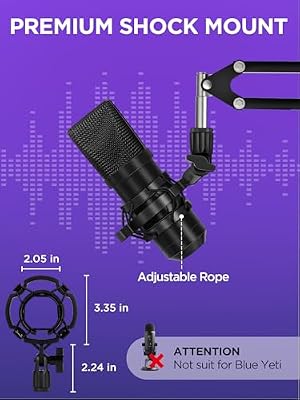
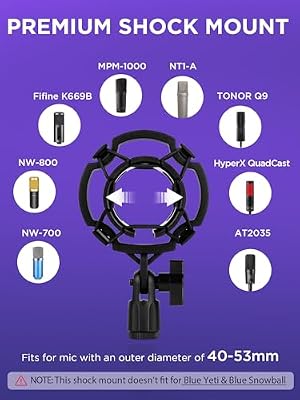
The InnoGear Mic Boom Arm’s particular strength is broad mic compatibility within its weight rating. It carries the Blue Yeti (the headline target — at roughly 3.4 lb the Blue Yeti is at the upper edge but works in practice for most users), the HyperX QuadCast and SoloCast, the Shure MV7 family, the Rode NT-USB family, and most lighter XLR mics. The supplied 5/8-inch and 3/8-inch threaded screws cover essentially every mic on the market.
For users who run multiple mics — a Blue Yeti for streaming and a HyperX QuadCast for podcasting, for example — the broad compatibility is genuinely useful. The arm is rated for the heavier mic and holds the lighter mics with margin to spare. See our best USB microphones guide for the USB mics that pair well with this arm, our best streaming microphones guide for the broader streaming-mic category, and best audio interfaces for the audio interface to complete an XLR signal chain.
Installation & Setup
Installation is straightforward and consistent with the other InnoGear arms. Slide the C-clamp under the back edge of the desk and tighten the bolt by hand until firm — the clamp fits a desk lip up to about 2 inches, which covers most gaming and office desks. Drop the arm pole into the clamp socket. Thread the mic cable through the arm tubes during install (the internal routing requires this step before the mic is attached), then screw the mic onto the appropriate thread adapter.
Total install time is about fifteen minutes including cable routing. The metal-on-metal pivot joints typically need no tension adjustment out of the box — they ship calibrated for the rated weight class — and the arm is ready to use immediately after installation. Re-check the desk clamp tightness after the first week of use, particularly if you frequently adjust the arm position with a heavier mic attached.
Verdict
The InnoGear Mic Boom Arm for Yeti, HyperX and SoloCast is one of the best value spring booms in the heavy-rated tier. At around $30 it carries the Blue Yeti class, includes internal cable routing for a clean appearance, and the build quality is appropriate to the price. For users who own multiple mics or expect to upgrade through several mic generations, the broad compatibility plus heavy rating means a single arm investment that scales with the setup.
It is not the silent damping of a flagship RØDE PSA1+, and it is not a complete bundle with pop filter and shock mount like the InnoGear Heavy Duty package. For users who already own a pop filter and shock mount or who do not need them, however, this is one of the sensible budget-to-mid-tier choices. Combine it with a mic from our best USB microphones guide and the rest of the streaming gear from our best streaming gear category.
Frequently Asked Questions
Will this arm hold a Blue Yeti?
Yes. The arm is one of InnoGear’s Blue Yeti-rated booms, with spring tensioning that holds the mic confidently at full extension. The Blue Yeti at roughly 3.4 lb assembled is at the upper edge of the rating but works in practice.
Does this arm fit a HyperX QuadCast and SoloCast?
Yes. Both the HyperX QuadCast and SoloCast are well within the arm’s load envelope and mount via the supplied 5/8-inch and 3/8-inch threaded screws. The arm is broadly compatible with most popular USB mics.
Is cable routing internal or external?
Internal. The mic cable runs through the inside of the arm tubes from the mic end to the clamp, with no visible external cable wraps. The result is a clean appearance suitable for a streaming-desk camera framing.
How thick a desk does the clamp fit?
The C-clamp fits a desk lip up to about 2 inches thick, which covers the typical gaming and office desk. Thicker or curved-edge desks may not work — measure before purchase.
More Boom Arm Reviews
- Aokeo AK-49 Adjustable Compact Boom Scissor Arm Review
- InnoGear Mic Stand for Blue Snowball with Pop Filter Review
- NEEWER Microphone Arm Stand Suspension Scissor Review
- NEEWER Boom Scissor Mic Arm with Screws Review
- NEEWER Low Profile Mic Arm with Damping 360° Review
- InnoGear Boom Arm for Blue Yeti and HyperX QuadCast Review
- RØDE PSA1+ Professional Studio Arm Review (Black)
- RØDE PSA1+ Professional Studio Arm Review (White)
Affiliate Disclosure: As an Amazon Associate, we earn from qualifying purchases. If you click a link and make a purchase, we may earn a small commission at no extra cost to you. Prices and availability are accurate as of publication and may change.










